This app is designed to save space on the dashboard.
The Smalldata app ensures that you can store a lot of data in a minimalist way.
Infinite possibilities with the use of data from your devices.
Addition of Snapshots.
All data is flowmap-oriented, so it can be processed in any flow.
Suppose you want to see the temperatures of the entire house during a certain action, this can be arranged.
Only to see other data afterwards.
If you like this app, don’t forget to give it a like!
If you really love the app, a small contribution would certainly be appreciated!
Small data widgets!
Deze app is ontwikkeld om ruimte op het dashboard te besparen.
De Smalldata app zorgt dat je minimalistich en toch veel data kwijt kan.
Oneindige mogelijkheden met het gebruik van gegevens uit je apparaten.
Toevoeging van Snapshots.
Alle data is flowcard gestuurd dus in elke flow te verwerken.
Stel je wilt bij een bepaalde actie de temperaturen van heel het huis zien is dit te regelen.
Om vervolgens daar na weer andere data te zien.
Vind je deze app leuk vergeet hem dan niet een like te geven!
Mocht je de app echt geweldig vinden wordt een kleine donatie zeker gewaardeerd!
Been playing about with this today and works well.
I wondered on whether its possible to say have a 1 x 2 widget and have a text tag as the second widget?
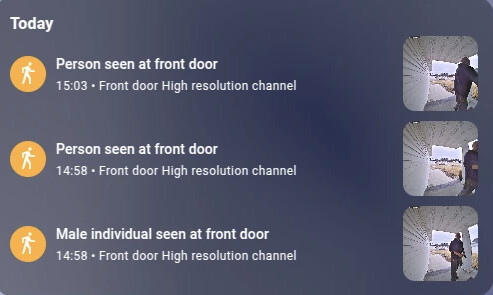
I have a reolink doorbell and with the Gemini AI app ( [APP][Pro] Gemini AI - Control your Smart Home with Google's Gemini ) It creates a text tag and describes who’s at my front door and sends me a push notification and timeline notification of the answer. Would it be possible to say have the text tag as the second widget?
That would be pretty neat and just what im looking for similar to a HA timeline dashboard widget I was using
Hi there dynamic hight is a problem to install on widgets. I’m still searching to finf a solution for this. At this moment i don’t have much time. But will look at it later.
Have you tried whether this works in the other data tiles? Here you can also place a tag/token in the text. If this works it would be a lot easier to build.
I made this. Saving the individual snapshot for review is very difficult and I also suggest doing that as a push notification with the Telegram app, for example. I tried to make the rules when and by whom the doorbell rang with a loop of text so that you can say more. is this what you are looking for? I use notifications myself for when the doorbell rings on my other developed app where you can also enter this. just search for the Popup app.
dynamic height is only possible in widget, but unfortunately not to adjust the entire widget. so I will have to create a separate widget for each size. Can you provide a screenshot that you would like to see adjusted?
hi Rogier, I suspect that your variable value at the top flowcard does not display. I assume you see the title. which widget do you use? what you can do to test create a push notification with alarm input 2 and see what is displayed on your phone. If this is not the case, it will not show anything in the widget either.