I am fairly new ro Homey(pro).
Im am writing a advanced flow. To debug I would like to show some variables on a device to help me debugging.
I looked around for some information and found that AVD can do the job.
I tried to make a AVD via Device capabilities.
- I make a empty AVD
- Go to repair
- Add a text field and tick "make a tag
Then in advanced flow add THEN - Logic - Pick card “Calculate to”
Put the variable in and the tagname mentioned above.
Then attache that card into my flow.
It worked…however with only textfield. With to textfields(with different names) the value apprears in both textfields. How???
Then it worked for 1 textfield, but then the next day it did not work anymore. It displayed the value from yesterday. Without any changes in the flow.
I then deleted the AVD and did it all over again. It did not work. I worked some hours on it, but I could not get it to work.
I just want to easily monitor some variables during the flow is running.
Any solutions???
Just a thought: wouldn’t it be easier if you send the intermediate results/variables as a notification to the timeline? At each point in your flow where you want to see what the (current) value of a variable or calculation is, you connect a timeline notification card in series, so that that card is fully executed before moving in to the next part of your flow.
If you do want to use an AVD:
- Then you would need to create a field for each item that you want to track;
- Make sure to create the correct field that aligns to the data type of the item you want to track: text fields for text; numeric fields for numbers and boolean fields for yes/no values (though you could also store numbers and boolean values in a text field if your only purpose is to view the values);
- In your flow you need to update the respective field in the AVD at the point where you want to store the value using the corresponding THEN card of the AVD (Set number/text/boolean field to xyz).
Watch out with changing values: the AVD will display only the last value that you set.
It is probably easier to create timeline notifications or, as an alternative, log entries via the Simple (Sys) Log app.
Thanks,
Yes, I did use the timeline. But if I need to follow 2-3 variables, it proofs difficult.
That is why I was looking for a alternative.
AVD problem stil not solved…
Koos
It would help if you can post a screenshot of both your flow and the configuration of your AVD.
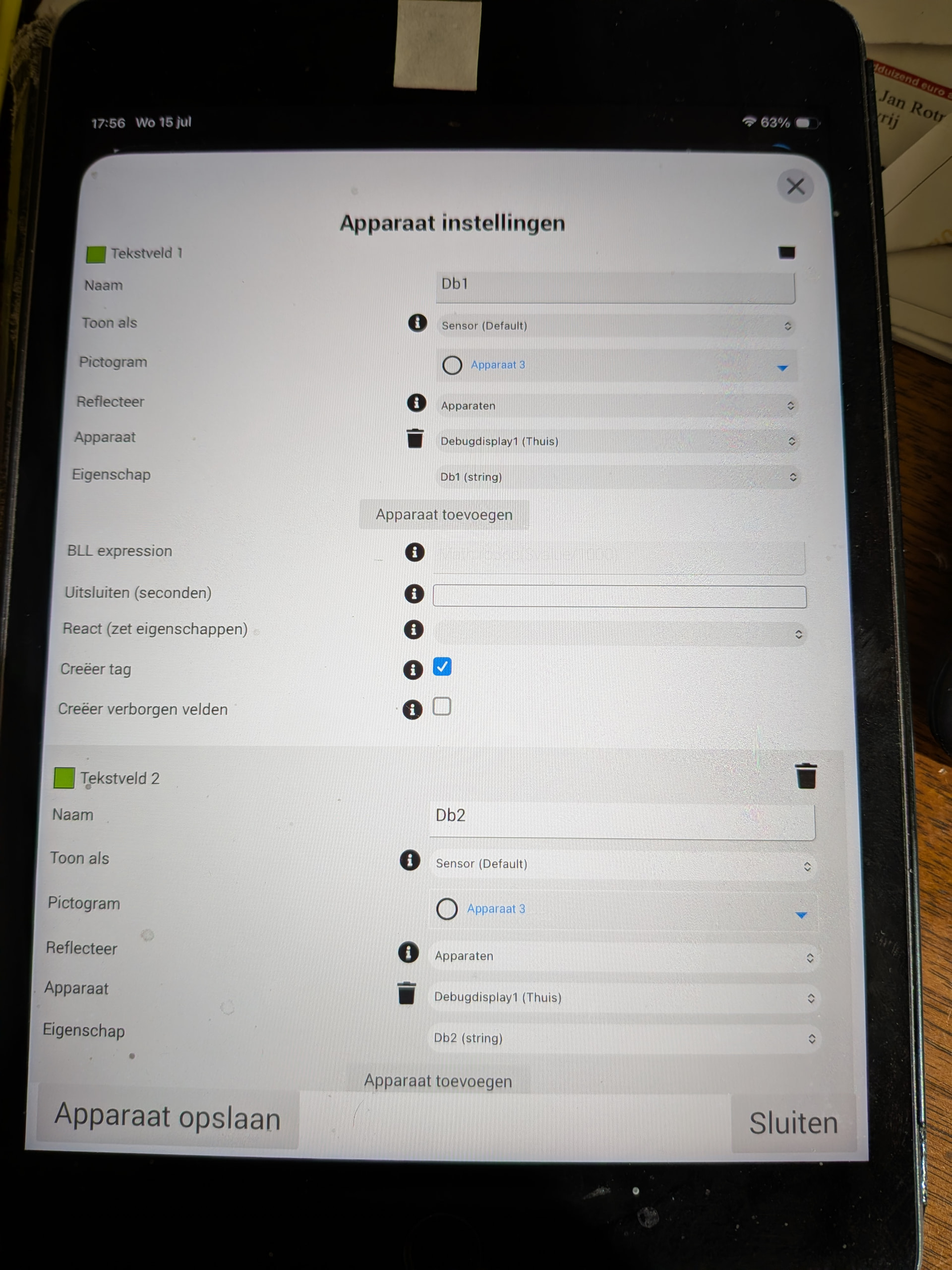
The ‘Screenshot’. Buton on the ipad is broken so a real screenshot is not possible.
Hope this is enough.
You should leave the Reflect (Reflecteer), Device (Apparaat) and Capability (Eigenschap) fields empty. Because now you have a circular reference: the field is filled by its own value.
In the flow you then use the THEN card of the AVD: Set [text field] to [xyz]. Where [text field] is the name of your AVD field. So Db1 or Db2. And [xyz] is the value you want to assign.
I assume you will only assign a value to Db1 and Db1 once in your flow. Otherwise only the last assignment will remain in the AVD.
If you don’t get it working then please also post a screenshot of your flow.
I will try again tomorrow…
Yes, it works.
Setting as picture:
I made 2 Textfields, later I addex a third one.
The first two work the best. The third one refers to the first if no data is set yet in the third field.
I do not know why, but no problem.
If you make the 3 field in one go, all is perfect.
Making such a AVD is en bit a pain in the butt. First installing and then having to go to Settings- repair/maintanance is not logical for a newbie.
Thanks for your help!
Koos
Good to hear that it works.
Though, as indicated before, leave the Reflect (Reflecteer), Device (Apparaat) and Capability (Eigenschap) fields empty. Because now you have a circular reference.
I tried to delete the three fields as you indicated..however…if I now go to maintanance/repair it does not show ANY of my three defined fields…
It shows the page if No field is defined.
So do I delete this AVD and setup a new one…or…
Please advise.
Regards,
Koos
I just tried the following.
I created a new AVD (called ‘Test AVD’) based on the blank template, using Device Class ‘Other (default)’. I added two text fields (Db1 and Db2) using the following settings and saving them:
This AVD now contains a sensors tab with these two fields:
I then created a simple flow that sets the value of both text fields:
If I open the sensors tab, both fields now have the value I assigned:
In addition, both values are also available as tags that can be used in flows:
Not sure what is different in your case, but it should work. Perhaps best indeed to delete your current AVD and create a new one.
Hi,
The AVD gave me no possibilities in Maintanance/repair anymore.
I have deleted it and made a new one with the changes that you recommended.
I now seems to work, however I have still some doubts if the AVD updates.
Sometimes it seems frozen en than I have to close it and open it again it then works as expected.
I am not sure about “Freezing”. I will monitor this and come back as it is not working properly.
Thanks for you assistance!!! it brings me a step further!!
Regards,
Koos