Helaas niet. Verzoek gedaan naar installateur maar tot op heden nog geen response 
Hi Wout, thanks for making this information available! After playing a bit with this, I have the following feedback:
- The API that is used here is documented at Portaal eplucon - API Docs
- You are creating a bearer token by logging into the portal using your login/password, but it’s also possible to (using your browser) simply create an API access token on the website and use that. That saves a POST request every minute when you run the script.
- You are using the ‘statistics’ API call, which returns information for the entire day, and requires you to calculate the current day as well. The API also offers a ‘get_realtime_info’ API call which just returns the current readings. Any particular reason you decided not to use this instead? It seems more efficient (less data to transfer every minute).
- You wrote in a post that:
But from the API documentation and after a conversation with Eplucon you also should be able to “write” settings.
I could not find any reference to this anywhere. Is there another API somewhere? A newer API which I’ve missed? An undocumented part of the API? I would love to be able to set the DHW/WW temperature in response to an excess of electricity from my solar panels.
Thanks for your work here! It helped me a lot!
Hi @Peter_Haijen,
you can run the command:
console.log("API Response:", latestDataStats);
This gives back all the available responses of the API. Sending commands is still not possible I guess.
In my case:
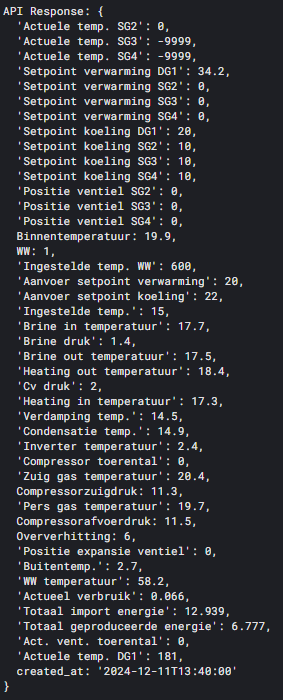
And these are the readouts I do:
    Timestamp: { value: latestDataStats.created_at },
    Binnentemperatuur: { value: parseFloat(latestDataStats['Binnentemperatuur']) },
    WW_temperatuur: { value: parseFloat(latestDataStats['WW temperatuur']) },
    Brine_in_temperatuur: { value: parseFloat(latestDataStats['Brine in temperatuur']) },
    Brine_out_temperatuur: { value: parseFloat(latestDataStats['Brine out temperatuur']) },
    Brine_druk: { value: parseFloat(latestDataStats['Brine druk']) },
    Heating_in_temperatuur: { value: parseFloat(latestDataStats['Heating in temperatuur']) },
    Heating_out_temperatuur: { value: parseFloat(latestDataStats['Heating out temperatuur']) },
    Buitentemp: { value: parseFloat(latestDataStats['Buitentemp.']) },
    Cv_druk: { value: parseFloat(latestDataStats['Cv druk']) },
    Actueel_verbruik: { value: parseFloat(latestDataStats['Actueel verbruik']) },
    WW_ingeschakeld: { value: parseFloat(latestDataStats['WW']) },
    Ingestelde_temp_WW: { value: parseFloat(latestDataStats['Ingestelde temp. WW'])/10 },
    WW_temperatuur: { value: parseFloat(latestDataStats['WW temperatuur']) },
    Aanvoer_setpoint_verwarming: { value: parseFloat(latestDataStats['Aanvoer setpoint verwarming']) },
    Aanvoer_setpoint_koeling: { value: parseFloat(latestDataStats['Aanvoer setpoint koeling']) },
    Ingestelde_temp: { value: parseFloat(latestDataStats['Ingestelde temp.']) },
    Condensatie_temp: { value: parseFloat(latestDataStats['Condensatie temp.']) },
    Compressor_toerental: { value: parseFloat(latestDataStats['Compressor toerental']) },
    Zuig_gas_temperatuur: { value: parseFloat(latestDataStats['Zuig gas temperatuur']) },
    Pers_gas_temperatuur: { value: parseFloat(latestDataStats['Pers gas temperatuur']) },
    Compressorzuigdruk: { value: parseFloat(latestDataStats['Compressorzuigdruk']) },
    Compressorafvoerdruk: { value: parseFloat(latestDataStats['Compressorafvoerdruk']) },
    Positie_expansie_ventiel: { value: parseFloat(latestDataStats['Positie expansie ventiel']) },
    Totaal_import_energie: { value: parseFloat(latestDataStats['Totaal import energie']) },
    Act_vent_toerental: { value: parseFloat(latestDataStats['Act. vent. toerental']) },
    WW: { value: parseInt(latestDataStats['WW']) },
    Oververhitting: { value: parseFloat(latestDataStats['Oververhitting']) },
    Totaal_geproduceerde_energie: { value: parseFloat(latestDataStats['Totaal geproduceerde energie']) },
    Verdamping_temp: { value: parseFloat(latestDataStats['Verdamping temp.']) },
    Inverter_temperatuur: { value: parseFloat(latestDataStats['Inverter temperatuur']) },
Thanks Peter for the feedback; whitout any developer knowledge and many attempts with perplexity I got this working…
I see your feedback and am happy to update the documentation, would you mind sharing the full scripts you use? Or share it in a post below…
For me, for now it is running… Only thing missing is the amount of KWh used… And how much came from the solar panels directly in the heat pump… (I use the boiler also as a battery kind of).
Hey Wout
I don’t own a Homey; I used your script only as inspiration for a Perl script to learn about the info I could get out of the Eplucon/Ecoforest; but as soon as I realized that the interface is basically read-only I stopped working on it as I want to change the WW set-point in response to the production of my solar panels.
Below is the data I get from the ‘get_realtime_info’ API function; all these named fields are returned from the API call so all of these could be made available through your script as well I suppose. In particular there is ‘energy_delivered’ and ‘energy_usage’ which might be of some use to you?
There is also ‘import_energy’ which I think is the actual energy used from by the heatpump, but unfortunately, it is always zero for me. It’s also zero in the Eplucon web interface.
act_vent_rpm => 0.0
active_requests_ww => OFF
alarm_active => 0
brine_circulation_pump => 0.0
brine_in_temperature => 0.0
brine_out_temperature => 0.0
brine_pressure => 0.0
compressor_speed => 0
condensation_temperature => 13.4
configured_indoor_temperature => 21.0
current_heating_pump_state => 1
current_heating_state => 0
cv_pressure => 2.3
dg1 =>
energy_delivered => 827
energy_usage => 178
evaporation_temperature => 14.0
export_energy => 0
heating_in_temperature => 14.5
heating_mode => 1
heating_out_temperature => 14.3
import_energy => 0
indoor_temperature => 21.8
inverter_temperature => 105
number_of_starts => 339
operating_hours => 68
operation_mode => 3
outdoor_temperature => 12.7
overheating => 0.9
position_expansion_ventil => 0.0
press_gas_pressure => 6.0
press_gas_temperature => 14.3
production_circulation_pump => 0.0
sg2 =>
sg3 =>
sg4 =>
spf => 4.6
suction_gas_pressure => 6.1
suction_gas_temperature => 14.7
total_active_power => 0
warmwater => 0
ww_temperature => 56.1
ww_temperature_configured => 55
Hi Peter, First in my case there are values available in the API since July 2024 but in the interface since recent… Do you have this as well?
“Actueel verbruik”:1.843,
“Totaal import energie”:10.529,
“Totaal geproduceerde energie”:6.171,
Any Idea what this is?
I hope it is usage, but don’t get why it doesn’t count up…
Screenshot:

Second I found somebody who steers his Homey (via Home Assistant) see this link to Github
The first one, did not check. But the second, I got this working now on an old Raspberry Pi running Home Assistant. Now checking if I can send the vallues to Homey and can control via Homey.


Well done, and via MQTT connected to Homey?
I am working on an App for Eplucon, any volunteers willing to test this? Will be initially read only
Eplucon Heat Pump for Homey
Monitor your Eplucon Ecoforest Heat Pump directly from your Homey smart home hub.
Features
- Real-time temperature monitoring (indoor, outdoor, hot water, brine, heating)
- CV pressure monitoring
- Monthly energy statistics (consumed, heat delivered, cooling delivered)
- Automatic polling every 60 seconds
- Flow card support for automations
Supported Devices
- Eplucon Ecoforest Heat Pumps (via Eplucon Portal)
Capabilities
| Capability | Description | Unit |
|---|---|---|
| Indoor Temperature | Room temperature | °C |
| Outdoor Temperature | Outside temperature | °C |
| Hot Water Temperature | Domestic hot water | °C |
| Brine In/Out | Ground loop temperatures | °C |
| Heating In/Out | Heating circuit temperatures | °C |
| CV Pressure | Central heating pressure | bar |
| Monthly Consumed | Previous month energy used | kWh |
| Monthly Heat | Previous month heat delivered | kWh |
| Monthly Cooling | Previous month cooling delivered | kWh |
Flow Cards
Conditions
- Temperature thresholds for all sensors
- Pressure level checks
Triggers
- Temperature changes
- Pressure changes
Happy to help and test the app.
You can find the test version here: Eplucon Heat Pump | Homey
I will also help out testing!
happy year ending!
Here is the link to the App Store, it is accepted by Homey in the App Store, several users are using it: https://homey.app/nl-nl/app/nl.eplucon.heatpump/Eplucon-Warmtepomp/
Hi Wout,
Tried to get to gothic to report issues and improvements but got a 404 error. How do you want me to report any issues or ideas. Trying to avoid you get the same feedback from multiple testers. So far I have the app working!
Great to hear, can you send me a DM with the details and which link does not work for bug reporting… for now I can handle the volume of bugs easily, did not consider how to log all bugs and progress, maybe Github…
Happy that it works for you!!
