ahh! ok, you need:
- install app local_api and configure it
- create homeyscript for extracting bearer token
- create a flow that every day update token
ahh! ok, you need:
ok, if you open http://homey_ip:3000/token you have the json with the token?
v 0.240305.1
- Optimized barear token retrieve for Homey 2016/2019 @sandro711 it should work better
Yes it’s seems to be good
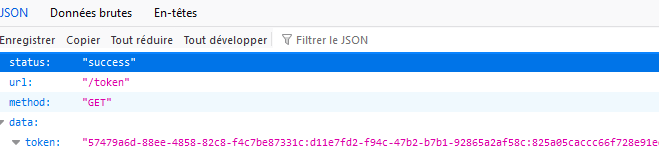
Ok, in app go into setting - homey and insert this token and the url at last field
For virtual button is maybe a quick solution:
Background-color on:
Background-color off:
Yes, its a valid solution for socket, light, etc
ok
In API Key Field = > the token is already write
In the last Fiel => the url is already good
Sorry Nicolas, I had lost the thread of the conversation 
In homey 2019 you use an specific account for get token, you need to check if this account has full access in homey.
Another user had it too but I don’t remember how he solved it
ok i will check
thanks
hello,
I have the same problem with insight empty
how do you solved this problem ?
i have HP2019
Is it a problem with the account who get the token ?
thanks
Nicolas
Nicholas try this homeyscript and post the result:
const logs = await Homey.insights.getLogs();
for (const tmp of Object.values(logs)) {
log(tmp);
break
}
In homey 2023 the result is like this:
{
__athom_api_type: ‘HomeyAPI.ManagerInsights.Log’,
id: ‘homey:device:056a66fe-d455-4bca-81ff-b8d770316254:energy_power’,
ownerUri: ‘homey:device:056a66fe-d455-4bca-81ff-b8d770316254’,
ownerName: ‘Consumo casa’,
ownerId: ‘energy_power’,
type: ‘number’,
title: ‘Consumo di energia’,
titleTrue: null,
titleFalse: null,
units: ‘W’,
decimals: 2,
lastValue: 2654.39,
uri: undefined
}
I don’t know if i do the good script
i supress "In Homey 2023 is like this


No no, Remove all text after “in homey 2023 is like this” and check the result of homeyscript, i have correct previous post 

result

Ok, insights infos are different from 2019 and 2023, need to make some testing for adapt the app code
ok
Many thanks for your help
go in setting → system and check if unsecure certificates is enabled (if not enable it and kill and restart app)


