I was tinkering a bit with this and made a copy to work on. This version lets you read devices, so importing is a bit easier. Doesn’t really help much as it seems to not be possible to get the necessary permissions to write to it afterwards…But it might help with testing the device, and if it can be improved, it will be a reason to find out how to actually replace the json  It also has a button to hide deactivated devices.


That’s strange. Which Homey are you on? I made it for the 2023 Pro, and there seems to be some API differences between the Cloud, 2019 and 2023 versions.
I’ve been contemplating just ditching this if I cannot write to the device anyway. It doesn’t really add much if you can only read them, but have to enter the device settings to paste it afterwards 

Yeah it crossed my mind when I noticed “API”; I’m still on Pro 2019.
Well if we can edit devices capabilities with this tool, and copy paste the resulting JSON into the device settings, that’s pretty neat already.
Would you mind help me testing my new feature? I think I’ve had a light bulb moment for scene restoration and created a “state capture device”. Basically, just tell it what to store and either store it as a named state or use push and pop to recreate. The stack should be plenty deep, too
Hi Lars,
I’ve local API access now, but I need to refresh after nights of migrating to my new Homey
What should I test? Edit states and copy paste the resulting JSON into the device @ Homey again?
So,
I added a state device
Added the new API credentials in the state editor
Loaded the JSON
Canged some device states (capabilities)
“Played” the JSON to check on errors
No error: copy the JSON (green button)
Paste JSON in advanced device settings
Turn on state device
Devices were set accordingly the settings I changed in the state editor

Awesome! That’s good news about the “old” state device
I was hoping you would be able to help check out the state capturing device I added today. I’ve used it to recreate some scenes myself, but that’s not much of a beta if n=1. As you’re an advanced user, I’d love to hear your thoughts about it. It might be a bit much for the average joe, but I think it rocks especially for recreating states. Like if I have to pause the TV and I’ve made changes to the standard lighting, or if someone rings the door bell while I’m doing something else.
Well, at least I could confirm it now as “Tested OK  ”, on to the next
 .
.
Silly me assumed test versions are updated when auto-update is enabled, but not seeing a state capture device made me wonder what you were talking about 
LSS, installed update and State Capture Device now, adjusted some capabilities and saved it.
I had some “challenges” understanding your sample flow, but I figured it out.
Some remarks / questions:
WHEN: Doorbell button pressed
OK, just trigger X
THEN: Push current state to stack [Living Room Lights Capture]
Found the card, but there’s no field for the [Capture state name]
THEN: Set Living Room Lights to 100%
This is out of this scope, right?
I mean how we dim them here is not in the scope of the state capture system?
THEN: Wait 5 minutes
Awesome, there’s a milliseconds delay unit as well 
THEN: IF stack is NOT empty
This should be
AND: The state stack is NOT empty
THEN: Pop and apply state from stack [Living Room Lights Capture]
This one also lacks the [Capture State Name].
Here’s the working flows I built
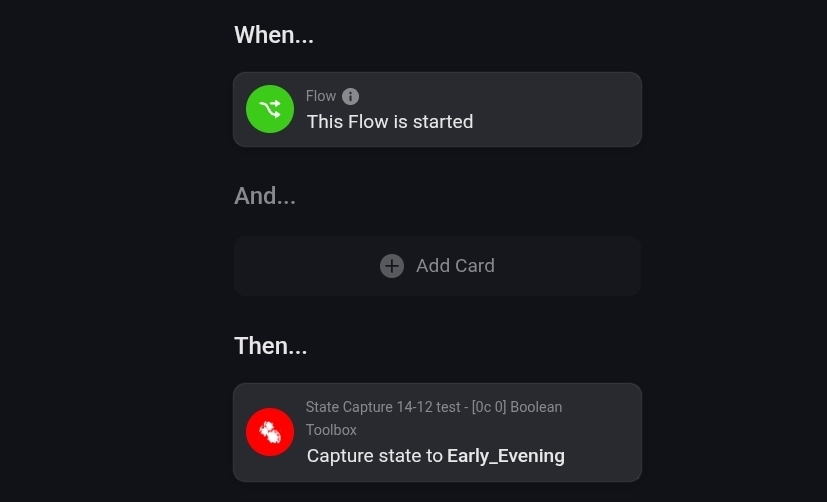

The cards didn’t let you name it? Push and pop shouldn’t allow names as it’s just an array (think of a stack of plates - you put one on top of the other, so when you “pop” a plate you just take the top one). There are basically three things you can do with a stack:
- push (put something on top of the stack)
- pop (take the top item off and remote it)
- peek (take a look at the top item without removing it)
For most people, I think push and pop are sufficient.
Did this work?
If you chose to save it, you need to use this card:

Then you should be able to use it as a named state and use whatever logic or whitchcraft in your power to name it. Not sure how this could be useful myself, but I do know there are smarter people than me here and the feature would probably be missed.
One cenario I can think of that named scene captures would be useful is if someone wanted to create several similar scenarios, say morning, lunch, dinner and afternoon lights in a room. Instead of creating 5 state devices, they could create one holding the template and then save the five different ones using the one state capture device.


Ok, sorry for the confusion
Push/pop/peek er temporary storage. These cannot be named.
Capture/apply/delete are permanent. These can be named and re-used as many times as you want (until you use the “delete state” card to permanently delete it):

If you just want to retain a snapshot for temporary use, like if there’s an interruption, push it onto the stack, handle the interruption, pop it off the stack again.
If you always have this same settings while watching TV, save it (capture it) with a name and apply that named state whenever you watch TV. This is very similar to the “old” state cards, only they don’t have a dedicated device for each state and thus don’t have their own device.
The old state card let you save a json with the exact values you wanted for each device. The capture devices stores a json telling it what to save (as a template). I might be able to describe better when my brain wakes up
I think the best way to describe it (and I might change my opinion on that when “upstairs” opens for business) is by describing as how permanent they are:
- Stack (push/pop/peek): Volatile. These are just snapshots used once.
- Capture (capture/apply/delete): Temporary. These are reusable, bont don’t have their own device. When changing hardware, these must be (at least until someone flags it as a problem) recreated in a flow.
- State device: Permanent and stored in their separate device. Manual and more work to get going.
Thanks Lars, I get the differences, but I just wanted to re-create your example flow, but these two cards you use are missing @ my Homey → that’s what I don’t get
Pop and apply state from stack [Living Room Lights Capture]
Push current state to stack [Living Room Lights Capture
I"ve tried this with other cards, which obviously doesn’t work (can’t set a temp state which hasn’t been captured yet:
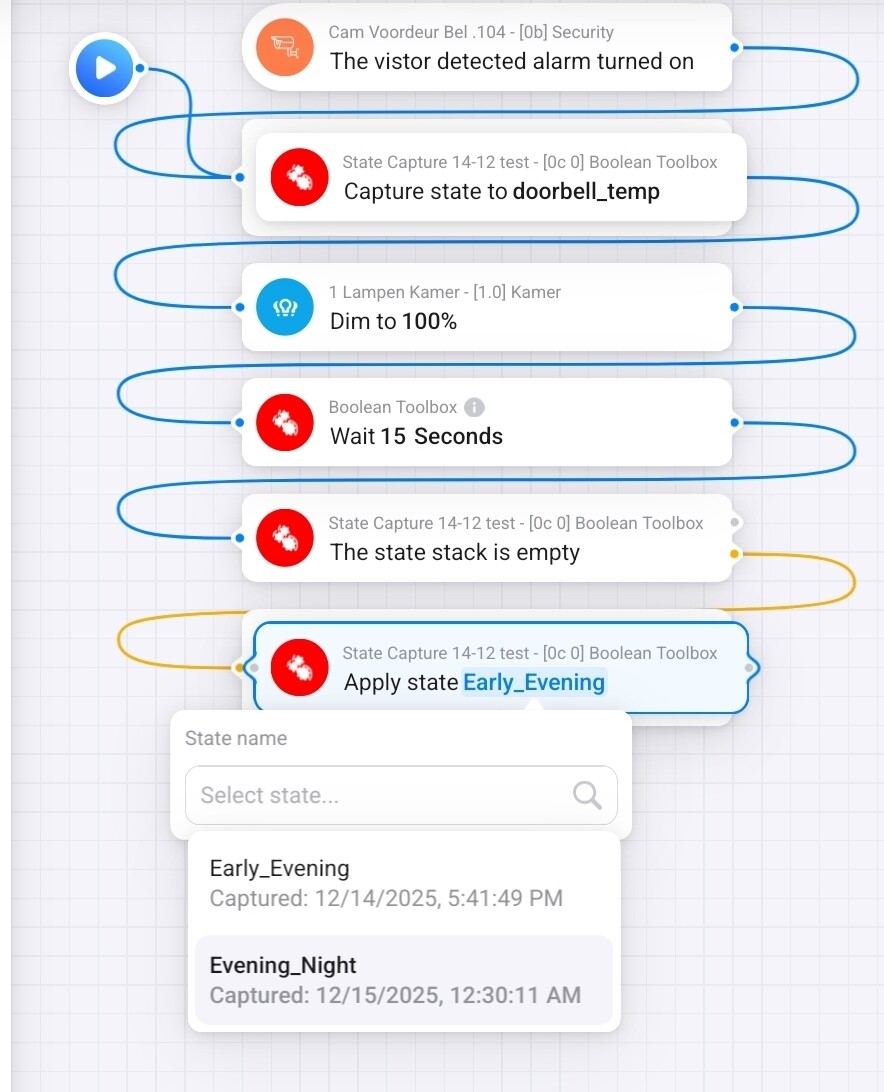
There are som problems with the flow.
- You’re mixing and matching stack operations with named operations. Checking if the stack is empty doesn’t make sense if you’re to work with named states.
- You have to first create the named state in a separate flow. Once created, you can use it wherever you feel like it. The way I do it, is to just add a card to capture the state with a name. I then right-click it and choose “test from here” (or whatever it’s called). After that, I can apply it.
This is the initial step. Before I run the create-card, I won’t have access to the state:

After testing on the create-card, I can use the state:

This is the grouping:

I’m completely dense now, just tell me. I often use this to start my prompts to AI chatbots “Please explain the following to my like I’m a five-year-old child”. Please do
Hello, I’m currently testing out the flow card “Wait until Device Capability becomes Target Value” and in doing so I found a bug. It says that “Waiter ID“ is optional and that it will autogenerate if I leave it blank. If I however do leave it blank, the flow will not save and I am forced to put in some random value.
Thanks for the report!
Does it work well for you otherwise? Getting feedback hasn’t been as easy as I was hoping for
Regarding the reported issue, it sounds like an annoyance that can be handled (for the moment). Is that correct? If it breaks something, I’ll fix it right away, but I have some deadlines coming up soon.
I don’t know if anything else is not working as currently this is the only feature I need (I think), so I haven’t tested much else.
You’re right, it’s just an annoyance. The card still works, I just need to type in a random ID for every card. How annoying it is will depend on how much use it, as I’m currently just testing it I don’t know that yet. But no worries, fix it when you have time
Ok - that was a lot harder than I thought and took a lot more time than I had
I think I’ve made some good implementations. There were problems just auto-generating the ID, but if you click on the ID field you’ll have the option to use the one suggested (auto) or create your own. At the same time, I found I used the wrong method to find the ID from other cards, like the ones controlling the waiter cards.
Could you please test Smart (Components) Toolkit | Homey and tell me if it works better and if you think the fix is sufficient?
Thanks!
