Same issue with “Battery level” card
I have updated the app so now it should work again
Yes it does, thanks! 
Yes, it works again, also for Toyota BZ4X!
I am struggeling to get answer on the production request, and read here that they dont give production access for this purpose anymore. I am waiting on my new Xpeng G9, and would love to include it into Homey and my Dashboard.
Any optional solutions are well appriciated.
Hi. I am struggeling to get production access from enode. Any tips? Other solutions?
Hi. Did you find any solutions to this?
After upgrading my G6 to 5.6.0, I noticed the the battery drain while parked overnight seems to be exceptionally high compared to 5.4.5. I noticed from the enode asset view that the car is constantly sending data to enode, even after deleting the xpeng car manager app. According to enode’s API, the asset delinking can only be done via the endpoint app. Is there anyway that I can deregister the asset from xpeng car manager?
Heads-up, testers!
The next build removes the requirement for an Enode developer account.
To verify that everything works end-to-end, I’ll publish a Test-build update shortly.
After installing that version you’ll need to pair your XPENG again (Link-UI will guide you).
Sorry for the extra step, but it’s the only way to confirm the new flow is solid.
Thanks in advance for helping me make the upgrade seamless for everyone!
test it here XPENG Car Manager | Homey
It worked for me! Great work @Kjetil_Vert! 
Great stuff then I wait for one more confirmation and then I will push this to prod.
Amazing work Kjetil:partying_face:
Hello Kjetil. After the latest release I again needed to re-add my car, but I now get a fault message after I added my Xpeng account/car and everything looks ok.

After this, I get below fault message and my car has not been added to Homey. I can only see two “dummy” cars, one Xpeng G9 and one other that I dont recognize.
{“success”:false,“message”:“Missing: code”}
Do you have any idea what this problem could be?
This error can be ignored and joust close this and go back to the page where you clicked the button and you can then click the new button to add your car.
tis 29 apr. 2025 kl. 10:47 skrev Jens Edberg via Homey Community Forum <notifications@athom.discoursemail.com>:
Well, something is not right. When I do as you say and goes back to Homey, there is as I wrote above two other Xpeng cars available - see below;
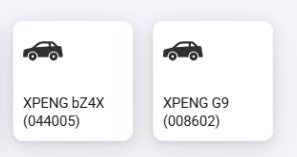
The G9 is located somewhere in Norway and the bZ4X (Toyota and not Xpeng?) is located in the Netherlands.. I live in Sweden and drive a G6. This is very strange.


This is not good at all. I will look into this as I don’t get this error in my local installed Homey so it might be only for some users.
also are you on the latest version as this was an error in the one before?
I have info from other user that after a uninstall and a reinstall this fixed it so you dont see the two cars and only your car.
I hope this will be a fix for all as this problem is not something I would like to see.
Re-installing the Xpeng Car Manager-app solved the issue! Now everything works as a charm again 
Many thanks!
