When connecting SmartLife to a Tuya Project, all SmartLife device names are automatically transferred. These names are stored as custom_name for the Tuya device.
No visible improvement/change for me in v1.0.83.
EDIT: I can setup the status indicator (position) of the curtain devices in the Homey Android app, but this same indicator has been disabled in the Homey web app.
Are you logging in to your Homey via a local user account?
If so, the local web app version is not up to date. I think it is version 1.15.x, while the cloud web app version is currently on 1.18.1. Check the cloud version via my.homey.app.
I have another suggestion, but I don’t know if it is technically feasible:
Enter Access ID and Access Secret once and press a Test button to test the connection in the Toya local app settings. Save the access credentials so that they only need to be entered once.
When creating a Homey Tuya device, first select the desired IP address of the device to be paired. Then select the desired Tuya device from a dropdown based on name or custom_name, using the access credentials as set in the app settings behind the scenes.
Tuya local app “Cloud lookup” settings are actually no longer necessary, because the same settings are now also available in the device settings, including saving Access settings
if a Homey device already exists, there is still no clear notification, but only a disabled “Add device” button
Auto detect does not include v3.2 (which happens to be used by my curtain motors) and manual setting does not include v3.22
change the color scheme of the “Fetch devices” button (dark blue with black text is difficult to read)
@Andi
I gave it a go and I’m especially impressed by the device and ID+Key detection! Thanks, highly appreciated.
Using Tuya w/o cloud dependency (plus privacy) is always a plus.
About the missing quick action button for curtain device types @Amersfoort reported:
It misses @ my Tuya local curtains as well. So I’ve been diggin into it a bit.
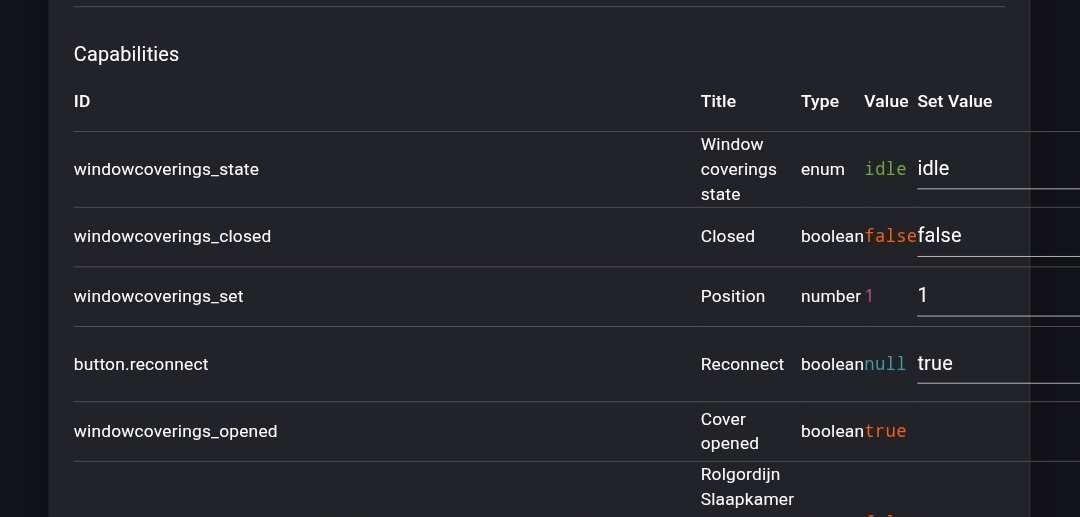
By comparison, I found out a curtain device needs to have both windowcoverings_opened and windowcoverings_closed boolean capabilities in order for the Quick action toggle to become available;
The weird part:
apparently only the “closed” capability seem to act as toggle button, as you can see on the Aqara curtain device settings screenshot.
So, Andi, my question will be:
Is it possible to add both these windowcoverings_opened and windowcoverings_closed capabilities to the curtain device driver?
And if true, are you willing to add this to the app in a future release?
That’s not fully true → if you click on a device under the app settings, Cloud Lookup, you will get the full picture of the device regarding the DPs and possible values (important for me to debug issues).
added message " This Device ID already exists in Homey" in next version
Thanks for the detailed investigation — that was exactly the right lead! You’re correct that windowcoverings_closed is the key capability Homey needs to show the Quick Action toggle.
I’ve added it to the Curtain Motor driver in v1.0.91 (just published TEST Tuya Local | Homey). The toggle sends open/close commands and its state reflects the actual position — closed = 0%, open = anything above. Existing curtain devices are migrated automatically; just restart the Tuya Local app after updating and the Quick Action should appear.
Note: windowcoverings_opened is not a standard Homey capability — it’s a custom one defined by the Aqara app, so we don’t need it here. windowcoverings_closed alone is sufficient per the Homey developer docs. Window coverings | Homey Apps SDK
Let me know if the Quick Action shows up after the update!