Version 3.0.3 is live now.
It brings Bluetooth LE support to all users.
BLE is optional and can be used in addition to cloud access (FleetAPI) to control your car at home.
Please read my Blog post for more details and as HowTo setup BLE mode.
Version 3.0.3 is live now.
It brings Bluetooth LE support to all users.
BLE is optional and can be used in addition to cloud access (FleetAPI) to control your car at home.
Please read my Blog post for more details and as HowTo setup BLE mode.
Looks like a great feature
Do older cars have this ability? (MX 2018)
Cheers
I think so. BLE should be the same for both.
My MX 2018 is about 5 meters from the homey pro, but it is not found when searching via your link
Mine is very close to my Homey as well. I have been able to connect at some point, but now using it again, it cannot connect.
I think it is due to the fact that some stuff is in between. A few walls, a fuse box etc. Perhaps it is not only the distance
New test version: 3.1.0:
Tesla changed their Firmware for energy site and local access doesn’t seem to be possible now.
But energy data is also included in FleetAPI. So this app just uses FleetAPI to import energy data into Homey.
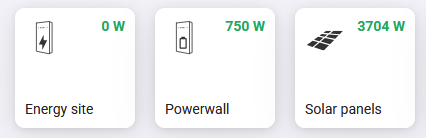
Add the energy site device first (it handles the API - like the car device).
Then add battery/solar device, These separated devices are needed to show the data in HomeyEnergy.
Currently only live data is supported.
PS: Energy API is not priced 
PPS:
The new app version 3.1.x has two new scopes for energy.
If you want to use energy devices, you have to add the scopes
If that doesn’t work, delete the 3th party app from your profile (not from your developer account). Then do the repair/login process in repair view of your car device. Select all scopes in login popup.
If you are using a different developer account, then delete browser cookies for tesla.com before doing the login process in Homey.
Hi i am pretty new here. I just installed the Tesla plugin to connect my Tesla. I made a developer account and that looks oke to me. But after the step client ID and Client Secret, I get a 403 forbidden Unauthorized missing scopes on my phone. In my Tesla account i have the Homey 3 party app. I have the multi factor authenticator option on on.
Hope you can help me.
Which version are you using, live or test version?
Please check:
If that does nor work, remove 3th party app and proceed the repair process in Homey device repair view (login). Contiue the views (client_id is prefilled) to login screen. There you can again set the scopes and the 3th party app is assigned again to your account.
Adjusting the scopes at developer en account did the trick.
Thank you for de rapid respons !!
Robert
Thanks I also had issues I had the scopes selected but was getting the same error. I simply removed the whole Tesla app and then re added it to my homey. As I went though the API it asked again for the scope and now it’s working.
@RonnyW your are a life saver thank you for the work you do
For all with ‘scope missing’ error after updating scopes in developer account:
I think it needs a re-login to update the session to use the new scopes. I try to provide a repair function to force a re-login to update the scopes.
New test version 3.1.1:
This version makes adding scopes for Tesla Energy Site much easier.
Just proceed these steps:
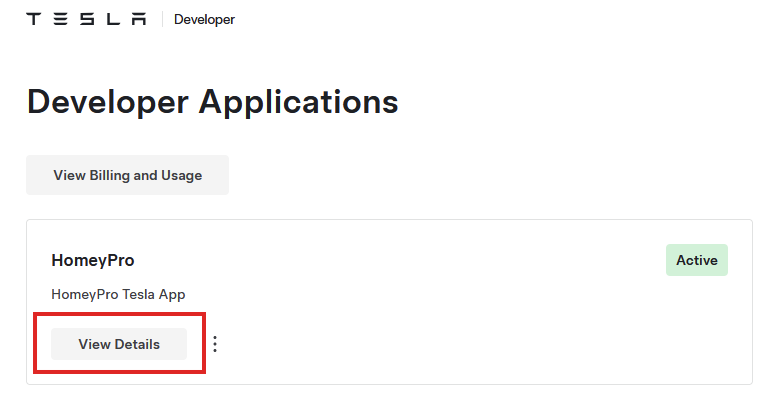
Go to developer account, open app detail
Activate Energy scopes for your app registration
Then go to Homey, open repair view for your energy site device
Proceed the auth process (keep client_id and secret unchanged).
The Tesla auth popup is shown prompting to set scopes. Activate the Energy scopes and continue.
The has now a new auth session including the needed scopes 
@RonnyW
It’s Been working great so far
Would it be possible to have the energy tab to pull the power from the power wall to show for the house usage?
Hi Ryan,
currently only live data is used (kW).
The API does not provide a real energy meter (overall and always increasing like a smart meter). You can only read historical data like:
I haven’t found a good way to calculate the real meter value.
A way could be to use yesterday/today and add the data to a meter capability. The meter will start a 0 kWh with an app update and won’t represent your real data from your instalation.
But this way, HomeyEnergy can show some kWh for the day.
Got it thank for the quick reply.
Version 3.1.2 is now live:
To add the new devices and adjust your Tesla app registration (adding new scopes), please follow the desctiption on my Blog
New test version 3.1.3:
Test version:
@Ryan_guinn1 For you to try. It would be nice if could check if the data in devices/HomeyEnergy matches the Tesla data. Also next days because I just use today/yesterday data to build an internal energy meter.
In HomeyEnergy you will see the usage from yesterday and today as todays usage. Tomorrow it should only display the daily amount.
At first das I have to use yesterday total as startimg point to sum up.