Yeah, ignore the timeout. The app just sends the key request and don’t get any response. At least it’s not already documented.
I will use another message later…
Small background:
I saw in old BLE examples that the car should send messages like “present NFC card” or “key added”. But my car doesn’t seem to send such messages. and it’s not documented by Tesla yet.
Currently the app is waiting some time and closes the connection with this timeout message.
In future I hope to catch a acknowledge and finish the key pairing with a success message.
New test version 3.0.1:
- Fixed BLE repair issue (closed session).
- Fixed BLE key pair message.
@StevenV Thanks for your feedback. I changed the message to ‘Key was sent. Confirm on the car display…’ after the request was successfully sent. And I think I also found an issue where the connection could kept open, could be the cause for your connection issue.
I don’t quite understand — does my car need to connect to Homey via Bluetooth? In most cases, that’s not possible, right? Bluetooth usually doesn’t have that kind of range, does it?
I received this notification/message: BLEServer: Failed to find advertisement with
ID: S*********C
can connect
Read the description carefully
Bluetooth is a second, optional way to communicate with your car.
FleetAPI (cloud access) is still needed. Bluetooth can be used for a local access.
If BLE is turned on in device settings, the app first tries to use BLE. If this errors (car not reached), FleetAPI is used instead.
If your Homey is not in BLE range, just do nothing.
If you want use BLE (PV charging etc.), you can move Homey closer - or if you have a HomesPro23 you can use the HomeyBridte as BLE satellite (BLE over Wifi).
I just made an attempt as well. I only get the message peripheral_in_use.
I got details from Athom (thanks  )
)
The error message means, another Homey aop is already using the BLE device. In your case it can only be the developer tools.
Alright, I don’t quite understand what you mean. What can I change to make it work?
Just try again, please. Your car was already connected by ‘another app’ (and I think it was the developer tools page if you tried to reach your car there).
Hi,
I realize I did not react on your mail. You were right and I was able to solve the problem with your info. Thanks!
Kind regards,
Marcel F.
How often does the homey app refresh Tesla data. It seems distance from home is only updating every 20 seconds or so with my setup. Any ideas why i dont get live data for this value ?
The app is polling car data. The interval is set in car device settings. Default is every 1 min.
Based on your average online time of your car (driving, charging) it can be neccessary to use 5min or more to keep in your API limit.
If you need a shorter interval, only use it for a short time.
You can adjust it in device settings or via flow (e.g. IEC cable connected > use higher interval). There are some examples in this thread.
Does it work via HomeyLink? I have a 2019 closer (within BLE range) to my Tesla than my main 2023 Pro?
No, HomeyLink uses devices via WebAPI. BLE access is not possible this way. That’s only possible with a combination of HP23 and HomeyBridge as BLE satellite.
Hey @RonnyW, I meant to say, install Tesla App on Homey 2019 with BLE access to Tesla, then publish Tesla object via HomeyLink back to Homey 2023 (no BLE required) installed at other end of house. Won’t all BLE calls to car happen on 2019 however status / object updates go back to 2023?
Yes, that’s possible. But you will have the Homey devices on your HP19. I don’t use HomeyLink and don’t know what’s possible in this case or not.
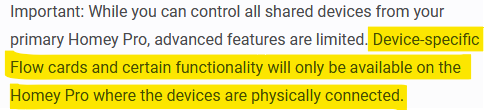
Perhaps you can mirror your devices, but I think you can’t use the Tesla device flow cards.
If you want to try:
- Create a new app in your Tesla developer account
- Use this client_id / client_secret on your HP19
This way you can try without loosing your HP23 device and statistics.
Both apps are counted on your 10€ limit.
But you can set the HP19 device to “BLE only” if that’s enough for you.
I’m getting this a lot too. The only key connected is the key card. Sometimes I get the message to confirm connecting a new key. But after hitting confirm, nothing happens
Can you please check the key status after confirmation on car display?
This will hopefully show that the key is registered.
Currently I don’t get a realtime response after the key is added. I hope for a documentation about such details from Tesla (the already made an ticket for).
After dozens of times I got it connected…I think 
It shows as a phone key on the car, right?
At least now I also saw some bluetooth errors in the insights and I will most likely see some bluetooth commands as soon as the sun is shining and my automatic charging thingie kicks in
By the way: you and some other developers are so freaking quick to respond! That’s just crazy! Appreciated!
