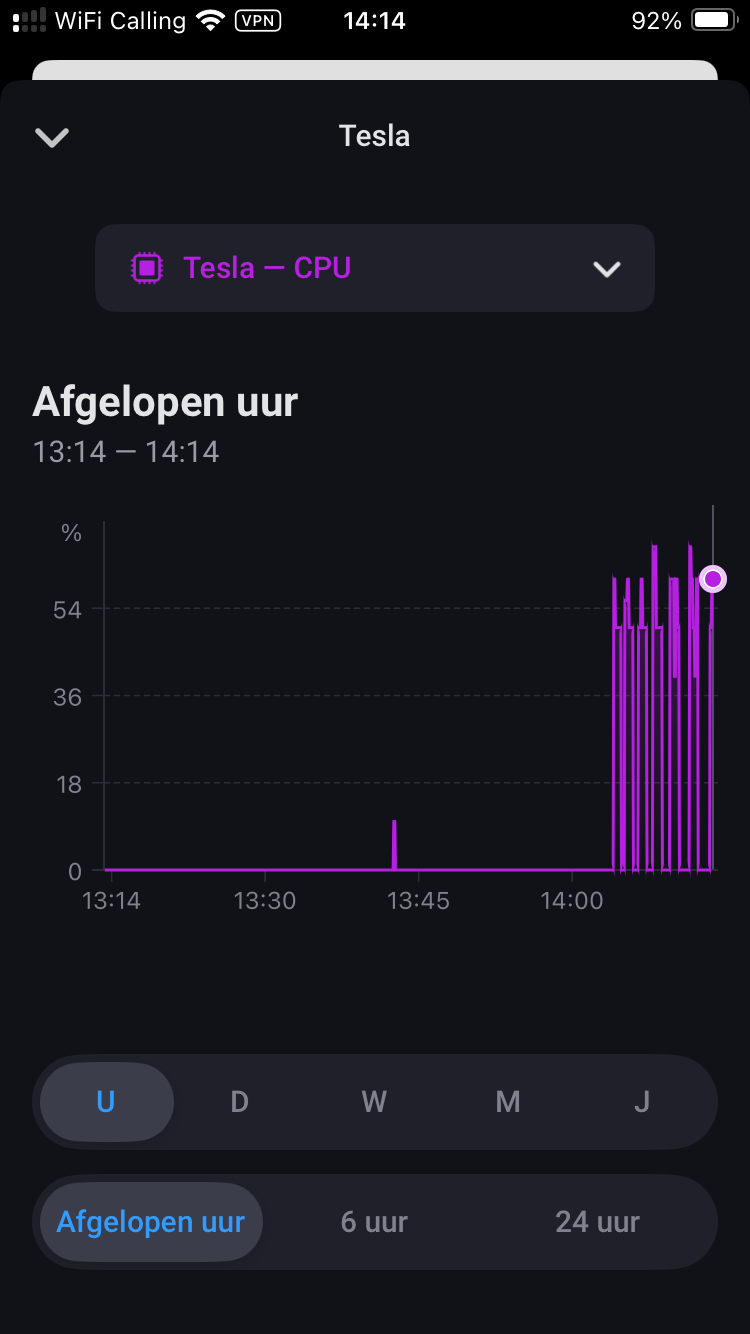
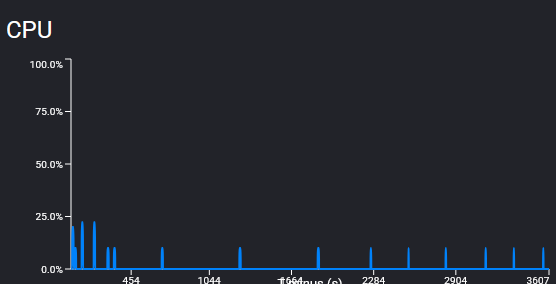
Don’t know if this helps. But it prevents a CPU spike at app start.
The CPU usage chart in developer tools is a bit strange.
The app start takes ~1sec. But the CPU usage is showing 25 up to 50% for over 10sec.
The Sync are just 2 http calls and takes <1sec. But the CPU usage chart shows sometimes ~25% for over 10sec.
Still high cpu, crash & restart of app ~every minute. Can it be linked to polling interval? Every time the app restarts, the online polling interval is reset to 1 minute. Or to the number of calls today, which is reset to 0 when the new app is installed and which keeps at 0 after every crash and restart of app?
If you have a LOT of solar panels, this might work. But keep in mind that a Tesla needs at least 5A to charge which is quite a lot of power just from solar panels (minus what your home is using). So anything below that and it won’t charge. You need a P1 meter to check how much you export to the grid. Also, you use up a lot of “free” commands when changing the charge power of your car each time the export from your solar panels changes.
I thought of this and dismissed it because I only have 3.6kWp of solar plus I use my allotment of free daily commands for other stuff so I’d have to stop doing all those other things just to make this work. A home battery or a smart boiler is a better choice imo.
I have dynamic power pricing and I just keep an eye on the hourly rate each day and plan accordingly: do laundry or run the dishwasher when prices are low and/or there is a lot of surplus solar. When prices are really low, I put some extra juice into my car or I cook or bake something in the middle of the day (and reheat at dinner time). I keep my car at 80% so I can add 10% as the opportunity presents and when I know that tomorrow there will be hours with negative prices, I keep it lower so I can add more and take full advantage of the free money.
BTW you’re not checking if your car is at home. If you charge at a public charger, your flow will also control your charging… I doubt that’s what you want
Interval was at 1 min, I changed it to 10 to see if it takes then longer before an app crash, but still crash after ~1 min. After restart of app, interval is back at 1 min
Checked twice. The new settings are used directly to start the new interval. If that did not work, the interval restart somehow seems to have a problem.
But the app doesn’t change the interval. It should still be 10min in device settings. Or the app crashed while saving the settings.
You paired two cars with your account? Perhaps the check in the app is not exact enough. I only check is there is a paired VIN.
The app must be added as car key to every car you add to Homey. Can you check if this is done. You should find the URL in your car assigned as key.
No, just one VIN. Got two Tesla accounts, one where I am owner, and the second where I have signed up as developer, and added in your homey app. Made the 2nd account driver of car, from the first account, and paired the car key when logged in to the 2nd account on ios, and since not an owner had to use a key card to finish the pairing.
I’m wonder, according to your second post in this thread, commandChargeLimit is implemented, and indeed it works. Is that not going through the command api?
I’ll go through again to see if any flow or something is trying to send some command currently not implemented, but that used to be prior to 2.0.0.
Thanks. Yes it is indeed something fishy, perhaps some old data under the hood still laying around in your app. The dev portal says I have done many commands, but the app stays at zero.
Anyway, a future re-install might solve it, if I bother re-creating the flows.
Or just app update. Since it works, sort of, for what is most important for me now, and it i more cosmetic bits, I guess you could focus on more important things than this.
The app now sits at version 2.0.10, and crashes every 1 minute and restarts. I haven’t changed any settings in the last 24 hours since the app was updated.
Hi Paul, my Solarsystem goes up to 11 KW… So i can use the solar power for charging.
P1 Meter and so on is here. What i didn´t know is, that I set with the Flow also my charging on every charger
But okay, that´s easy to controll. But Any Ideas with the flow ?
Thanks!
Then it seems that Homey FW is causing issues if the app tries to add or remove capabilities.
I will discuss this with the Athom devs (I hope).
I hope we can get a solution then because else it’s not possible to improve a device with new capabilities
I have this error by using climate control. I have updates of all datas of the car, I can wake up the car, but can’t send commands (climate or others commands). Error is:
L’application n’est pas enregistrée dans la voiture. Enregistrez-la via le processus de réparation de l’appareil de la voiture.
Sorry if this has been answered already, but I’m not seeing my car in the Energy tab. Is this because EVs are yet to be supported by Athom, or is it yet to be implemented for the app?
This is a mockup image, right?
The app only shows battery and car (better: ev charger) in the app image.
It’s showing detail data for these devices yet.
And it’s based on device class ob battery and ev charger devices. So has nothing to do with the car itself - as far as I know.
Perhaps the Tesla battery device could work as a virtual ev charger device to show upnin energy tab if a non-smart ev charger is used. But that’s something for the future.