You can use a short interval between 1 and 5min I think, because it only counts if your car is online. It depends on the average online time during a day.
Long daily journeys or long sentry time => use a longer interval
Short journeys and no or short sentty times => use a short interval
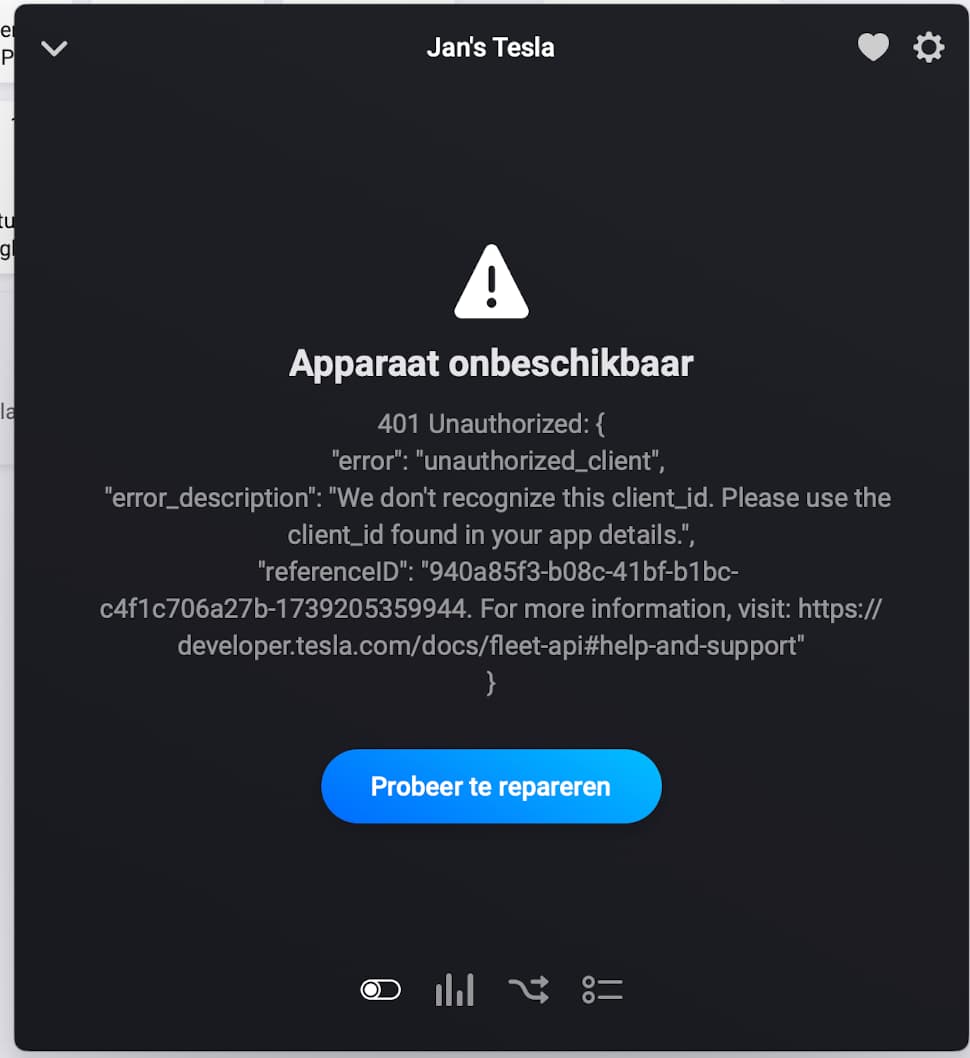
This morning I tried to add a flow that controls the climate and I got:
“Error
401 Unauthorized: {
“error”: “unauthorized_client”,
“error_description”: “We don’t recognize this client_id. Please use the client_id found in your app details.”,
“referenceID”: “###########. For more information, visit: https://developer.tesla.com/docs/fleet-api#help-and-support”
}”
For obvious reasons I masked the referenced ID. Am I trying to use a command not yet available? Or is something else wrong?
At first glance of the list of commands I would say the former.
That’s strange. Sound like the client_id is missing in the app.
Can you please check the repair view? Go to auth view until the client_id screen is shown.
Is the client_id field filled?
If yes, then I perhaps missed an adjustment somewhere for token refresh.
Is your device ok and showing data in mobile app?
Which app version are you using? 2.0.2?
PS: if the client_id or client_secret is changed in pair/repair view, a new public key is generated. In this case, the app must be added again as car key.
Ah, yes I see. Whereas it was working yesterday, the “device” in the mobile app shows an exclamation mark now. Clicking the repair button shows the same error as mentioned above. I will perform the suggested steps and update this reply
Edit: I have to click the “Change login” button, right? Then, yes, the client ID is filled.
I continued logging in and got the confirmation to use the MFA. After that I got the message that I could close the window. I did, using the x in the left top of the window.
After that it returned with a window indicating I have to log into the manufacturer’s website. It’s been there for minutes now
Edit 2: closed the window and the exclamation mark is gone. Using version 2.0.2
Edit 3: Tested the flow again. No immediate error, but after a while a time out.
Tried adjusting the climate manually from the app and the car switches to maximum cooling. If I change the climate settings from the car controls, it is reflected in the Homey app
Not sure if this is the case
Hm, can’t reproduce the issue. Can you send a diagnostics report?
I couldn’t see an error in the log. Perhaps it was too long ago.
To everyone having similar issues: Please send me a diagnostics report with comment “client_id not set”. And perhaps describe if that happens in normal use or after a while.
So, I restarted the app and the exclamation mark is back.
I was in the car, but now I am at my desk. I will try to repair the device once more. See what happens.
Ok, repaired. I saw the screen with the API credential and secret. It logged in (this time around I didn’t have to fill out my Tesla credentials using the MFA). Now I got back to the “vehicle” screen and everything seems up and running again.
As I am not anywhere near my car I will not try to open the frunk or trunk 
Restarting the app almost instantly makes the exclamation mark reappear
Is it a HP19 or HP23?
It’s HP23
Can you please show the device details with a screenshot?
And please restart again and if the error is back, send a diagnostics report.
Thanks.
Hi, I removed the old app and devices. New app 2.0.2 and fresh apps in developer.tesla.com. Data readingfs are fine but all commands fails: “Session info hmac invalid”. Any tips?
I noticed the same issue as @Rudi_Hendrix
-
A red exclamation mark on the Tesla device
-
Error message 401:
-
Repairing the device (same clientID and secret) fixes the problem, car data is coming again.
-
Restart the app (2.0.2) and the red exclamation mark is there again.
Diagnostic report has been sent: d79b52f5-1d38-4123-8efa-0c2375c6238f
Greetings, I am using app version 2.0.2, and have finished the steps on developer.tesla.com. In the app, I enter the Client ID and Client Secret generated by developer.tesla.com and select “Next” and this error appears:
400 Bad Request: {“response”:null,“error”:“Invalid EC public key”,“error_description”:“”,“txid”:“deleted for privacy”}
I have the correct URLs defined on developer.tesla.com:
Allowed Origin(s)
Allowed Redirect URI(s)
https://callback.athom.com/oauth2/callback
Any suggestions?

New test version 2.0.3:
- Added climate commands: vent, temperature, preconditioning, defrost, overheat protection
It seems Tesla could not read the public key from your Homey. Can you please try the following URL, replace the [ID] with your HomeyID.
https://[ID].tesla.rwdevelopment.de/.well-known/appspecific/com.tesla.3p.public-key.pem
Please check if you can download the key file (starting with -----BEGIN PUBLIC KEY-----) or if you get an error.
I am getting an error:
{“error”:“homey_offline”}
My Homey is online, I can access the dashboard through the cloud URL at https://my.homey.app/homeys/***My Homey ID***
Can you access it also on your phone from outside your LAN?
Of yes, then it’s perhaps caused by a regional URL. In that case I have to ask Athom…
Yes, I can access my Homey on my phone outside my LAN. If it helps, I am in the US.
Is the error still present with v. 2.0.3?
Can you try ro re-install the test version via app store? I have no ideas what’s wrong if only you are affected. I sounds as if not all app files got updated 
