[APP][Pro] OpenAI ChatGPT

I am interested in using this app. I have homey pro 2019 + alexa (echo show 15 and echo 4) + OpenAI api access.

I would like to figure out how to do speech to text that my setup could take in and send to OpenAI. Echo show 15 has a screen, so it would be nice to show the response on it, apart from getting the response speech played.

Side question, what are the devices listed as supported - ChatBot and CompletionBot?

Not sure if the question is already asked, but are you able to send an image to chat gpt and ask a question about it thru flows? that would be awesome…

1 Like

I purposely have not added speech-to-text with the OpenAI API because you can get that through Google completely for free and it supports more languages. OpenAI’s variant is a paid service, and since I have to pay to debug the app because they won’t give me free access to the OpenAI API to develop this app I don’t see the point adding it. I myself use Google assistant to do speech-to-text and send it to the webhook of this app.

No, I have not added that option yet. I would like to add it though, but I am a bit limited on time right now, so if someone else want to add it I will merge it in without hesitation.

Also, as with the speech-to-text, debugging the image interface steals money from my personal OpenAI account, which feels annoying because OpenAI themselves only earn money by having those features exposed in this app, so they surely should have a better way to approach the opensource community, but right now they just silently ignored every mail I sent to them…

2 Likes

@frodeheg Will it be possible to add support for GPT-4o mini?

I’ve already made a Pull Request on GitHub so that 4o-mini will be added.
I’ve tested it and works like a charm!
If you want, you can already install the update with CLI, just use my updated branch: GitHub - Pimmeke1989/OpenAI_Homey: OpenAI for Homey

2 Likes

I am terribly sorry that I have not included your pull request yet, my focus has been slightly shifted. I will try to add it tomorrow.

Should be possible, take the output of this app then use a flow tag to input it into the Alexa app ā€œrun commandā€.

Ok, I have merged the pull request and published a new test version 1.6.5. Thank you Pim

@frodeheg Hi, i am in need of some assistance:

I have this in my prompt:

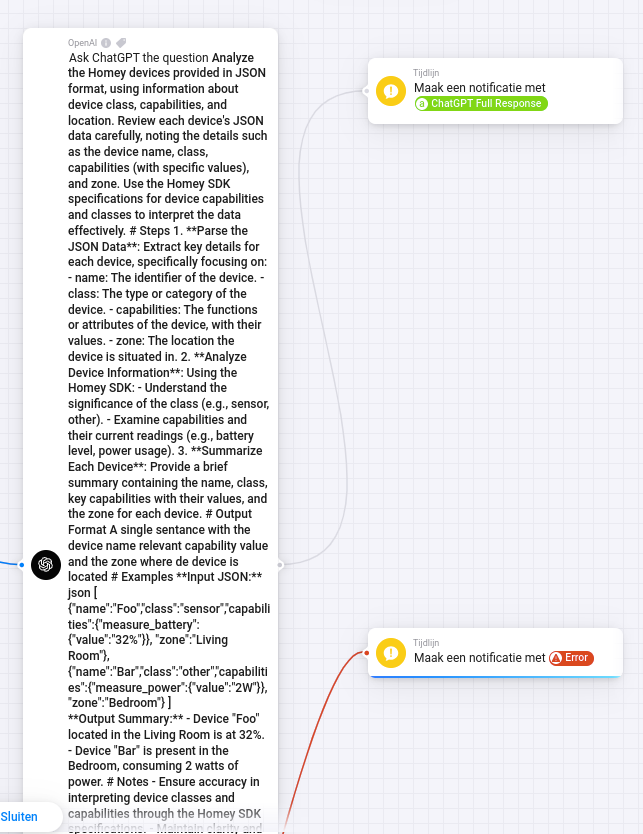
Analyze the Homey devices provided in JSON format, using information about device class, capabilities, and location. Review each device's JSON data carefully, noting the details such as the device name, class, capabilities (with specific values), and zone. Use the Homey SDK specifications for device capabilities and classes to interpret the data effectively. # Steps 1. **Parse the JSON Data**: Extract key details for each device, specifically focusing on: - name: The identifier of the device. - class: The type or category of the device. - capabilities: The functions or attributes of the device, with their values. - zone: The location the device is situated in. 2. **Analyze Device Information**: Using the Homey SDK: - Understand the significance of the class (e.g., sensor, other). - Examine capabilities and their current readings (e.g., battery level, power usage). 3. **Summarize Each Device**: Provide a brief summary containing the name, class, key capabilities with their values, and the zone for each device. # Output Format A single sentance with the device name relevant capability value and the zone where de device is located # Examples **Input JSON:** 
json [ {"name":"Foo","class":"sensor","capabilities":{"measure_battery":{"value":"32%"}}, "zone":"Living Room"}, {"name":"Bar","class":"other","capabilities":{"measure_power":{"value":"2W"}}, "zone":"Bedroom"} ]
 **Output Summary:** - Device "Foo" located in the Living Room is at 32%. - Device "Bar" is present in the Bedroom, consuming 2 watts of power. # Notes - Ensure accuracy in interpreting device classes and capabilities through the Homey SDK specifications. - Maintain clarity and precision in device summary statements. [{"name":"Toilet (temp)","class":"sensor","zone":"Toilet","capabilities":[{"measure_temperature":{"value":"20.3°C","title":"Temperatuur"}},{"measure_humidity":{"value":"56.9%","title":"Luchtvochtigheid"}},{"measure_pressure":{"value":"1014mbar","title":"Druk"}},{"measure_battery":{"value":"45%","title":"Accuniveau"}},{"alarm_battery":{"value":false,"title":"Batterij alarm"}}]}] How many degrees is it in the toilet?

But I am getting a strange 400 error in my flow:

Error: 400 Invalid 'messages': empty array. Expected an array with minimum length 1, but got an empty array instead.

While entering it directly into ChatGPT I have a correct answer:

Any idea what I am doing wrong??

Greets,
Frank

Oke, I got it working with tweaking some setting but in the end I want to push all my sensor data to be interpetated. Is that possible?

[{"name":"Gang (temp)","class":"sensor","capabilities":[{"measure_temperature":{"value":"20.1°C","title":"Temperatuur"}},{"measure_humidity":{"value":"52.1%","title":"Luchtvochtigheid"}},{"measure_battery":{"value":"41%","title":"Accuniveau"}},{"alarm_battery":{"value":false,"title":"Batterij alarm"}}]},{"name":"Toilet (temp)","class":"sensor","capabilities":[{"measure_temperature":{"value":"19.8°C","title":"Temperatuur"}},{"measure_humidity":{"value":"56.9%","title":"Luchtvochtigheid"}},{"measure_pressure":{"value":"1014mbar","title":"Druk"}},{"measure_battery":{"value":"45%","title":"Accuniveau"}},{"alarm_battery":{"value":false,"title":"Batterij alarm"}}]},{"name":"Kitchen (temp)","class":"sensor","capabilities":[{"measure_temperature":{"value":"20.8°C","title":"Temperatuur"}},{"measure_humidity":{"value":"50.9%","title":"Luchtvochtigheid"}},{"measure_pressure":{"value":"1013mbar","title":"Druk"}},{"measure_battery":{"value":"45%","title":"Accuniveau"}},{"alarm_battery":{"value":false,"title":"Batterij alarm"}}]},{"name":"Slaapkamer (temp)","class":"sensor","capabilities":[{"measure_temperature":{"value":"20.1°C","title":"Temperatuur"}},{"measure_humidity":{"value":"51.9%","title":"Luchtvochtigheid"}},{"measure_battery":{"value":"null%","title":"Accuniveau"}},{"alarm_battery":{"value":null,"title":"Batterij alarm"}}]},{"name":"Server (temp)","class":"sensor","capabilities":[{"measure_temperature":{"value":"20.7°C","title":"Temperatuur"}},{"measure_humidity":{"value":"49.7%","title":"Luchtvochtigheid"}},{"measure_battery":{"value":"41%","title":"Accuniveau"}},{"alarm_battery":{"value":false,"title":"Batterij alarm"}}]},{"name":"Kledingkast (temp)","class":"sensor","capabilities":[{"measure_temperature":{"value":"20.8°C","title":"Temperatuur"}},{"measure_humidity":{"value":"53.7%","title":"Luchtvochtigheid"}},{"measure_pressure":{"value":"1012mbar","title":"Druk"}},{"measure_battery":{"value":"null%","title":"Accuniveau"}},{"alarm_battery":{"value":null,"title":"Batterij alarm"}}]},{"name":"Lily (temp)","class":"sensor","capabilities":[{"measure_temperature":{"value":"21.6°C","title":"Temperatuur"}},{"measure_humidity":{"value":"52.5%","title":"Luchtvochtigheid"}},{"measure_pressure":{"value":"1012mbar","title":"Druk"}},{"measure_battery":{"value":"null%","title":"Accuniveau"}},{"alarm_battery":{"value":null,"title":"Batterij alarm"}}]},{"name":"Levi (temp)","class":"sensor","capabilities":[{"measure_temperature":{"value":"22.3°C","title":"Temperatuur"}},{"measure_humidity":{"value":"54%","title":"Luchtvochtigheid"}},{"measure_battery":{"value":"null%","title":"Accuniveau"}},{"alarm_battery":{"value":null,"title":"Batterij alarm"}}]},{"name":"Overloop (temp)","class":"sensor","capabilities":[{"measure_temperature":{"value":"20.6°C","title":"Temperatuur"}},{"measure_humidity":{"value":"49.9%","title":"Luchtvochtigheid"}},{"measure_pressure":{"value":"1013mbar","title":"Druk"}},{"measure_battery":{"value":"null%","title":"Accuniveau"}},{"alarm_battery":{"value":null,"title":"Batterij alarm"}}]},{"name":"Badkamer  (temp)","class":"sensor","capabilities":[{"measure_temperature":{"value":"19.7°C","title":"Temperatuur"}},{"measure_humidity":{"value":"60.5%","title":"Luchtvochtigheid"}},{"measure_pressure":{"value":"1012mbar","title":"Druk"}},{"measure_battery":{"value":"null%","title":"Accuniveau"}},{"alarm_battery":{"value":null,"title":"Batterij alarm"}}]},{"name":"Achterdeur (temp)","class":"sensor","capabilities":[{"measure_temperature":{"value":"20.3°C","title":"Temperatuur"}},{"measure_humidity":{"value":"52.8%","title":"Luchtvochtigheid"}},{"measure_battery":{"value":"45%","title":"Accuniveau"}},{"alarm_battery":{"value":false,"title":"Batterij alarm"}}]},{"name":"Living (temp)","class":"sensor","capabilities":[{"measure_temperature":{"value":"20.3°C","title":"Temperatuur"}},{"measure_humidity":{"value":"50.7%","title":"Luchtvochtigheid"}},{"measure_battery":{"value":"45%","title":"Accuniveau"}},{"alarm_battery":{"value":false,"title":"Batterij alarm"}}]}]

Or is that just too long?

Update:

I guess i am hitting this limit. Can I somehow call ChatGPT multiple times?
So I guess

  1. Give the context
  2. Push the json array of sensor data
  3. Ask the actual question

Is that possible?
Sorry about the late answer.
There are different limits for the size of the context depending on which engine you use. You can see the limitations on this page:
https://platform.openai.com/docs/models/gpt-4o

Also, you have to enter the app settings and increase the Maximum result length. It currently defaults to 4000.

Hi @frodeheg,

I now fixed it by asking 3 separate prompts. I did try to change the maximum result length to an higher number but it keeps reverting back to 4000 (tried different engine, but all are reverting back to 4000).

By the way, I am talking about the 4000 char INPUT. Maximum result length sounds more like OUTPUT :wink:

Thanks again for the time to respond,

Frank

1 Like

Thanx for that great integration. I would also be interested in sending image to chatgpt and ask question about it :sunglasses:

1 Like

No matter what length messages I use in my flows, I get this error:

This model’s maximum context length is 16385 tokens. However, you requested 16536 tokens (14536 in the messages, 2000 in the completion). Please reduce the length of the messages or completion.

Cheers for an awesome app! One question, do you plan to implement the new realtime API-functions to the app? The thing im currently missing is the better 4o voices which would be nice to have and be able to play from my Sonos speakers. I’ve tried to use the realtime API via Homey-script but as it uses websockets its not possible. :frowning:

All the best,
Zack

1 Like

Love the app @frodeheg. I use it for many things to give homey some next level flair :sparkles:.
Do you have any plans add the ability to connect to ā€œGPT Assistantsā€? This would give even more control over the context, output and additional options (eg functions) - or use dedicated bots opotimized very specific tasks. Cheers.
https://platform.openai.com/playground/assistants

1 Like

Is it also possible to send an image (say from the camera feed) and have ChatGPT process that in a way one can specify. Like check if my bins are still in their spot while they should be out. Or if I should clean my backyard, or cut the grass, trim the trees :sweat_smile:

1 Like

Hi, just being interested.. Can you tell us where you are using it for? I still can not find any good use cases for this app other than read bedtime stories..

Do i need to pay for a plan in chatgpt to make this work??

Yes, you need a OpenAI API key. And to get this, you have to add your credit card to your OpenAI account.
Then choose an amount you want to transfer from your credit card to your OpenAI account (it’s prepaid). Then you can use the API.
The API calls are counted by used tokens.

For a personal use, up to 5€ for a year is more then enough.