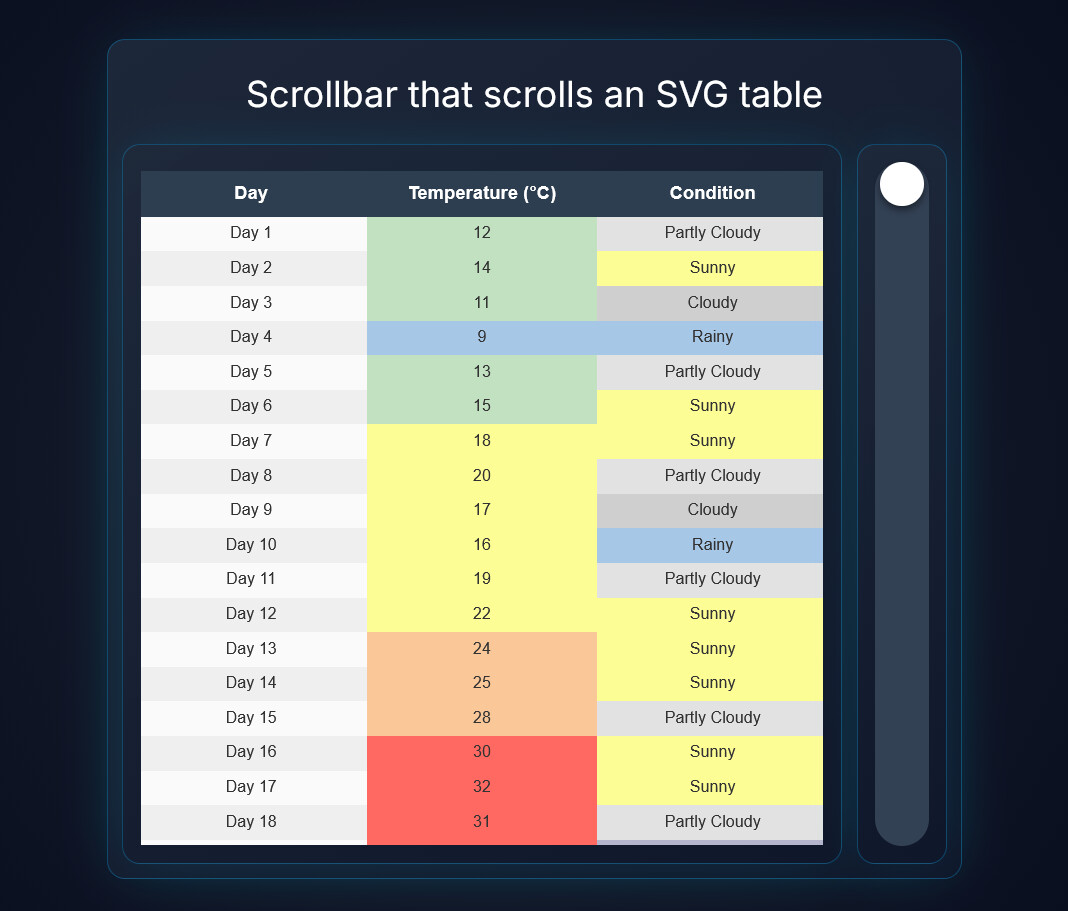
I was thinking of this. But you could just use the slider widget and attach the value using a local topic to the “move Y” of the image widget 
It works, but it is not really responsive since the slider only sends new data on release.
Dashboard snippet:
{
  "snippetHeader": "Dashboard Studio Snippet",
  "snippetType": "widget-snippet",
  "snippetFormatVersion": 1,
  "version": "1.4.1",
  "source": {
    "dashboardName": "test5",
    "page": 1,
    "createdAt": "2026-03-20T13:25:29.915Z"
  },
  "master": {
    "currentPage": 1
  },
  "widgets": {
    "image_4028": {
      "type": "image",
      "overrides": {
        "x": 340,
        "y": 200,
        "width": 480,
        "height": 480,
        "zIndex": 10,
        "page": 1,
        "sourceType": "svg",
        "url": "images/placeholder.png",
        "svgRaw": "<svg xmlns=\"http://www.w3.org/2000/svg\" viewBox=\"0 0 600 1540\" width=\"100%\" height=\"100%\">\n  <style>\n    .hdr { font-family: sans-serif; font-size: 16px; font-weight: bold; fill: #ffffff; text-anchor: middle; dominant-baseline: middle; }\n    .txt { font-family: sans-serif; font-size: 14px; fill: #333333; text-anchor: middle; dominant-baseline: middle; }\n  </style>\n\n  <rect x=\"0\" y=\"0\" width=\"600\" height=\"40\" fill=\"#2C3E50\"/>\n  <text x=\"100\" y=\"20\" class=\"hdr\">Day</text>\n  <text x=\"300\" y=\"20\" class=\"hdr\">Temperature (°C)</text>\n  <text x=\"500\" y=\"20\" class=\"hdr\">Condition</text>\n\n  <g transform=\"translate(0, 40)\">\n    <rect x=\"0\" width=\"200\" height=\"30\" fill=\"#FAFAFA\"/><text x=\"100\" y=\"15\" class=\"txt\">Day 1</text>\n    <rect x=\"200\" width=\"200\" height=\"30\" fill=\"#C1E1C1\"/><text x=\"300\" y=\"15\" class=\"txt\">12</text>\n    <rect x=\"400\" width=\"200\" height=\"30\" fill=\"#E2E2E2\"/><text x=\"500\" y=\"15\" class=\"txt\">Partly Cloudy</text>\n  </g>\n  <g transform=\"translate(0, 70)\">\n    <rect x=\"0\" width=\"200\" height=\"30\" fill=\"#EFEFEF\"/><text x=\"100\" y=\"15\" class=\"txt\">Day 2</text>\n    <rect x=\"200\" width=\"200\" height=\"30\" fill=\"#C1E1C1\"/><text x=\"300\" y=\"15\" class=\"txt\">14</text>\n    <rect x=\"400\" width=\"200\" height=\"30\" fill=\"#FDFD96\"/><text x=\"500\" y=\"15\" class=\"txt\">Sunny</text>\n  </g>\n  <g transform=\"translate(0, 100)\">\n    <rect x=\"0\" width=\"200\" height=\"30\" fill=\"#FAFAFA\"/><text x=\"100\" y=\"15\" class=\"txt\">Day 3</text>\n    <rect x=\"200\" width=\"200\" height=\"30\" fill=\"#C1E1C1\"/><text x=\"300\" y=\"15\" class=\"txt\">11</text>\n    <rect x=\"400\" width=\"200\" height=\"30\" fill=\"#CFCFCF\"/><text x=\"500\" y=\"15\" class=\"txt\">Cloudy</text>\n  </g>\n  <g transform=\"translate(0, 130)\">\n    <rect x=\"0\" width=\"200\" height=\"30\" fill=\"#EFEFEF\"/><text x=\"100\" y=\"15\" class=\"txt\">Day 4</text>\n    <rect x=\"200\" width=\"200\" height=\"30\" fill=\"#A7C7E7\"/><text x=\"300\" y=\"15\" class=\"txt\">9</text>\n    <rect x=\"400\" width=\"200\" height=\"30\" fill=\"#A7C7E7\"/><text x=\"500\" y=\"15\" class=\"txt\">Rainy</text>\n  </g>\n  <g transform=\"translate(0, 160)\">\n    <rect x=\"0\" width=\"200\" height=\"30\" fill=\"#FAFAFA\"/><text x=\"100\" y=\"15\" class=\"txt\">Day 5</text>\n    <rect x=\"200\" width=\"200\" height=\"30\" fill=\"#C1E1C1\"/><text x=\"300\" y=\"15\" class=\"txt\">13</text>\n    <rect x=\"400\" width=\"200\" height=\"30\" fill=\"#E2E2E2\"/><text x=\"500\" y=\"15\" class=\"txt\">Partly Cloudy</text>\n  </g>\n  <g transform=\"translate(0, 190)\">\n    <rect x=\"0\" width=\"200\" height=\"30\" fill=\"#EFEFEF\"/><text x=\"100\" y=\"15\" class=\"txt\">Day 6</text>\n    <rect x=\"200\" width=\"200\" height=\"30\" fill=\"#C1E1C1\"/><text x=\"300\" y=\"15\" class=\"txt\">15</text>\n    <rect x=\"400\" width=\"200\" height=\"30\" fill=\"#FDFD96\"/><text x=\"500\" y=\"15\" class=\"txt\">Sunny</text>\n  </g>\n  <g transform=\"translate(0, 220)\">\n    <rect x=\"0\" width=\"200\" height=\"30\" fill=\"#FAFAFA\"/><text x=\"100\" y=\"15\" class=\"txt\">Day 7</text>\n    <rect x=\"200\" width=\"200\" height=\"30\" fill=\"#FDFD96\"/><text x=\"300\" y=\"15\" class=\"txt\">18</text>\n    <rect x=\"400\" width=\"200\" height=\"30\" fill=\"#FDFD96\"/><text x=\"500\" y=\"15\" class=\"txt\">Sunny</text>\n  </g>\n  <g transform=\"translate(0, 250)\">\n    <rect x=\"0\" width=\"200\" height=\"30\" fill=\"#EFEFEF\"/><text x=\"100\" y=\"15\" class=\"txt\">Day 8</text>\n    <rect x=\"200\" width=\"200\" height=\"30\" fill=\"#FDFD96\"/><text x=\"300\" y=\"15\" class=\"txt\">20</text>\n    <rect x=\"400\" width=\"200\" height=\"30\" fill=\"#E2E2E2\"/><text x=\"500\" y=\"15\" class=\"txt\">Partly Cloudy</text>\n  </g>\n  <g transform=\"translate(0, 280)\">\n    <rect x=\"0\" width=\"200\" height=\"30\" fill=\"#FAFAFA\"/><text x=\"100\" y=\"15\" class=\"txt\">Day 9</text>\n    <rect x=\"200\" width=\"200\" height=\"30\" fill=\"#FDFD96\"/><text x=\"300\" y=\"15\" class=\"txt\">17</text>\n    <rect x=\"400\" width=\"200\" height=\"30\" fill=\"#CFCFCF\"/><text x=\"500\" y=\"15\" class=\"txt\">Cloudy</text>\n  </g>\n  <g transform=\"translate(0, 310)\">\n    <rect x=\"0\" width=\"200\" height=\"30\" fill=\"#EFEFEF\"/><text x=\"100\" y=\"15\" class=\"txt\">Day 10</text>\n    <rect x=\"200\" width=\"200\" height=\"30\" fill=\"#FDFD96\"/><text x=\"300\" y=\"15\" class=\"txt\">16</text>\n    <rect x=\"400\" width=\"200\" height=\"30\" fill=\"#A7C7E7\"/><text x=\"500\" y=\"15\" class=\"txt\">Rainy</text>\n  </g>\n  <g transform=\"translate(0, 340)\">\n    <rect x=\"0\" width=\"200\" height=\"30\" fill=\"#FAFAFA\"/><text x=\"100\" y=\"15\" class=\"txt\">Day 11</text>\n    <rect x=\"200\" width=\"200\" height=\"30\" fill=\"#FDFD96\"/><text x=\"300\" y=\"15\" class=\"txt\">19</text>\n    <rect x=\"400\" width=\"200\" height=\"30\" fill=\"#E2E2E2\"/><text x=\"500\" y=\"15\" class=\"txt\">Partly Cloudy</text>\n  </g>\n  <g transform=\"translate(0, 370)\">\n    <rect x=\"0\" width=\"200\" height=\"30\" fill=\"#EFEFEF\"/><text x=\"100\" y=\"15\" class=\"txt\">Day 12</text>\n    <rect x=\"200\" width=\"200\" height=\"30\" fill=\"#FDFD96\"/><text x=\"300\" y=\"15\" class=\"txt\">22</text>\n    <rect x=\"400\" width=\"200\" height=\"30\" fill=\"#FDFD96\"/><text x=\"500\" y=\"15\" class=\"txt\">Sunny</text>\n  </g>\n  <g transform=\"translate(0, 400)\">\n    <rect x=\"0\" width=\"200\" height=\"30\" fill=\"#FAFAFA\"/><text x=\"100\" y=\"15\" class=\"txt\">Day 13</text>\n    <rect x=\"200\" width=\"200\" height=\"30\" fill=\"#FAC898\"/><text x=\"300\" y=\"15\" class=\"txt\">24</text>\n    <rect x=\"400\" width=\"200\" height=\"30\" fill=\"#FDFD96\"/><text x=\"500\" y=\"15\" class=\"txt\">Sunny</text>\n  </g>\n  <g transform=\"translate(0, 430)\">\n    <rect x=\"0\" width=\"200\" height=\"30\" fill=\"#EFEFEF\"/><text x=\"100\" y=\"15\" class=\"txt\">Day 14</text>\n    <rect x=\"200\" width=\"200\" height=\"30\" fill=\"#FAC898\"/><text x=\"300\" y=\"15\" class=\"txt\">25</text>\n    <rect x=\"400\" width=\"200\" height=\"30\" fill=\"#FDFD96\"/><text x=\"500\" y=\"15\" class=\"txt\">Sunny</text>\n  </g>\n  <g transform=\"translate(0, 460)\">\n    <rect x=\"0\" width=\"200\" height=\"30\" fill=\"#FAFAFA\"/><text x=\"100\" y=\"15\" class=\"txt\">Day 15</text>\n    <rect x=\"200\" width=\"200\" height=\"30\" fill=\"#FAC898\"/><text x=\"300\" y=\"15\" class=\"txt\">28</text>\n    <rect x=\"400\" width=\"200\" height=\"30\" fill=\"#E2E2E2\"/><text x=\"500\" y=\"15\" class=\"txt\">Partly Cloudy</text>\n  </g>\n  <g transform=\"translate(0, 490)\">\n    <rect x=\"0\" width=\"200\" height=\"30\" fill=\"#EFEFEF\"/><text x=\"100\" y=\"15\" class=\"txt\">Day 16</text>\n    <rect x=\"200\" width=\"200\" height=\"30\" fill=\"#FF6961\"/><text x=\"300\" y=\"15\" class=\"txt\">30</text>\n    <rect x=\"400\" width=\"200\" height=\"30\" fill=\"#FDFD96\"/><text x=\"500\" y=\"15\" class=\"txt\">Sunny</text>\n  </g>\n  <g transform=\"translate(0, 520)\">\n    <rect x=\"0\" width=\"200\" height=\"30\" fill=\"#FAFAFA\"/><text x=\"100\" y=\"15\" class=\"txt\">Day 17</text>\n    <rect x=\"200\" width=\"200\" height=\"30\" fill=\"#FF6961\"/><text x=\"300\" y=\"15\" class=\"txt\">32</text>\n    <rect x=\"400\" width=\"200\" height=\"30\" fill=\"#FDFD96\"/><text x=\"500\" y=\"15\" class=\"txt\">Sunny</text>\n  </g>\n  <g transform=\"translate(0, 550)\">\n    <rect x=\"0\" width=\"200\" height=\"30\" fill=\"#EFEFEF\"/><text x=\"100\" y=\"15\" class=\"txt\">Day 18</text>\n    <rect x=\"200\" width=\"200\" height=\"30\" fill=\"#FF6961\"/><text x=\"300\" y=\"15\" class=\"txt\">31</text>\n    <rect x=\"400\" width=\"200\" height=\"30\" fill=\"#E2E2E2\"/><text x=\"500\" y=\"15\" class=\"txt\">Partly Cloudy</text>\n  </g>\n  <g transform=\"translate(0, 580)\">\n    <rect x=\"0\" width=\"200\" height=\"30\" fill=\"#FAFAFA\"/><text x=\"100\" y=\"15\" class=\"txt\">Day 19</text>\n    <rect x=\"200\" width=\"200\" height=\"30\" fill=\"#FF6961\"/><text x=\"300\" y=\"15\" class=\"txt\">29</text>\n    <rect x=\"400\" width=\"200\" height=\"30\" fill=\"#B4B4CC\"/><text x=\"500\" y=\"15\" class=\"txt\">Stormy</text>\n  </g>\n  <g transform=\"translate(0, 610)\">\n    <rect x=\"0\" width=\"200\" height=\"30\" fill=\"#EFEFEF\"/><text x=\"100\" y=\"15\" class=\"txt\">Day 20</text>\n    <rect x=\"200\" width=\"200\" height=\"30\" fill=\"#FAC898\"/><text x=\"300\" y=\"15\" class=\"txt\">26</text>\n    <rect x=\"400\" width=\"200\" height=\"30\" fill=\"#A7C7E7\"/><text x=\"500\" y=\"15\" class=\"txt\">Rainy</text>\n  </g>\n  <g transform=\"translate(0, 640)\">\n    <rect x=\"0\" width=\"200\" height=\"30\" fill=\"#FAFAFA\"/><text x=\"100\" y=\"15\" class=\"txt\">Day 21</text>\n    <rect x=\"200\" width=\"200\" height=\"30\" fill=\"#FAC898\"/><text x=\"300\" y=\"15\" class=\"txt\">23</text>\n    <rect x=\"400\" width=\"200\" height=\"30\" fill=\"#CFCFCF\"/><text x=\"500\" y=\"15\" class=\"txt\">Cloudy</text>\n  </g>\n  <g transform=\"translate(0, 670)\">\n    <rect x=\"0\" width=\"200\" height=\"30\" fill=\"#EFEFEF\"/><text x=\"100\" y=\"15\" class=\"txt\">Day 22</text>\n    <rect x=\"200\" width=\"200\" height=\"30\" fill=\"#FAC898\"/><text x=\"300\" y=\"15\" class=\"txt\">25</text>\n    <rect x=\"400\" width=\"200\" height=\"30\" fill=\"#E2E2E2\"/><text x=\"500\" y=\"15\" class=\"txt\">Partly Cloudy</text>\n  </g>\n  <g transform=\"translate(0, 700)\">\n    <rect x=\"0\" width=\"200\" height=\"30\" fill=\"#FAFAFA\"/><text x=\"100\" y=\"15\" class=\"txt\">Day 23</text>\n    <rect x=\"200\" width=\"200\" height=\"30\" fill=\"#FAC898\"/><text x=\"300\" y=\"15\" class=\"txt\">27</text>\n    <rect x=\"400\" width=\"200\" height=\"30\" fill=\"#FDFD96\"/><text x=\"500\" y=\"15\" class=\"txt\">Sunny</text>\n  </g>\n  <g transform=\"translate(0, 730)\">\n    <rect x=\"0\" width=\"200\" height=\"30\" fill=\"#EFEFEF\"/><text x=\"100\" y=\"15\" class=\"txt\">Day 24</text>\n    <rect x=\"200\" width=\"200\" height=\"30\" fill=\"#FF6961\"/><text x=\"300\" y=\"15\" class=\"txt\">29</text>\n    <rect x=\"400\" width=\"200\" height=\"30\" fill=\"#FDFD96\"/><text x=\"500\" y=\"15\" class=\"txt\">Sunny</text>\n  </g>\n  <g transform=\"translate(0, 760)\">\n    <rect x=\"0\" width=\"200\" height=\"30\" fill=\"#FAFAFA\"/><text x=\"100\" y=\"15\" class=\"txt\">Day 25</text>\n    <rect x=\"200\" width=\"200\" height=\"30\" fill=\"#FF6961\"/><text x=\"300\" y=\"15\" class=\"txt\">33</text>\n    <rect x=\"400\" width=\"200\" height=\"30\" fill=\"#FDFD96\"/><text x=\"500\" y=\"15\" class=\"txt\">Sunny</text>\n  </g>\n  <g transform=\"translate(0, 790)\">\n    <rect x=\"0\" width=\"200\" height=\"30\" fill=\"#EFEFEF\"/><text x=\"100\" y=\"15\" class=\"txt\">Day 26</text>\n    <rect x=\"200\" width=\"200\" height=\"30\" fill=\"#FF6961\"/><text x=\"300\" y=\"15\" class=\"txt\">34</text>\n    <rect x=\"400\" width=\"200\" height=\"30\" fill=\"#E2E2E2\"/><text x=\"500\" y=\"15\" class=\"txt\">Partly Cloudy</text>\n  </g>\n  <g transform=\"translate(0, 820)\">\n    <rect x=\"0\" width=\"200\" height=\"30\" fill=\"#FAFAFA\"/><text x=\"100\" y=\"15\" class=\"txt\">Day 27</text>\n    <rect x=\"200\" width=\"200\" height=\"30\" fill=\"#FF6961\"/><text x=\"300\" y=\"15\" class=\"txt\">30</text>\n    <rect x=\"400\" width=\"200\" height=\"30\" fill=\"#B4B4CC\"/><text x=\"500\" y=\"15\" class=\"txt\">Stormy</text>\n  </g>\n  <g transform=\"translate(0, 850)\">\n    <rect x=\"0\" width=\"200\" height=\"30\" fill=\"#EFEFEF\"/><text x=\"100\" y=\"15\" class=\"txt\">Day 28</text>\n    <rect x=\"200\" width=\"200\" height=\"30\" fill=\"#FAC898\"/><text x=\"300\" y=\"15\" class=\"txt\">26</text>\n    <rect x=\"400\" width=\"200\" height=\"30\" fill=\"#A7C7E7\"/><text x=\"500\" y=\"15\" class=\"txt\">Rainy</text>\n  </g>\n  <g transform=\"translate(0, 880)\">\n    <rect x=\"0\" width=\"200\" height=\"30\" fill=\"#FAFAFA\"/><text x=\"100\" y=\"15\" class=\"txt\">Day 29</text>\n    <rect x=\"200\" width=\"200\" height=\"30\" fill=\"#FDFD96\"/><text x=\"300\" y=\"15\" class=\"txt\">22</text>\n    <rect x=\"400\" width=\"200\" height=\"30\" fill=\"#CFCFCF\"/><text x=\"500\" y=\"15\" class=\"txt\">Cloudy</text>\n  </g>\n  <g transform=\"translate(0, 910)\">\n    <rect x=\"0\" width=\"200\" height=\"30\" fill=\"#EFEFEF\"/><text x=\"100\" y=\"15\" class=\"txt\">Day 30</text>\n    <rect x=\"200\" width=\"200\" height=\"30\" fill=\"#FDFD96\"/><text x=\"300\" y=\"15\" class=\"txt\">20</text>\n    <rect x=\"400\" width=\"200\" height=\"30\" fill=\"#E2E2E2\"/><text x=\"500\" y=\"15\" class=\"txt\">Partly Cloudy</text>\n  </g>\n  <g transform=\"translate(0, 940)\">\n    <rect x=\"0\" width=\"200\" height=\"30\" fill=\"#FAFAFA\"/><text x=\"100\" y=\"15\" class=\"txt\">Day 31</text>\n    <rect x=\"200\" width=\"200\" height=\"30\" fill=\"#FDFD96\"/><text x=\"300\" y=\"15\" class=\"txt\">21</text>\n    <rect x=\"400\" width=\"200\" height=\"30\" fill=\"#FDFD96\"/><text x=\"500\" y=\"15\" class=\"txt\">Sunny</text>\n  </g>\n  <g transform=\"translate(0, 970)\">\n    <rect x=\"0\" width=\"200\" height=\"30\" fill=\"#EFEFEF\"/><text x=\"100\" y=\"15\" class=\"txt\">Day 32</text>\n    <rect x=\"200\" width=\"200\" height=\"30\" fill=\"#FAC898\"/><text x=\"300\" y=\"15\" class=\"txt\">24</text>\n    <rect x=\"400\" width=\"200\" height=\"30\" fill=\"#E2E2E2\"/><text x=\"500\" y=\"15\" class=\"txt\">Partly Cloudy</text>\n  </g>\n  <g transform=\"translate(0, 1000)\">\n    <rect x=\"0\" width=\"200\" height=\"30\" fill=\"#FAFAFA\"/><text x=\"100\" y=\"15\" class=\"txt\">Day 33</text>\n    <rect x=\"200\" width=\"200\" height=\"30\" fill=\"#FDFD96\"/><text x=\"300\" y=\"15\" class=\"txt\">22</text>\n    <rect x=\"400\" width=\"200\" height=\"30\" fill=\"#CFCFCF\"/><text x=\"500\" y=\"15\" class=\"txt\">Cloudy</text>\n  </g>\n  <g transform=\"translate(0, 1030)\">\n    <rect x=\"0\" width=\"200\" height=\"30\" fill=\"#EFEFEF\"/><text x=\"100\" y=\"15\" class=\"txt\">Day 34</text>\n    <rect x=\"200\" width=\"200\" height=\"30\" fill=\"#FDFD96\"/><text x=\"300\" y=\"15\" class=\"txt\">18</text>\n    <rect x=\"400\" width=\"200\" height=\"30\" fill=\"#A7C7E7\"/><text x=\"500\" y=\"15\" class=\"txt\">Rainy</text>\n  </g>\n  <g transform=\"translate(0, 1060)\">\n    <rect x=\"0\" width=\"200\" height=\"30\" fill=\"#FAFAFA\"/><text x=\"100\" y=\"15\" class=\"txt\">Day 35</text>\n    <rect x=\"200\" width=\"200\" height=\"30\" fill=\"#FDFD96\"/><text x=\"300\" y=\"15\" class=\"txt\">16</text>\n    <rect x=\"400\" width=\"200\" height=\"30\" fill=\"#A7C7E7\"/><text x=\"500\" y=\"15\" class=\"txt\">Rainy</text>\n  </g>\n  <g transform=\"translate(0, 1090)\">\n    <rect x=\"0\" width=\"200\" height=\"30\" fill=\"#EFEFEF\"/><text x=\"100\" y=\"15\" class=\"txt\">Day 36</text>\n    <rect x=\"200\" width=\"200\" height=\"30\" fill=\"#C1E1C1\"/><text x=\"300\" y=\"15\" class=\"txt\">15</text>\n    <rect x=\"400\" width=\"200\" height=\"30\" fill=\"#CFCFCF\"/><text x=\"500\" y=\"15\" class=\"txt\">Cloudy</text>\n  </g>\n  <g transform=\"translate(0, 1120)\">\n    <rect x=\"0\" width=\"200\" height=\"30\" fill=\"#FAFAFA\"/><text x=\"100\" y=\"15\" class=\"txt\">Day 37</text>\n    <rect x=\"200\" width=\"200\" height=\"30\" fill=\"#C1E1C1\"/><text x=\"300\" y=\"15\" class=\"txt\">13</text>\n    <rect x=\"400\" width=\"200\" height=\"30\" fill=\"#E2E2E2\"/><text x=\"500\" y=\"15\" class=\"txt\">Partly Cloudy</text>\n  </g>\n  <g transform=\"translate(0, 1150)\">\n    <rect x=\"0\" width=\"200\" height=\"30\" fill=\"#EFEFEF\"/><text x=\"100\" y=\"15\" class=\"txt\">Day 38</text>\n    <rect x=\"200\" width=\"200\" height=\"30\" fill=\"#C1E1C1\"/><text x=\"300\" y=\"15\" class=\"txt\">14</text>\n    <rect x=\"400\" width=\"200\" height=\"30\" fill=\"#FDFD96\"/><text x=\"500\" y=\"15\" class=\"txt\">Sunny</text>\n  </g>\n  <g transform=\"translate(0, 1180)\">\n    <rect x=\"0\" width=\"200\" height=\"30\" fill=\"#FAFAFA\"/><text x=\"100\" y=\"15\" class=\"txt\">Day 39</text>\n    <rect x=\"200\" width=\"200\" height=\"30\" fill=\"#C1E1C1\"/><text x=\"300\" y=\"15\" class=\"txt\">12</text>\n    <rect x=\"400\" width=\"200\" height=\"30\" fill=\"#CFCFCF\"/><text x=\"500\" y=\"15\" class=\"txt\">Cloudy</text>\n  </g>\n  <g transform=\"translate(0, 1210)\">\n    <rect x=\"0\" width=\"200\" height=\"30\" fill=\"#EFEFEF\"/><text x=\"100\" y=\"15\" class=\"txt\">Day 40</text>\n    <rect x=\"200\" width=\"200\" height=\"30\" fill=\"#A7C7E7\"/><text x=\"300\" y=\"15\" class=\"txt\">9</text>\n    <rect x=\"400\" width=\"200\" height=\"30\" fill=\"#A7C7E7\"/><text x=\"500\" y=\"15\" class=\"txt\">Rainy</text>\n  </g>\n  <g transform=\"translate(0, 1240)\">\n    <rect x=\"0\" width=\"200\" height=\"30\" fill=\"#FAFAFA\"/><text x=\"100\" y=\"15\" class=\"txt\">Day 41</text>\n    <rect x=\"200\" width=\"200\" height=\"30\" fill=\"#A7C7E7\"/><text x=\"300\" y=\"15\" class=\"txt\">8</text>\n    <rect x=\"400\" width=\"200\" height=\"30\" fill=\"#B4B4CC\"/><text x=\"500\" y=\"15\" class=\"txt\">Stormy</text>\n  </g>\n  <g transform=\"translate(0, 1270)\">\n    <rect x=\"0\" width=\"200\" height=\"30\" fill=\"#EFEFEF\"/><text x=\"100\" y=\"15\" class=\"txt\">Day 42</text>\n    <rect x=\"200\" width=\"200\" height=\"30\" fill=\"#C1E1C1\"/><text x=\"300\" y=\"15\" class=\"txt\">10</text>\n    <rect x=\"400\" width=\"200\" height=\"30\" fill=\"#A7C7E7\"/><text x=\"500\" y=\"15\" class=\"txt\">Rainy</text>\n  </g>\n  <g transform=\"translate(0, 1300)\">\n    <rect x=\"0\" width=\"200\" height=\"30\" fill=\"#FAFAFA\"/><text x=\"100\" y=\"15\" class=\"txt\">Day 43</text>\n    <rect x=\"200\" width=\"200\" height=\"30\" fill=\"#C1E1C1\"/><text x=\"300\" y=\"15\" class=\"txt\">11</text>\n    <rect x=\"400\" width=\"200\" height=\"30\" fill=\"#CFCFCF\"/><text x=\"500\" y=\"15\" class=\"txt\">Cloudy</text>\n  </g>\n  <g transform=\"translate(0, 1330)\">\n    <rect x=\"0\" width=\"200\" height=\"30\" fill=\"#EFEFEF\"/><text x=\"100\" y=\"15\" class=\"txt\">Day 44</text>\n    <rect x=\"200\" width=\"200\" height=\"30\" fill=\"#C1E1C1\"/><text x=\"300\" y=\"15\" class=\"txt\">13</text>\n    <rect x=\"400\" width=\"200\" height=\"30\" fill=\"#E2E2E2\"/><text x=\"500\" y=\"15\" class=\"txt\">Partly Cloudy</text>\n  </g>\n  <g transform=\"translate(0, 1360)\">\n    <rect x=\"0\" width=\"200\" height=\"30\" fill=\"#FAFAFA\"/><text x=\"100\" y=\"15\" class=\"txt\">Day 45</text>\n    <rect x=\"200\" width=\"200\" height=\"30\" fill=\"#C1E1C1\"/><text x=\"300\" y=\"15\" class=\"txt\">15</text>\n    <rect x=\"400\" width=\"200\" height=\"30\" fill=\"#FDFD96\"/><text x=\"500\" y=\"15\" class=\"txt\">Sunny</text>\n  </g>\n  <g transform=\"translate(0, 1390)\">\n    <rect x=\"0\" width=\"200\" height=\"30\" fill=\"#EFEFEF\"/><text x=\"100\" y=\"15\" class=\"txt\">Day 46</text>\n    <rect x=\"200\" width=\"200\" height=\"30\" fill=\"#C1E1C1\"/><text x=\"300\" y=\"15\" class=\"txt\">14</text>\n    <rect x=\"400\" width=\"200\" height=\"30\" fill=\"#E2E2E2\"/><text x=\"500\" y=\"15\" class=\"txt\">Partly Cloudy</text>\n  </g>\n  <g transform=\"translate(0, 1420)\">\n    <rect x=\"0\" width=\"200\" height=\"30\" fill=\"#FAFAFA\"/><text x=\"100\" y=\"15\" class=\"txt\">Day 47</text>\n    <rect x=\"200\" width=\"200\" height=\"30\" fill=\"#C1E1C1\"/><text x=\"300\" y=\"15\" class=\"txt\">12</text>\n    <rect x=\"400\" width=\"200\" height=\"30\" fill=\"#CFCFCF\"/><text x=\"500\" y=\"15\" class=\"txt\">Cloudy</text>\n  </g>\n  <g transform=\"translate(0, 1450)\">\n    <rect x=\"0\" width=\"200\" height=\"30\" fill=\"#EFEFEF\"/><text x=\"100\" y=\"15\" class=\"txt\">Day 48</text>\n    <rect x=\"200\" width=\"200\" height=\"30\" fill=\"#C1E1C1\"/><text x=\"300\" y=\"15\" class=\"txt\">10</text>\n    <rect x=\"400\" width=\"200\" height=\"30\" fill=\"#A7C7E7\"/><text x=\"500\" y=\"15\" class=\"txt\">Rainy</text>\n  </g>\n  <g transform=\"translate(0, 1480)\">\n    <rect x=\"0\" width=\"200\" height=\"30\" fill=\"#FAFAFA\"/><text x=\"100\" y=\"15\" class=\"txt\">Day 49</text>\n    <rect x=\"200\" width=\"200\" height=\"30\" fill=\"#A7C7E7\"/><text x=\"300\" y=\"15\" class=\"txt\">9</text>\n    <rect x=\"400\" width=\"200\" height=\"30\" fill=\"#A7C7E7\"/><text x=\"500\" y=\"15\" class=\"txt\">Rainy</text>\n  </g>\n  <g transform=\"translate(0, 1510)\">\n    <rect x=\"0\" width=\"200\" height=\"30\" fill=\"#EFEFEF\"/><text x=\"100\" y=\"15\" class=\"txt\">Day 50</text>\n    <rect x=\"200\" width=\"200\" height=\"30\" fill=\"#A7C7E7\"/><text x=\"300\" y=\"15\" class=\"txt\">7</text>\n    <rect x=\"400\" width=\"200\" height=\"30\" fill=\"#CFCFCF\"/><text x=\"500\" y=\"15\" class=\"txt\">Cloudy</text>\n  </g>\n</svg>\n",
        "moveX": 0,
        "moveY": 113,
        "label": "",
        "metaName": "New Image",
        "scale": 203,
        "fit": false,
        "proportional": false
      },
      "bindings": {
        "moveY": "local/scrollbarY"
      }
    },
    "slider_7069": {
      "type": "slider",
      "overrides": {
        "x": 830,
        "y": 200,
        "width": 60,
        "height": 480,
        "zIndex": 10,
        "page": 1,
        "value": 370,
        "min": -370,
        "max": 370,
        "allowDecimals": false,
        "vertical": true,
        "showVal": false,
        "valOffX": 0,
        "valOffY": 0,
        "valAlign": "center",
        "outputTopic": "local/scrollbarY",
        "label": "",
        "labelOffX": 0,
        "labelOffY": 0,
        "metaName": "New Slider",
        "colFill": "#334155"
      },
      "bindings": {}
    },
    "label_5798": {
      "type": "label",
      "overrides": {
        "x": 330,
        "y": 130,
        "width": 570,
        "height": 560,
        "zIndex": 9,
        "page": 1,
        "text": "Scrollbar that scrolls an SVG table",
        "metaName": "text",
        "labelCase": "none",
        "textVerticalAlign": "top",
        "padding": 2
      },
      "bindings": {}
    }
  }
}

 )
)


 .
.

 ).
).