Can you share what you did to get the ratgdo board to work in homey?. I have been messing with the thing for months, and still nothing, When I try to configure it in ESPHome Controller, it is asking for an encryption key. Asking chat gpt leads me to think I need a custom yaml file to flash to the board. What were you able to do? I reached out to ugrbnk and he suggested I reach out to you. tyia
There’s a ratgdo device in Esphome Controller Now. Did you upgrade the ratgdo to the latest firmware?
Hi @ugrbnk - first of all I wanted to say that this has been working fantastically with my Neewer lights! Thank you!
I am now attempting to add control of a USB hub using a remote control wired to the GPIO pins. I can add the first button, but I don’t get the choice of multiple buttons like I do on the lights after your fix. Is there a fix that needs replicating to that device type? Thanks!
Oh and I notice the device add jumps the first page where there are multiple devices - that’s a great usability improvement 
Here is my current yaml
esphome:
  name: esp-studio
  friendly_name: Studio Control

esp32:
  board: esp32dev
  framework:
    type: esp-idf

# Enable logging
logger:

# Enable Home Assistant API
api:
  encryption:
    key: "**********"

ota:
  - platform: esphome
    password: "**********"

wifi:
  ssid: !secret wifi_ssid
  password: !secret wifi_password

  # Enable fallback hotspot (captive portal) in case wifi connection fails
  ap:
    ssid: "Esp-Studio Fallback Hotspot"
    password: "**********"

captive_portal:

external_components:
  - source: **********
    refresh: 0s # Recommended to ensure your fixes are pulled immediately
    components: [ neewerlight_ble, neewerlight ]

esp32_ble_tracker:

### Commented out after initial detection:
#neewerlight_ble:
#text_sensor:
#  - platform: ble_scanner
#    name: "BLE Devices Scanner"

### Added the following blocks with the detected
### mac addresses:
ble_client:
  - mac_address: **********
    id: nw660_ble_1
  - mac_address: **********
    id: nw660_ble_2

light:
  - platform: neewerlight
    name: "NW660 RGB Light 1"
    ble_client_id: nw660_ble_1
    color_interlock: true
    gamma_correct: 1.0
    default_transition_length: 0s

  - platform: neewerlight
    name: "NW660 RGB Light 2"
    ble_client_id: nw660_ble_2
    color_interlock: true
    gamma_correct: 1.0
    default_transition_length: 0s

# --- GPIO Outputs (PC817 LED side) ---
output:
  - platform: gpio
    pin:
      number: GPIO16
      mode: OUTPUT
    id: opto_pair_usb

  - platform: gpio
    pin:
      number: GPIO17
      mode: OUTPUT
    id: opto_next_usb

  - platform: gpio
    pin:
      number: GPIO18
      mode: OUTPUT
    id: opto_usb_1

  - platform: gpio
    pin:
      number: GPIO19
      mode: OUTPUT
    id: opto_usb_2

# --- Momentary Button Actions ---
button:
  - platform: template
    name: "Pair USB"
    on_press:
      - output.turn_on: opto_pair_usb
      - delay: 250ms
      - output.turn_off: opto_pair_usb

  - platform: template
    name: "Next USB"
    on_press:
      - output.turn_on: opto_next_usb
      - delay: 250ms
      - output.turn_off: opto_next_usb

  - platform: template
    name: "USB 1"
    on_press:
      - output.turn_on: opto_usb_1
      - delay: 250ms
      - output.turn_off: opto_usb_1

  - platform: template
    name: "USB 2"
    on_press:
      - output.turn_on: opto_usb_2
      - delay: 250ms
      - output.turn_off: opto_usb_2
Thanks for all your work!
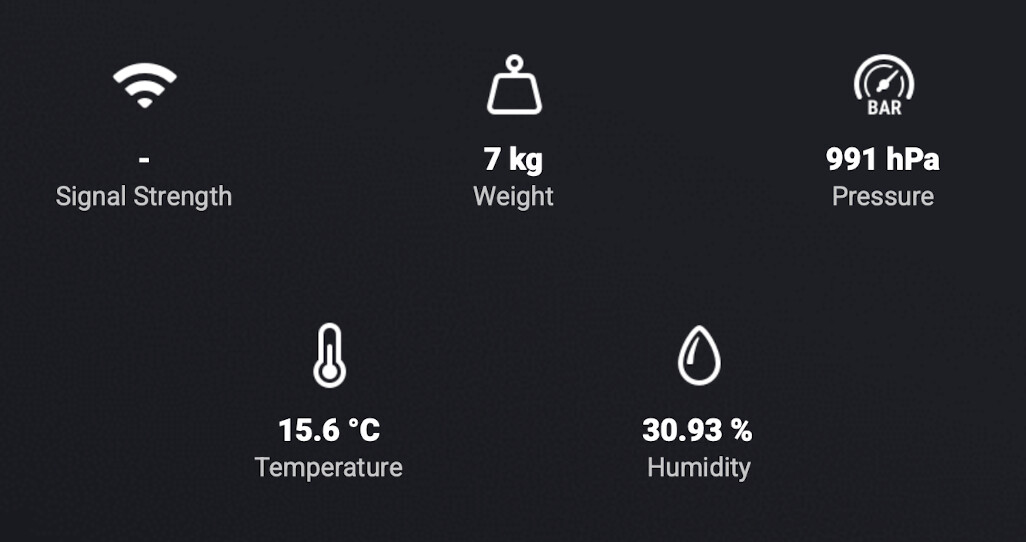
The “EspHome Device” seems to connect fine, it shows a red triangle when I turn my ESP32 off, and triangle disappears when turned on.
But device does not show any sensor values, only “Signal Strength” which is “-” (and updated “56 years ago" ) despite being WiFi-connected). Do I need anything extra in my .yaml for the sensor?
sensor:
  - platform: hx711
    name: “Beehive”
    dout_pin: 14
    clk_pin: 23
    gain: 128
    update_interval: 1s
    unit_of_measurement: “kg”
I made the corrections. I would appreciate it if you could test it and let me know the result.
Great, now it shows the weight thanks! A little rounding would make it neater.
(Updated: rounding could be managed in .yaml - “accuracy_decimals: 1”).
”Weight” does not show up under Insights though.

Unfortunately for my issue, it still jumps past the stage to select a specific entity of type button. I note that entity key has now appeared as a config param when adding a button though - don’t think that was there before.
I’ll make a correction for that.
I’m correcting it.
I can confirm that the adding works when entity key is manually specified, so (as I’m sure you’ve already deduced) it looks like it’s just the discovery logic. Thanks!
@clindh @MarkT ESPHome Controller | Homey
@clindh Thank you for your donation.
Happy to confirm the discovery now works as expected - great stuff @ugrbnk! A complete non-rush but at some point it would be great to be able to add multiple devices at once, or for the app to remember the IP and encryption key, or similar so it is quicker to add multiple entities.
But fantastic that it now does discovery for buttons too Thank you again!
The suggestion to add multiple devices and remind users of connection details makes a lot of sense from a user experience perspective. However, since Homey’s core pairing infrastructure is currently built around a single device addition onboarding procedure, allowing multiple selections in the interface would require an infrastructure update.
1 Like
Yes, I tried to link my device to that option in Esphome Controller. That is where I was asked for IP address, encryption key and password. The encryption key is what I don’t have.
Yes, I updated my device to the latest firmware dated 2026.2.22
The last few commands in the log are:
11:43:19 [W] [ratgdo_secplus2:438]
Not connected to GDO, ignoring command: GET_OPENINGS
11:43:19 [D] [ratgdo_secplus2:215]
Query paired devices of type: ALL
11:43:19 [D] [ratgdo_secplus2:426]
Send command: GET_PAIRED_DEVICES, data: 000000
11:43:19 [W] [ratgdo_secplus2:438]
Not connected to GDO, ignoring command: GET_PAIRED_DEVICES
11:43:19 [D] [ratgdo_secplus2:215]
Query paired devices of type: REMOTE
11:43:19 [D] [ratgdo_secplus2:215]
Query paired devices of type: WALL_CONTROL
11:43:46 [I] [safe_mode:071]
Boot seems successful; resetting boot loop counter
There’s no longer an encryption key or password. I didn’t enter any–just the ip address.
 )
)