The same issue has been reported in other apps uploaded this afternoon. The problem is currently on Homey’s end. I will upload the new files as soon as it is fixed. Please stay on the stable version.
1 Like
Thanks, that explains. I’m not in a hurry or using the device, just testing & helping.
1 Like
Hi @ugrbnk, thanks for your nice work. Do you think you could share the git repo of your project, I want trying to vibe code something similar ( not that advance) and I am curious of your approach
1 Like
Hello, thank you. I have a few more projects on hand. Once they are finished and the esphome Controller is fully complete, I will upload it to GitHub. I will share it here when I upload it.
v1.0.66
Test result remarks
I think you have named the subcapababilities not according guidelines, you’d use a dot as separator;
When the capability is called
measure_distance
then
measure_distance_movingshould be
measure_distance.movingmeasure_distance_detectionshould be
measure_distance.detectionmeasure_distance_stillshould be
measure_distance.still
The capability currently named as measure_distance.moving isn’t bound to a source
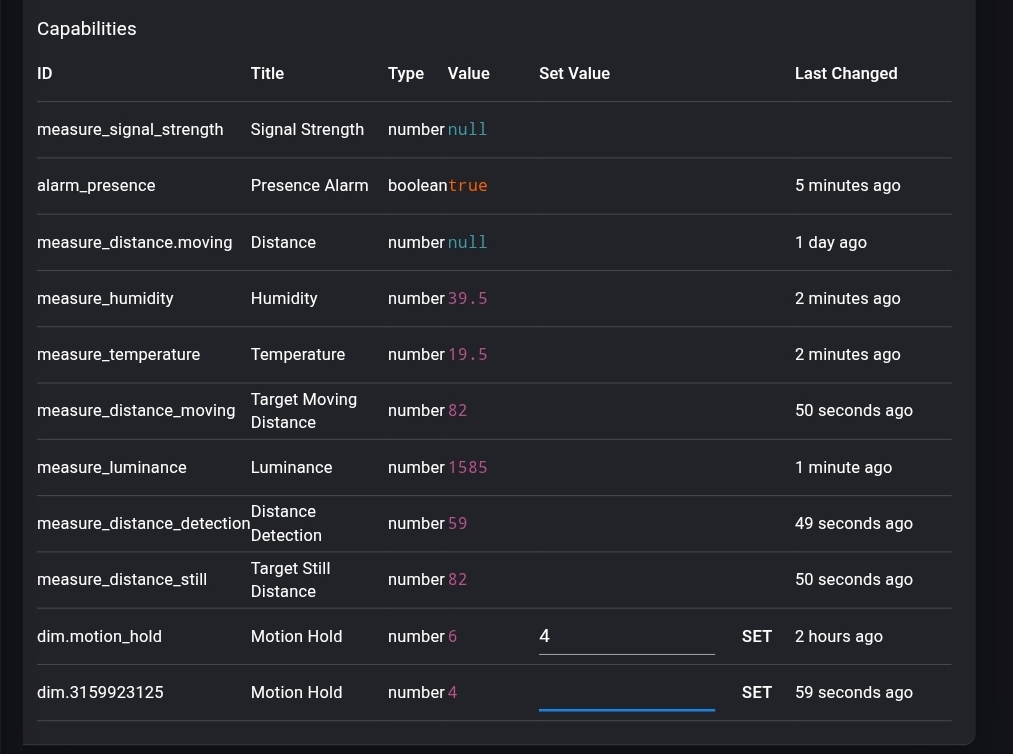
dim.motion_hold now gets updated when adjusted at the sensor’s webpage. Nice!
However, it errors with “missing capability listener” when I adjust it with Homey,

I have made the corrections. I would appreciate it if you could test it again and get back to me.
Hi,
Thanks!
These capabilities are connected and working.
The dim capability works as well (from and to the ESP)

(there’s no signal strength entity)
1 Like
Thank you for your feedback and support.
No problem.
For our overview, these entities have been added successfully:

binary_sensor.occupancy
number.motion_hold (s)
sensor.distance_detection (cm)
sensor.humidity (%)
sensor.illuminance (lux)
sensor.target_moving_distance (cm)
sensor.target_still_distance (cm)
sensor.temperature (°C)
Do you have plans to add some of the other entities as well? (no hurries of course)
I’d particularly be interested in these four:
number.max_distance(m) as dim capability
value range: 0 - 6 / 2 digits / step: 0.75number.sensitivity_thold(%) as dim capability
value range: 10 - 100 / 0 digits / step: 2
(these two above appear and dissappear between app updates)switch.show_target_statsswitch.config_mode
And the nice to haves are:
button.restart_esp (Restart)
switch.safe_mode (Restart in safe mode)
sensor.target_still_energy (%)
sensor.target_moving_energy (%)
sensor.uptime_human (string)
Thank you!
I’ve tried to include what you requested. I’ll make adjustments based on your feedback.
1 Like
I discovered I had to install the app “over” the installed app again, after adding a device. Only then the ‘missing’ entities were added

Is it possible to name the 3 capabilities entitled ‘Distance’ after their capability name?
Like:
measure_distance.detection : ‘Detection Distance’
measure_distance.moving : ‘Moving Distance’
measure_distance.still : ‘Still Distance’
That’ll be great.
Thanks!
Hello @ugrbnk and thanks for your App.
I just received my Konnected Alarm Panel Pro 12 zones that I configured in the Konnected Android App:

Enabled Local Native API, with no Encryption for now:

For now only configured one Zone (Front Door HA) and as a Standalone Alarm System:

I could add Front Door HA using your ESPHome Controller App as a ESPHome Door Sensor:


However, after a few seconds, it shows Device Unavailable with sendMessage timeout waiting for ListEntitiesDoneResponse:

Any idea what could go wrong?
FYI, it all works fine in SmartThings, so I guess my Konnected Panel setup is fine…
Hello, I will look into the issue and let you know once I have made the correction.
Thanks @ugrbnl! Anything I can do or information to provide to help you?
I forgot to mention Konnected Alarm Panel Pro 12 Zones version 1.9, ESPHome version 2026.1.3, Project version 1.2.2.1, and I get this kind of errors every 30s in Konnected Web interface (My Homey is 192.168.178.22):

I’ve added a new driver for the alarm panel. If you try it and provide feedback, I’ll continue updating accordingly. ( I made a new correction.)
https://homey.app/en-tr/app/com.ugrbnk.esphome/ESPHome-Controller/test/
Thank you so much. Everything OK!
1 Like
Have you tried the latest update?
Hi @ugrbnk, I tried the new version 1.0.78 you sent me, added a Konnected Alarm Panel, but no change, I would still get the same errors as before, but x2, and triyng to Arm or Disarm the panel, I got “No alarm panel found“ error in Homey:

So I deleted both devices, de-install your app, re-installed: Same problem.
This time I deleted the two devices again, this time added first the Door sensor, and called it exactly the same way as in Konnected app, so Front Door HA. It started working. I added again Konnected Alarm Panel by your app, this time with exactly the same name as defined in Konnected app, so Marc Home Alarm: Same error “No alarm panel found“ if I try to arm or disarm from Homey.
Also nothing in Konnected log.
If that helps, this is what I get in Homery Developer for Marc Home Alarm:

Any idea?
One thing that is not clear to me, is that there is the “Standalone Alarm System“ in my Konnected Alarm Panel Pro, but also the 12 separate sensors. How do you differenciate each since all on the same IP address? Do I have to use in your app exactly the same name as in the Konnected App?
There seems to be another issue with the Homey App Store right now; packages are not downloading properly. I will share a new update as soon as it is fixed. Please refrain from using the test version for now.
I now configured all inputs and outputs on my Konnected 12 zone Panel, as follows:
- Zone 1: Door Main HA as Door
- Zone 2: Motion HA as Motion
- Zone 3: Window BJ as Window
- Zone 4: Motion BJ as Motion
- Zone 5: Motion BA as Motion
- Zone 6: Window BM as Window
- Zone 7: Motion BM as Motion
- Zone 8 Door Back OF as Door
- Zone 9: Motion OF as Motion
- Zone 10: Door Sliding LR as Door
- Zone 11: Motion LR as Motion
- Zone 12: Door System HA as Door
- Alarm 1: Alarm 1 as On/Off Switch
- Out 1: Out 1 as On/Off Switch
- Alarm 2 / Out 2: Out 2 as On/Off Switch
Then I started adding in Homey with your App, it went fine for the first two (Door Main HA and Motion HA):

I skipped the 3rd wince you do not have ESPHome Windows Sensor type, but at the 4th (Motion BJ) I got a weird error message:

I tried Other Door or Motion sensors, same problem. It looked like you can manage only one Sensor of each type? So I deleted Motion HA and tried to add again Motion BJ that failed previously, and bingo, it worked:

OK, so I tried adding Door System HA as type ESPHome Device, and it worked too:

I forgot to mention that all the steps, I tested the devices by closing or opening them, checked in Homey, Smartthings and Konnected Web interface that the status is correct. But when I checked Door System HA, to my surprise, not only Door System HA status changed, but also Door Main HA status, both at the same time in Homey, while they are correct in Smartthings or Konnected Web interface**:**

Same if I test Door Main HA, Door System HA is also changing status at the same time.
If I test Motion BJ, no problem, only Motion BJ is changing status in Homey.
So it looks like your app gets confused with two devices of the same type starting wih the same name, such as Door XXXX. Not only it refuses to add the second one if using the same type, but also gets confused between 2 devices from different type names starting the same way when once is activated.
So I reconfigured my Konnected Alarm Panel as follows:
- Zone 1: 1 as Door
- Zone 2: 2 as Motion
- Zone 3: 3 as Window
- Zone 4: 4 as Motion
- Zone 5: 5 as Motion
- Zone 6: 6 as Window
- Zone 7: 7 as Motion
- Zone 8: 8 as Door
- Zone 9: 9 as Motion
- Zone 10: 10 as Door
- Zone 11: 11 as Motion
- Zone 12: 12 as Door
- Alarm 1: Alarm 1 as On/Off Switch
- Out 1: Out 1 as On/Off Switch
- Alarm 2 / Out 2: Out 2 as On/Off Switch
But same problem, I cannot add a second device of the same type, so first Door and Motion works, but second is refused with this error:
But then I realised that it does not matter which Door sensor I test: Basically ANY Door sensor will change the state of the one Door sensor I installed, and ANY Motion will change the state of the one Motion sensor I installed!!!
Could you check what is going on with this?
Also, interesting things:
-
ESPHome Windows Sensor type is missing, could you please add?
-
I could manage to add and control my Out 2 when adding it with your app as ESPHome Switch, but of course I do no need the Power, Energy, Voltage, Current. Could you maybe add a simple On/Off output?
-
Same worked with Alarm 1, after deleting Out 2 of course, since again, I cannot have two devices of the same type (and definitely nothing to do with the name).
-
If I try to add Out 1 as EPSHome Switch (after deleting Alarm 1), somehow it still activates Alarm 1

-
I also tried to add and control my Out 1 as ESPHome Button, but pressing it gave me a nice reset, same as if I pressed the reboot button on the Konnected interface:

So I made a new ESPHome Button, this time called Reboot and that works, even if I do not have any Zone or Output called this way
-
Very strange, but it looks like as long as your app is connected to the Konnected Alarm Panel, it is NOT allowing firmware updates anymore from the Konnected App. I tried many times, impossible to update firmware anymore. Until I deleted all devices from your app, deinstalled app, then I could update my firmware again.
