Sorry, I don’t understand, could you explain a bit more?

Ah, I see. I don’t think I have any control over the width as that’s set by Athom.
Are they the built-in ones provided by Athom?
Within a single status widget you could create an HTML-table that consists of three columns. Each of which can contain a different image. However, in the end, the width of that widget is limited to to the column width of the dashboard.
Also, I am not sure that it is possible to create clickable images that trigger an action.
Finally: If I am correct, I see that you are referring to images uploaded via the Gallery app. You might want to check my earlier post on referencing images in the Galley app. Your current reference will most likely not work anymore after a restart of your Homey.

Athom have their own rules and their widgets are native to the Homey app.
Thanks,
But with a table containing 3 images is it possible to trigger click on each image?
I don’t think so. @Adrian_Rockall: do you know?
Not with the current implementation. I will ponder upon it, but not sure how I can do that yet.
Thanks a lot!
New test version in the store.
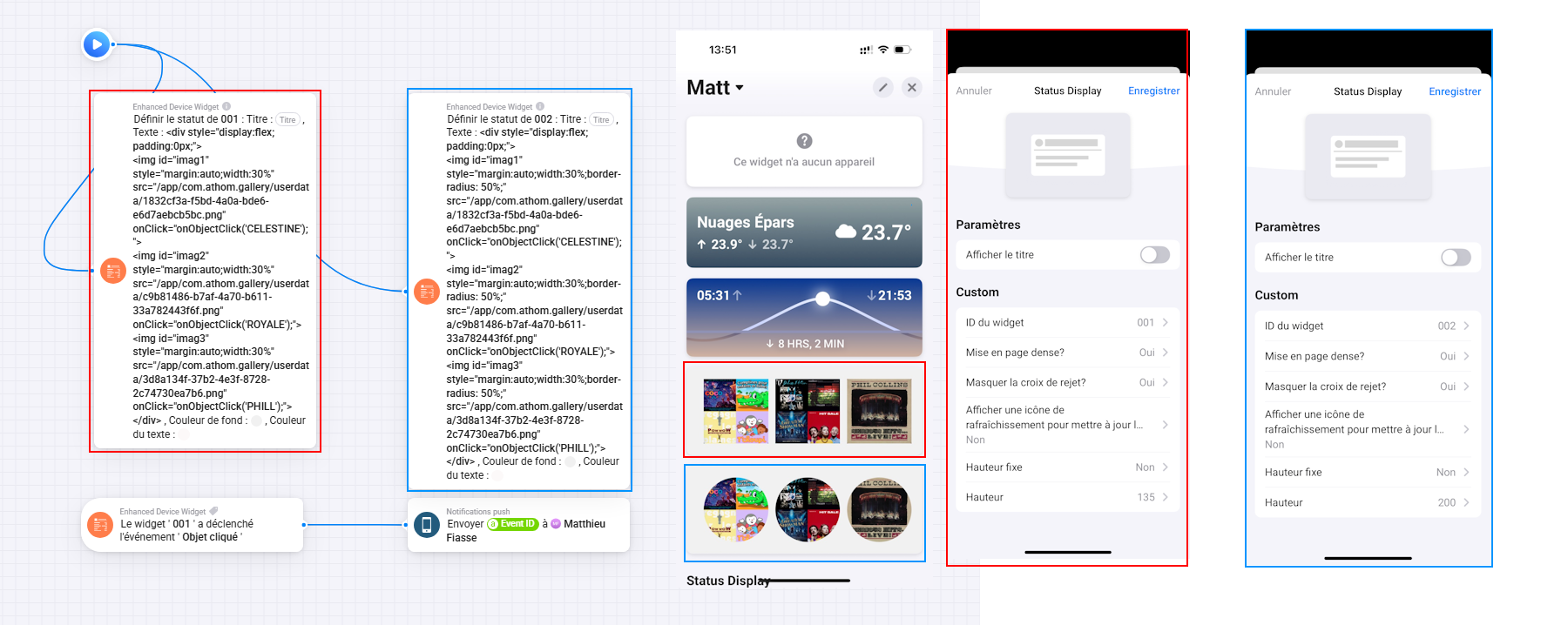
I have added a new event option to trigger user object clicks. So in the HTML that you pass in, add an onClick attribute to the objects as follows:
<img id="imag1" src="ok.png" " onClick="onObjectClick('OK');"> <img id="imag2" src="cancel.png" onClick="onObjectClick('CANCEL');">
The ‘onObjectClick’ has to be exactly as shown so that it calls the correct function.
The ‘OK’ / ‘CANCEL’ can be any text you like and is passed into the Flow as a token so you and use that in the AND section to decide what object was clicked.
2 Likes
I Found, It’s working very Well!!!
Amaizing 
2 Likes
Can you post examples how you do this ?
Hey!
I tried to replicate this status on my dashboard, but for whatever reason the start of the text in the title doesn’t align with the text on the row below…


Any idea? There’s no spaces anywhere in the text.
Thank you in advance!
1 Like
I believe that’s a question for the developer, Adrian. You could just put a space in front of the word “ Kameror“ to line up with the title text.
I have published a new test version that has options for specifying the margins of the tile and status text area, plus an alignment option for the tile.
The previous versions had a 5 pixel offset for the status text to indent it.
2 Likes
This works great @Adrian_Rockall! It allows me to use the full width of the status widget content box. Before I had to limit the width of included HTML tables to 97%.

1 Like
