As far as I know. The reply I got from Athom said they think they have fixed it and it will in some future mobile app release.
4 Likes

I do not know if my issue is caused by the above update issue. Sorry if I am mistaken…
I want to update the status of my Eufy homebase in a label. However, the status is only updated when I turn off and on the alarm. In all other flows the status stays on “thuis”.
But when I use the testbutton in advanced flows, all flows are working fine.
What am I doing wrong?
If the widget is not visible when the status changes, then it’s likely to be the known issue.
1 Like
Hi Adrian, I love the widgets. Easy to use and edit.
But, I use the dashboard only on my phone. Sometimes the information is not readable because the characters are too big and text is cut off. Is there a way to adjust this?

It says on Homey Mobile App Changelog | Homey that the 9.0.2 appupdate now is live. I havent recieved it yet, but lets hope it fixes the widget update problem.
see not live indeed

Appear as widget use 0-1 rather than 0-100?
Also there seem to be a problem loading a logo in the upper left corner?
Live now. Lets hope it fixes it
The widgets seems to update correctly now with the latest Homey update!
Maybe we can get a app update with the option to remove the sync arrows?
1 Like
Are you really sure? I couldn’t confirm that yesterday at least - a little better, but after a while it stopped, as before.
I havent noticed any problems so far. Have added a latest updated time at the bottom and it has always been updated (so far).

Cool @Fredrik_Gustafsson 
Maybe I should add an update label as well - because I have the same problems as before (Android).
Apart from this, all the widgets load slower after the app update.
EDIT: My update(s) is reflected by changing images, maybe it’s a cache problem?
I have also noticed the slower widget load. Not just from this app but all apps. So probably something Athom has to fix.
After the last update from the mobile app the refresh of your widget seems to work.
Now that I can work with the ‘Status Display’ widget I have a question for you. Can you add the pictures from the gallery app as a tag?
Like ‘Guest WiFi’ as in screenshot below. The picture is a QR code

Many Thanks
Rogier
1 Like
First off, wonderful work on this app. It is really cool what you’ve done here and your contributions to the community are greatly appreciated.
I have been working with the Enhanced Device Widgets for a couple of days now and I have a couple of observations to share. I’ve gone through the thread and still unsure of these concerns have been stated, so forgive me if they have and I merely missed them.
The following is a screenshot of “enhanced” devices in my Dashboard titled “1-Kitchen”. I what to specifically address your attention to the “Hall Light” (a RBGW Zemismart ceiling light) and the “Echo Show” (This was added via the Community “Amazon Alexa” app).

Referring to the Hall Light, the color temperature slider works fine, however moving the sliders for the “Hue” and “Color saturation” does not result in any change on the device. Also, the position of the slider for the “Dim level” does not correspond to the percentage for brightness. The 85% light level appears to be accurate because if you adjust the slider down, and then back to maximum, it does get brighter and then reports at 100%. Finally, regarding Color saturation”, I believe the number reporting saturation level should be 71% rather than “0.71”. If you move saturation to the max, it reports as “1”.
Referring to the Echo Show, the six elements showing a value of a blue “1”, (Stop, Weather Report…). These elements do not seem to respond to a tap. I am uncertain what the blue number “1” is to represent. Are these features non-functional? The volume appears to be the only element the works. The “Playing” button is not reelecting the true state of the echo device. I have not thoroughly tested the “Shuffle” or “Repeat” switches but turning them on does not appear to have the desired effect. The “Artist” and “Track” are populated for the Echo Show 8, but there does not appear to be any data available for the other echo devices, those without a display screen.
As for the green “Security” display, yes that is your status display widget. Here is my simple flow. If my home is set to Armed(stay) or Armed(away) that tile turn red and displays “Armed Mode (ON)” Very Nice!

Thanks again Adrian for all your fantastic work on this widget!
There’s a fair bit to unpack there, so forgive me if I miss anything.
On my lamps, I have a capability that switches between white and colour mode. You might have to toggle that to be in the correct mode for the relevant sliders to work. For my SwitchBot lights, my app automatically changes the mode based on the values that change, but I don’t think that is guaranteed in all apps.
I will need to investigate this one.
Unfortunately, Homey is very inconsistent with % as some capabilities are presented between 0 and 1 while others are 0 and 100. For the dim capability I know that is between 0 and 1, so the widget does the multiply/divided to convert it to 0 to 100.
With the temperature, hue, and saturation, these seem to be device dependent. With temperature especially, some devices will have values of say 25000 to 65000, so I just present the numbers given by the driver.
Those are just push buttons, e.g. buttons that have no state and just send a command when pressed. I need to find a better indicator, but I’m not sure what to use. Maybe just  would be better. I don’t know why they don’t work for you though, so I will look into that.
The widget should get notifications from the device when the state changes. Do you see the correct status in the actual app?
Again, the widget should get notifications from the device and display the text that is reported. Do you see the correct information in the app for those?
Yes, however the app displays the pause button while the echo device is playing. The app then displays the “play” button while the echo device is paused. Here is a screenshot of my Echo Show while playing :
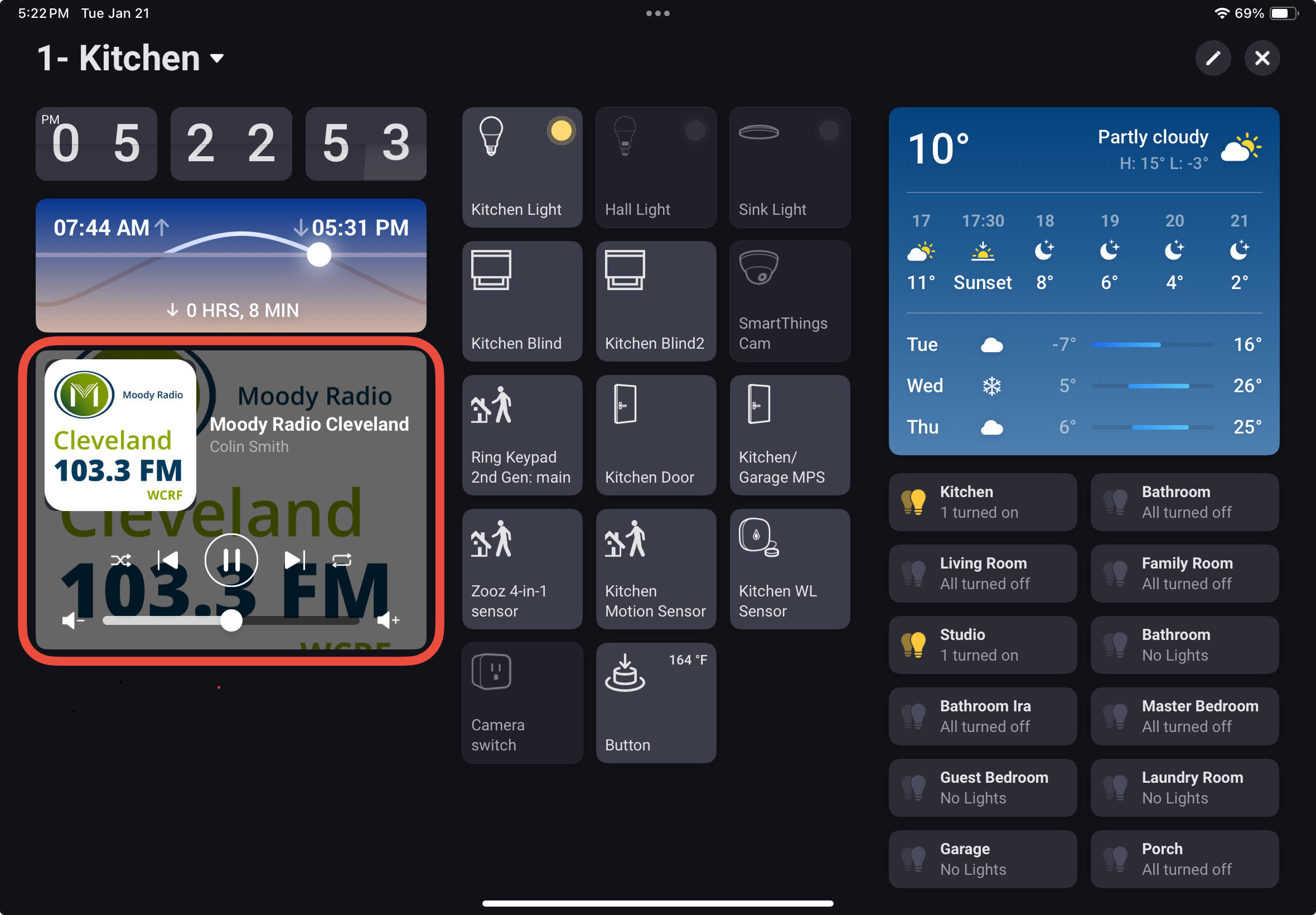
Hmm, interesting. I will need to dig deeper into that one.
Below you will see three devices in my Living Room dashboard. These are the Third Reality Nightlight and two Third Realty Color Smart Bulbs. Like the Zemismart down light, the “Color temperature” is controllable, however the “Hue” and :Color saturation" sliders have no effect when adjusted. I tried making adjustments and then turning the devices off and back on, however there is no change. I have no way to toggle these devices to change between the color and white modes.
One other important note: I am bringing these devices into Homey via your SmartThings2 App, so I am not sure if that disrupts anything? My experience is that all devices work fine, although slightly delayed in response at times. The only exception to this is SmartThings devices reporting temperatures. Homey appears to assume that temperatures in SmartThings are reporting as Celsius. Therefore when Homey converts a SmartThings device temperature of 72 degrees Fahrenheit, the temperature gets translated to 162 degrees in the Homey app.

About “Artist” and “Track” information, although I can not speak for all of the different echo devices, it does not appear in the echo devices that lack a display provide this data.
