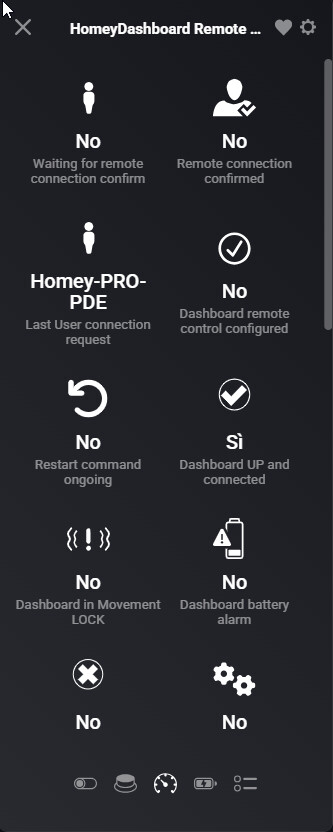
I have a HPE2023 running on v12.8.2 and Device Capabilities APP v2.16.2. I often face an issue regarding my virtual devices. If I add or modify a field in it, then delete and/or add modify again, after the refresh of the device by clicking SAVE, a “fake” icon field remains in the virtual device.
If I try to find this “fake field” inside the flow cards of the device it doesn’t exist, but in the device it is.
I have tried to save and close the device several times, in some case the “fake field” disappears in other case not.
Above an example. If you see the field which is signed as “Yes/No” it is a boolean field which I can’t remove anymore from my virtual device. In the field list I am not capable to find it. I have already restarted Device Capabilities APP and Homey too but the “fake” field is still present
Ah, it’s a “ghost” capability as I would call it.
In my experience, after editing an AVD capabilities, the screen you showed gets refreshed when you open a devices’ settings from an other device in an other zone.
In theory an app- or Homey restart should have the same result, I can’t tell why the deleted capability keeps appearing in your case.
Am I missing something? None of my devices show up under the “condition”. Is there something that needs to be turned on so I can check if for example is turned on or off? See attached image for the options I have.
@Torsten_Zauner, Please write in English, as this is an English-language topic.
No, no solution found. Currently, it doesn’t seem possible to create an AVD for home batteries.
What do you mean exactly, @Arie_J_Godschalk?
These are the settings we used:
However, the AVD isn’t displayed at all in the Energy Dashboard.
But in the AVD, on the Sensor page, are import and export both shown?
Because right now, you have 2 fields Energy both checked for Create Real Fields, which is not possible (it would create 2 fields internally called “meter_power").
I need to check how i can implemented 2 “real" fields for meter_power.
etin = energy total in (import)
etout = energy total out (export)
I understand what you mean and, of course, it’s logically.
But I guess this isn’t the problem.
I created myself an AVD for our Smart Meter. It also provides values for energy imports and exports and I check marked both meter_power fields with “Create Real Fields”. Both values, i.e., energy imports and exports, are displayed correct in the Homey Energy Dashboard.
The only difference to the Home Battery AVD is, that the device class of the Homey Battery AVD is set to Battery and the device class of the Smart Meter is set to Sensor.
Therefore, my assumption is that the problem may lie in the device class Battery.