# Widget styling questions
**URL:** https://community.homey.app/t/widget-styling-questions/121720
**Category:** Developers
**Created:** [November 26, 2024, 2:20pm UTC](https://community.homey.app/t/widget-styling-questions/121720 "2024-11-26T14:20:01Z")
**Posts on this page:** 3
**Page:** 1
### Author:  [@Emiliano\_Quetimporta](https://community.homey.app/u/Emiliano_Quetimporta)
#### Post date: [November 26, 2024, 2:20pm UTC](https://community.homey.app/t/widget-styling-questions/121720/1 "2024-11-26T14:20:01Z")
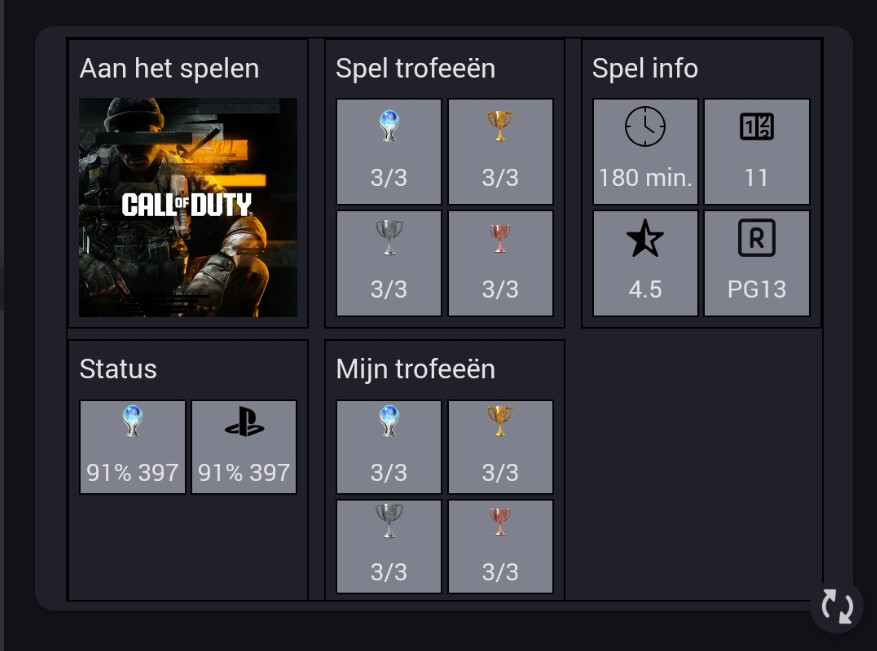
I’m developing a widget for the Playstation app.
This is what I have so far (I’m not a CSS master)
1. Is there a class to round the borders exactly as Homey ? As you can see all gray squares should be rounded and the image too. (the rest of the borders will disappear so no need to burn them down 😃 )
2. How can I colour the svgs like the text? So depending on the theme the svgs are lighter or darker (all black icons on the picture are svgs)
---
### Author:  [@RonnyW](https://community.homey.app/u/RonnyW)
#### Post date: [November 26, 2024, 9:09pm UTC](https://community.homey.app/t/widget-styling-questions/121720/2 "2024-11-26T21:09:44Z")
I used this example:
> **[Styling | Homey Apps SDK](https://apps.developer.homey.app/the-basics/widgets/styling#custom-icons)**
>
> Styling your widget with the provided CSS variables and classes helps it fit nicely alongside other widgets on the user’s dashboard.
This way, the icons are using default CSS color (dependent on light/dark theme).
If you want a fixed color, you can set it in the CSS part. You can use RGB/HEX/ColorCodes or just Homey CSS variables:
> **[Styling | Homey Apps SDK](https://apps.developer.homey.app/the-basics/widgets/styling#palette)**
>
> Styling your widget with the provided CSS variables and classes helps it fit nicely alongside other widgets on the user’s dashboard.
---
### Author:  [@Emiliano\_Quetimporta](https://community.homey.app/u/Emiliano_Quetimporta)
#### Post date: [November 26, 2024, 9:27pm UTC](https://community.homey.app/t/widget-styling-questions/121720/3 "2024-11-26T21:27:44Z")
I’ve clearly missed it, too much hectic xD thx!