# Webhook with ubiquiti protect
**URL:** https://community.homey.app/t/webhook-with-ubiquiti-protect/122324
**Category:** Questions & Help
**Tags:** webhook
**Created:** [December 2, 2024, 5:58am UTC](https://community.homey.app/t/webhook-with-ubiquiti-protect/122324 "2024-12-02T05:58:56Z")
**Posts on this page:** 12
**Page:** 1
### Author:  [@tanwk3](https://community.homey.app/u/tanwk3)
#### Post date: [December 2, 2024, 5:58am UTC](https://community.homey.app/t/webhook-with-ubiquiti-protect/122324/1 "2024-12-02T05:58:56Z")
I have tried using the logic in homey using the URL provided with the myevent tag and = it to a name and paste it into the customer webhook in ubiquiti protect alarm and set as POST and it doesnt work when triggered. Anyone facing the same issue? Or did i use a wrong webhook for this? Not expert with webhook need some help on this.


---
### Author:  [@robertklep](https://community.homey.app/u/robertklep)
#### Post date: [December 2, 2024, 6:34am UTC](https://community.homey.app/t/webhook-with-ubiquiti-protect/122324/2 "2024-12-02T06:34:46Z")
What’s the value of `(ⓐ Tag)` in the first card? It should be `my_event`
---
### Author:  [@Caseda](https://community.homey.app/u/Caseda)
#### Post date: [December 2, 2024, 7:35am UTC](https://community.homey.app/t/webhook-with-ubiquiti-protect/122324/3 "2024-12-02T07:35:34Z")
Just an FYI, Might not be possible to use a tag in the trigger card, and has to be written.
---
### Author:  [@tanwk3](https://community.homey.app/u/tanwk3)
#### Post date: [December 2, 2024, 11:41am UTC](https://community.homey.app/t/webhook-with-ubiquiti-protect/122324/4 "2024-12-02T11:41:26Z")
what i did was … [https://webhook.homey.app/](https://webhook.homey.app/) [homey id] /my\_event?tag=fingerprint is place in unifi protect alarm webhook post
where fingerprint is my tag value.

so in the trigger i check tag is exactly fingerprint.
---
### Author:  [@robertklep](https://community.homey.app/u/robertklep)
#### Post date: [December 2, 2024, 11:44am UTC](https://community.homey.app/t/webhook-with-ubiquiti-protect/122324/5 "2024-12-02T11:44:03Z")
> [@tanwk3](#):
>
> what i did was … /my\_event?tag=fingerprint
> where fingerprint is my tag value.
The “When” card should contain the _event_ name, so `my_event`
---
### Author:  [@tanwk3](https://community.homey.app/u/tanwk3)
#### Post date: [December 2, 2024, 11:52am UTC](https://community.homey.app/t/webhook-with-ubiquiti-protect/122324/6 "2024-12-02T11:52:29Z")
> [@tanwk3](#):
>
> [https://webhook.homey.app/](https://webhook.homey.app/) [homey id] /my\_event?tag=fingerprint
so putting this in the unifi protect UI for post
[https://webhook.homey.app/](https://webhook.homey.app/) [homey id] /my\_event?tag=fingerprint is not correct? Cos my\_event doesnt has a naming convention here.
should i change to …my\_event=fingerprint?tag=yes
---
### Author:  [@robertklep](https://community.homey.app/u/robertklep)
#### Post date: [December 2, 2024, 11:59am UTC](https://community.homey.app/t/webhook-with-ubiquiti-protect/122324/7 "2024-12-02T11:59:06Z")
If you have this:
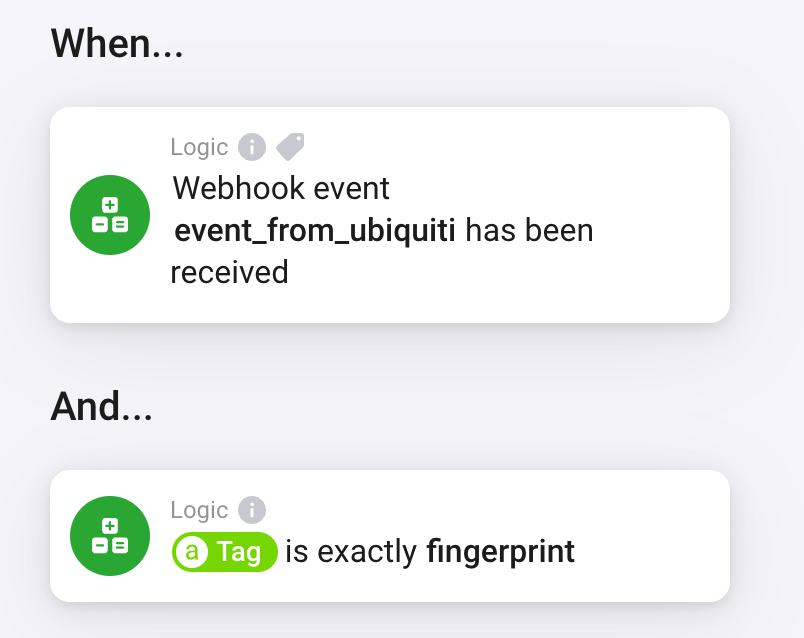
The URL should be:
```auto
https://webhook.homey.app/[homey id]/event_from_ubiquiti?tag=fingerprint
```
---
### Author:  [@tanwk3](https://community.homey.app/u/tanwk3)
#### Post date: [December 2, 2024, 12:09pm UTC](https://community.homey.app/t/webhook-with-ubiquiti-protect/122324/8 "2024-12-02T12:09:37Z")
that works. thanks a lot. finally understand that statement in the icon.
---
### Author:  [@Ollem](https://community.homey.app/u/Ollem)
#### Post date: [January 20, 2025, 1:55pm UTC](https://community.homey.app/t/webhook-with-ubiquiti-protect/122324/9 "2025-01-20T13:55:37Z")
Any idea if it is also possible to pass json or variable from Unifi Protect?
Or do I need to hard code each tag in Unifi Protect Alarm for Homey?
According to this article the Unifi HTTP POST Alarm should send additional information but I haven’t been able to capture it with ‘tag’:
> **[Send UniFi Protect Alerts to Web Services using Webhooks](https://help.ui.com/hc/en-us/articles/25478744592023-Send-UniFi-Protect-Alerts-to-Web-Services-using-Webhooks)**
>
> UniFi Protect custom webhooks make it easy to connect UniFi Protect with other web services. They allow you to automatically respond to alerts, improve monitoring, and scale effortlessly. With webh...
---
### Author:  [@robertklep](https://community.homey.app/u/robertklep)
#### Post date: [January 20, 2025, 2:01pm UTC](https://community.homey.app/t/webhook-with-ubiquiti-protect/122324/10 "2025-01-20T14:01:43Z")
Homey’s webhooks are very limited, only “event” and “tag” (passed in the URL) are supported.
---
### Author:  [@Ollem](https://community.homey.app/u/Ollem)
#### Post date: [January 20, 2025, 2:36pm UTC](https://community.homey.app/t/webhook-with-ubiquiti-protect/122324/11 "2025-01-20T14:36:25Z")
Thanks for your reply!
This triggered me to check if someone had made an alternative webhook app and there is 🙂
> **[Webhooks](https://homey.app/nl-nl/app/skogsaas.webhooks/Webhooks/)**
>
> Webhooks with full access to request headers, query and body
When using the webhook URL as can be found in the config of this app
(e.g. [https://webhooks.athom.com/webhook/123456789abcde?homey=](https://webhooks.athom.com/webhook/123456789abcde?homey=)‘_homey id of your homey_’&event=‘_event name as defined in unifi protect_’)
The json can now be read…
E.g. these Unifi Protect Alarm settings

now returns the expected json:
```auto
{
"alarm": {
"name": "Person of interest (Webhook)",
"sources": [
{
"device": "E0631DABCDE",
"type": "include"
}
],
"conditions": [
{
"condition": {
"type": "is",
"source": "face_of_interest"
}
},
{
"condition": {
"type": "is",
"source": "face_unknown"
}
},
{
"condition": {
"type": "is",
"source": "face_known"
}
}
],
"triggers": [
{
"device": "E0631DABCDE",
"value": "John Doe",
"key": "face_known",
"eventId": "678e5b1b022dd903e400e376"
},
{
"device": "E0631DABCDE",
"value": "John Doe",
"key": "face_of_interest",
"eventId": "678e5b1b022dd903e400e376"
}
]
},
"timestamp": 1737382688066
}
```
---
### Author:  [@robertklep](https://community.homey.app/u/robertklep)
#### Post date: [January 20, 2025, 2:45pm UTC](https://community.homey.app/t/webhook-with-ubiquiti-protect/122324/12 "2025-01-20T14:45:46Z")
I forgot about that app 😅