# Visonic PowerMax App
**URL:** https://community.homey.app/t/visonic-powermax-app/4904
**Category:** Apps
**Created:** [December 4, 2018, 7:41pm UTC](https://community.homey.app/t/visonic-powermax-app/4904 "2018-12-04T19:41:06Z")
**Posts on this page:** 20
**Page:** 1
### Author:  [@Martin\_Persson](https://community.homey.app/u/Martin_Persson)
#### Post date: [December 4, 2018, 7:41pm UTC](https://community.homey.app/t/visonic-powermax-app/4904/1 "2018-12-04T19:41:06Z")
I continue this old forum thread here
> **[\[APP\] Visonic PowerMax App (1.1.1) - Page 7](https://forum.athom.com/discussion/1264/app-visonic-powermax-app-1-1-1/p7)**
>
> The logical place is to download it from the Visonic website.
Hi.
I have some question regarding the Visonic PowerMax app. I am trying to connect my Powermaster 10 and I have now come so far as getting the app to the state “waiting for enrollment to complete”, but it seems to get stuck there, or how long time does the enrollment take?
What do I need to do for it to continue?
Hopefully someone can assist me in this.
BR
Martin
---
### Author:  [@Robin\_Roeland](https://community.homey.app/u/Robin_Roeland)
#### Post date: [November 25, 2019, 6:49pm UTC](https://community.homey.app/t/visonic-powermax-app/4904/2 "2019-11-25T18:49:20Z")
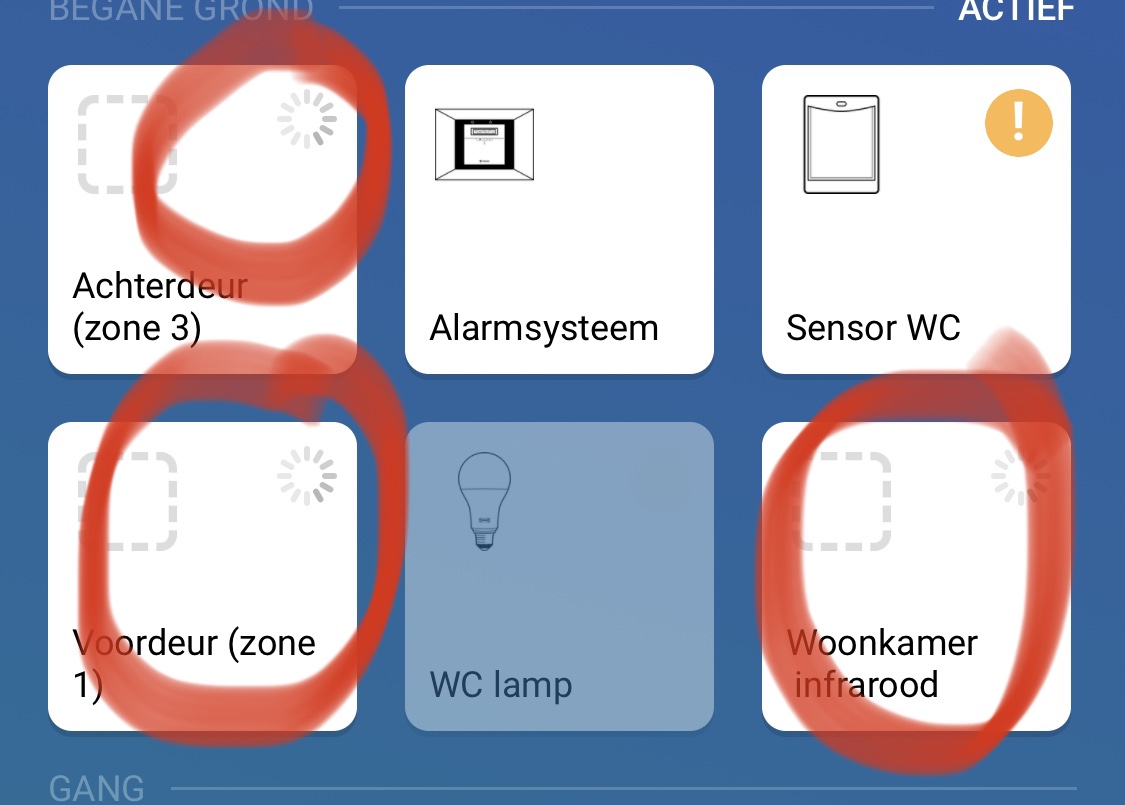
After the update today (homey
2.0.3) the sensors doesn’t work anymore.
Are there more users with this problem?
Is there a solutions for this problem.
I have got a lot of flows with the sensors.
---
### Author:  [@Fred\_G](https://community.homey.app/u/Fred_G)
#### Post date: [November 27, 2019, 11:49am UTC](https://community.homey.app/t/visonic-powermax-app/4904/3 "2019-11-27T11:49:20Z")
Yes same problem here.
---
### Author:  [@Chris\_L](https://community.homey.app/u/Chris_L)
#### Post date: [December 7, 2019, 11:55am UTC](https://community.homey.app/t/visonic-powermax-app/4904/4 "2019-12-07T11:55:37Z")
Yes, same here. I had to remove my panel and re-add it again and after that I see most of my sensors, but a couple of them are not recognized and showing as unknown in the logs when I re-added the panel.
---
### Author:  [@Chris\_L](https://community.homey.app/u/Chris_L)
#### Post date: [January 2, 2020, 11:41am UTC](https://community.homey.app/t/visonic-powermax-app/4904/5 "2020-01-02T11:41:04Z")
With app version v2.0.4 update today all the sensors are now working properly. Thanks for the update.
---
### Author:  [@MagnusGbg](https://community.homey.app/u/MagnusGbg)
#### Post date: [April 26, 2020, 9:47am UTC](https://community.homey.app/t/visonic-powermax-app/4904/6 "2020-04-26T09:47:16Z")
Is there a way to make use of the PowerLink3 to connect to this app? Have a PowerMaster 10G2 with that installed.
---
### Author:  [@Robin\_Lunden](https://community.homey.app/u/Robin_Lunden)
#### Post date: [January 1, 2021, 10:57pm UTC](https://community.homey.app/t/visonic-powermax-app/4904/7 "2021-01-01T22:57:59Z")
Hej,
What hardware solution did you use to connect the power master 10? A TTL to Ethernet module? What was the pinout in that case?
The PRG/BBA that is the only available pins in my powermaster and that I used with my previous Vera, only has ten pins… Any help, and pictures, appreciated!
Robin
---
### Author:  [@Robin\_Lunden](https://community.homey.app/u/Robin_Lunden)
#### Post date: [March 23, 2021, 9:46am UTC](https://community.homey.app/t/visonic-powermax-app/4904/8 "2021-03-23T09:46:06Z")
Hi, after a lot of tinkering and reading threads online, I finally figured out how to connect my Powermaster10 and Homey. In order to help others, I’ve put together a step by step guide, with the steps that worked for me. I hope it may be of some use to you.
Robin
> **[Guide%20connecting%20Powermaster%20to%20Homey.pdf](https://www.dropbox.com/s/en9fgibqoh9ctb8/Guide%20connecting%20Powermaster%20to%20Homey.pdf?dl=0)**
---
### Author:  [@Bart\_van\_Diem](https://community.homey.app/u/Bart_van_Diem)
#### Post date: [April 6, 2021, 2:04pm UTC](https://community.homey.app/t/visonic-powermax-app/4904/9 "2021-04-06T14:04:17Z")
Hi Robin,
Several month ago I tried to connect my powermax pro to homey. I spend weeks on trying to get it right. I thought that I had the wrong panel and finally gave up. Than I saw your guide and it motivated me to go over all aspects again and I spotted my mistake in the wiring. After correcting it the panel was recognized by homey and I am up and running.Thank you very much for taking the time to write this. You made my day! Thanks again!
Bart.
---
### Author:  [@Robin\_Lunden](https://community.homey.app/u/Robin_Lunden)
#### Post date: [April 8, 2021, 7:33am UTC](https://community.homey.app/t/visonic-powermax-app/4904/10 "2021-04-08T07:33:22Z")
I was majorly confused about this for a long time. The info was all there, but it was spread out over a couple of threads. Really glad to hear that my guide was of use to you.
---
### Author:  [@Peter\_Hendrix](https://community.homey.app/u/Peter_Hendrix)
#### Post date: [March 19, 2023, 6:45pm UTC](https://community.homey.app/t/visonic-powermax-app/4904/11 "2023-03-19T18:45:32Z")
Fyi, we have almost completed an sdk-3 version of the app.
We need to do some reviewing and ask the developer @nlrb to deploy it to Athom if he likes our changes.
---
### Author:  [@Bart\_van\_Diem](https://community.homey.app/u/Bart_van_Diem)
#### Post date: [April 21, 2023, 7:18am UTC](https://community.homey.app/t/visonic-powermax-app/4904/12 "2023-04-21T07:18:44Z")
Excellent! Good news. Thanks!
---
### Author:  [@Robin\_Lunden](https://community.homey.app/u/Robin_Lunden)
#### Post date: [April 29, 2023, 8:51am UTC](https://community.homey.app/t/visonic-powermax-app/4904/13 "2023-04-29T08:51:33Z")
Awsome! This app is so good! invaluable.
---
### Author:  [@Peter\_Hendrix](https://community.homey.app/u/Peter_Hendrix)
#### Post date: [May 9, 2023, 3:44pm UTC](https://community.homey.app/t/visonic-powermax-app/4904/14 "2023-05-09T15:44:10Z")
The new version of the app is live.
Thanks @nlrb !
---
### Author:  [@Edwin\_F](https://community.homey.app/u/Edwin_F)
#### Post date: [December 28, 2023, 4:43pm UTC](https://community.homey.app/t/visonic-powermax-app/4904/15 "2023-12-28T16:43:58Z")
I looked around but could not find all the answers I need. I have a (white) PowerMaster Pro with 3G modem and PowerLink3 module and was planning to integrate it with Homey. I can easily give up the 3G modem and it looks like I have to give up the PowerLink3 module as well to make this work. That’s acceptable assuming I get all to work fine.
But how to connect?
My unit has a dual RS-232 connection. Can I just connect a convertor there? I have the USR-TCP232-E2 ([https://www.aliexpress.com/item/1005002662485636.html](https://www.aliexpress.com/item/1005002662485636.html)) and think I configured that correctly. But which pins on that 20-pins port? Or do I really need a Visonic adapter first?
Or is it the port currently occupied by the cable to the PowerLink3 unit that I have to use?
---
### Author:  [@Niklas\_Bellander](https://community.homey.app/u/Niklas_Bellander)
#### Post date: [September 17, 2024, 9:23pm UTC](https://community.homey.app/t/visonic-powermax-app/4904/17 "2024-09-17T21:23:18Z")
Having issues to get active alarm status “yes” in the latest app. Even when a active alarm is present in the panel, nothing is shown in the app. Seems that the status in the field alarm does not update and never become “yes” Have been verified ths isse with two different users
Is this an known issue @nlrb ?
The event log in the app shows information “perimeter alarm” but does not work in the app. Not possible to activated flows against actve alarm
---
### Author:  [@Rene\_Kaeseler](https://community.homey.app/u/Rene_Kaeseler)
#### Post date: [May 17, 2026, 6:59pm UTC](https://community.homey.app/t/visonic-powermax-app/4904/18 "2026-05-17T18:59:56Z")
Can anyone please share the communication settings in Powermax Pro?
I have been struggling with integrating my alarm panel using the USR-TCP232-T2. I am pretty sure that the cabling is correct, following the guide provided by @Robin_Lunden and that the TCP232-module settings are correct as well.
Nothing happens when I try to add the ip-adress and port of the TCP232-module.
Any kind of suggestions are very welcome 🙂
---
### Author:  [@Robin\_Lunden](https://community.homey.app/u/Robin_Lunden)
#### Post date: [May 17, 2026, 8:23pm UTC](https://community.homey.app/t/visonic-powermax-app/4904/19 "2026-05-17T20:23:47Z")
I onlybhave experience with he powermaster 10. The powermaster should work from wha give heard but I can’t confirm this.
Do the diodes light up on the USR? If not maybe you aren’t able to piggyback off the power on the panel. Try connecting an external 5v trafo.
Are you able to log into the onboard web server to adjust the settings.
/Robin
sön 17 maj 2026 kl. 21:10 skrev Rene Kæseler \<[notifications@athom.discoursemail.com](mailto:notifications@athom.discoursemail.com)\>:
---
### Author:  [@Rene\_Kaeseler](https://community.homey.app/u/Rene_Kaeseler)
#### Post date: [May 18, 2026, 5:34am UTC](https://community.homey.app/t/visonic-powermax-app/4904/20 "2026-05-18T05:34:54Z")
> [@Robin\_Lunden](#):
>
> e diodes light up on the USR? If not maybe you aren’t able to piggyback off the power on the panel. Try connecting an external 5v trafo.
@Robin_Lunden Yes, the TCP232 module gets power from the Powermax and I can access it’s web-interface. Also, I did adjust the network settings of the module (fixed ip adress) and changed the serial port settings.
---
### Author:  [@Robin\_Lunden](https://community.homey.app/u/Robin_Lunden)
#### Post date: [May 18, 2026, 5:55am UTC](https://community.homey.app/t/visonic-powermax-app/4904/21 "2026-05-18T05:55:51Z")
Could it be the baude rate? I have never confirmed that this works with power max. But @NLRB who created the homey app has called it powermax and not powermaster. Perhaps he can provide more suggestions?
Robin
mån 18 maj 2026 kl. 07:45 skrev Rene Kæseler \<[notifications@athom.discoursemail.com](mailto:notifications@athom.discoursemail.com)\>:
[Next page](https://community.homey.app/t/visonic-powermax-app/4904.md?page=2)