# Updating frameware to 10.0.0-rc.64 to 10.0.6
**URL:** https://community.homey.app/t/updating-frameware-to-10-0-0-rc-64-to-10-0-6/90446
**Category:** Questions & Help
**Tags:** homey-pro
**Created:** [September 28, 2023, 1:24pm UTC](https://community.homey.app/t/updating-frameware-to-10-0-0-rc-64-to-10-0-6/90446 "2023-09-28T13:24:19Z")
**Posts on this page:** 5
**Page:** 1
### Author:  [@Morten\_Binding](https://community.homey.app/u/Morten_Binding)
#### Post date: [September 28, 2023, 1:24pm UTC](https://community.homey.app/t/updating-frameware-to-10-0-0-rc-64-to-10-0-6/90446/1 "2023-09-28T13:24:19Z")
Hello.
I just bought a Homey pro 2023, and you are completely new to the Homey world
It has been set up as it should and there were no problems.
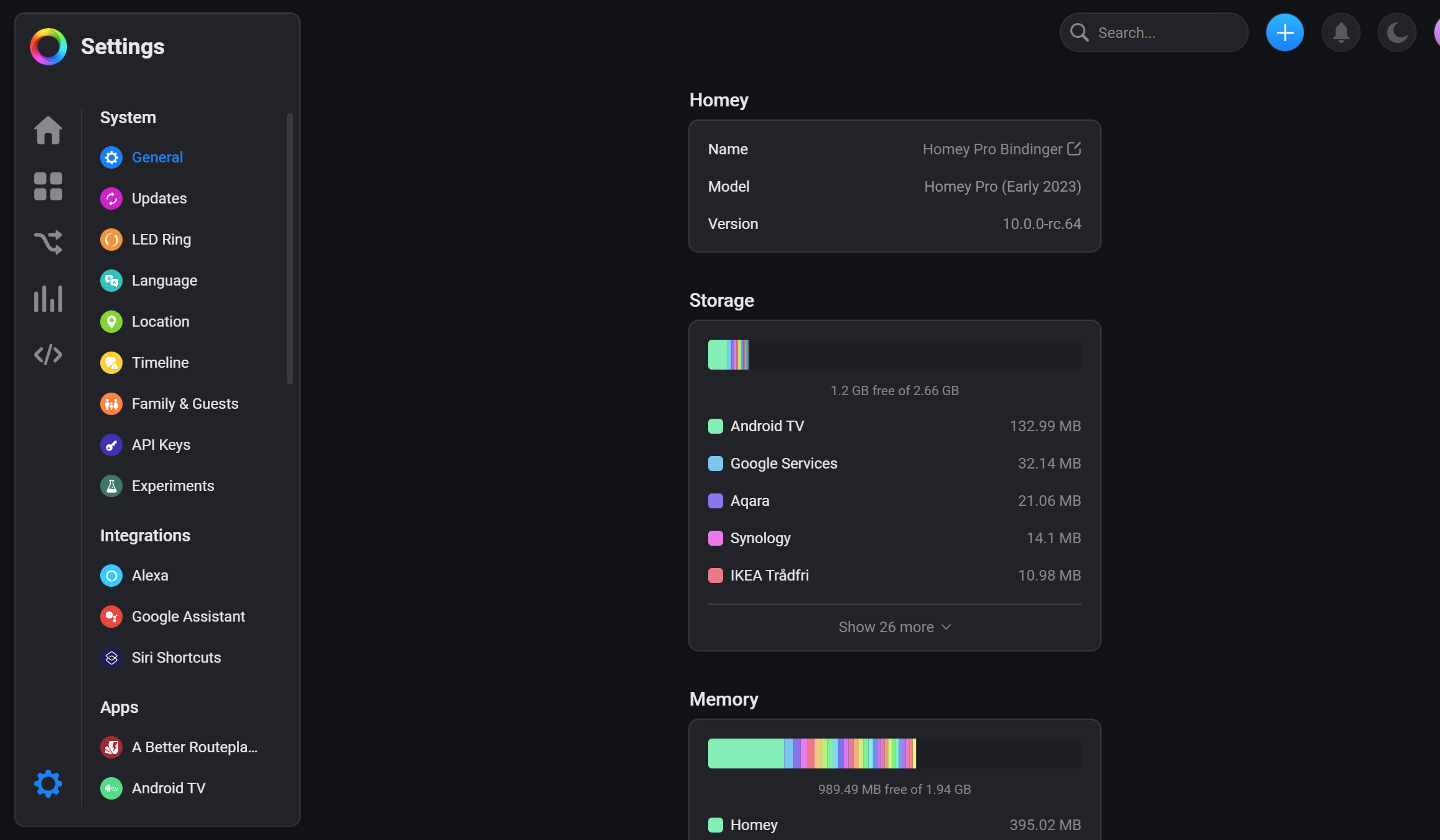
But. when I look under “update” I can see that there is a framiware update. my homy pro is running right now ver. 10.0.0-rc.64 and the new firmware er ver. 10.0.6. I have now downloaded and installed this update several times without any problems, except that every time my Homry pro has restarted after the update, it shows that the firmware is stable. 10.0.0-rc.64 is on the device, and that there is an update to the ver. 10.0.6 must be downloaded and installed.
what do i do

Super day to all of you
---
### Author:  [@Henk\_Renting](https://community.homey.app/u/Henk_Renting)
#### Post date: [September 28, 2023, 2:05pm UTC](https://community.homey.app/t/updating-frameware-to-10-0-0-rc-64-to-10-0-6/90446/2 "2023-09-28T14:05:35Z")
That is strange indeed…
Did you try to update your Homey by connecting it to a pc?
See:
> **[Connecting Homey Pro (Early 2023) to a PC / Mac with USB](https://support.homey.app/hc/en-us/articles/7263435817116-Connecting-Homey-Pro-Early-2023-to-a-PC-Mac-with-USB)**
>
> Homey Pro (Early 2023) can be connected to a PC or Mac for various tasks:
>
> Create a Local Backup
> Restore a Local Backup
> Updating Software
> Factory Resetting
>
>
> To start, unplug Homey Pro (Early 2023)...
Tip: use a USB-A to USB-C cable, not the one provided with your Homey.
EDIT: I see another post with the exact same problem and versions as yours. The above solved it for this user:
> [@\[APP\] Aqara & Xiaomi Smart Home - A different kind of Smart Home solution (Zigbee App)](https://community.homey.app/t/app-aqara-xiaomi-smart-home-a-different-kind-of-smart-home-solution-zigbee-app/156/4863):
>
> This Zigbee firmware comes with Homey firmware 10.0.6? My Homey doesn’t want to upgrade from rc64. Tried several times. Upgrade process seems to run as expected, but in the end it still shows rc64 and the update is still available in the settings.
---
### Author:  [@roma](https://community.homey.app/u/roma)
#### Post date: [September 28, 2023, 2:28pm UTC](https://community.homey.app/t/updating-frameware-to-10-0-0-rc-64-to-10-0-6/90446/3 "2023-09-28T14:28:04Z")
Yes. Updating with the USB tool fixed that problem for me. Don’t forget to make a backup before you start, so you can restore all your setting afterwards.
---
### Author:  [@Henk\_Renting](https://community.homey.app/u/Henk_Renting)
#### Post date: [September 28, 2023, 2:31pm UTC](https://community.homey.app/t/updating-frameware-to-10-0-0-rc-64-to-10-0-6/90446/4 "2023-09-28T14:31:14Z")
Making a backup before updating is always a good idea!
But you shouldn’t have to restore it, since updating shouldn’t reset your Homey and therefor keep all the data.
---
### Author:  [@Morten\_Binding](https://community.homey.app/u/Morten_Binding)
#### Post date: [September 28, 2023, 3:47pm UTC](https://community.homey.app/t/updating-frameware-to-10-0-0-rc-64-to-10-0-6/90446/5 "2023-09-28T15:47:36Z")
Connecting my Homey to my PC with a USB-C to USB-C cable and updating that way solved the problems. It was not necessary to use the backup I of course made first.
thanks for the help