# Philips Hue Lights Fade in / Fade out
**URL:** https://community.homey.app/t/philips-hue-lights-fade-in-fade-out/146185
**Category:** Questions & Help
**Tags:** homey-pro
**Created:** [November 30, 2025, 2:22pm UTC](https://community.homey.app/t/philips-hue-lights-fade-in-fade-out/146185 "2025-11-30T14:22:54Z")
**Posts on this page:** 7
**Page:** 1
### Author:  [@Danny\_Daniels](https://community.homey.app/u/Danny_Daniels)
#### Post date: [November 30, 2025, 2:22pm UTC](https://community.homey.app/t/philips-hue-lights-fade-in-fade-out/146185/1 "2025-11-30T14:22:54Z")
I have a lot of Philips Hue GU 10 lights. Is there a way to **Fade In / Out** these lights by timer ?
---
### Author:  [@SunBeech](https://community.homey.app/u/SunBeech)
#### Post date: [November 30, 2025, 3:27pm UTC](https://community.homey.app/t/philips-hue-lights-fade-in-fade-out/146185/2 "2025-11-30T15:27:34Z")
Often the flowcard that you use for setting the dim level has an additional ‘duration’ option that you can enable. I assume this is also the case for Philips Hue lights.
In Advanced Flow, you right click on the flowcard. You’ll see an option to add a duration.
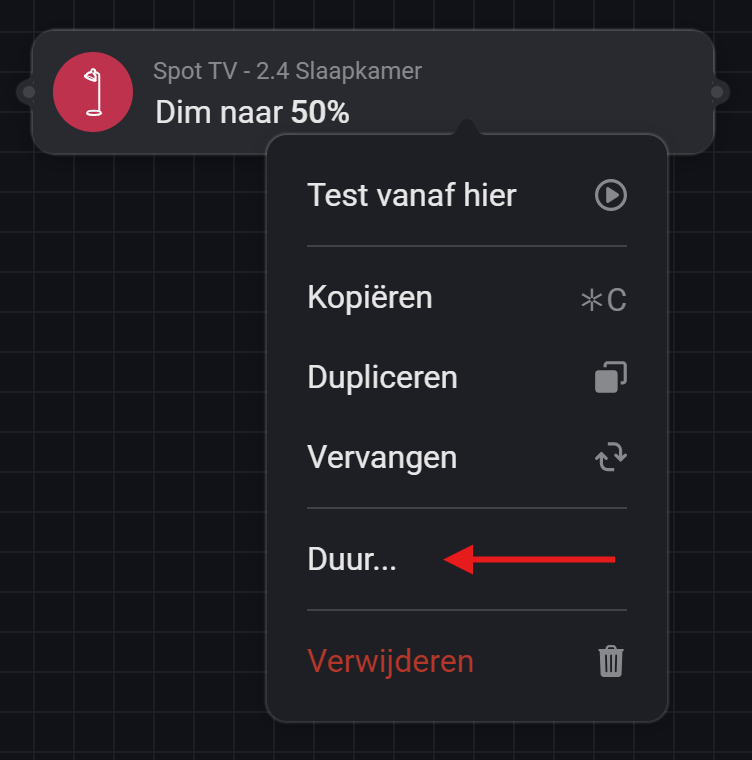
As an example, a duration of 5 seconds:

The same option is available in Standard Flow.
---
### Author:  [@Danny\_Daniels](https://community.homey.app/u/Danny_Daniels)
#### Post date: [November 30, 2025, 10:16pm UTC](https://community.homey.app/t/philips-hue-lights-fade-in-fade-out/146185/3 "2025-11-30T22:16:51Z")
Issue solved 👍
---
### Author:  [@Wim\_Post](https://community.homey.app/u/Wim_Post)
#### Post date: [November 30, 2025, 10:38pm UTC](https://community.homey.app/t/philips-hue-lights-fade-in-fade-out/146185/4 "2025-11-30T22:38:06Z")
Did you find a solution yourself? If so, can you share your solution here?
Or did SunBeech hand you the solution?
---
### Author:  [@Danny\_Daniels](https://community.homey.app/u/Danny_Daniels)
#### Post date: [December 1, 2025, 8:02am UTC](https://community.homey.app/t/philips-hue-lights-fade-in-fade-out/146185/5 "2025-12-01T08:02:22Z")
Often the flowcard that you use for setting the dim level has an additional ‘duration’ option that you can enable. I assume this is also the case for Philips Hue lights.
In Advanced Flow, you right click on the flowcard. You’ll see an option to add a duration.
**[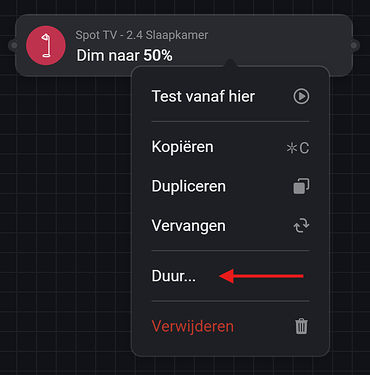](https://us1.discourse-cdn.com/flex025/uploads/athom/original/3X/7/2/72cd45ea7b7407400da5bce6653d026f5bd8795b.png "Dim Duration 1")**
As an example, a duration of 5 seconds:
**[](https://us1.discourse-cdn.com/flex025/uploads/athom/original/3X/a/6/a659e35b902d43516a9b7c5da0a8b52097530166.png "Dim Duration 2")**
The same option is available in Standard Flow.
---
### Author:  [@andyjimmy](https://community.homey.app/u/andyjimmy)
#### Post date: [March 5, 2026, 10:43pm UTC](https://community.homey.app/t/philips-hue-lights-fade-in-fade-out/146185/6 "2026-03-05T22:43:26Z")
I don’t have the duration option in my context menu.
I’m using these lights with the Hue hub… is that the reason why I’m not seeing it?
---
### Author:  [@Danny\_Daniels](https://community.homey.app/u/Danny_Daniels)
#### Post date: [March 9, 2026, 8:26am UTC](https://community.homey.app/t/philips-hue-lights-fade-in-fade-out/146185/7 "2026-03-09T08:26:27Z")
Hi , I using also the hue Hub & it works . You must select the card “ DIM to “ than select Duur