# Philips HUE | CONTACT SENSOR
**URL:** https://community.homey.app/t/philips-hue-contact-sensor/96577
**Category:** Devices
**Tags:** hue
**Created:** [December 2, 2023, 6:36pm UTC](https://community.homey.app/t/philips-hue-contact-sensor/96577 "2023-12-02T18:36:45Z")
**Posts on this page:** 15
**Page:** 2
### Author:  [@Richard\_Jager](https://community.homey.app/u/Richard_Jager)
#### Post date: [May 5, 2024, 8:10am UTC](https://community.homey.app/t/philips-hue-contact-sensor/96577/22 "2024-05-05T08:10:36Z")
Thanks for your reply, the contact alarm goes off in an amount of time, like 2 minutes.
Alarm is than off but the door is still open.
In hue the door status is open.
The alarm seems only an alarm signal to mount an acoustic signal on it.
I would like to use the door open status.
Thanks,
---
### Author:  [@Peter\_Kawa](https://community.homey.app/u/Peter_Kawa)
#### Post date: [May 5, 2024, 2:34pm UTC](https://community.homey.app/t/philips-hue-contact-sensor/96577/23 "2024-05-05T14:34:48Z")
Hmmm, that’s odd. My Aqara + Sonoff contact sensors do report an alarm for as long as the contact is open
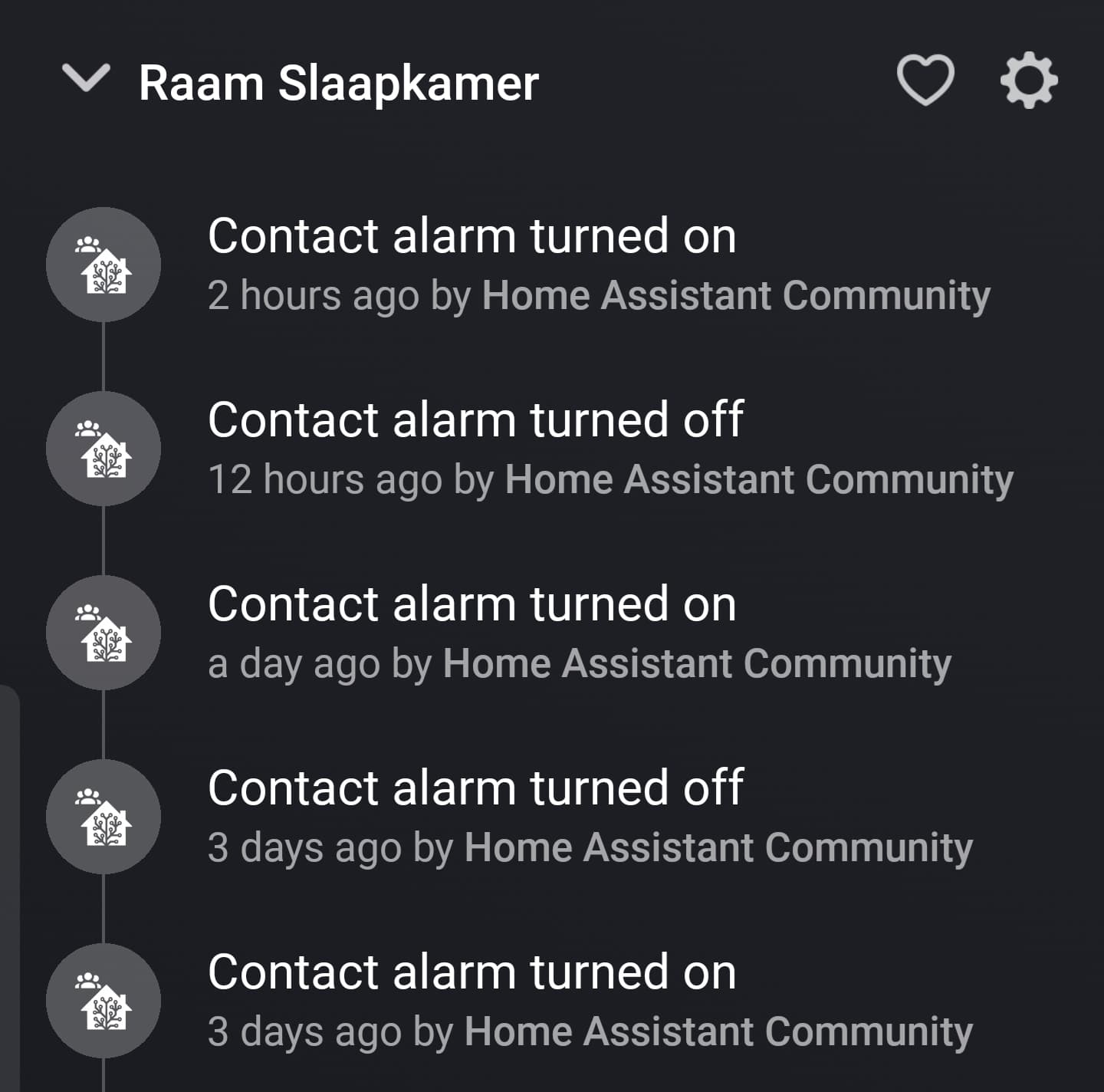
(I know they’re now HA devices, but it was the same when I had them paired with Homey zigbee)
---
### Author:  [@Marian\_Sedlacek](https://community.homey.app/u/Marian_Sedlacek)
#### Post date: [May 13, 2024, 7:00am UTC](https://community.homey.app/t/philips-hue-contact-sensor/96577/24 "2024-05-13T07:00:22Z")
@Doekse hi, could you please explain me why Philips hue contact sensor is listed in the recommended door sensors in your website when now you are writing it is not supported?
> **[Smart Door/Window Sensors](https://homey.app/en-at/best-buy-guide/door-and-window-sensors/)**
>
> Discover the Best Door/Window Sensors for Your Smart Home.
I just bough one and having issue to connect it even with the test app
---
### Author:  [@Doekse](https://community.homey.app/u/Doekse)
#### Post date: [May 13, 2024, 7:31am UTC](https://community.homey.app/t/philips-hue-contact-sensor/96577/25 "2024-05-13T07:31:22Z")
It is supported within the Official Phillips Hue App, you don’t need the test version to get it to work since it has been pushed to stable two weeks ago 😉 👍
Are you having trouble connecting it to the Hue Bridge? Or are you trying to connect it directly with Homey via Zigbee?
---
### Author:  [@Marian\_Sedlacek](https://community.homey.app/u/Marian_Sedlacek)
#### Post date: [May 14, 2024, 10:59am UTC](https://community.homey.app/t/philips-hue-contact-sensor/96577/26 "2024-05-14T10:59:53Z")
Thanks a lot for reply.
I am new to Homey, not experienced.
I dont have Hue bridge.
I tried the app Hue without bridge. But that also did not find the sensor.
So i tried via zigbee and it was found, but not working ☹ … i just named it Hue Contact Sensor, but nothibg else.
The sensor itself seems to be working, meaning it blicks once when opening, twice when closing the door.
Thanks for any help
Marian

---
### Author:  [@robertklep](https://community.homey.app/u/robertklep)
#### Post date: [May 14, 2024, 11:22am UTC](https://community.homey.app/t/philips-hue-contact-sensor/96577/27 "2024-05-14T11:22:40Z")
It looks like you misunderstand how contact sensors work within a Homey context: they cannot be turned on/off, you can only use them as _input_ device in flows, where you can start a flow when the contact sensor triggers.
It looks like it’s working fine.
---
### Author:  [@Doekse](https://community.homey.app/u/Doekse)
#### Post date: [May 14, 2024, 11:28am UTC](https://community.homey.app/t/philips-hue-contact-sensor/96577/28 "2024-05-14T11:28:39Z")
The Hue App without a Bridge isn’t officially supported by us, you should contact the community developer to add support for the sensor 😉
---
### Author:  [@Marian\_Sedlacek](https://community.homey.app/u/Marian_Sedlacek)
#### Post date: [May 14, 2024, 2:46pm UTC](https://community.homey.app/t/philips-hue-contact-sensor/96577/29 "2024-05-14T14:46:37Z")
@Doekse
Quote from your web - It seamlessly integrates with your Homey Pro through Zigbee directly or through the Hue Bridge.
---
### Author:  [@Marian\_Sedlacek](https://community.homey.app/u/Marian_Sedlacek)
#### Post date: [May 14, 2024, 2:50pm UTC](https://community.homey.app/t/philips-hue-contact-sensor/96577/30 "2024-05-14T14:50:57Z")
I’m not trying to turn it on/off. Thats just default error message from Homey Pro.
I simply could not add it without the bridge using the community app (without bridge). Maybe I am doing something wrong.
---
### Author:  [@robertklep](https://community.homey.app/u/robertklep)
#### Post date: [May 14, 2024, 3:12pm UTC](https://community.homey.app/t/philips-hue-contact-sensor/96577/31 "2024-05-14T15:12:38Z")
> [@Marian\_Sedlacek](#):
>
> I simply could not add it without the bridge using the community app (without bridge)
What does “could not add it” mean? Your screenshot shows it as a device so it _was_ added.
---
### Author:  [@Rmb](https://community.homey.app/u/Rmb)
#### Post date: [May 14, 2024, 3:45pm UTC](https://community.homey.app/t/philips-hue-contact-sensor/96577/32 "2024-05-14T15:45:53Z")
> [@Marian\_Sedlacek](#):
>
> I’m not trying to turn it on/off. Thats just default error message from Homey Pro.
Default error messages appear by default? What did you do to get this error message, or when did this error message appear? Something must have happened to trigger this message. Maybe you clicked on the tile?
---
### Author:  [@Peter\_Kawa](https://community.homey.app/u/Peter_Kawa)
#### Post date: [May 14, 2024, 7:32pm UTC](https://community.homey.app/t/philips-hue-contact-sensor/96577/33 "2024-05-14T19:32:34Z")
I get your confusion.
When Homey returns “device added as unknown zigbee device”, it means: it is added as generic Homey zigbee device.
BUT, the incomprehensible thing here is, it _also_ just adds devices which are **not** supported as generic zigbee device, like sensors. There’s no alert or warning whatsoever 🙈
Generic zigbee is very basic, only On/Off devices like lights and switches are supported, along with Dim and some Color control.
> [@Marian\_Sedlacek](#):
>
> I simply could not add it without the bridge using the community app (without bridge)
Like @Doekse wrote, probably this sensor is not supported yet by that app.
At the app store app page, you can find links to, like, forum topic/support email/issue reporting:
> 
Many developers use [github.com](http://github.com), and the so called issue tracker can be used for device requests.
Just follow the link “Report an issue”.
.
> [@Doekse](#):
>
> The Hue App without a Bridge isn’t officially supported by us, you should contact the community developer to add support for the sensor
> [@Marian\_Sedlacek](#):
>
> Quote from your web - It seamlessly integrates with your Homey Pro through Zigbee directly or through the Hue Bridge.
This is one of the odd and unfriendly sides of Athom unfortunately.
In this case, they market stuff which is only made possible by 3rd party independent developers 🤷♂️🥴
But when you encounter issues, they just point to the developer, and don’t even tell you _how_ one should do that.
Also no developer is 24/7 busy with his/her app(s), it can take a while.
---
### Author:  [@Doekse](https://community.homey.app/u/Doekse)
#### Post date: [May 14, 2024, 8:04pm UTC](https://community.homey.app/t/philips-hue-contact-sensor/96577/34 "2024-05-14T20:04:31Z")
> [@Marian\_Sedlacek](#):
>
> … It seamlessly integrates with your Homey Pro through Zigbee directly …
To clarify, this part of the text should not have been included in the Best Buy Guide. It operates exclusively through the official Hue App, which requires the Hue Bridge. We apologize for any inconvenience this has caused and will make the necessary corrections.
And do note; we greatly value the dedication and effort of our community, and it is never our intention to exploit that commitment. 🙌
---
### Author:  [@Marian\_Sedlacek](https://community.homey.app/u/Marian_Sedlacek)
#### Post date: [May 16, 2024, 7:31pm UTC](https://community.homey.app/t/philips-hue-contact-sensor/96577/35 "2024-05-16T19:31:35Z")
Thanks a lot for very clear explanation and help!!
---
### Author:  [@MrDutchfighter](https://community.homey.app/u/MrDutchfighter)
#### Post date: [April 27, 2026, 3:31pm UTC](https://community.homey.app/t/philips-hue-contact-sensor/96577/36 "2026-04-27T15:31:09Z")
Anyone working on the hue secure contact and connecting it without the bridge? The apps seems to be not updated anymore…. Or any tips on how to fix the app?
[Previous page](https://community.homey.app/t/philips-hue-contact-sensor/96577.md?page=1)