# Hue tap dial switch long button press
**URL:** https://community.homey.app/t/hue-tap-dial-switch-long-button-press/119749
**Category:** Questions & Help
**Tags:** advancedflow
**Created:** [November 4, 2024, 1:46pm UTC](https://community.homey.app/t/hue-tap-dial-switch-long-button-press/119749 "2024-11-04T13:46:32Z")
**Posts on this page:** 10
**Page:** 1
### Author:  [@Mees\_Hart](https://community.homey.app/u/Mees_Hart)
#### Post date: [November 4, 2024, 1:46pm UTC](https://community.homey.app/t/hue-tap-dial-switch-long-button-press/119749/1 "2024-11-04T13:46:32Z")
Hi there,
i have 2 hue tap dial switches that i use to switch hue/non hue lights on and off. in the hue app you can set the switch up so that when you press and hold for 3 seconds the lights will turn off. when i tried to configure the tap dial switch in hue advanced flow i could not find this long press option, does anybody know how if i could make it work?
the reason for this is because i cant otherwise pair my non hue lights with the switch.
---
### Author:  [@Martijn\_van\_Beek](https://community.homey.app/u/Martijn_van_Beek)
#### Post date: [November 19, 2024, 2:55pm UTC](https://community.homey.app/t/hue-tap-dial-switch-long-button-press/119749/2 "2024-11-19T14:55:46Z")
Hi Mees, did you find an soluiton yet? As I was wondering the same… ☹
---
### Author:  [@Vally\_1](https://community.homey.app/u/Vally_1)
#### Post date: [November 19, 2024, 3:08pm UTC](https://community.homey.app/t/hue-tap-dial-switch-long-button-press/119749/3 "2024-11-19T15:08:49Z")
I have all hue connected through matter and there i can choose press and long press for this device. Do not know if this is also available in other (app) connections.
---
### Author:  [@Martijn\_van\_Beek](https://community.homey.app/u/Martijn_van_Beek)
#### Post date: [November 19, 2024, 3:31pm UTC](https://community.homey.app/t/hue-tap-dial-switch-long-button-press/119749/4 "2024-11-19T15:31:27Z")
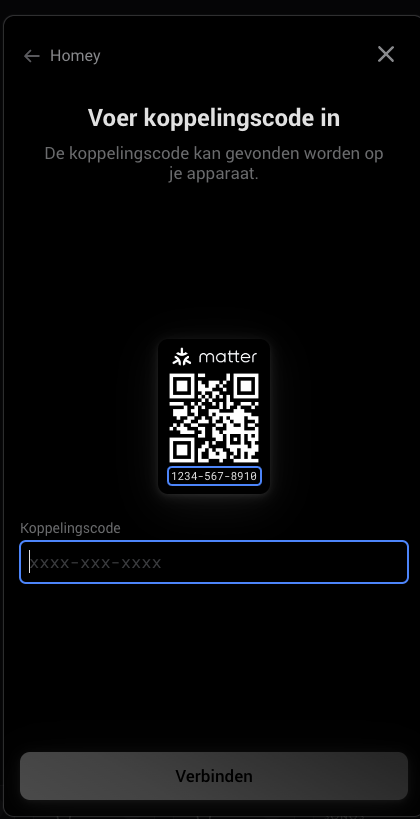
hmmm I have them all conected through the HUE Hub… I deleted my hue tap inside homey pro
and try to connect it with matter but no idea where to find the code which i need to enter in this screen… Did you do it the same way?
---
### Author:  [@Vally\_1](https://community.homey.app/u/Vally_1)
#### Post date: [November 19, 2024, 4:00pm UTC](https://community.homey.app/t/hue-tap-dial-switch-long-button-press/119749/5 "2024-11-19T16:00:06Z")
In the Hue app you find intergrations. Under smart home you can add a connection to other apps which will generate a code.
---
### Author:  [@Martijn\_van\_Beek](https://community.homey.app/u/Martijn_van_Beek)
#### Post date: [November 19, 2024, 6:15pm UTC](https://community.homey.app/t/hue-tap-dial-switch-long-button-press/119749/6 "2024-11-19T18:15:03Z")
works! great! however all HUE lights are double now! 😉 delete
---
### Author:  [@Vally\_1](https://community.homey.app/u/Vally_1)
#### Post date: [November 20, 2024, 7:42am UTC](https://community.homey.app/t/hue-tap-dial-switch-long-button-press/119749/7 "2024-11-20T07:42:03Z")
Ah, yes thats a thing…I kept all matter devices and removed all devices from app. reaction times is also better. Hue app i only use for scenes and moods. Only thing is you have to update flows…
---
### Author:  [@Peter\_Kawa](https://community.homey.app/u/Peter_Kawa)
#### Post date: [November 20, 2024, 9:16am UTC](https://community.homey.app/t/hue-tap-dial-switch-long-button-press/119749/8 "2024-11-20T09:16:39Z")
> [@Vally\_1](#):
>
> Only thing is you have to update flows…
To replace similar devices in flows, just use the magic script of our famous “Homey podcast dev” Martijn 🪄✅🥳
> [@\[HOW-TO\]\[Pro\]\[Cloud\] - Tool to FIX (advanced) flows after removing and re-adding devices](https://community.homey.app/t/how-to-pro-cloud-tool-to-fix-advanced-flows-after-removing-and-re-adding-devices/65018):
>
> rotating_lightwarning Use at own risk! warning rotating_light Hi, So I just go a new house and wanted to make my Zigbee network a bit better by removing an re-adding my devices so I get a stable network. But the issue with this is you have to fix all your flows. (Ofcourse [Flow Checker App for Homey | Homey](https://homey.app/a/com.athom.flowchecker/) can indicate the broken flows) I made a small script which can help with fixing the flows. So what do you need: Device ID you would like to update - You can get this via t…
---
### Author:  [@Martijn\_van\_Beek](https://community.homey.app/u/Martijn_van_Beek)
#### Post date: [November 21, 2024, 4:48pm UTC](https://community.homey.app/t/hue-tap-dial-switch-long-button-press/119749/9 "2024-11-21T16:48:48Z")
hmmmm looks like the turning wheel option is gone when you install it as a matter device ☹
---
### Author:  [@Peter\_Kawa](https://community.homey.app/u/Peter_Kawa)
#### Post date: [November 21, 2024, 10:10pm UTC](https://community.homey.app/t/hue-tap-dial-switch-long-button-press/119749/10 "2024-11-21T22:10:15Z")
Please report to Support.