# How to do string-operations - if through Homeyscript I need some guidance
**URL:** https://community.homey.app/t/how-to-do-string-operations-if-through-homeyscript-i-need-some-guidance/90698
**Category:** Questions & Help
**Tags:** homeyscript, homey-pro, homey-pro-2023
**Created:** [October 1, 2023, 4:56pm UTC](https://community.homey.app/t/how-to-do-string-operations-if-through-homeyscript-i-need-some-guidance/90698 "2023-10-01T16:56:56Z")
**Posts on this page:** 4
**Page:** 1
### Author:  [@Esben](https://community.homey.app/u/Esben)
#### Post date: [October 1, 2023, 4:56pm UTC](https://community.homey.app/t/how-to-do-string-operations-if-through-homeyscript-i-need-some-guidance/90698/1 "2023-10-01T16:56:57Z")
Hi folks
I would love to do a bit of string operations and I fear the only way for me to accomplish what I want is through HomeyScript… However, I haven’t been able to figure out how to get it to work.
What I am looking for:
I have a variable with the value “Peter: Visit the library” now I want to remove "Peter: " from the variable so I can add “Visit the library” to the variable named “Peters todo list for today”.
I have been trying to use HomeyScript but since this is my first try, I just can’t get it to work.
It is important to note that I am not a developer, so any coding on my part has to be/will be really simple for me to also know, what I am doing.
I hope someone can help explain what I am doing wrong - or even better give an example of how to accomplish what I want so I can learn to use HomeyScript.
Here is the code I have been trying to use (which fails):
As arguments I input “Peter: ;”@Title
```auto
const inputString = args[0];
function removeStringA(inputString) {
// Split the input string by the semicolon
const parts = inputString.split(';');
// Ensure there are two parts (string A and string B)
if (parts.length !== 2) {
throw new Error('Input string must contain exactly one semicolon.');
}
// Extract string A and string B
const stringA = parts[0].trim();
let stringB = parts[1].trim();
// Check if string A is found in string B
if (stringB.includes(stringA)) {
// Remove string A from string B
stringB = stringB.replace(stringA, '').trim();
}
return stringB;
}
```
---
### Author:  [@Peter\_Kawa](https://community.homey.app/u/Peter_Kawa)
#### Post date: [October 1, 2023, 7:13pm UTC](https://community.homey.app/t/how-to-do-string-operations-if-through-homeyscript-i-need-some-guidance/90698/2 "2023-10-01T19:13:50Z")
Hi Esben
```auto
// Strip name from event
let input = (args[0]);
var res_1 = input.slice(input.indexOf(';')+1);
var res = res_1.split("\"")[0];
return(res);
```

---
### Author:  [@Esben](https://community.homey.app/u/Esben)
#### Post date: [October 2, 2023, 6:14am UTC](https://community.homey.app/t/how-to-do-string-operations-if-through-homeyscript-i-need-some-guidance/90698/3 "2023-10-02T06:14:33Z")
> [@Peter\_Kawa](#):
>
> ```auto
> let input = (args[0]);
> var res_1 = input.slice(input.indexOf(';')+1);
> var res = res_1.split("\"")[0];
> return(res);
>
> ```
Thank you very much!
I dropped trying to create a dynamic function in which I could just change the spliced input and instead hardcoded the function to the specific name.
It works like a charm now 😃
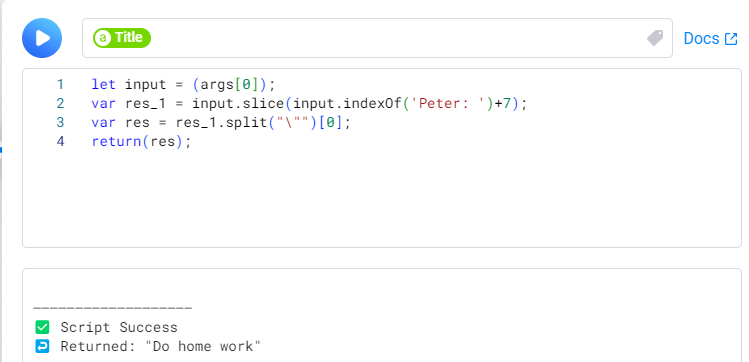
For context:
I am using this with the icalCalendar app but a dedicated calendar is not yet relevant for our child.
Instead I have built a flow, which checks if the event title contains "Peter: " when fetching events from my or my wife’s calendar. If TRUE then I use this Homeyscript and add the resulting string to the variable “Peters todo list for today”.
When Peter gets home this todo list is read aloud by a speaker.
Without this Homeyscript the speaker could read:
“Peter: Do home work, Peter: Go to swim class, Peter: Take out the trash”.
The script converts it to:
“Do home work, Go to swim class, Take out the trash”.
This way I or my wife can create daily tasks/reminders for Peter in our own calendars by simply starting the event name with "Peter: ".
---
### Author:  [@Peter\_Kawa](https://community.homey.app/u/Peter_Kawa)
#### Post date: [October 2, 2023, 11:55am UTC](https://community.homey.app/t/how-to-do-string-operations-if-through-homeyscript-i-need-some-guidance/90698/4 "2023-10-02T11:55:12Z")
Thanks! Nice usecase indeed.
Oh, for throwing errors, you could use the ‘error’ output of the HS flowcard.
I’m always having a hard time to add error throwing to scripts somehow 😏