# Homey most active client on my router
**URL:** https://community.homey.app/t/homey-most-active-client-on-my-router/75741
**Category:** Questions & Help
**Tags:** wifi, homey-pro, access-point
**Created:** [January 29, 2023, 1:13pm UTC](https://community.homey.app/t/homey-most-active-client-on-my-router/75741 "2023-01-29T13:13:11Z")
**Posts on this page:** 6
**Page:** 1
### Author:  [@Thomas\_Doorn](https://community.homey.app/u/Thomas_Doorn)
#### Post date: [January 29, 2023, 1:13pm UTC](https://community.homey.app/t/homey-most-active-client-on-my-router/75741/1 "2023-01-29T13:13:11Z")
Hi!
I recently bought a Unifi Dream Router for my home. This router measures the data “used” by the different clients and applications. It came to my attention that my Homey is the most active client in my network and uses a lot of data (see screenshot). It hasn’t caused any problems on my network so far, but it seems a bit unnecessary for a device that is supposed to work mostly locally.
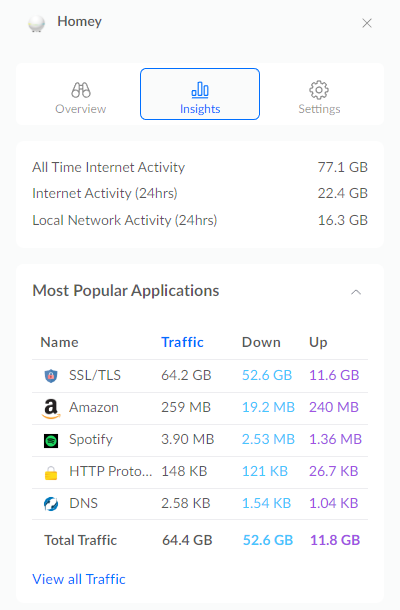
Because my new router can’t show real time data usage (as far as I know) , disabling my apps and flows one-by-one isn’t practical. Because I would need to have it disabled for at least 24 hours to measure the impact. This takes a lot of time and my spouse isn’t that thrilled about it either. So I’m hoping someone has had the same problem or knows how I can diagnose the culprit in a faster way.
I have the following apps installed on my Homey:
- Aqara
- CountDown
- Flow Checker
- Homey Community Store
- iRobot
- Philips Hue
- Samsung SmartTV
- Simple LOG
- Smart Presence
- Smarthings 2 (via HCS)
- Sonos
---
### Author:  [@robertklep](https://community.homey.app/u/robertklep)
#### Post date: [January 29, 2023, 1:16pm UTC](https://community.homey.app/t/homey-most-active-client-on-my-router/75741/2 "2023-01-29T13:16:49Z")
Does this also count local traffic? The Hue app is known, [and has been known for a long time](https://community.homey.app/t/data-usage-extremely-high-with-hue-app-installed/17310), to transfer a lot of data.
---
### Author:  [@Thomas\_Doorn](https://community.homey.app/u/Thomas_Doorn)
#### Post date: [January 29, 2023, 1:26pm UTC](https://community.homey.app/t/homey-most-active-client-on-my-router/75741/3 "2023-01-29T13:26:35Z")
It does. But i don’t know if the “Local Network Activity (24hrs)” is part of the “Internet Activity (24hrs)”. How it read it is that the internet activity in the last 24 hours is 22,4GB in total from which 16,3GB locally and 6,1GB to the internet.
Hue could explain a big part of it. I have 26 lights and 6 sensors connected to the Hue app. But I understand that there is still no fix for this?
---
### Author:  [@robertklep](https://community.homey.app/u/robertklep)
#### Post date: [January 29, 2023, 1:35pm UTC](https://community.homey.app/t/homey-most-active-client-on-my-router/75741/4 "2023-01-29T13:35:38Z")
> [@Thomas\_Doorn](#):
>
> But I understand that there is still no fix for this?
The issue is that Homey uses an outdated method of updating device statuses, by polling the bridge every 5 or 10 seconds, and if the returned data is substantial this adds up quickly.
Hue also has push support, where the Hue bridge pushes changes when they occur, but for some reason Athom doesn’t use this method.
---
### Author:  [@Adrian\_Rockall](https://community.homey.app/u/Adrian_Rockall)
#### Post date: [January 29, 2023, 3:12pm UTC](https://community.homey.app/t/homey-most-active-client-on-my-router/75741/5 "2023-01-29T15:12:16Z")
SmartThings2 will be polling the server on a regular basis (default is 5 seconds) but each response is only a couple of hundred bytes, depending on how many devices there are.
---
### Author:  [@Philip\_Montgomery](https://community.homey.app/u/Philip_Montgomery)
#### Post date: [January 29, 2023, 3:50pm UTC](https://community.homey.app/t/homey-most-active-client-on-my-router/75741/6 "2023-01-29T15:50:56Z")
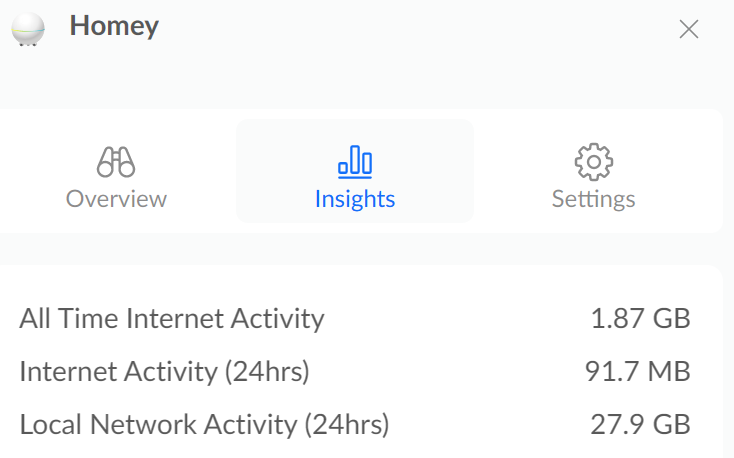
I have the same Unifi UDR, absolutely love it and leagues better than my previous few which were Netgear. Fairly sure the Hue app is the source of the local traffic and as that isn’t causing any trouble I don’t worry about it. It appears that in our house we’re having a mostly, screens off kind of day