# Homey doesn't recognize Fibaro Keyfob 2x/3x presses
**URL:** https://community.homey.app/t/homey-doesnt-recognize-fibaro-keyfob-2x-3x-presses/11521
**Category:** Questions & Help
**Created:** [April 6, 2019, 2:40pm UTC](https://community.homey.app/t/homey-doesnt-recognize-fibaro-keyfob-2x-3x-presses/11521 "2019-04-06T14:40:40Z")
**Posts on this page:** 14
**Page:** 1
### Author:  [@daan\_banaan](https://community.homey.app/u/daan_banaan)
#### Post date: [April 6, 2019, 2:40pm UTC](https://community.homey.app/t/homey-doesnt-recognize-fibaro-keyfob-2x-3x-presses/11521/1 "2019-04-06T14:40:40Z")
Hi,
I just recieved my Keyfob and am setting it up. The 1x press and long-press work fine but the 2x/3x presses don’t seem to be registering. I’ve enabled the 2x/3x keypress in the Fibaro settings, so it should work. Even after restarting the Fibaro app in Homey, the issue remains. Also, the Homey app is unable to show the Keyfob’s history. I don’t know if this is related but it seems worth mentioning.
Is anyone familiar with this problem and/or have a solution?
---
### Author:  [@Caseda](https://community.homey.app/u/Caseda)
#### Post date: [April 6, 2019, 3:09pm UTC](https://community.homey.app/t/homey-doesnt-recognize-fibaro-keyfob-2x-3x-presses/11521/2 "2019-04-06T15:09:41Z")
did you wake up the keyfob just before you pressed the save button?
the keyfob will never wake up on its own, and the sending signal it is not wake enough to receive any parameters
---
### Author:  [@PetervdK](https://community.homey.app/u/PetervdK)
#### Post date: [April 6, 2019, 5:04pm UTC](https://community.homey.app/t/homey-doesnt-recognize-fibaro-keyfob-2x-3x-presses/11521/3 "2019-04-06T17:04:32Z")
How do you check the 1x/2x/3x press? In a flow? Did you choose the correct trigger?
Often you have to choose “a scene has been triggered” and then choose the number of times instead of “a button has been pressed” for that purpose.
---
### Author:  [@Pascal34500](https://community.homey.app/u/Pascal34500)
#### Post date: [November 22, 2024, 10:40am UTC](https://community.homey.app/t/homey-doesnt-recognize-fibaro-keyfob-2x-3x-presses/11521/4 "2024-11-22T10:40:05Z")
Hello everyone,
I’m trying to configure my Fibaro keyfob, but there are things that don’t work well.
No problem configuring the buttons with 1X and long press released.
But when I choose 2X it doesn’t work.
I have configured the remote control with 1x, 2x and 3x
Anyone to help me?
---
### Author:  [@JPe4619](https://community.homey.app/u/JPe4619)
#### Post date: [November 22, 2024, 3:31pm UTC](https://community.homey.app/t/homey-doesnt-recognize-fibaro-keyfob-2x-3x-presses/11521/5 "2024-11-22T15:31:52Z")
Maybe your answer is here?
> [@Fibaro Keyfob](https://community.homey.app/t/fibaro-keyfob/7377):
>
> Hello, I just bought a Fibaro KeyFob. What I notice is that the response of homey to a key-press is very unpredictable. Sometimes it’s very slow and sometimes homey doesn’t respond at all, just like a key-press is lost… Does anyone else have the same experience or a solution to this problem ? Thanks !
---
### Author:  [@Pascal34500](https://community.homey.app/u/Pascal34500)
#### Post date: [November 22, 2024, 4:10pm UTC](https://community.homey.app/t/homey-doesnt-recognize-fibaro-keyfob-2x-3x-presses/11521/6 "2024-11-22T16:10:20Z")
Hi Thanks lot,
Unfortunetly, anay real answer in these topics.
---
### Author:  [@Andy\_Henderson](https://community.homey.app/u/Andy_Henderson)
#### Post date: [November 22, 2024, 4:30pm UTC](https://community.homey.app/t/homey-doesnt-recognize-fibaro-keyfob-2x-3x-presses/11521/7 "2024-11-22T16:30:02Z")
My post [here](https://community.homey.app/t/getting-a-flic-button-to-do-more-than-three-things/102648) provides a technique for _simulating_ multi-press operations. I describe the technique for Flic buttons but it would work for any type of button press. Not as good as handling double press and triple press properly, but it might be the next best thing.
---
### Author:  [@Pascal34500](https://community.homey.app/u/Pascal34500)
#### Post date: [November 22, 2024, 5:51pm UTC](https://community.homey.app/t/homey-doesnt-recognize-fibaro-keyfob-2x-3x-presses/11521/8 "2024-11-22T17:51:38Z")
Hi, thanks a lot. I will try your solution and come back to you
---
### Author:  [@JanPieter88](https://community.homey.app/u/JanPieter88)
#### Post date: [July 22, 2025, 2:13pm UTC](https://community.homey.app/t/homey-doesnt-recognize-fibaro-keyfob-2x-3x-presses/11521/9 "2025-07-22T14:13:57Z")
Did you get this to work?
I just bought a Fibaro Keyfob and added it to Homey. Created a test flow to turn on the lights.
This works fine with: Pressed 1x, Long Press, and Long Press Released.
But it does not work with Pressed 2x and Pressed 3x. I have enabled this in the Settings and even restarted the Fibaro app.

---
### Author:  [@Peter\_Kawa](https://community.homey.app/u/Peter_Kawa)
#### Post date: [July 22, 2025, 2:28pm UTC](https://community.homey.app/t/homey-doesnt-recognize-fibaro-keyfob-2x-3x-presses/11521/10 "2025-07-22T14:28:32Z")
> [@JanPieter88](#):
>
> But it does not work with Pressed 2x and Pressed 3x
The ℹ on the flowcard example says this:
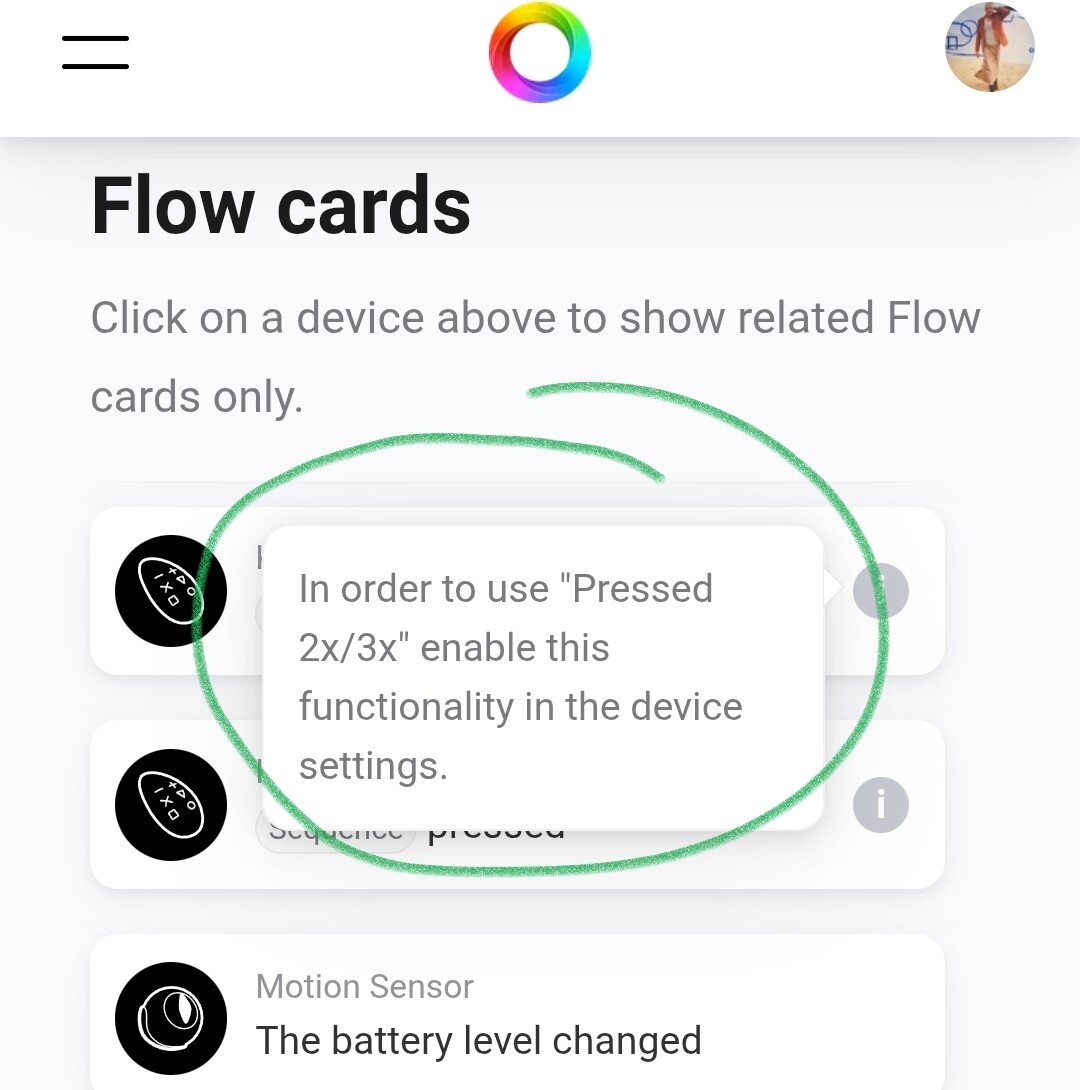
No clue if this setting is the right one

---
### Author:  [@JanPieter88](https://community.homey.app/u/JanPieter88)
#### Post date: [July 22, 2025, 2:42pm UTC](https://community.homey.app/t/homey-doesnt-recognize-fibaro-keyfob-2x-3x-presses/11521/11 "2025-07-22T14:42:26Z")
Yes, that should be the setting that enables it.
It seems, using the search, it’s been a problem for a couple of years. Also on Home Assistant and Hubitat (which I don’t use).
> **[Fibaro Keyfob (FGKF-601) all presses work (1x, 2x 3x press, hold, release)](https://community.home-assistant.io/t/fibaro-keyfob-fgkf-601-all-presses-work-1x-2x-3x-press-hold-release/399761/6)**
>
> Fiddling around with the blueprint, it became clear, that the Blueprint selects the Fibaro Keyfob: selector: device: integration: zwave\_js manufacturer: Fibargroup model: FGKF601 multiple: false If...
> **[Any chance that someone will fix the FIbaro 6 key fob button driver?](https://community.hubitat.com/t/any-chance-that-someone-will-fix-the-fibaro-6-key-fob-button-driver/129527/39)**
>
> I did a cloud reinstall back to a known save before I added the keyfob. I reset device, added fine and then gets stuck in sync. Is there a way to load the older driver? I want to make sure it is not something on my side. The old driver worked...
Last comment on the HA thread:
_"Watching the z-wave protocol log, I could see, that the keyfob though operated as expected._
_I started a new interview with the keyfob several times. This brought the resolution: the second keyfob is now available for the blueprint, and all entities are available._
_Long story short: the keyfob obviously needs some additional “kicks in the ass” to become operational."_
---
### Author:  [@Peter\_Kawa](https://community.homey.app/u/Peter_Kawa)
#### Post date: [July 22, 2025, 2:46pm UTC](https://community.homey.app/t/homey-doesnt-recognize-fibaro-keyfob-2x-3x-presses/11521/12 "2025-07-22T14:46:20Z")
From what I read, interviewing the keyfob might “unlock” the missing functions
[https://tools.developer.homey.app/tools/zwave](https://tools.developer.homey.app/tools/zwave)
You probably have to keep the keyfob alive by pressing the pair button briefly every other 2 seconds
---
### Author:  [@JanPieter88](https://community.homey.app/u/JanPieter88)
#### Post date: [July 22, 2025, 2:58pm UTC](https://community.homey.app/t/homey-doesnt-recognize-fibaro-keyfob-2x-3x-presses/11521/13 "2025-07-22T14:58:58Z")
Ha! Brilliant, I had forgotten about the Homey developer site 😄
I got the double press working now! This is what I did:
I went to [Homey Developer Tools](https://tools.developer.homey.app/tools/zwave) and “Keyfob Fibaro” showed up in the list as NodeID 4.
In its menu I clicked on ‘Heal’ (because why not) and I got an error “request\_timeout”. I clicked ‘Test’ and got the error “Node 4 is unreachable”.
So I pressed a couple of random buttons on the Keyfob to wake the device up and kept pressing a (unassigned) button every second or so (to keep the thing alive I guess), and clicked ‘Test’ again. Then I got “Node 4 is reachable” and I clicked ‘Heal’. This resulted in “REQUEST\_NEIGHBOR\_UPDATE\_DONE” and a working Keyfob it seems 👍
Thanks for the help!
---
### Author:  [@Snappy](https://community.homey.app/u/Snappy)
#### Post date: [August 9, 2026, 9:22pm UTC](https://community.homey.app/t/homey-doesnt-recognize-fibaro-keyfob-2x-3x-presses/11521/14 "2026-08-09T21:22:36Z")
Only 1x press and long press seem to work. No luck with the developer tool to get it working. Now I use a flow with a 2 second timer to enable button combinations. Trigger in flows is to check if variable KeyfobCode changed, combined with "and value = ". Single key press in 2 seconds will result in value 10, 20 … 60. Two key’s pressed within 2 seconds will result in value 11, 12, … 66.
