# Developer Tools: Error message \[object Object\] when entering the Zigbee and Z-Wave page
**URL:** https://community.homey.app/t/developer-tools-error-message-object-object-when-entering-the-zigbee-and-z-wave-page/64105
**Category:** Questions & Help
**Tags:** z-wave, zigbee, homey-pro
**Created:** [May 27, 2022, 8:45am UTC](https://community.homey.app/t/developer-tools-error-message-object-object-when-entering-the-zigbee-and-z-wave-page/64105 "2022-05-27T08:45:32Z")
**Posts on this page:** 20
**Page:** 1
### Author:  [@DirkG](https://community.homey.app/u/DirkG)
#### Post date: [May 27, 2022, 8:45am UTC](https://community.homey.app/t/developer-tools-error-message-object-object-when-entering-the-zigbee-and-z-wave-page/64105/1 "2022-05-27T08:45:32Z")
Does anyone know what this means?

As mentioned in this [thread](https://community.homey.app/t/not-possible-to-heal-z-wave-anymore/64091), Athom reduced the timeout on the developer pages from 30 to 5 s. Could the error message **[object Object]** also have something to do with it?
Btw, I haven’t noticed any problems so far.
---
### Author:  [@robertklep](https://community.homey.app/u/robertklep)
#### Post date: [May 27, 2022, 8:48am UTC](https://community.homey.app/t/developer-tools-error-message-object-object-when-entering-the-zigbee-and-z-wave-page/64105/2 "2022-05-27T08:48:27Z")
Check your browser’s developer console, perhaps there’s more info here. But random errors like this happen to me all the time on the developer site, on various pages.
---
### Author:  [@DirkG](https://community.homey.app/u/DirkG)
#### Post date: [May 27, 2022, 8:53am UTC](https://community.homey.app/t/developer-tools-error-message-object-object-when-entering-the-zigbee-and-z-wave-page/64105/3 "2022-05-27T08:53:35Z")
Do you mean something like this:

Btw, I have absolutely no knowledge of the subject… 🤷🏼♂️
---
### Author:  [@robertklep](https://community.homey.app/u/robertklep)
#### Post date: [May 27, 2022, 9:27am UTC](https://community.homey.app/t/developer-tools-error-message-object-object-when-entering-the-zigbee-and-z-wave-page/64105/4 "2022-05-27T09:27:10Z")
Looks like you may need to log out and back in again.
---
### Author:  [@DirkG](https://community.homey.app/u/DirkG)
#### Post date: [May 27, 2022, 9:45am UTC](https://community.homey.app/t/developer-tools-error-message-object-object-when-entering-the-zigbee-and-z-wave-page/64105/5 "2022-05-27T09:45:36Z")
It seems that was the solution. 😂
Thank you very much! 👍🏼
---
### Author:  [@DirkG](https://community.homey.app/u/DirkG)
#### Post date: [June 14, 2022, 5:39am UTC](https://community.homey.app/t/developer-tools-error-message-object-object-when-entering-the-zigbee-and-z-wave-page/64105/6 "2022-06-14T05:39:32Z")
Hi @robertklep, after some days it appears again. @Peter_Kawa has the same problem. Any idea?
---
### Author:  [@robertklep](https://community.homey.app/u/robertklep)
#### Post date: [June 14, 2022, 5:42am UTC](https://community.homey.app/t/developer-tools-error-message-object-object-when-entering-the-zigbee-and-z-wave-page/64105/7 "2022-06-14T05:42:29Z")
If it’s the exact same issue, log back in again 😛
But random `[object Object]` errors have popped up on the developer site for ages now, seemingly random.
---
### Author:  [@DirkG](https://community.homey.app/u/DirkG)
#### Post date: [June 14, 2022, 5:47am UTC](https://community.homey.app/t/developer-tools-error-message-object-object-when-entering-the-zigbee-and-z-wave-page/64105/8 "2022-06-14T05:47:54Z")
For me, it just started a few weeks ago. But I use Homey since 2019… 🤔
---
### Author:  [@robertklep](https://community.homey.app/u/robertklep)
#### Post date: [June 14, 2022, 5:59am UTC](https://community.homey.app/t/developer-tools-error-message-object-object-when-entering-the-zigbee-and-z-wave-page/64105/9 "2022-06-14T05:59:32Z")
Check your browser’s developer console again, perhaps it’s a different issue this time.
---
### Author:  [@Peter\_Kawa](https://community.homey.app/u/Peter_Kawa)
#### Post date: [June 14, 2022, 12:56pm UTC](https://community.homey.app/t/developer-tools-error-message-object-object-when-entering-the-zigbee-and-z-wave-page/64105/10 "2022-06-14T12:56:42Z")
For me it also started a few weeks ago. To me it seems v7.4.x related.
I got these messages too
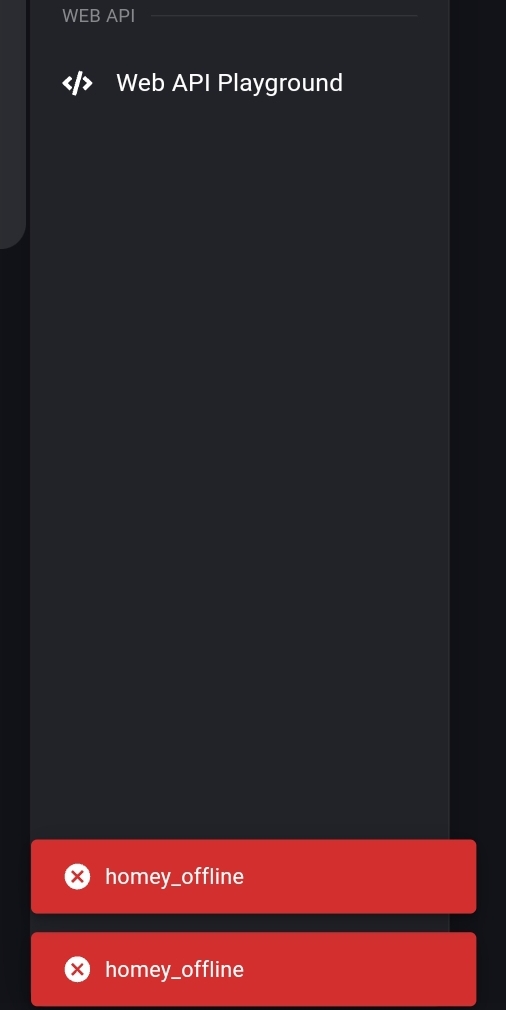
For f.i. the zigbee overview, it then only shows device `0 Homey`
Only after a manually refresh all my zigbee devices are listed again.
In the mobile app “Homey offline” notifications are very, very rare;
so Homey isn’t really offline, or does it suddenly respond not quick enough?
---
### Author:  [@bjoern](https://community.homey.app/u/bjoern)
#### Post date: [July 12, 2022, 4:14pm UTC](https://community.homey.app/t/developer-tools-error-message-object-object-when-entering-the-zigbee-and-z-wave-page/64105/11 "2022-07-12T16:14:27Z")
hey,
I’ve had exactly the same problem for a few weeks. I had my pihole in suspicion. But nothing is blocked there. Unfortunately, support doesn’t know what the problem is either. ☹
---
### Author:  [@robertklep](https://community.homey.app/u/robertklep)
#### Post date: [July 12, 2022, 4:18pm UTC](https://community.homey.app/t/developer-tools-error-message-object-object-when-entering-the-zigbee-and-z-wave-page/64105/12 "2022-07-12T16:18:45Z")
@bjoern are your issues solved when reloading the page?
---
### Author:  [@bjoern](https://community.homey.app/u/bjoern)
#### Post date: [July 12, 2022, 4:28pm UTC](https://community.homey.app/t/developer-tools-error-message-object-object-when-entering-the-zigbee-and-z-wave-page/64105/13 "2022-07-12T16:28:44Z")
@robertklep no… but:
I have seen in the browser developer tool that connections to [192-168-178-10.homey.homeylocal.com](http://192-168-178-10.homey.homeylocal.com) are blocked. Or cannot be resolved. Now have a local DNS entry for [192-168-178-10.homey.homeylocal.com](http://192-168-178-10.homey.homeylocal.com) and my local IP created and now it works. Something seems to be wrong in homey?
---
### Author:  [@robertklep](https://community.homey.app/u/robertklep)
#### Post date: [July 12, 2022, 4:56pm UTC](https://community.homey.app/t/developer-tools-error-message-object-object-when-entering-the-zigbee-and-z-wave-page/64105/14 "2022-07-12T16:56:04Z")
A reasonably secure home internet router will not allow DNS requests that resolve to local IP-addresses (`192-168-178-10.homey.homeylocal.com` resolves to `192.168.178.10`), because that can be used for breaching private networks. These are called “DNS rebinding attacks”.
However, in their quest for security (local networks are evil), Athom decided at some point (I think with firmware v2 but can’t remember) that you should be able to connect to your local Homey using TLS/HTTPS. But for that to work, Homey requires to be accessed through a hostname, not an IP-address. Hence the `192-168-178-10.homey.homeylocal.com` hostname. This allows a TLS certificate to be issued for the `*.homeylocal.com` domain (every Homey will have to download this certificate from Athom’s servers every three months or so).
Paradoxically, for this to work, you need to _disable_ DNS rebinding attack prevention in your modem. So you need to downgrade the security for your entire local network just to be able to communicate a bit more security with Homey on your local network.
Luckily, according to Athom, the website and the mobile app should fall back to plain HTTP when it finds it cannot resolve the `homeylocal.com` hostname. However, this is susceptible to failure, and when it fails, you’ll get the message that Homey is offline.
The method you found, adding a local DNS entry, is the safest way of solving this issue (however, most home routers don’t have the option to create local DNS entries, so users either end up with downgraded local network security or with spurious “Homey offline” messages).
---
### Author:  [@Eternity](https://community.homey.app/u/Eternity)
#### Post date: [July 12, 2022, 6:07pm UTC](https://community.homey.app/t/developer-tools-error-message-object-object-when-entering-the-zigbee-and-z-wave-page/64105/15 "2022-07-12T18:07:27Z")
@bjoern
“Now have a local DNS entry for [192-168-178-10.homey.homeylocal.com](http://192-168-178-10.homey.homeylocal.com/) and my local IP created and now it works.”
Could you please explain how you managed to do that…(with Pi-Hole?). I too have Pi-Hole running on my network.
Thanks!
And @robertklep, thanks for the additional information. You make me learn!
---
### Author:  [@bjoern](https://community.homey.app/u/bjoern)
#### Post date: [July 13, 2022, 6:20am UTC](https://community.homey.app/t/developer-tools-error-message-object-object-when-entering-the-zigbee-and-z-wave-page/64105/16 "2022-07-13T06:20:42Z")
@Eternity Yeah, you can create a local entry in the hosts file on your computer or directly in PiHole under local entries… 🙂
---
### Author:  [@Eternity](https://community.homey.app/u/Eternity)
#### Post date: [July 13, 2022, 8:56am UTC](https://community.homey.app/t/developer-tools-error-message-object-object-when-entering-the-zigbee-and-z-wave-page/64105/17 "2022-07-13T08:56:28Z")
I checked the developers console but don’t see a similar error you have ([http://ip.homey.homeylocal.com/](http://ip.homey.homeylocal.com/)), but do see this error:

I had a problem loading the web page of Homey. So I disabled Pi-Hole for 30 seconds, and than it loaded without an issue.
I googled on “Pi-Hole & ingest.sentry” and found a discussion that suggest this domein should not be blocked.
What do you guys think?
---
### Author:  [@robertklep](https://community.homey.app/u/robertklep)
#### Post date: [July 13, 2022, 8:59am UTC](https://community.homey.app/t/developer-tools-error-message-object-object-when-entering-the-zigbee-and-z-wave-page/64105/18 "2022-07-13T08:59:16Z")
> [@Eternity](#):
>
> I googled on “Pi-Hole & ingest.sentry” and found a discussion that suggest this domein should not be blocked.
`ERR_BLOCKED_BY_CLIENT` suggests that you’re using an ad blocker in your browser which is blocking the request. I get the same message (also using an ad blocker) and don’t have issues with the page not loading.
---
### Author:  [@Eternity](https://community.homey.app/u/Eternity)
#### Post date: [July 13, 2022, 9:17am UTC](https://community.homey.app/t/developer-tools-error-message-object-object-when-entering-the-zigbee-and-z-wave-page/64105/19 "2022-07-13T09:17:08Z")
It happens sometimes… So I guess more is happening. This error must have been there longer, and the Homey page loaded without issues. Only now I seem to have this issue occasionally.
The only add-blocker is Pi-Hole.
---
### Author:  [@robertklep](https://community.homey.app/u/robertklep)
#### Post date: [February 1, 2025, 6:13am UTC](https://community.homey.app/t/developer-tools-error-message-object-object-when-entering-the-zigbee-and-z-wave-page/64105/21 "2025-02-01T06:13:12Z")
This is an English thread, so I’ll respond in English 🙂
Try removing Homey from power for a few minutes to see if that helps. There are also some other solutions, depending on the Homey model that you have.
[Next page](https://community.homey.app/t/developer-tools-error-message-object-object-when-entering-the-zigbee-and-z-wave-page/64105.md?page=2)