# Daytime / Night time lights
**URL:** https://community.homey.app/t/daytime-night-time-lights/103906
**Category:** Flows
**Tags:** domoticz
**Created:** [February 13, 2024, 12:26pm UTC](https://community.homey.app/t/daytime-night-time-lights/103906 "2024-02-13T12:26:11Z")
**Posts on this page:** 15
**Page:** 1
### Author:  [@PeterSWE](https://community.homey.app/u/PeterSWE)
#### Post date: [February 13, 2024, 12:26pm UTC](https://community.homey.app/t/daytime-night-time-lights/103906/1 "2024-02-13T12:26:11Z")
Hi,
I’m “migrating” over to Homey from Domoticz and Blockly and need help with understanding the logic in Flows, specifically how I can achieve turn on / off lights at sunset / sunrise IF it is between a set time.
Ie in Blockly I had a flow that went
If
Virtual device Night == TRUE
AND Time \> 06.00 AND \< 08:00
AND Light switch == OFF
Do
Light switch == ON
Meaning by this is that sunrise can occur at 02.00 in the morning and I have no need for it to turn on at 02, I want it to turn on at 06. Equally the other way around, sometimes sunset is at 22.00 in the evening, I do not need it to turn on then.
I tried mimic above with a Homey flow but failed. I setup the experimental Virtual Devices and I tried adding the Better Logic app, but I got so far that I failed on the “AND Light Switch == OFF” in the flow, I could only select “Activated”, or “On” I assume it means, in the And… part of the flow when I selected my dimmer light.
How can I make sure that the flow isn’t firing ON triggers constantly between the hours of 06 and 08?
Or perhaps the logic is just different in Homey… Willing to learn new ways without Virtual Devices if I get pointers in the right direction.
Thanks.
---
### Author:  [@Alex069](https://community.homey.app/u/Alex069)
#### Post date: [February 13, 2024, 12:32pm UTC](https://community.homey.app/t/daytime-night-time-lights/103906/2 "2024-02-13T12:32:56Z")
Have you tried using the “Advanced Flow” with the “Date” function?
---
### Author:  [@PeterSWE](https://community.homey.app/u/PeterSWE)
#### Post date: [February 13, 2024, 12:51pm UTC](https://community.homey.app/t/daytime-night-time-lights/103906/3 "2024-02-13T12:51:57Z")
No I have not. Thanks for the suggestion, I appreciate it and I will look into it and see if I have better luck there.
---
### Author:  [@Rmb](https://community.homey.app/u/Rmb)
#### Post date: [February 13, 2024, 1:00pm UTC](https://community.homey.app/t/daytime-night-time-lights/103906/5 "2024-02-13T13:00:54Z")
This flow might do the tric and give some ideas:

---
### Author:  [@DirkG](https://community.homey.app/u/DirkG)
#### Post date: [February 13, 2024, 1:00pm UTC](https://community.homey.app/t/daytime-night-time-lights/103906/6 "2024-02-13T13:00:56Z")
Hi Peter,
there is absolut no need for the Better Logic Library App.
For what is the “Virtual device Night”? How is it defined? Between sunset and sunrise?
I ask, because I think it can also be done by a build in time flow card. For example this one:

Translation:
It’s daytime (or nighttime)
Definition: When it is between dawn and dusk.
With Advanced Flow, this use case is no problem.
---
### Author:  [@Rrrr](https://community.homey.app/u/Rrrr)
#### Post date: [February 13, 2024, 2:14pm UTC](https://community.homey.app/t/daytime-night-time-lights/103906/7 "2024-02-13T14:14:19Z")
@PeterSWE
Very interesting to see how your previous logic works differently.
If I understood you correctly, you want the lights on between 6-8am if its dark.
There is the daytime (invert for nighttime) option, but there is an app Sun events that can do more.
In addition, testing the position of a light switch may sometimes be a solution (use the AND card, select logic and search for the switch, but it may not exist), but in Homey we mostly test the light itself. There usually is a card for that, but you also have the option to use the logic card. Both shown in the below example.
Below two options: one set of flows with a light and one set of flows for a zone that allows you to switch one or more lights.
Hope this helps.

---
### Author:  [@PeterSWE](https://community.homey.app/u/PeterSWE)
#### Post date: [February 13, 2024, 2:25pm UTC](https://community.homey.app/t/daytime-night-time-lights/103906/8 "2024-02-13T14:25:31Z")
@Rmb Thanks for the suggestion and example. I was unclear in my previous post, sorry about that. The logic I’m after is that if it is Night and the Time is between 06 and 08 I want the light to turn on, if it is Day time when it is 06 I do not want it to turn on, and if day time happens somewhere in between 06 and 08 I need to be able to turn the light off.
@DirkG Thanks for the welcome to the forum. The virtual device gives me (and which I replicated in Homey but I guess that isn’t the correct way forward) gives me an opportunity to check against if the device is set to ON or OFF. I.e. when sunset happens set Virtual Device Night to ON - I can then check if the Night value equals ON and if Virtual Device Day value equals FALSE (or vice versa).

I saw the “It is after sunrise” as a “And” option (I assume this is the “Day option” mentioned). I tried using that with the trigger of “check every one minute” together with the “time is between 06 and 08” - but then I was back at the issue that my aeotec nano dimmer only has the option of “Is activated / Is turned on”. That would mean that the ON command would be sent 120 times during those 2 hours since I can’t have a check to make sure it isn’t turned on before trying to turning it on. A bit unnecessary… And definitely me being silly and doing it wrong by not understanding Homey’s logic.
---
### Author:  [@PeterSWE](https://community.homey.app/u/PeterSWE)
#### Post date: [February 13, 2024, 2:51pm UTC](https://community.homey.app/t/daytime-night-time-lights/103906/9 "2024-02-13T14:51:32Z")
@Rrrr Thanks of the excellent response and suggestion. I guess I could fall back to and only trigger it once at a specific time, but I’m still faced with the fact that I cannot do a check if the light is turned off. I have no card for that for my aeotec nano dimmer.
By looking at the suggestions in here I see that perhaps I need to fix that underlying issue first. Might have to create another thread for that.

---
### Author:  [@Peter\_Kawa](https://community.homey.app/u/Peter_Kawa)
#### Post date: [February 13, 2024, 3:02pm UTC](https://community.homey.app/t/daytime-night-time-lights/103906/10 "2024-02-13T15:02:13Z")
> [@PeterSWE](#):
>
> I cannot do a check if the light is turned off. I have no card for that for my aeotec nano dimmer.
That needs a little trick, Peter: Select that card “Nano dimmer är på” anyways, and then use the ‘invert’ switch → now the card becomes inverted: _is off_ (_ **är av** _ in Swedish)


.
In advanced flow, right click on the flow card to select “invert”.
---
### Author:  [@Rmb](https://community.homey.app/u/Rmb)
#### Post date: [February 13, 2024, 3:11pm UTC](https://community.homey.app/t/daytime-night-time-lights/103906/11 "2024-02-13T15:11:17Z")
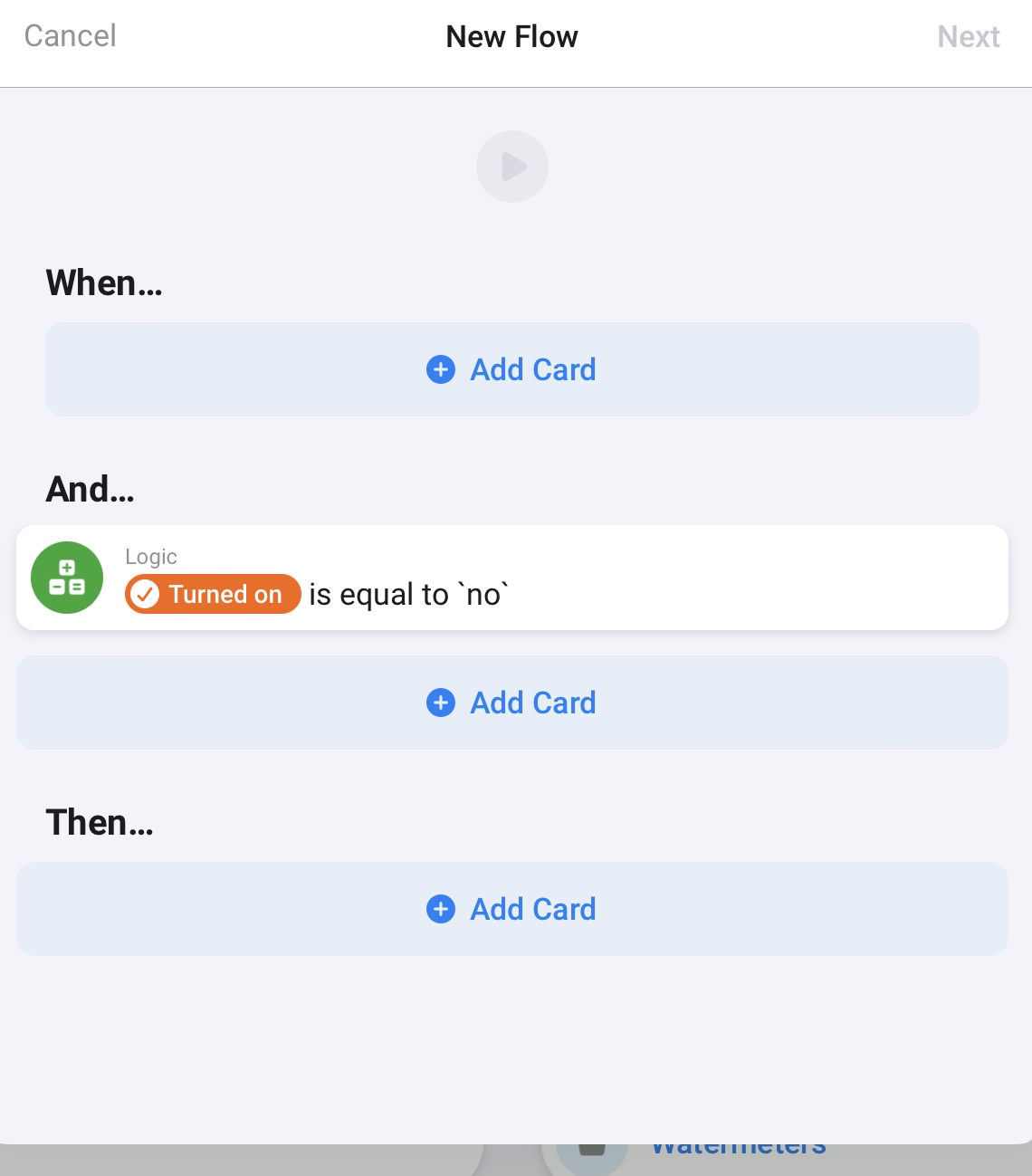
I still think your use case is unclear. You want the light on between 6 and 8 when it is dark. But the sun might rise between 6 and 8. So maybe you can think in terms when to switch on the light and when to switch of the light. As every flow starts at an event/trigger. You probably want to switch it on at 6 o’clock when it is still dark (or before sunrise) and then switch it of at sunrise if sunrise is after 6 o’clock.
Use a logic card to test if the light is on, and invert it. So use one flow to switch it on and one flow to switch it off.
---
### Author:  [@Rrrr](https://community.homey.app/u/Rrrr)
#### Post date: [February 13, 2024, 3:17pm UTC](https://community.homey.app/t/daytime-night-time-lights/103906/12 "2024-02-13T15:17:09Z")
> [@PeterSWE](#):
>
> only trigger it once at a specific time
You can also use a trigger related to sunrise (or check the other app I mentioned).
In Homey native you cannot use daytime as a triiger. Usually its light 10-20 min after sunrise: YMMV.
| Period | Day
time | Night
time | Degrees sun below horizon | Period starts at | Period ends at | Amsterdam
3 Jun 2019 |
| --- | --- | --- | --- | --- | --- | --- |
| Astronomical twilight | | V | 12-18 degrees | Astronomical dawn | Nautical dawn | 00:00-03:22 |
| Nautical twilight | | V | 6-12 degrees | Nautical dawn | Civil dawn | 03:22-04:35 |
| Civil twilight | V | | 0-6 degrees | Civil dawn | Sunrise | 04:35-05:23 |
| Daylight | V | | - | Sunrise | Sunset | 05:23-21:54 |
| Civil twilight | V | | 0-6 degrees | Sunset | Civil dusk | 21:54-22:42 |
| Nautical twilight | | V | 6-12 degrees | Civil dusk | Nautical dusk | 22:42:23:56 |
| Astronomical twilight | | V | 12-18 degrees | Nautical dusk | Astronomical dusk | 23:56-00:00 |
| Nightlight | | V | \>18 degrees | Astronomical dusk | Astronomical dawn | 00:00-
4 jun 2019 |

---
### Author:  [@PeterSWE](https://community.homey.app/u/PeterSWE)
#### Post date: [February 13, 2024, 5:46pm UTC](https://community.homey.app/t/daytime-night-time-lights/103906/13 "2024-02-13T17:46:58Z")
Thanks everyone for your valuable input and effort spent. I will try the invert “trick” and use the things I’ve learned in here to try and build something.
---
### Author:  [@widameista](https://community.homey.app/u/widameista)
#### Post date: [February 14, 2024, 2:33pm UTC](https://community.homey.app/t/daytime-night-time-lights/103906/14 "2024-02-14T14:33:24Z")
Just another hint, i had to come over when i started with homey.
Some of your comments seem to imply that you want something to happen if any of x conditions come true.
This is not possible in homey.
The logic is always that you need a trigger first and then you can add more conditions.
e.g.
in my case i wanted to switch the lights on, if
- i’m awake and time is between x and y but not before time z and only if x\> sunset
i need multiple flows for that each triggered by another condition
- trigger1: i wake up
- trigger2: time is x
- trigger3: time is sunset
hope this was understandable 🙂
---
### Author:  [@Arnt\_Soloy](https://community.homey.app/u/Arnt_Soloy)
#### Post date: [February 14, 2024, 3:53pm UTC](https://community.homey.app/t/daytime-night-time-lights/103906/15 "2024-02-14T15:53:27Z")
Or you can get a light sensor and use the lux value to turn on/off the lights.
Tried the sunrise sunset approach myself in the beginning, but living up north where sunrise sunset not necessary is on the same day, it just got a bit cumbersome.
I have a lux sensor located in window to read the outdoor brighness, and use that for my outdoor lights, and some indoor lights.
---
### Author:  [@Rrrr](https://community.homey.app/u/Rrrr)
#### Post date: [March 1, 2024, 6:12am UTC](https://community.homey.app/t/daytime-night-time-lights/103906/16 "2024-03-01T06:12:09Z")
Good one!
In fact, you can do this with a single advanced flow which has the three triggers followed by the conditions.