# Count time?
**URL:** https://community.homey.app/t/count-time/105429
**Category:** Flows
**Tags:** homey-bridge
**Created:** [March 3, 2024, 1:12pm UTC](https://community.homey.app/t/count-time/105429 "2024-03-03T13:12:33Z")
**Posts on this page:** 14
**Page:** 1
### Author:  [@DjSax](https://community.homey.app/u/DjSax)
#### Post date: [March 3, 2024, 1:12pm UTC](https://community.homey.app/t/count-time/105429/1 "2024-03-03T13:12:33Z")
I want a function that counts the time when the temperature is above a defined threshold level.
Believed that should be very simple, but I got stuck immediately…
I thought it should be possible to have a time tick (every minute), check if the temperature is above the treshold and if so just increase the value of a variable.
But how do I generate a time tick? Do I need an app for that? If so, are there any available for Homey Bridge?
And how do I increment a variable?
---
### Author:  [@Rrrr](https://community.homey.app/u/Rrrr)
#### Post date: [March 3, 2024, 2:57pm UTC](https://community.homey.app/t/count-time/105429/2 "2024-03-03T14:57:17Z")
Best is to use the Chronograph app.
When T \> threshold, then “start or resume stopwatch” (not “start or replace”)
When T \< threshold then “Stop or pause stopwatch”, “Get elapsed duration of stopwatch”, etc
Elapsed duration:

PS If you want to take into account that T can go above and below the threshold a couple of times, use pause instead of stop stopwatch so you can resume it again. In that case add eg:
When time is 00.00, then stop stopwatch.
PS I do not know about Homey Bridge
---
### Author:  [@DjSax](https://community.homey.app/u/DjSax)
#### Post date: [March 3, 2024, 3:36pm UTC](https://community.homey.app/t/count-time/105429/3 "2024-03-03T15:36:28Z")
Thanks, but the Chronograph app is only available on Homey Pro, not Bridge.
Not many apps available for Bridge yet ☹
---
### Author:  [@robertklep](https://community.homey.app/u/robertklep)
#### Post date: [March 3, 2024, 3:53pm UTC](https://community.homey.app/t/count-time/105429/4 "2024-03-03T15:53:45Z")
> [@DjSax](#):
>
> Not many apps available for Bridge yet ☹
Tools-type apps will not become available for Homey Cloud.
---
### Author:  [@Valtsu](https://community.homey.app/u/Valtsu)
#### Post date: [March 3, 2024, 5:12pm UTC](https://community.homey.app/t/count-time/105429/5 "2024-03-03T17:12:40Z")
You can make a flow that runs every minute. If the condition applies, add +1 to a variable “counter”. The counter value tells you how many minutes the condition has been true.
---
### Author:  [@robertklep](https://community.homey.app/u/robertklep)
#### Post date: [March 4, 2024, 7:10am UTC](https://community.homey.app/t/count-time/105429/6 "2024-03-04T07:10:31Z")
> [@Valtsu](#):
>
> The counter value tells you how many minutes the condition has been true.
If the condition is true at 00:01:00 when it gets sampled, then goes false at 00:01:30, then goes true at 00:02:00 when it gets sampled again, you could mistakenly assume that it was true all the time between 00:01 and 00:02.
---
### Author:  [@DjSax](https://community.homey.app/u/DjSax)
#### Post date: [March 4, 2024, 7:14am UTC](https://community.homey.app/t/count-time/105429/7 "2024-03-04T07:14:55Z")
How do I set up the flow to run every minute?
Is there any native support or do I need an app?
---
### Author:  [@Valtsu](https://community.homey.app/u/Valtsu)
#### Post date: [March 4, 2024, 4:51pm UTC](https://community.homey.app/t/count-time/105429/8 "2024-03-04T16:51:14Z")
You start the flow normally with a when-card. Use the native Date & Time.
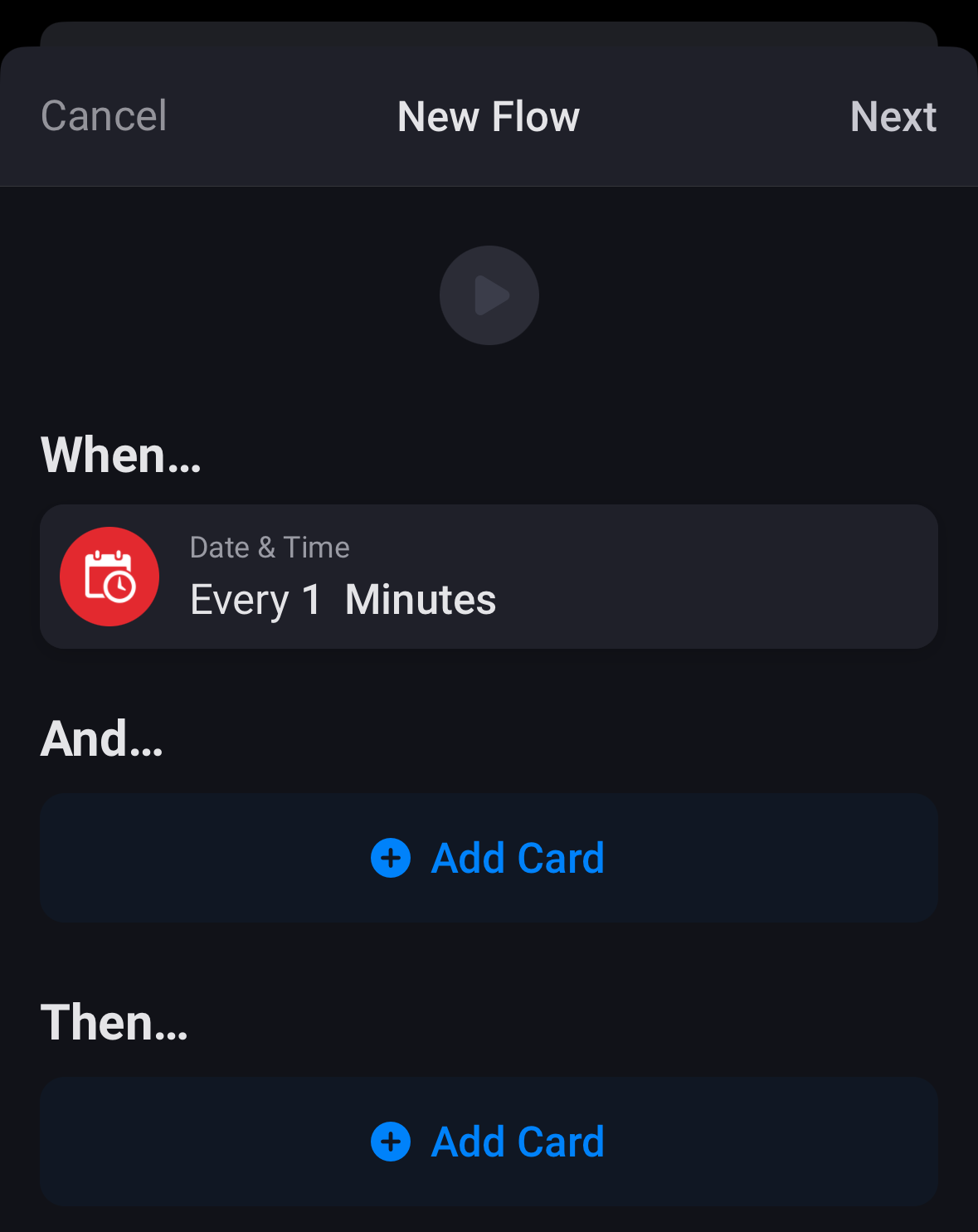
I do not know the nature of your sampled parameter i.e. how often it is typically changing. To save system load, don’t use 1 minute interval if it’s not needed. This was just an example.
---
### Author:  [@DjSax](https://community.homey.app/u/DjSax)
#### Post date: [March 4, 2024, 5:18pm UTC](https://community.homey.app/t/count-time/105429/9 "2024-03-04T17:18:58Z")
My native Date & Time only contains three options, "Time is \_ ", “Sun goes up in \_” and “Sun goes down in \_”

Is this a limitation that comes with the Homey Bridge Version?
---
### Author:  [@JPe4619](https://community.homey.app/u/JPe4619)
#### Post date: [March 4, 2024, 5:23pm UTC](https://community.homey.app/t/count-time/105429/10 "2024-03-04T17:23:18Z")
Yes, but under **AND** you have more options.
---
### Author:  [@DjSax](https://community.homey.app/u/DjSax)
#### Post date: [March 4, 2024, 5:31pm UTC](https://community.homey.app/t/count-time/105429/11 "2024-03-04T17:31:17Z")
Yes there are more options under **AND…** , but I still need the one minute trigger in the **WHEN…** part
---
### Author:  [@Valtsu](https://community.homey.app/u/Valtsu)
#### Post date: [March 4, 2024, 9:37pm UTC](https://community.homey.app/t/count-time/105429/12 "2024-03-04T21:37:13Z")
It seems more limited in the Bridge. Perhaps they are protecting either the processing capacity of the device or the upselling appeal of the Pro. Or both 🤷♂️
---
### Author:  [@Valtsu](https://community.homey.app/u/Valtsu)
#### Post date: [March 4, 2024, 9:41pm UTC](https://community.homey.app/t/count-time/105429/13 "2024-03-04T21:41:38Z")
If you want to go wild, you can always start a flow with another flow. At least with Pro you can. Say you have two flows A and B:
A: when started, check condition and update counter accordingly with 1 min delay. Then run Flow B.
B: similar to A but in the end run Flow A.
---
### Author:  [@JPe4619](https://community.homey.app/u/JPe4619)
#### Post date: [March 4, 2024, 11:57pm UTC](https://community.homey.app/t/count-time/105429/14 "2024-03-04T23:57:55Z")
> [@Valtsu](#):
>
> limited in the Bridge.
The Bridge is just an interface for some protocols, ‘Homey’ is running in the cloud.