# Button + (Release 0.7.33, Test 1.0.1)
**URL:** https://community.homey.app/t/button-release-0-7-33-test-1-0-1/89931
**Category:** Apps
**Tags:** app
**Created:** [September 21, 2023, 9:54pm UTC](https://community.homey.app/t/button-release-0-7-33-test-1-0-1/89931 "2023-09-21T21:54:31Z")
**Posts on this page:** 20
**Page:** 32
### Author:  [@Henk\_Renting](https://community.homey.app/u/Henk_Renting)
#### Post date: [July 18, 2024, 5:29pm UTC](https://community.homey.app/t/button-release-0-7-33-test-1-0-1/89931/629 "2024-07-18T17:29:14Z")
Would it be possible to have a IF flow card “If this app has started”, @Adrian_Rockall?
That way we can resend configurations to the device after the Button+ app has restarted…
I am now using the Device Capabilities app for it, but that is it’s only use. So would be nice if I can uninstall another app… 🙂
---
### Author:  [@groteberg](https://community.homey.app/u/groteberg)
#### Post date: [July 20, 2024, 9:20am UTC](https://community.homey.app/t/button-release-0-7-33-test-1-0-1/89931/630 "2024-07-20T09:20:42Z")
I’m using the left and right buttons on one connector for variables. So the left one corresponds to a Homey variable and the right one as well. Since a while this doesn’t work properly anymore. Currently a variable in Homey is true, but on the button+ device false. I used to change the variable by clicking the buttons, but that also doesn’t work properly anymore.
Just as check, if I properly want to set up the buttons to work with variables, should I only configure the variable I’d like to control to the correct connector and button, or do I also need a create a flow that if button x on connector y is turned on or off, the corresponding variable changes?
---
### Author:  [@Adrian\_Rockall](https://community.homey.app/u/Adrian_Rockall)
#### Post date: [July 20, 2024, 11:40am UTC](https://community.homey.app/t/button-release-0-7-33-test-1-0-1/89931/631 "2024-07-20T11:40:30Z")
You just need to set it up on the button configuration and then assign that configuration to the required button bar.
---
### Author:  [@groteberg](https://community.homey.app/u/groteberg)
#### Post date: [July 21, 2024, 8:47am UTC](https://community.homey.app/t/button-release-0-7-33-test-1-0-1/89931/632 "2024-07-21T08:47:36Z")
Ah okay, thanks for your quick reply! Then I’ve set it up correctly. Has been working for a couple of months, but since some weeks if I press the button (which is linked to a variable in the configuration) the variable reacts randomly, either it changes, or it doesn’t.
I’ve checked for hardware issues by creating a control flow (I know there’s ‘left’ in both notifications, but that’s the tag created by the previous card):

And I do receive the push notifications. After pressing a button the LED sometimes goes on or off, sometimes not, and the variable used to change in Homey, but that doesn’t happen anymore. So now most of the times nothing happens when I click the buttons, except the push notifications.
Fun thing is that I also receive the push notification if I change the variable from true to false in Homey, without touching Button+.
Ultimately I’d like to control the built-in sleep/awake status from Homey, but presence and sleep/awake are not selectable from the configuration dropdowns in Button+. It would be great if that functionality could be added, to directly control sleep status or even presence with Button+. Or am I missing that that’s already possible?
---
### Author:  [@BoerLowie](https://community.homey.app/u/BoerLowie)
#### Post date: [July 22, 2024, 8:41pm UTC](https://community.homey.app/t/button-release-0-7-33-test-1-0-1/89931/633 "2024-07-22T20:41:07Z")
Hi,
i’m trying to control a Somfy RTS sunscreen with ButtonPlus. For most of them, i’m able to control it using one button which sets the state of the device.
I do however have one screen that i’d like to control more granularly: for example stop it halfway.
Does anybody has an idea how to accomplish this with the ButtonPlus? I already thought of playing with a Virtual Device that mimics a sunscreen, allowing me to give it more control and control it in a flow (depending on the actual state of the sunscreen?
---
### Author:  [@Adrian\_Rockall](https://community.homey.app/u/Adrian_Rockall)
#### Post date: [July 22, 2024, 8:49pm UTC](https://community.homey.app/t/button-release-0-7-33-test-1-0-1/89931/634 "2024-07-22T20:49:59Z")
Have you tried assigning the open/stop/close capability to the button?
In theory if you press and hold the button it should start moving and then stop when you release the button.
---
### Author:  [@Henk\_Renting](https://community.homey.app/u/Henk_Renting)
#### Post date: [July 22, 2024, 8:55pm UTC](https://community.homey.app/t/button-release-0-7-33-test-1-0-1/89931/635 "2024-07-22T20:55:38Z")
Any idea, @Adrian_Rockall?
Still struggling with the automatic resending of the configurations after a Homey restart and/or an app restart.
For now it seems that the device is partly updated with the configurations, but the values are not shown… ☹
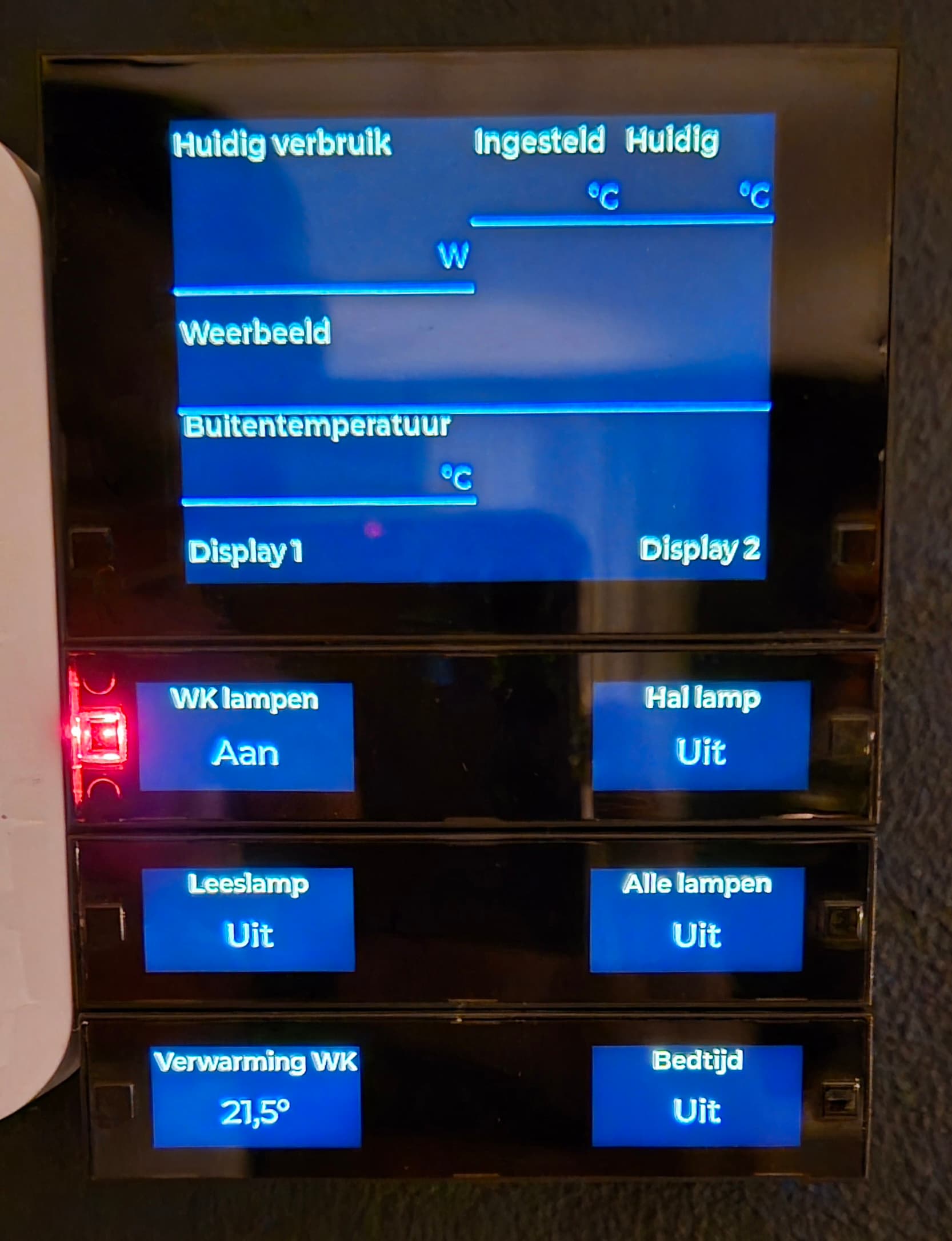
Is this something only I have or can you reproduce?
When I do a “manual” reapply configurations from the device settings this always works flawless…
---
### Author:  [@Adrian\_Rockall](https://community.homey.app/u/Adrian_Rockall)
#### Post date: [July 22, 2024, 8:58pm UTC](https://community.homey.app/t/button-release-0-7-33-test-1-0-1/89931/636 "2024-07-22T20:58:26Z")
I’m not sure how to access those features, but I will take a look.
Have you tried just using the Flow action cards to detect the button press and change the presence, etc?
---
### Author:  [@Adrian\_Rockall](https://community.homey.app/u/Adrian_Rockall)
#### Post date: [July 22, 2024, 9:02pm UTC](https://community.homey.app/t/button-release-0-7-33-test-1-0-1/89931/637 "2024-07-22T21:02:58Z")
Have you tried with version 0.5.7?
---
### Author:  [@Henk\_Renting](https://community.homey.app/u/Henk_Renting)
#### Post date: [July 22, 2024, 9:05pm UTC](https://community.homey.app/t/button-release-0-7-33-test-1-0-1/89931/638 "2024-07-22T21:05:48Z")
Yes, I am already on v0.5.7. Sorry, forgot to mention… 😉
---
### Author:  [@Adrian\_Rockall](https://community.homey.app/u/Adrian_Rockall)
#### Post date: [July 22, 2024, 9:32pm UTC](https://community.homey.app/t/button-release-0-7-33-test-1-0-1/89931/639 "2024-07-22T21:32:26Z")
Strange, when I restart the app, the display refreshes and shows the current data straight away.
Could you enable the full diagnostics log and then restart the app. Once it has refreshed, send the log soi can see what it is doing.
---
### Author:  [@Henk\_Renting](https://community.homey.app/u/Henk_Renting)
#### Post date: [July 22, 2024, 9:43pm UTC](https://community.homey.app/t/button-release-0-7-33-test-1-0-1/89931/640 "2024-07-22T21:43:07Z")
No problem, did so now.
But now it works.
Hmmm, could something else make the device loose these settings?
Sometimes when I get back to the device it shows the screen like in my post above.
Always thought that was after a restart of the app or Homey…
---
### Author:  [@Henk\_Renting](https://community.homey.app/u/Henk_Renting)
#### Post date: [July 22, 2024, 9:55pm UTC](https://community.homey.app/t/button-release-0-7-33-test-1-0-1/89931/641 "2024-07-22T21:55:02Z")
Ah, I restarted Homey now and after it I get the sceen from my post above.
So, restarting the app is fine, restarting Homey is not.
Sent you a new (second) log
The flow (made with Device Capabilities) for re-applying configurations after the Button+ app has restarted, didn’t change it unfortunately.
Only a manual re-apply or a re-apply by a flow that is manually started (last one could be a problem.of Device Capabilities too of course).
---
### Author:  [@groteberg](https://community.homey.app/u/groteberg)
#### Post date: [July 22, 2024, 10:10pm UTC](https://community.homey.app/t/button-release-0-7-33-test-1-0-1/89931/642 "2024-07-22T22:10:51Z")
I’ve just sent the log! The flow action cards to trigger sleep mode would also be fine, but the great added value of a variable is that the LEDs immediately show from a distance what the current status is…
---
### Author:  [@BoerLowie](https://community.homey.app/u/BoerLowie)
#### Post date: [July 23, 2024, 6:28am UTC](https://community.homey.app/t/button-release-0-7-33-test-1-0-1/89931/644 "2024-07-23T06:28:11Z")
Hi,
No. Is that a capability of the device? Or a specific setting somewhere?
---
### Author:  [@Adrian\_Rockall](https://community.homey.app/u/Adrian_Rockall)
#### Post date: [July 23, 2024, 6:51am UTC](https://community.homey.app/t/button-release-0-7-33-test-1-0-1/89931/645 "2024-07-23T06:51:32Z")
It’s a device capability. So when you setup the configuration, select the device and the capability should be available.
---
### Author:  [@Robin\_De\_Lange](https://community.homey.app/u/Robin_De_Lange)
#### Post date: [August 17, 2024, 2:22pm UTC](https://community.homey.app/t/button-release-0-7-33-test-1-0-1/89931/646 "2024-08-17T14:22:59Z")
@Adrian_Rockall looks like i have the same problem. Problem i also have that i can push a button 1 time and this works, all pushes after that dont work, until i restart the app again. When a screen config changes, i need to restart the app also because there is no info on the display en the device dont react to anything but app restart.
Im on latest firmware 1.13 of button plus and 0.5.8 and latest homey software.
I send the log.
Hope you can help. Thank you in advance
---
### Author:  [@Peter\_Stern](https://community.homey.app/u/Peter_Stern)
#### Post date: [August 18, 2024, 6:46am UTC](https://community.homey.app/t/button-release-0-7-33-test-1-0-1/89931/647 "2024-08-18T06:46:47Z")
Hi
I also have the same problem. Normally I had a problem after FW update of homey and after restart app and re configuration itr was working. Since new release candidate of homey pro (12.0.1-rc.8 button plus FW 1.13, button plus app 0.5.5 and 0.5.8) it is also not working after this procedure.
---
### Author:  [@Peter\_Stern](https://community.homey.app/u/Peter_Stern)
#### Post date: [August 18, 2024, 7:01am UTC](https://community.homey.app/t/button-release-0-7-33-test-1-0-1/89931/648 "2024-08-18T07:01:24Z")
PS: I checked MQTT connection with MQTT Explorer. It is not working, after restart app it is working for some seconds than it disconnect again
I have send you a diagnosis:
f238d1d9-348a-4c6a-b9be-d9c3eb725fa3
---
### Author:  [@Adrian\_Rockall](https://community.homey.app/u/Adrian_Rockall)
#### Post date: [August 18, 2024, 7:24am UTC](https://community.homey.app/t/button-release-0-7-33-test-1-0-1/89931/649 "2024-08-18T07:24:53Z")
Can you try to restart Homey to see if that fixes it.
I seem to be getting a lot of network issues with apps since updating to firmware 12.0.1 and rebooting Homey fixes it for a while.
[Previous page](https://community.homey.app/t/button-release-0-7-33-test-1-0-1/89931.md?page=31)
[Next page](https://community.homey.app/t/button-release-0-7-33-test-1-0-1/89931.md?page=33)