# Button + (Release 0.7.33, Test 1.0.1)
**URL:** https://community.homey.app/t/button-release-0-7-33-test-1-0-1/89931
**Category:** Apps
**Tags:** app
**Created:** [September 21, 2023, 9:54pm UTC](https://community.homey.app/t/button-release-0-7-33-test-1-0-1/89931 "2023-09-21T21:54:31Z")
**Posts on this page:** 20
**Page:** 25
### Author:  [@Mark\_Meeuwisse](https://community.homey.app/u/Mark_Meeuwisse)
#### Post date: [April 19, 2024, 9:07pm UTC](https://community.homey.app/t/button-release-0-7-33-test-1-0-1/89931/487 "2024-04-19T21:07:17Z")
---
### Author:  [@Adrian\_Rockall](https://community.homey.app/u/Adrian_Rockall)
#### Post date: [April 19, 2024, 10:58pm UTC](https://community.homey.app/t/button-release-0-7-33-test-1-0-1/89931/488 "2024-04-19T22:58:18Z")
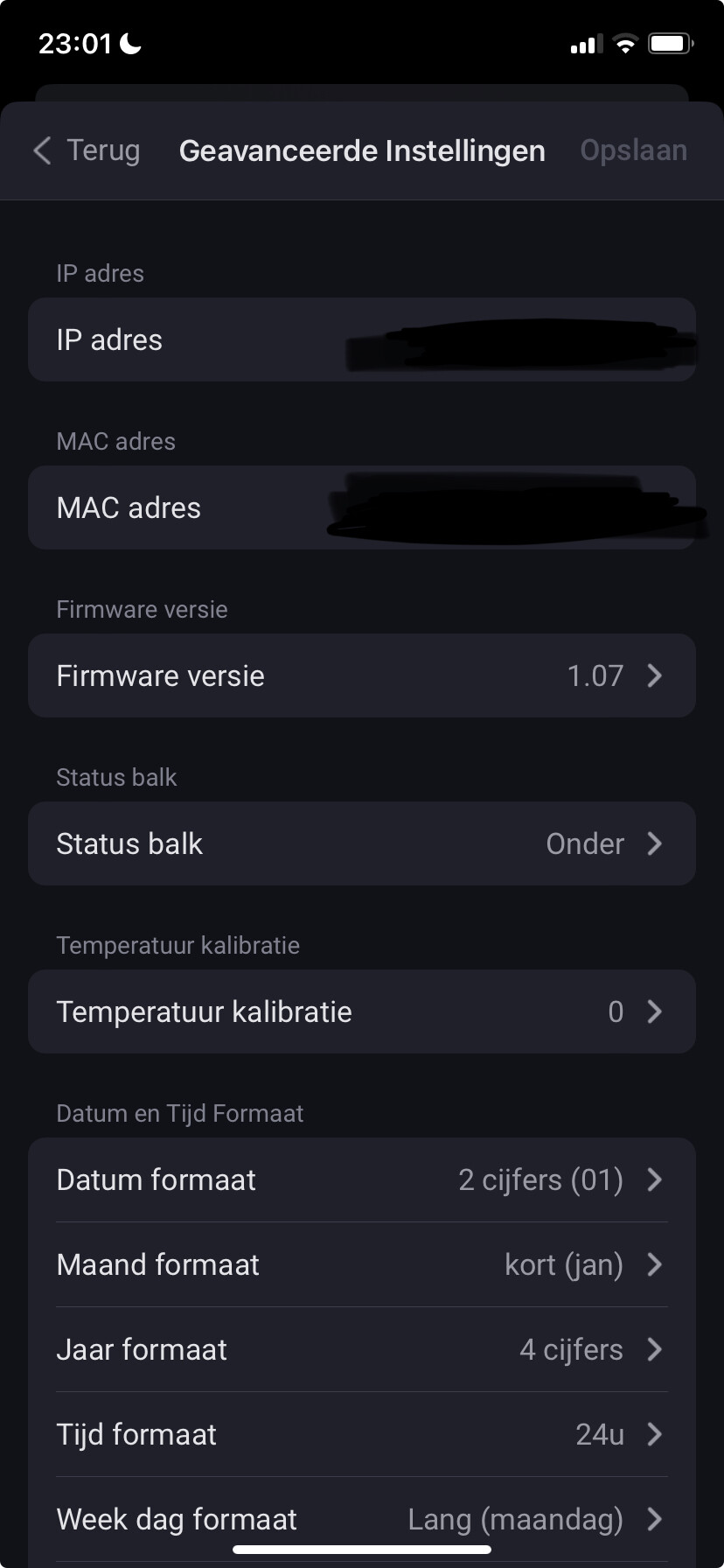
Sorry, not sure what you are showing there?
---
### Author:  [@Wilfred\_Greven](https://community.homey.app/u/Wilfred_Greven)
#### Post date: [April 20, 2024, 11:27am UTC](https://community.homey.app/t/button-release-0-7-33-test-1-0-1/89931/489 "2024-04-20T11:27:05Z")
I think he is on firmware version 1.07.
---
### Author:  [@Gunther\_Potters](https://community.homey.app/u/Gunther_Potters)
#### Post date: [April 20, 2024, 2:23pm UTC](https://community.homey.app/t/button-release-0-7-33-test-1-0-1/89931/490 "2024-04-20T14:23:29Z")
Hi,
I don’t see any flows in the button bar configurator?
Is it possible to start a flow when you press a button, how can i fix that?
thanks in advance.
Gunther.
---
### Author:  [@Adrian\_Rockall](https://community.homey.app/u/Adrian_Rockall)
#### Post date: [April 20, 2024, 8:06pm UTC](https://community.homey.app/t/button-release-0-7-33-test-1-0-1/89931/491 "2024-04-20T20:06:28Z")
There are Flow triggers for buttons, so just create a Flow as normal and use one of the triggers.
---
### Author:  [@Thilo](https://community.homey.app/u/Thilo)
#### Post date: [April 21, 2024, 8:23am UTC](https://community.homey.app/t/button-release-0-7-33-test-1-0-1/89931/492 "2024-04-21T08:23:44Z")
Hi Adrian,
I’m still trying to trigger a flow by the configuration and not by the connector ( see posts above).
I would be very lucky, if you could give me a hint, concerning the display buttons.
Thanks and nice WE
Thilo
---
### Author:  [@Adrian\_Rockall](https://community.homey.app/u/Adrian_Rockall)
#### Post date: [April 21, 2024, 8:35am UTC](https://community.homey.app/t/button-release-0-7-33-test-1-0-1/89931/493 "2024-04-21T08:35:47Z")
Could you make sure you are using the test version.
I presume the display is showing the required configuration number for the flow?
Unfortunately, I am redecorating my study, so my development / checking ability is hindered as that’s where my PC normally lives.
Could you enable the Diagnostics Log in the app settings then press the button and then send the log. I will take a look to see i if I can spot anything.
---
### Author:  [@Thilo](https://community.homey.app/u/Thilo)
#### Post date: [April 21, 2024, 6:33pm UTC](https://community.homey.app/t/button-release-0-7-33-test-1-0-1/89931/494 "2024-04-21T18:33:05Z")
Hi Adrian,
thank you for your response! Unfortunatly updating to test-version 0.49 didn´t do the trick, so I sent you the log.
Please take your time for redecorating your study, I´m actually worried about the mecanical side of the item: pressing buttons bends the whole display…
Thanks ! Thilo
---
### Author:  [@Adrian\_Rockall](https://community.homey.app/u/Adrian_Rockall)
#### Post date: [April 21, 2024, 7:35pm UTC](https://community.homey.app/t/button-release-0-7-33-test-1-0-1/89931/495 "2024-04-21T19:35:10Z")
In the log, it shows configuration 1 is active when the button is pressed. I will check to make sure I haven’t got a 0/1 based issue somewhere, but could you confirm which configuration you expected to be active?
As far as the display bending, that’s how it’s supposed to work. The buttons are actually on the bottom and the display rocks when you press it to activate the button.
---
### Author:  [@Thilo](https://community.homey.app/u/Thilo)
#### Post date: [April 22, 2024, 4:33am UTC](https://community.homey.app/t/button-release-0-7-33-test-1-0-1/89931/496 "2024-04-22T04:33:12Z")
Hi, yes I confirm that configuration 1 one is active. I also have a flow for configuration 2, same problem.
---
### Author:  [@JP123](https://community.homey.app/u/JP123)
#### Post date: [April 22, 2024, 6:51pm UTC](https://community.homey.app/t/button-release-0-7-33-test-1-0-1/89931/497 "2024-04-22T18:51:28Z")
Apologies for the amateur question, but how do you get the reading from button+’s own temperature sensor to show up on the display? Same for time/date and custom words. Button+ isn’t listed under devices in Display Items.
---
### Author:  [@Adrian\_Rockall](https://community.homey.app/u/Adrian_Rockall)
#### Post date: [April 22, 2024, 7:56pm UTC](https://community.homey.app/t/button-release-0-7-33-test-1-0-1/89931/498 "2024-04-22T19:56:03Z")
It should be in the device list

---
### Author:  [@Thilo](https://community.homey.app/u/Thilo)
#### Post date: [April 23, 2024, 7:04pm UTC](https://community.homey.app/t/button-release-0-7-33-test-1-0-1/89931/500 "2024-04-23T19:04:31Z")
Hi Ranney,
how do you manage to configer 3 button+ devices? In the app config page I can see my 2 devices, but when turning to the diplay confi page, it is allways the same and changes are only saved to my first Button+?
---
### Author:  [@Adrian\_Rockall](https://community.homey.app/u/Adrian_Rockall)
#### Post date: [April 23, 2024, 7:08pm UTC](https://community.homey.app/t/button-release-0-7-33-test-1-0-1/89931/501 "2024-04-23T19:08:20Z")
If you want different things on each display then make 3 configurations and select the one you want to show in the Homey Button + device.
---
### Author:  [@Thilo](https://community.homey.app/u/Thilo)
#### Post date: [April 24, 2024, 5:24pm UTC](https://community.homey.app/t/button-release-0-7-33-test-1-0-1/89931/502 "2024-04-24T17:24:20Z")
Ok, but how do I address different devices? In the config I can choose between the devices on the first card, but when I save the configuration, it always saves it to the first device?
By the way: did you find a moment to look at the trigger by configuration?
Thanks Thilo
---
### Author:  [@Kringloper](https://community.homey.app/u/Kringloper)
#### Post date: [April 24, 2024, 5:54pm UTC](https://community.homey.app/t/button-release-0-7-33-test-1-0-1/89931/503 "2024-04-24T17:54:53Z")
@Thilo, I had the same question. I now use configuration 1-5 for my first device and 10-15 for my second device.
Within my flows I load one of the 1-5 configs to my first device. And for the second one the other ones (5-10).
I made a flow for skipping through the configs via the display buttons and use per device a variable for the start configuration number and and end configuration number the device can toggle between. I don’t use the page option, since that is more something for a one b+ device or if you have te same button and display layouts I guess
---
### Author:  [@Thilo](https://community.homey.app/u/Thilo)
#### Post date: [April 24, 2024, 6:15pm UTC](https://community.homey.app/t/button-release-0-7-33-test-1-0-1/89931/504 "2024-04-24T18:15:31Z")
Hi Kringloper,
thank you for this information! So it is really not possible to adress more than one device by the app-configuration?
Concerning your flow: do you use the trigger (when) card with connector or with configuration? I wanted to do the same with a variable, so maybe with a and-card (and conguration is = variable)?
---
### Author:  [@Adrian\_Rockall](https://community.homey.app/u/Adrian_Rockall)
#### Post date: [April 24, 2024, 6:50pm UTC](https://community.homey.app/t/button-release-0-7-33-test-1-0-1/89931/505 "2024-04-24T18:50:52Z")
I don’t understand what you mean by addressing more than one device by the configuration?
A configuration defines the Homey devices / capabilities that will be displayed when the configuration is assigned to a Button +.
You can assign any configuration to one or more Button +, so each one can display the same information or different information. Assigning configurations to a Button + is done in the Homey Button + device or by Flow cards.
---
### Author:  [@Thilo](https://community.homey.app/u/Thilo)
#### Post date: [April 24, 2024, 7:24pm UTC](https://community.homey.app/t/button-release-0-7-33-test-1-0-1/89931/506 "2024-04-24T19:24:06Z")
Probably it´s me who doesn´t get it… 😇
When I configer items for the display and the button bar in the app and then click on save configuration, all is immediatly saved to the Button+ and it shows it in real and in the webview.
But when I use 2 Button+, it is only saved to the first one. So for the second Button+, I have to assign the configuration by a flow, as Krinloper did?
---
### Author:  [@Adrian\_Rockall](https://community.homey.app/u/Adrian_Rockall)
#### Post date: [April 24, 2024, 8:02pm UTC](https://community.homey.app/t/button-release-0-7-33-test-1-0-1/89931/507 "2024-04-24T20:02:13Z")
I will test that as soon as I can.
[Previous page](https://community.homey.app/t/button-release-0-7-33-test-1-0-1/89931.md?page=24)
[Next page](https://community.homey.app/t/button-release-0-7-33-test-1-0-1/89931.md?page=26)