# Button + (Release 0.7.33, Test 1.0.1)
**URL:** https://community.homey.app/t/button-release-0-7-33-test-1-0-1/89931
**Category:** Apps
**Tags:** app
**Created:** [September 21, 2023, 9:54pm UTC](https://community.homey.app/t/button-release-0-7-33-test-1-0-1/89931 "2023-09-21T21:54:31Z")
**Posts on this page:** 20
**Page:** 24
### Author:  [@DuMees](https://community.homey.app/u/DuMees)
#### Post date: [April 12, 2024, 1:09pm UTC](https://community.homey.app/t/button-release-0-7-33-test-1-0-1/89931/466 "2024-04-12T13:09:20Z")
Works now, send the log. Weirdly the error as above is not there anymore. It still does not change the button label and top label though
---
### Author:  [@DuMees](https://community.homey.app/u/DuMees)
#### Post date: [April 13, 2024, 8:10pm UTC](https://community.homey.app/t/button-release-0-7-33-test-1-0-1/89931/467 "2024-04-13T20:10:24Z")
Today it worked. I haven’t touched it since yesterday. Errors are gone. I will check thoroughly to see if all is okay.
---
### Author:  [@Mark\_Meeuwisse](https://community.homey.app/u/Mark_Meeuwisse)
#### Post date: [April 14, 2024, 10:25am UTC](https://community.homey.app/t/button-release-0-7-33-test-1-0-1/89931/468 "2024-04-14T10:25:42Z")
Creating flows in Homey Pro and the combination with Button+ does not go completely smoothly. The following seems to be happening. When creating flows, Homey seems to do it digitally (in the Homey app with a digital screen of a button+). The actions are then carried out in Homey. However, the physical Button+ does not seem to send a signal when pressing the buttons. This seems like the same issue as DuMees… Thanks in advance for your response. Gr Mark

---
### Author:  [@Urlauber](https://community.homey.app/u/Urlauber)
#### Post date: [April 17, 2024, 9:10am UTC](https://community.homey.app/t/button-release-0-7-33-test-1-0-1/89931/469 "2024-04-17T09:10:37Z")
Hello,
I don’t know what I’m doing wrong, but no matter what I set in the config in Homey - nothing happens on the display.
I installed Button+ on the Homey and then the module was found online. The display says “Homey says hello…”
can someone help me ?
---
### Author:  [@Hielke\_de\_Jong](https://community.homey.app/u/Hielke_de_Jong)
#### Post date: [April 17, 2024, 10:28am UTC](https://community.homey.app/t/button-release-0-7-33-test-1-0-1/89931/470 "2024-04-17T10:28:00Z")
Unfortunate I cannot help, but ‘It is not working help me’ is also not a lof of info. With some more info it is easier to know where you need help 🙂
Can you specify: what you already did (see instructions in [Button + (Release 0.3.17, Test 0.4.9)](https://community.homey.app/t/button-release-0-3-17-test-0-4-9/89931)) and what does not work or gives not the expected result?
---
### Author:  [@Adrian\_Rockall](https://community.homey.app/u/Adrian_Rockall)
#### Post date: [April 17, 2024, 1:40pm UTC](https://community.homey.app/t/button-release-0-7-33-test-1-0-1/89931/471 "2024-04-17T13:40:38Z")
Have you configured the device in Homey and assigned configurations to each of the buttons and the display?
---
### Author:  [@Thilo](https://community.homey.app/u/Thilo)
#### Post date: [April 18, 2024, 9:39am UTC](https://community.homey.app/t/button-release-0-7-33-test-1-0-1/89931/472 "2024-04-18T09:39:42Z")
Hi,
just start trying Button+, very nice! Adrian, thanks for the great app!
One general question: do I have to configer all either in the app or in the Button+ frontend? Can I combine that? What overwrites what? E.g. configuered all in the app, than change something in the webpage of the device?
Sorry probably a very basic question, but I just don´t understand it…
Regards Thilo
---
### Author:  [@Adrian\_Rockall](https://community.homey.app/u/Adrian_Rockall)
#### Post date: [April 18, 2024, 10:32am UTC](https://community.homey.app/t/button-release-0-7-33-test-1-0-1/89931/473 "2024-04-18T10:32:56Z")
Everything should be configured in the app as it will overwrite any manual settings on the web interface.
---
### Author:  [@Thilo](https://community.homey.app/u/Thilo)
#### Post date: [April 19, 2024, 11:18am UTC](https://community.homey.app/t/button-release-0-7-33-test-1-0-1/89931/474 "2024-04-19T11:18:13Z")
Thanks!
Another question: to scroll through different display-configurations I would like to use the buttons of the display. Tried to use this card:

… but nothing happens. Works fine with the connector card, but selecting by configuration would give more flexibility.
Is there something I´m doing wrong?
regards
Thilo
---
### Author:  [@Adrian\_Rockall](https://community.homey.app/u/Adrian_Rockall)
#### Post date: [April 19, 2024, 12:23pm UTC](https://community.homey.app/t/button-release-0-7-33-test-1-0-1/89931/475 "2024-04-19T12:23:31Z")
So those card settings will trigger when the display is showing configuration 2 and the left display button is pressed.
Paging on the display is much more efficient if you use the page property of the configuration.
---
### Author:  [@Thilo](https://community.homey.app/u/Thilo)
#### Post date: [April 19, 2024, 2:55pm UTC](https://community.homey.app/t/button-release-0-7-33-test-1-0-1/89931/476 "2024-04-19T14:55:57Z")
It works fine, when I manually start the flow, but pressing the buttons on the display doesn´t work. Feels like the click is not recognised by the flow. My display is on connector 2, the log says
- 2024-04-19T15:12:32.398Z
MQTTclient.on message: {
“connector”: 2,
“side”: “left”,
“device”: “none”,
“capability”: “none”,
“type”: “boolean”,
“panelId”: “btn\_467540”
}
Payload of the display button shows {“connector”:2,“side”:“left”,“device”:“none”,“capability”:“none”,“type”:“boolean”,“panelId”:“btn\_467540”}
in the web-interface, so the message passes.
Should capability be “app” or just “” as it is for the buttons when they are configuered for App? Do I need to specify that somewhere in the app?
- Sorry, I don´t get what you mean by “use the page property of the configuration”?
---
### Author:  [@JP123](https://community.homey.app/u/JP123)
#### Post date: [April 19, 2024, 6:09pm UTC](https://community.homey.app/t/button-release-0-7-33-test-1-0-1/89931/477 "2024-04-19T18:09:44Z")
Thanks for the app, Adrian. Got mine today but having issues. The button+ device does reflect labels correctly and flashes the LEDs upon starting up. However, pressing the physical buttons doesn’t trigger the flows. Same if I set up the buttons to toggle specific devices on/off. Pressing virtual buttons in the Homey app does work but the on/off status isn’t updated on the button+ display. In addition, all LEDs are off at all times. Anyone else experience anything similar?
---
### Author:  [@Mark\_Meeuwisse](https://community.homey.app/u/Mark_Meeuwisse)
#### Post date: [April 19, 2024, 6:36pm UTC](https://community.homey.app/t/button-release-0-7-33-test-1-0-1/89931/478 "2024-04-19T18:36:48Z")
Same here, the actual button+ does not seem to “send” the click. But when I am in homey app and push a digital menu of button the flow is started.
When assigning buttons and give buttons names, the button plus is displaying that. In that direction seems to work just fine. The other way seems not.
---
### Author:  [@Mark\_Meeuwisse](https://community.homey.app/u/Mark_Meeuwisse)
#### Post date: [April 19, 2024, 6:49pm UTC](https://community.homey.app/t/button-release-0-7-33-test-1-0-1/89931/479 "2024-04-19T18:49:10Z")
Hello Adrian, thank you for replying. Yes, in homey I assigned actions to each button. The labels are displayed on the button +. (It takes a few minutes but that works fine). It seems that the actual “click” on the button+ bar the device is not responding.
When clicking digital in the homey app → button plus screen buttons., the flow is working as it is assigned.
I also try to stay in the homey app, because the button plus configuration seems to “overtake” the homey configurations made earlier.
I am trying different ways to get it working but so far I am not seem to get it right. Thnx
---
### Author:  [@Mark\_Meeuwisse](https://community.homey.app/u/Mark_Meeuwisse)
#### Post date: [April 19, 2024, 7:50pm UTC](https://community.homey.app/t/button-release-0-7-33-test-1-0-1/89931/481 "2024-04-19T19:50:15Z")
Thank you, Yonas\_Patberg, for your quick response. Unfortunately, I’m still encountering the same issue. I’ve attempted to resolve it by restarting and uninstalling the app, as well as resetting Button+ to its factory settings. However, the problem persists. The Buttonplus app functions properly on Homey Pro when accessed digitally, but when physically pressed, there is no response. Any suggestions or further troubleshooting steps would be greatly appreciated. Thank you in advance for your assistance!
---
### Author:  [@Adrian\_Rockall](https://community.homey.app/u/Adrian_Rockall)
#### Post date: [April 19, 2024, 7:55pm UTC](https://community.homey.app/t/button-release-0-7-33-test-1-0-1/89931/482 "2024-04-19T19:55:57Z")
Could you check in the app settings that the
Homey MQTT broker is enabled and set as the default.
---
### Author:  [@Mark\_Meeuwisse](https://community.homey.app/u/Mark_Meeuwisse)
#### Post date: [April 19, 2024, 8:21pm UTC](https://community.homey.app/t/button-release-0-7-33-test-1-0-1/89931/483 "2024-04-19T20:21:38Z")
When I installed the Buttonplus app, there was no option to choose between enabling or disabling it. However, the app indicated that Buttonplus takes control over Homey Pro.
In the Homey app, I have the choice between a standard broker and Homey, and I choose Homey. Currently, I have left 2 brokers in the Button+ web app. When working in the Homey app, I assign the broker from Homey during allocation.
Does this fully address your question?

---
### Author:  [@Adrian\_Rockall](https://community.homey.app/u/Adrian_Rockall)
#### Post date: [April 19, 2024, 8:33pm UTC](https://community.homey.app/t/button-release-0-7-33-test-1-0-1/89931/484 "2024-04-19T20:33:42Z")
The Homey app takes control of the button + and overwrites all the settings made in the web app.
In the Homey app settings page, there is a section for brokers and that is where you need ensure Homey is selected as the default.

---
### Author:  [@Mark\_Meeuwisse](https://community.homey.app/u/Mark_Meeuwisse)
#### Post date: [April 19, 2024, 8:46pm UTC](https://community.homey.app/t/button-release-0-7-33-test-1-0-1/89931/485 "2024-04-19T20:46:55Z")
Thanks Adrian for your prompt response. It appears that I don’t have a choice between brokers, and that Homey is the only option available. That’s already set as default… Is there anywhere else I could make a change? I feel like it should work, but it’s not.

---
### Author:  [@Adrian\_Rockall](https://community.homey.app/u/Adrian_Rockall)
#### Post date: [April 19, 2024, 8:54pm UTC](https://community.homey.app/t/button-release-0-7-33-test-1-0-1/89931/486 "2024-04-19T20:54:00Z")
What version of the app are you using?
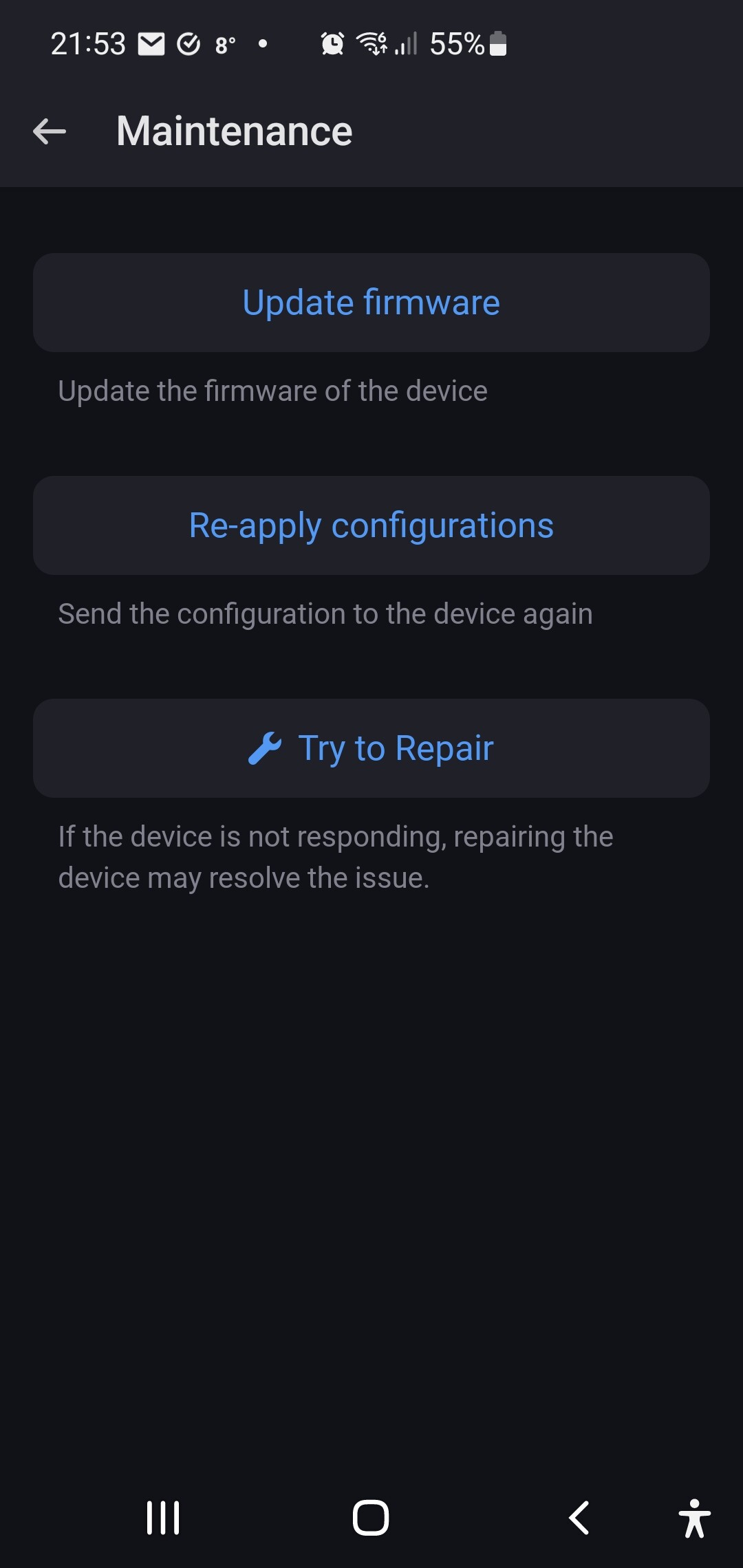
Can you try opening the advanced settings of the device and select the Apply Configure maintenance option.
[Previous page](https://community.homey.app/t/button-release-0-7-33-test-1-0-1/89931.md?page=23)
[Next page](https://community.homey.app/t/button-release-0-7-33-test-1-0-1/89931.md?page=25)