# Button + (Release 0.7.33, Test 1.0.1)
**URL:** https://community.homey.app/t/button-release-0-7-33-test-1-0-1/89931
**Category:** Apps
**Tags:** app
**Created:** [September 21, 2023, 9:54pm UTC](https://community.homey.app/t/button-release-0-7-33-test-1-0-1/89931 "2023-09-21T21:54:31Z")
**Posts on this page:** 20
**Page:** 17
### Author:  [@NoWorldOrder](https://community.homey.app/u/NoWorldOrder)
#### Post date: [January 27, 2024, 10:38am UTC](https://community.homey.app/t/button-release-0-7-33-test-1-0-1/89931/325 "2024-01-27T10:38:23Z")
The character is indeed not for the app but for button+ to fix.
---
### Author:  [@Ranney](https://community.homey.app/u/Ranney)
#### Post date: [January 27, 2024, 11:33am UTC](https://community.homey.app/t/button-release-0-7-33-test-1-0-1/89931/326 "2024-01-27T11:33:55Z")
Nice surprise in latest release @possibility to set dim niveau 👍
Just combined it with another App so it is automatically adjusting dim niveau over the day. (Night darker and during the day more brightness.)
Thanks 💪💪
---
### Author:  [@NoWorldOrder](https://community.homey.app/u/NoWorldOrder)
#### Post date: [January 27, 2024, 7:39pm UTC](https://community.homey.app/t/button-release-0-7-33-test-1-0-1/89931/327 "2024-01-27T19:39:25Z")
Ranney, not for this app, but would recommend using a light sensor ;-). If light is xx than dim to level xx.
Kinda useless if lights go on with the sun shining 🙂
---
### Author:  [@Ranney](https://community.homey.app/u/Ranney)
#### Post date: [January 27, 2024, 8:44pm UTC](https://community.homey.app/t/button-release-0-7-33-test-1-0-1/89931/328 "2024-01-27T20:44:05Z")
Haha, my English is very bad so sorry for that!
But I have combined it with the circadian app. Really nice. Over the day it is at max brightness and over the evening it is dimming to 20%.
Way easier than a light sensor. (That makes a lot of changes that is not needed for me) ☺💪
---
### Author:  [@Ranney](https://community.homey.app/u/Ranney)
#### Post date: [January 27, 2024, 8:46pm UTC](https://community.homey.app/t/button-release-0-7-33-test-1-0-1/89931/329 "2024-01-27T20:46:16Z")
Ps. I have of course motion, brightness, temperature and humidity sensors in every room, door and window sensors on every window/door. So I can use them for other automation 👍
---
### Author:  [@Steven\_Gebuis](https://community.homey.app/u/Steven_Gebuis)
#### Post date: [January 28, 2024, 7:59pm UTC](https://community.homey.app/t/button-release-0-7-33-test-1-0-1/89931/330 "2024-01-28T19:59:46Z")
I set up the Button+ through the Homey app. However, the big screen does not update the time. Would I need to adjust a setting or is there something wrong?
My settings:
- Display configuration 1
- Device: Button+
- Function: (time)
App version: 0.3.15
Button+ firmware: 1.08
---
### Author:  [@Adrian\_Rockall](https://community.homey.app/u/Adrian_Rockall)
#### Post date: [January 28, 2024, 9:21pm UTC](https://community.homey.app/t/button-release-0-7-33-test-1-0-1/89931/331 "2024-01-28T21:21:09Z")
If you have selected the time from the Button + device in Homey, then it should be all you need to do.
Have you tried to re-apply the configuration and if that doesn’t work re-start the app and if that doesn’t work reset the Button +.
If none of those work then enable the full diagnostics log, wait of a minute and then send the log. I will take a look to see if anything jumps out at me.
---
### Author:  [@Ranney](https://community.homey.app/u/Ranney)
#### Post date: [January 29, 2024, 10:27pm UTC](https://community.homey.app/t/button-release-0-7-33-test-1-0-1/89931/332 "2024-01-29T22:27:02Z")
@Adrian_Rockall
Just curious; in the latest app release I see that it is possible to change the ‘titels’ (labels) of the buttons. I’ve a lot of text fields that are filled in order (only when relevant and in priority). So my ‘title labels’ are empty because of this. Is it possible to edit the labels of fields on the display with a flow? ☺ @dare to ask 🙈
---
### Author:  [@Adrian\_Rockall](https://community.homey.app/u/Adrian_Rockall)
#### Post date: [January 29, 2024, 10:59pm UTC](https://community.homey.app/t/button-release-0-7-33-test-1-0-1/89931/333 "2024-01-29T22:59:11Z")
Currently, it’s not possible. Add it to the issues on GitHub and I will look into it.
---
### Author:  [@Torch1969](https://community.homey.app/u/Torch1969)
#### Post date: [January 30, 2024, 8:31pm UTC](https://community.homey.app/t/button-release-0-7-33-test-1-0-1/89931/334 "2024-01-30T20:31:08Z")
Great 😀. New firmware release 1.081 of button+. A little update with big improvement: Fix of the issue with large configurations 👏
Also in web configuration.
---
### Author:  [@Kringloper](https://community.homey.app/u/Kringloper)
#### Post date: [January 31, 2024, 9:45am UTC](https://community.homey.app/t/button-release-0-7-33-test-1-0-1/89931/335 "2024-01-31T09:45:39Z")
Just to doublecheck…
I just installed my second button+ device (great device, super app ;-)).
I thought you had to create different display & button configurations by switching between devices in the Homey button app. But i only get the option to go to the webpage for the selected device. So, i guess you just create extra display and button configurations which will be send to all your devices, after which you can define per device which display/button configuration you show on a specific device.
Am i right about this?
---
### Author:  [@Adrian\_Rockall](https://community.homey.app/u/Adrian_Rockall)
#### Post date: [January 31, 2024, 10:10am UTC](https://community.homey.app/t/button-release-0-7-33-test-1-0-1/89931/336 "2024-01-31T10:10:16Z")
Correct. You add each Button + as a separate device in Homey and then assign the required Configuration to each item. They can either share the same configuration or have different ones assigned.
For the open web page option, the drop list should have all the devices you have added to Homey.
---
### Author:  [@Remy](https://community.homey.app/u/Remy)
#### Post date: [February 1, 2024, 7:21pm UTC](https://community.homey.app/t/button-release-0-7-33-test-1-0-1/89931/337 "2024-02-01T19:21:32Z")
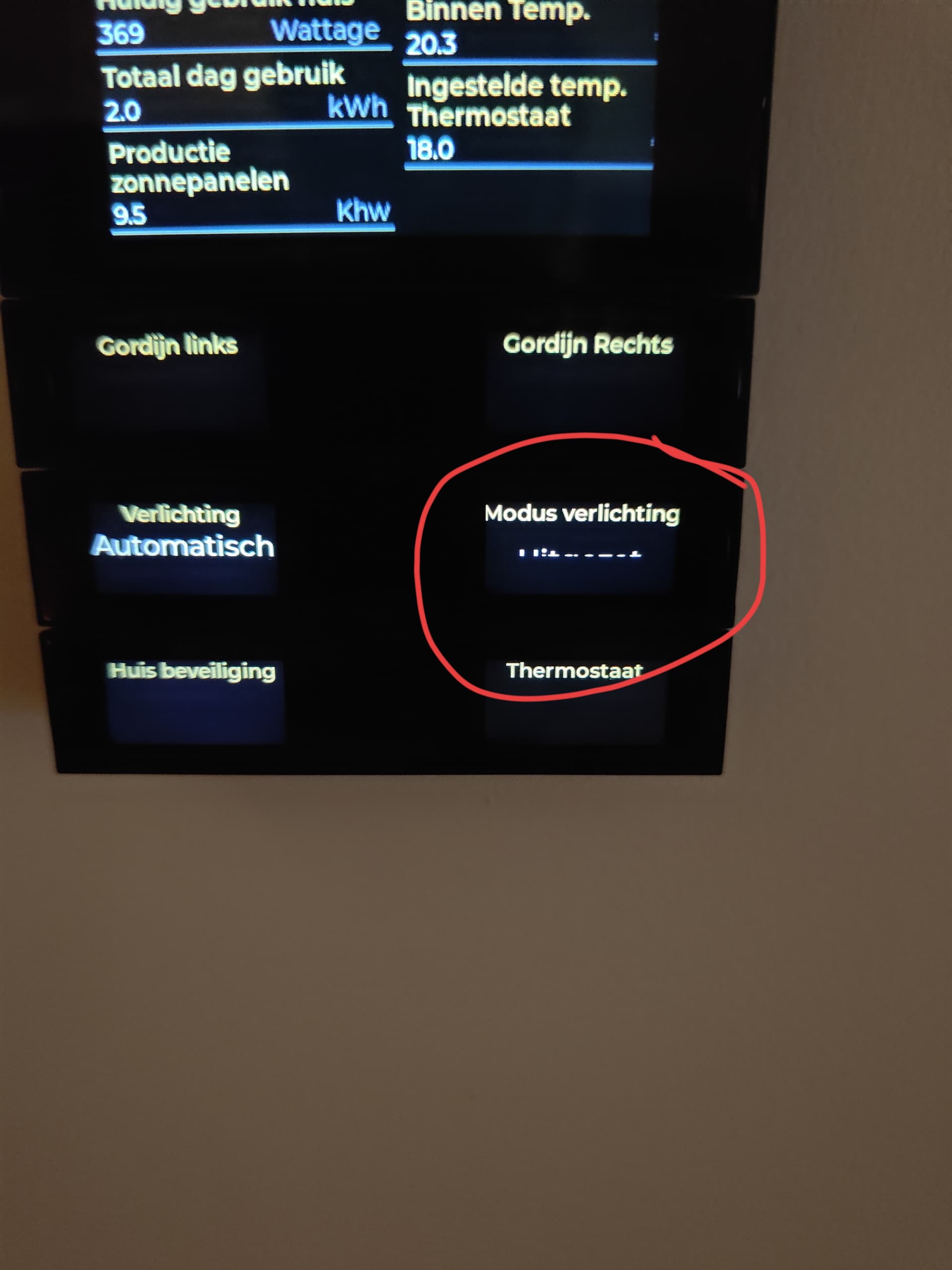
Always when I save button configuration 3, I get this. I must restart the B+ to fix this.
---
### Author:  [@Adrian\_Rockall](https://community.homey.app/u/Adrian_Rockall)
#### Post date: [February 1, 2024, 7:32pm UTC](https://community.homey.app/t/button-release-0-7-33-test-1-0-1/89931/338 "2024-02-01T19:32:12Z")
Are you on the latest Button + firmware.
---
### Author:  [@Remy](https://community.homey.app/u/Remy)
#### Post date: [February 2, 2024, 3:29pm UTC](https://community.homey.app/t/button-release-0-7-33-test-1-0-1/89931/339 "2024-02-02T15:29:55Z")
the lastest is 1.08 right? and i’m on Homey App version v0.3.15
---
### Author:  [@Adrian\_Rockall](https://community.homey.app/u/Adrian_Rockall)
#### Post date: [February 2, 2024, 3:37pm UTC](https://community.homey.app/t/button-release-0-7-33-test-1-0-1/89931/340 "2024-02-02T15:37:04Z")
It’s 1.081. It has a bigger decode buffer.
---
### Author:  [@Ranney](https://community.homey.app/u/Ranney)
#### Post date: [February 2, 2024, 3:50pm UTC](https://community.homey.app/t/button-release-0-7-33-test-1-0-1/89931/341 "2024-02-02T15:50:55Z")
Yes, was hoping that it is fixing may latest and only issue. But still the button+ is working great here. But… when switching from screens (display, on buttons it is no problem) the button+ is freezing and not responding to anything until a power cycle. This is not everytime. But every ~10 switches.
Anybody an idea what can be wrong? Would be really great if I can also use that last function!
---
### Author:  [@Adrian\_Rockall](https://community.homey.app/u/Adrian_Rockall)
#### Post date: [February 2, 2024, 4:18pm UTC](https://community.homey.app/t/button-release-0-7-33-test-1-0-1/89931/342 "2024-02-02T16:18:09Z")
There is a new feature in the pipeline to allow more efficient screen switching, so hopefully that will help.
Is there any chance you can plug the Button + into a PC via the USB, then run a terminal program so you can see the log output?
---
### Author:  [@Ranney](https://community.homey.app/u/Ranney)
#### Post date: [February 2, 2024, 4:30pm UTC](https://community.homey.app/t/button-release-0-7-33-test-1-0-1/89931/343 "2024-02-02T16:30:51Z")
Ahh, good to know!
Of course I would like to help! But… at the moment very busy with our twin (2 months old)
Can you tell me how to do it (with a mac)? I’ve not yet found the time to learn myself how to read the serial out of the device… thanks in advance for any help!
---
### Author:  [@Adrian\_Rockall](https://community.homey.app/u/Adrian_Rockall)
#### Post date: [February 2, 2024, 4:43pm UTC](https://community.homey.app/t/button-release-0-7-33-test-1-0-1/89931/344 "2024-02-02T16:43:07Z")
I can understand twin 2 month old’s keep you busy 😀
I’m not familiar with Mac’s, so not sure what is available. I think VSCode will work on a Mac and could be used, but is a bit overkill.
[Previous page](https://community.homey.app/t/button-release-0-7-33-test-1-0-1/89931.md?page=16)
[Next page](https://community.homey.app/t/button-release-0-7-33-test-1-0-1/89931.md?page=18)