# Automatic Door Opening on Approach
**URL:** https://community.homey.app/t/automatic-door-opening-on-approach/142162
**Category:** Questions & Help
**Tags:** mqtt
**Created:** [August 23, 2025, 5:44pm UTC](https://community.homey.app/t/automatic-door-opening-on-approach/142162 "2025-08-23T17:44:48Z")
**Posts on this page:** 3
**Page:** 1
### Author:  [@PawellCZ](https://community.homey.app/u/PawellCZ)
#### Post date: [August 23, 2025, 5:44pm UTC](https://community.homey.app/t/automatic-door-opening-on-approach/142162/1 "2025-08-23T17:44:48Z")
Hello,
I’m trying to find a reliable way to automatically open my front door when I approach with a Bluetooth locator on my keys. Currently, I’m unable to get the communication between my Bluetooth locator and Homey Pro to work. I’m new to this forum, so thank you for your patience in advance.
### **Goal**
My goal is **automatic door opening on approach** with a Bluetooth locator on my keys. For a start, I’d be happy if it worked by pressing a button on the locator.
### **Hardware and Topology**
- **Homey Pro (2023):** The central unit that acts as the brain of the system and an MQTT server. It’s located at my home on the **4th floor**.
- **Shelly BLU Gateway:** A gateway that scans for Bluetooth signals and sends them to Homey via own script or MQTT. It’s located in the **basement** by the front door. It’s connected via a standard **Wi-Fi router**.
- **Shelly BLU Button1:** A key locator that can function as a **button, but also as a beacon**.
### **What I’ve tried and where I’m stuck**
1. **Shelly BLE Gateway Integration with Homey:**
2. **Another attempt to connect via MQTT:**
### **Summary of the Problem**
Everything points to the problem not being in the MQTT configuration or hardware, but in the Homey software itself. I have a feeling that the MQTT Client app in Homey is not properly translating the data from the MQTT message into a format that a Flow can work with.
Does anyone have a similar experience or can recommend an effective solution?
Thank you for any help.
---
### Author:  [@Peter\_Kawa](https://community.homey.app/u/Peter_Kawa)
#### Post date: [August 23, 2025, 10:29pm UTC](https://community.homey.app/t/automatic-door-opening-on-approach/142162/2 "2025-08-23T22:29:39Z")
> [@PawellCZ](#):
>
> Everything points to the problem not being in the MQTT configuration
Well… it is. You wrote:
> [@PawellCZ](#):
>
> … incoming message via the MQTT server and how the **MQTT client** can …
MQTT Server does not need MQTT Client and they’re unaware of eachother…
You’d use this MQTT Server card instead:
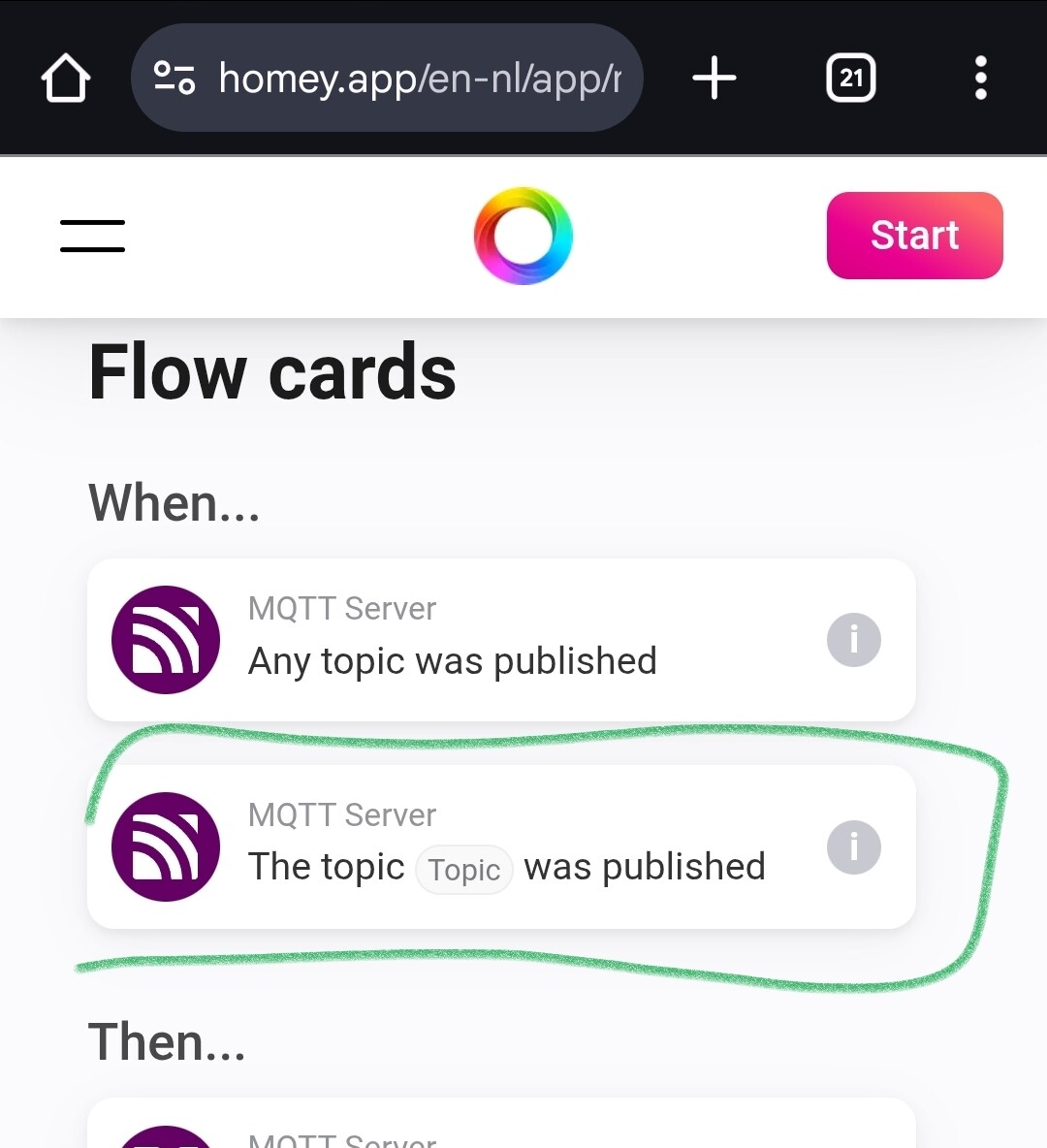
_MQTT Client is part of the MQTT system you can create with the MQTT Broker ( & MQTT Hub) community apps;_
_MQTT Server app is published by Emile (Athom)._
---
### Author:  [@PawellCZ](https://community.homey.app/u/PawellCZ)
#### Post date: [August 28, 2025, 8:30am UTC](https://community.homey.app/t/automatic-door-opening-on-approach/142162/3 "2025-08-28T08:30:38Z")
Hi, Thanks for your response. It helped me assure that the MQTT server application does not need the MQTT client application.
I also finally understood how to filter incoming topics using conditions. That was what I mainly didn’t understand. I didn’t know how to use AND cards for filtering. I understood that it is best for me to use the card Logic - Value contains…
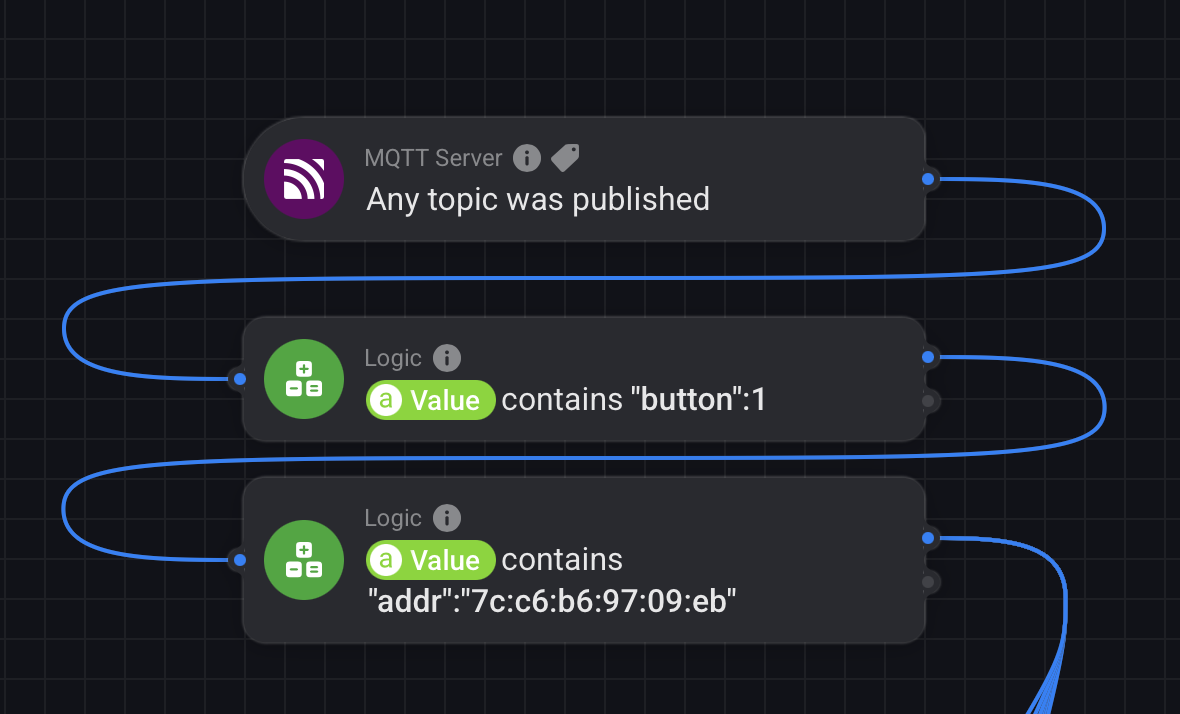
I was a little confused by MQTT explorer, which listed individual details about my BT button, but in order to use it in the AND card, I found that I had to remove one space, otherwise it didn’t work. For example: Value contain “button”:1 (not “button”:(remove space)1).
Now it is working! 🙂