# \[APP\]\[Pro\] Tesla Car & Energy - Zero emissions. Zero compromises
**URL:** https://community.homey.app/t/app-pro-tesla-car-energy-zero-emissions-zero-compromises/100824
**Category:** Apps
**Tags:** app, homey-pro
**Created:** [January 11, 2024, 5:15pm UTC](https://community.homey.app/t/app-pro-tesla-car-energy-zero-emissions-zero-compromises/100824 "2024-01-11T17:15:52Z")
**Posts on this page:** 20
**Page:** 6
### Author:  [@RonnyW](https://community.homey.app/u/RonnyW)
#### Post date: [January 23, 2024, 6:08am UTC](https://community.homey.app/t/app-pro-tesla-car-energy-zero-emissions-zero-compromises/100824/103 "2024-01-23T06:08:49Z")
New **test version 1.1.6** :
- Optimized online/offline state check.
- **Fixed schedule charging/departure** flow actions.
> **[Tesla](https://homey.app/en-us/app/com.tesla.car/Tesla/)**
>
> Zero emissions. Zero compromises.
@Anders_Klund-Hansen FYI
---
### Author:  [@Anders\_Klund-Hansen](https://community.homey.app/u/Anders_Klund-Hansen)
#### Post date: [January 23, 2024, 7:48am UTC](https://community.homey.app/t/app-pro-tesla-car-energy-zero-emissions-zero-compromises/100824/104 "2024-01-23T07:48:41Z")
Wow, @RonnyW, that was quickly resolved.
I wasn’t aware of the additional parameters that you added, as they are not documented in the Fleet API, but I tested it now, and it works as expected! 🙂
Regards,
Anders
---
### Author:  [@RonnyW](https://community.homey.app/u/RonnyW)
#### Post date: [January 23, 2024, 8:09am UTC](https://community.homey.app/t/app-pro-tesla-car-energy-zero-emissions-zero-compromises/100824/105 "2024-01-23T08:09:04Z")
Yes, not a good documentation. The old version was working, but it seems Tesla added parameters (like in Tesla app) for the new command protocol. But the documentation was not refreshed.
---
### Author:  [@Jacco\_van\_Eck](https://community.homey.app/u/Jacco_van_Eck)
#### Post date: [January 24, 2024, 8:00am UTC](https://community.homey.app/t/app-pro-tesla-car-energy-zero-emissions-zero-compromises/100824/106 "2024-01-24T08:00:13Z")
I have to log in to the Homey Tesla app again every day. A red exclamation mark appears and when I click on repair, I only have to enter my email account and then it works again. I use an authorized (with key) guest account for my car because I am not an owner. What is wrong?
---
### Author:  [@CaptainVoni](https://community.homey.app/u/CaptainVoni)
#### Post date: [January 24, 2024, 8:02am UTC](https://community.homey.app/t/app-pro-tesla-car-energy-zero-emissions-zero-compromises/100824/107 "2024-01-24T08:02:55Z")
I don’t have premium connectivity and the virtual key installed without any problem.
---
### Author:  [@RonnyW](https://community.homey.app/u/RonnyW)
#### Post date: [January 24, 2024, 8:20am UTC](https://community.homey.app/t/app-pro-tesla-car-energy-zero-emissions-zero-compromises/100824/108 "2024-01-24T08:20:51Z")
Is there any error description when you open the device?
---
### Author:  [@Jacco\_van\_Eck](https://community.homey.app/u/Jacco_van_Eck)
#### Post date: [January 24, 2024, 8:27am UTC](https://community.homey.app/t/app-pro-tesla-car-energy-zero-emissions-zero-compromises/100824/109 "2024-01-24T08:27:23Z")
Something like ‘cannot authenticate’ if I remember wel.
---
### Author:  [@StevenV](https://community.homey.app/u/StevenV)
#### Post date: [January 24, 2024, 8:48am UTC](https://community.homey.app/t/app-pro-tesla-car-energy-zero-emissions-zero-compromises/100824/110 "2024-01-24T08:48:28Z")
I received the updated Tesla app on my iphone yesterday, but the problem of installing the key on my leased car remains. I also received a call from Tesla Belgium today (after discussion with my leasing company) where they indicated that the issue for leasing cars was forwarded to their development team. But they also indicated that this might take quite a while & that this might even be difficult/not possible for leased cars to install the 3rd party key…
So for now, I will keep using the REST-API & hope that this will remain functional until a solution is found for the installation of the virtual key
---
### Author:  [@RonnyW](https://community.homey.app/u/RonnyW)
#### Post date: [January 24, 2024, 8:52am UTC](https://community.homey.app/t/app-pro-tesla-car-energy-zero-emissions-zero-compromises/100824/111 "2024-01-24T08:52:38Z")
Hm, sounds as if the refresh token is not valid.
The auth token should be refreshed automatically if it’s expired.
Has something changed in Background (Tesla account)? PW changed, App authorization changed?
---
### Author:  [@Jacco\_van\_Eck](https://community.homey.app/u/Jacco_van_Eck)
#### Post date: [January 24, 2024, 10:05am UTC](https://community.homey.app/t/app-pro-tesla-car-energy-zero-emissions-zero-compromises/100824/112 "2024-01-24T10:05:43Z")
No, nothing changed. When I start the repair process I only have to enter my email address and it than automatically completes the repair process without entering a password or passcode. It looks like this is triggering the key refresh.
---
### Author:  [@RonnyW](https://community.homey.app/u/RonnyW)
#### Post date: [January 24, 2024, 11:21am UTC](https://community.homey.app/t/app-pro-tesla-car-energy-zero-emissions-zero-compromises/100824/113 "2024-01-24T11:21:04Z")
I have no Idea why this happens to you.
But I have an explaination for the popup. This is a browser window and it seems Tesla is storing a cookie with a token to identify you again. So the app gets a new token without re-entering the password or 2FA
code.
So if you want to add a second car, you have to use another PC or incognito browser mode.
Is data retrieval active for your car device? If yes, a new request should update the tokens.
You can also try to change device settings (retrieval on/off) to force an update.
---
### Author:  [@RonnyW](https://community.homey.app/u/RonnyW)
#### Post date: [January 24, 2024, 12:18pm UTC](https://community.homey.app/t/app-pro-tesla-car-energy-zero-emissions-zero-compromises/100824/114 "2024-01-24T12:18:29Z")
> [@Jacco\_van\_Eck](#):
>
> I have to log in to the Homey Tesla app again every day. A red exclamation mark appears and when I click on repair, I only have to enter my email account and then it works again. I use an authorized (with key) guest account for my car because I am not an owner. What is wrong?
I have a good and a bad answer for you 🙃
Good:
It’s a known bug on Tesla side. Tesla uses region based service URLs. So I think in your case, your account is registered in EU. But the owner account seems to be registered somewhere else (US?).
In this case, the app tries to request the wrong server.
Bad:
There is no real fix for it. Another developer got it working with a region change in his Tesla account. But you have to tinker with hidden fields and Browser developer tools:
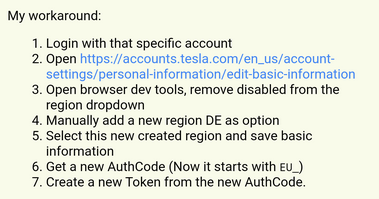
Are you able to try the fix in your browser?
PS: It seems you also have to change language in addition to country.
I haven’t done this by myself, so this is only forwarding the information.
>
>
> Some users are (randomly?) receiving "User revoked consent" 401 errors whenever …their access token is refreshed. This is happening multiple times a day, and it forces them to reauthorize their account over and over again - but the reauthorizations are automatic and do not prompt them for consent, so consent has not actually been revoked.
>
> They claim they are not altering their Tesla account in any way and have no other apps or services running.
>
> Here is an example Tesla OAuth response:
>
> \`\`\`
> HTTP 401
> {"error":"login\_required","error\_description":"User revoked consent","error\_uri":"https://auth.tesla.com/error/reference/c9e8ec46-74d8-4eb1-9ff1-caab349db462-1705012163951"}
> \`\`\`
---
### Author:  [@Jacco\_van\_Eck](https://community.homey.app/u/Jacco_van_Eck)
#### Post date: [January 24, 2024, 3:31pm UTC](https://community.homey.app/t/app-pro-tesla-car-energy-zero-emissions-zero-compromises/100824/115 "2024-01-24T15:31:39Z")
I tried it, but I’m not very good with HTML, so unfortunately I can’t do it. But we now know the root cause, thanks for that.
---
### Author:  [@RonnyW](https://community.homey.app/u/RonnyW)
#### Post date: [January 24, 2024, 3:39pm UTC](https://community.homey.app/t/app-pro-tesla-car-energy-zero-emissions-zero-compromises/100824/116 "2024-01-24T15:39:09Z")
I don’t know if the owner can change the region of your account. I don’t think so, because it should be independent accounts just connected with a role.
---
### Author:  [@RonnyW](https://community.homey.app/u/RonnyW)
#### Post date: [January 24, 2024, 8:56pm UTC](https://community.homey.app/t/app-pro-tesla-car-energy-zero-emissions-zero-compromises/100824/117 "2024-01-24T20:56:47Z")
New **test version 1.1.7** :
- Added **front/rear trunk control** :
Open front trunk or open/close rear trunk with flow action or device buttons.
To use device buttons, just enable button usage in car device settings. The buttons are diasbled as default to prevent accidential opening of trunks.
- Fixed location settings
@Moddycss FYI
---
### Author:  [@RonnyW](https://community.homey.app/u/RonnyW)
#### Post date: [January 25, 2024, 5:36pm UTC](https://community.homey.app/t/app-pro-tesla-car-energy-zero-emissions-zero-compromises/100824/118 "2024-01-25T17:36:45Z")
> [@RonnyW](#):
>
> There is no real fix for it. Another developer got it working with a region change in his Tesla account. But you have to tinker with hidden fields and Browser developer tools:
>
> 
@Jacco_van_Eck
Here is a step by step example.
Open this page in your browser.
[https://accounts.tesla.com/en\_us/account-settings/personal-information](https://accounts.tesla.com/en_us/account-settings/personal-information)
If it’s showing a 404 error, just click on the icon in top right corner and open account settings.


Then edit:
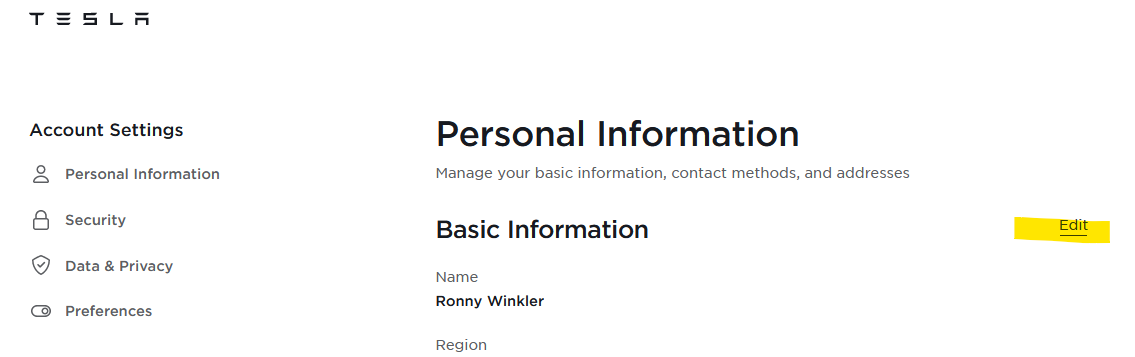
I think this is nor matching the owner region.

Hit STRG+Shift+K
Open the tree:
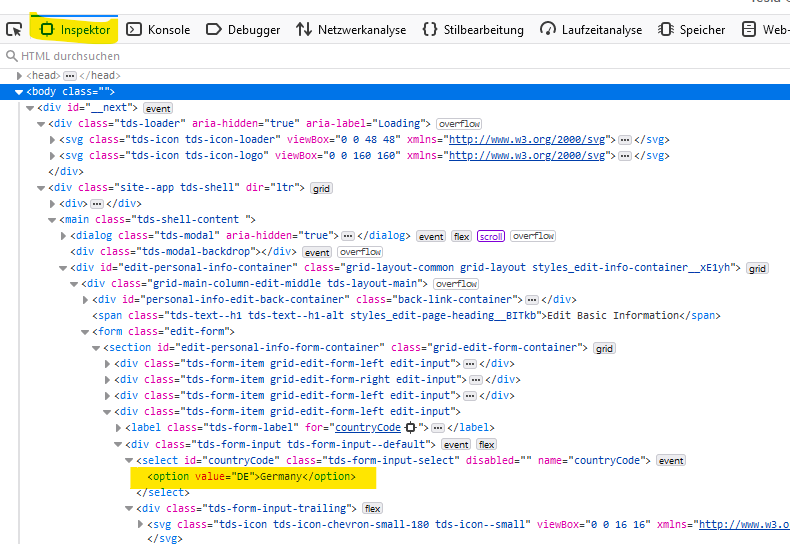
Right click. Then select “copy”. Then select “insert” and “after”

Double click on the values and change them to your needs (I don’t know the correct country code:-))
Delete the `disabled=""` part, too

Make both for Country and Language.
Then select the new added value.

Then store the settings.
But: You need to know the correct region/country of the owner/leasing company…
And I can understand if you don’t want to do such experiments 😄
---
### Author:  [@RonnyW](https://community.homey.app/u/RonnyW)
#### Post date: [January 25, 2024, 6:46pm UTC](https://community.homey.app/t/app-pro-tesla-car-energy-zero-emissions-zero-compromises/100824/119 "2024-01-25T18:46:31Z")
Short update for **navigation flow cards** …
The flow is working. The coordinates are sent to the car.
But…the position ist only shown on the map and the popup at th etop/left corner appers where you can start navigation.
Sending several locations with a order is showing up all the locations one after another, but the car donesn’t create a route.
So currently you can send one location and you have to start navigation manually in the car.
Edit: It seems this endpoint is only available for REST API
---
### Author:  [@RonnyW](https://community.homey.app/u/RonnyW)
#### Post date: [January 25, 2024, 9:20pm UTC](https://community.homey.app/t/app-pro-tesla-car-energy-zero-emissions-zero-compromises/100824/120 "2024-01-25T21:20:17Z")
New **test version 1.1.8** :
- Fixed interval. The interval was mnot changed to online interval when car state changed from asleep to online
- Force REST API for **navigation (location/GPS) flows**. You should now be able to send locations or coordinates to the car. The app forces REST API because it seems this function is not possible via Proxy/command protocol
- Translations
---
### Author:  [@danone](https://community.homey.app/u/danone)
#### Post date: [January 26, 2024, 2:26am UTC](https://community.homey.app/t/app-pro-tesla-car-energy-zero-emissions-zero-compromises/100824/121 "2024-01-26T02:26:07Z")
Hey @RonnyW , I am trying to change the login, but every time it just skips the email/password step and jumps straight to the box ticking page of what I want to allow the app to access.
I’ve tried everything that crossed my mind such as uninstall/re-install the app, remove the third party app from my Tesla account.
Basically skips this step.

I just want to use a different account to login and it seems that not possible once first login. Any ideas what could I try?
EDIT: It works on the web browser, so all good. It does the above from the Homey iOS app.
---
### Author:  [@RonnyW](https://community.homey.app/u/RonnyW)
#### Post date: [January 26, 2024, 7:21am UTC](https://community.homey.app/t/app-pro-tesla-car-energy-zero-emissions-zero-compromises/100824/122 "2024-01-26T07:21:31Z")
> [@danone](#):
>
> I am trying to change the login, but every time it just skips the email/password step and jumps straight to the box ticking page of what I want to allow the app to access.
Hi, that’s the Tesla auth popup. Tesla somehow caches your login or session.
After a while, the popup is shown again.
Some ways to solve can be:
- Use another browser (WebApp instead of MobileApp)
- Use another device
- Clear browser cookies (don’t now it that helps)
- Try browser in incognito mode
- Remove the app from your Tesla account (not the car). This will revoke yor authorization for the HomeyApp and you have to login again.
[Previous page](https://community.homey.app/t/app-pro-tesla-car-energy-zero-emissions-zero-compromises/100824.md?page=5)
[Next page](https://community.homey.app/t/app-pro-tesla-car-energy-zero-emissions-zero-compromises/100824.md?page=7)