# \[APP\]\[Pro\] Tesla Car & Energy - Zero emissions. Zero compromises
**URL:** https://community.homey.app/t/app-pro-tesla-car-energy-zero-emissions-zero-compromises/100824
**Category:** Apps
**Tags:** app, homey-pro
**Created:** [January 11, 2024, 5:15pm UTC](https://community.homey.app/t/app-pro-tesla-car-energy-zero-emissions-zero-compromises/100824 "2024-01-11T17:15:52Z")
**Posts on this page:** 20
**Page:** 55
### Author:  [@GRat](https://community.homey.app/u/GRat)
#### Post date: [November 4, 2025, 9:17pm UTC](https://community.homey.app/t/app-pro-tesla-car-energy-zero-emissions-zero-compromises/100824/1094 "2025-11-04T21:17:48Z")
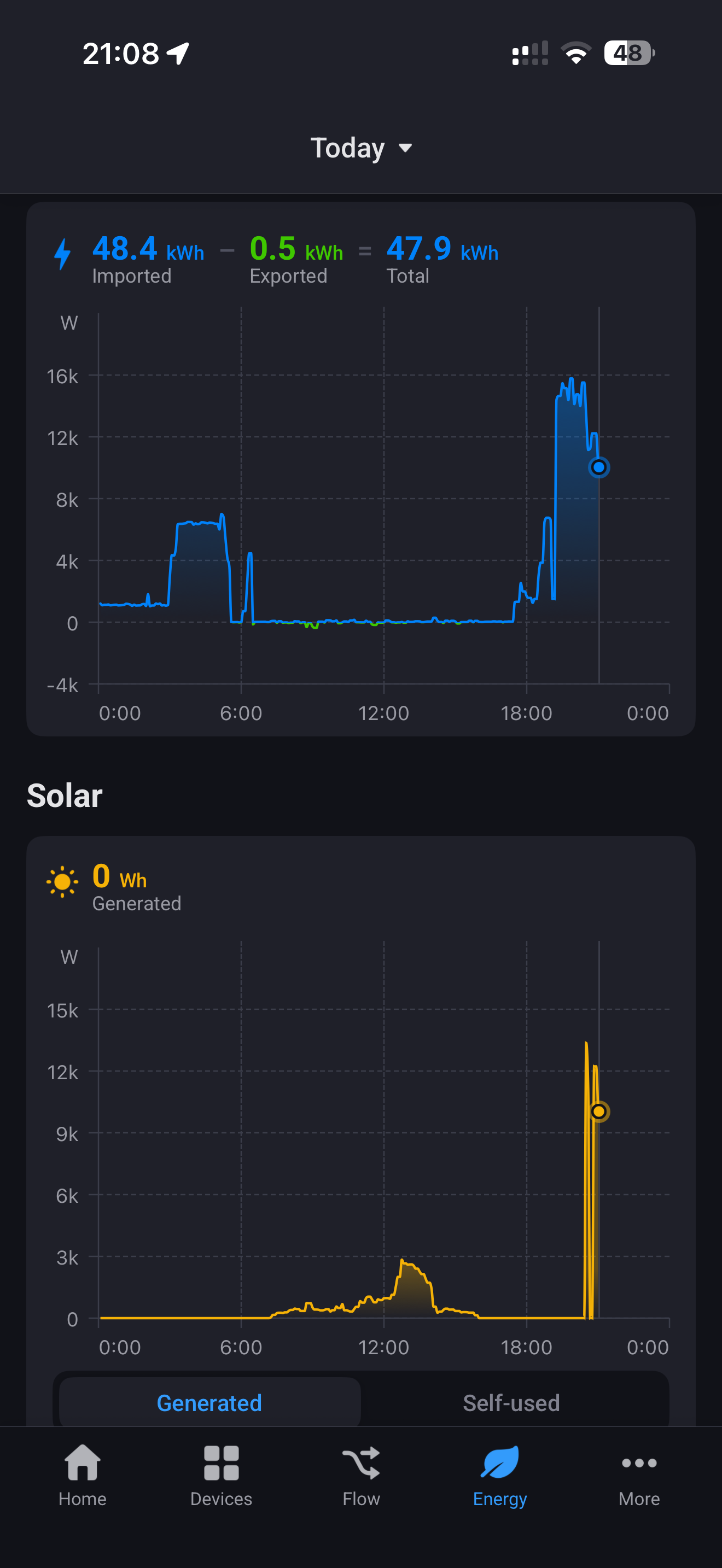
Evening @RonnyW i’ve enabled the energy integration awhile ago but it turned it off as I had been previously using a Home Assistant for my solar and house meter. Today I switched those off and reenable Tesla energy integration ( disabled exclude from energy) but I’m seeing a weird impact to the solar graph. As you can see from the image solar is showing at 9 o’clock in the evening, and seems to be tracking the site energy, but if I open the historical in the Tesla Solar card it shows correct information.
Just want to check if I’m doing something stupid or completely missing something.

---
### Author:  [@RonnyW](https://community.homey.app/u/RonnyW)
#### Post date: [November 4, 2025, 9:26pm UTC](https://community.homey.app/t/app-pro-tesla-car-energy-zero-emissions-zero-compromises/100824/1095 "2025-11-04T21:26:15Z")
The solar chart in HomeyEnergy is showing your production from 12 to 14:00. In the eveneing, another device seems to report energy. The chart is showing measure\_energy value of devices with class ‘solarpanel’. Do you have other dehices with this class (virtual devices, HA imported devices etc.) that have energy data with that amount?
---
### Author:  [@GRat](https://community.homey.app/u/GRat)
#### Post date: [November 4, 2025, 9:57pm UTC](https://community.homey.app/t/app-pro-tesla-car-energy-zero-emissions-zero-compromises/100824/1096 "2025-11-04T21:57:34Z")
Nothing, very strange. I’ve decided to completely remove and re-add to see what happens. I’ve reset the data as well in the Energy Dash as well.
Thanks! I’ll come back if still issues.
---
### Author:  [@GRat](https://community.homey.app/u/GRat)
#### Post date: [November 4, 2025, 10:46pm UTC](https://community.homey.app/t/app-pro-tesla-car-energy-zero-emissions-zero-compromises/100824/1097 "2025-11-04T22:46:53Z")
Completely deleted the existing solar and meter from HA.
Deleted and reinstalled the Tesla energy devices.
Reset the energy dashboard, deleted all data.
After a little wait for the data to start showing, I’m getting the same thing. Removed power meter (Energy site) and left solar, still showing. Removed solar and all not showing. Finally added site energy only back, get the issue. Will leave overnight / tomorrow and see what happens.
I’ve created a diagnostics report.
06431777-865f-4047-a48d-588ca6bab1df

Both solar and site energy enabled.

Both disabled.

Finally, added back only site energy enabled (Wilton Crescent Power) and showing the same issue.
Edit: this morning also noticed, my “site energy” is different from the one on your blog post (and from posted in post history from someone else)

my site energy.

From your blog post.
---
### Author:  [@RonnyW](https://community.homey.app/u/RonnyW)
#### Post date: [November 5, 2025, 6:04pm UTC](https://community.homey.app/t/app-pro-tesla-car-energy-zero-emissions-zero-compromises/100824/1098 "2025-11-05T18:04:15Z")
1.
Can you please first check if the solar panels are the only solar device?
[Homey Developer Tools](https://tools.developer.homey.app/tools/devices)
Search for “solarpanel” and check devices with this atribute:

1.
Do you see a corresponding value for the ~1kW up to 1,4kW?
Is there a value similar in Tesla mobile app?
I wil check the app later to see if a solar capability is somehow filled wrong.
---
### Author:  [@RonnyW](https://community.homey.app/u/RonnyW)
#### Post date: [November 5, 2025, 6:23pm UTC](https://community.homey.app/t/app-pro-tesla-car-energy-zero-emissions-zero-compromises/100824/1099 "2025-11-05T18:23:41Z")
> [@GRat](#):
>
> 06431777-865f-4047-a48d-588ca6bab1df
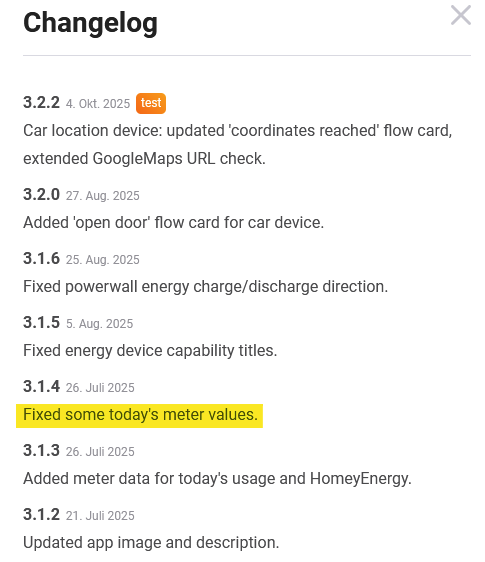
Please try the test version. I forgot to submit to approval 😅
This should fix some issues.
> **[Tesla Car & Energy | Homey](https://homey.app/en-us/app/com.tesla.car/Tesla-Car-&-Energy/test/)**
>
> Zero emissions. Zero compromises.
---
### Author:  [@GRat](https://community.homey.app/u/GRat)
#### Post date: [November 5, 2025, 10:51pm UTC](https://community.homey.app/t/app-pro-tesla-car-energy-zero-emissions-zero-compromises/100824/1100 "2025-11-05T22:51:30Z")
Added this evening, will test and revert.
Edit: Brilliant, many, many thanks - that seemed to have done it! All working 🎉
I’ll continue to monitor.

---
### Author:  [@Kai\_Engvik](https://community.homey.app/u/Kai_Engvik)
#### Post date: [November 6, 2025, 11:37am UTC](https://community.homey.app/t/app-pro-tesla-car-energy-zero-emissions-zero-compromises/100824/1101 "2025-11-06T11:37:02Z")
Anybody else experiencing this when trying to add the car to homey after inserting client ID and secret?

---
### Author:  [@RonnyW](https://community.homey.app/u/RonnyW)
#### Post date: [November 6, 2025, 1:31pm UTC](https://community.homey.app/t/app-pro-tesla-car-energy-zero-emissions-zero-compromises/100824/1102 "2025-11-06T13:31:30Z")
Please check in Tesla developer account that all URLs are correct. The URLs are shown in pair view wher you can also copy them.
Just insert all URLs in the correct fields in Tesla developer app creation view.
---
### Author:  [@Kai\_Engvik](https://community.homey.app/u/Kai_Engvik)
#### Post date: [November 6, 2025, 2:26pm UTC](https://community.homey.app/t/app-pro-tesla-car-energy-zero-emissions-zero-compromises/100824/1103 "2025-11-06T14:26:47Z")
It worked out in the end. After editing the URL, I had to go all the way out and log in from the beginning. then the URL was accepted.
---
### Author:  [@TonySopr](https://community.homey.app/u/TonySopr)
#### Post date: [November 6, 2025, 10:57pm UTC](https://community.homey.app/t/app-pro-tesla-car-energy-zero-emissions-zero-compromises/100824/1104 "2025-11-06T22:57:22Z")
Tried several different ones but unable to connect
422 Unprocessable Entity: {“response”:null,“error”:“Validation failed: Domain has already been taken”,“error\_description”:“”,"txid xxxxxxxxx
---
### Author:  [@RonnyW](https://community.homey.app/u/RonnyW)
#### Post date: [November 7, 2025, 7:25am UTC](https://community.homey.app/t/app-pro-tesla-car-energy-zero-emissions-zero-compromises/100824/1105 "2025-11-07T07:25:17Z")
You already registered a client\_id for your Homey. If you try tonise a second client\_id for a second car…that’s not working. You have to use use first used client\_id for the second car, too.
It’s a technical restriction caused by the car key assignment where the public Homey URL is registered to the client\_id.
If you have a second Homey. you could use a second client\_id.
---
### Author:  [@TonySopr](https://community.homey.app/u/TonySopr)
#### Post date: [November 7, 2025, 9:35am UTC](https://community.homey.app/t/app-pro-tesla-car-energy-zero-emissions-zero-compromises/100824/1106 "2025-11-07T09:35:50Z")
How to remove it? I sold that car
---
### Author:  [@RonnyW](https://community.homey.app/u/RonnyW)
#### Post date: [November 7, 2025, 10:04am UTC](https://community.homey.app/t/app-pro-tesla-car-energy-zero-emissions-zero-compromises/100824/1107 "2025-11-07T10:04:35Z")
The car is idependent from your app definition (the client ID in Tesla developer account).
I think you already reloved the car device from Homey.
To add a new car, use your already existing client\_id. The client\_id is ‘your’ Tesla developer account app for your subscription (or the 10€ free usage).
---
### Author:  [@aunmo](https://community.homey.app/u/aunmo)
#### Post date: [November 10, 2025, 11:06pm UTC](https://community.homey.app/t/app-pro-tesla-car-energy-zero-emissions-zero-compromises/100824/1108 "2025-11-10T23:06:09Z")
Hi.
Is there a max defrost function in the Homey app? Using the defrost function, the car only defrosts at medium fan mode/heat. If I use the native Tesla app, the button «Avis Bil» (Norwegian) sets max defrost, which is much more efficient than the defrost from the Homey app.
This flow was intended to remove ice from the car, but no chance. Easier to manually open the Tesla app and press «Avis Bil».


---
### Author:  [@RonnyW](https://community.homey.app/u/RonnyW)
#### Post date: [November 11, 2025, 4:09pm UTC](https://community.homey.app/t/app-pro-tesla-car-energy-zero-emissions-zero-compromises/100824/1109 "2025-11-11T16:09:55Z")
For me it’s working:

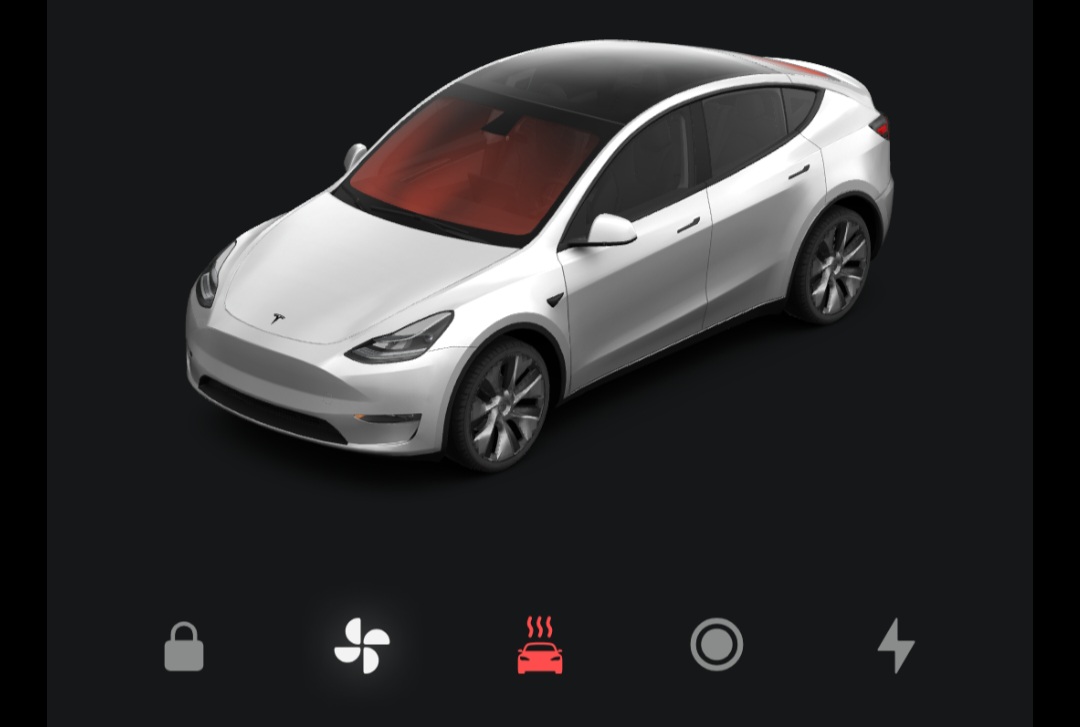
Hint: Defrost activates climate and defrost. If you deactivate defrost, climate keeps on and must be deactivated seperately if needed.
---
### Author:  [@aunmo](https://community.homey.app/u/aunmo)
#### Post date: [November 11, 2025, 5:36pm UTC](https://community.homey.app/t/app-pro-tesla-car-energy-zero-emissions-zero-compromises/100824/1110 "2025-11-11T17:36:29Z")
Setting the temperature at max (28°C) fixed it, then it says max defrost and the fans are working full mode.
So a defrost flow will continue defrosting «forever», and I would need another flow to disable defrost and climate after a certain amount of time? My plan is to set a daily timer, if the temperature is below a certain number and it’s a week day, then run flow. Some days I won’t leave at «15 minutes after running flow», so it would be stupid to let this go on forever.
---
### Author:  [@RonnyW](https://community.homey.app/u/RonnyW)
#### Post date: [November 11, 2025, 5:55pm UTC](https://community.homey.app/t/app-pro-tesla-car-energy-zero-emissions-zero-compromises/100824/1111 "2025-11-11T17:55:49Z")
I dod not set the temperature via flow. I only activated defrost via flow. Then all is done by the car
The command is doing the same like the defrost button in Tesla app. So defrost should go on to keep temperature if temperature is reached (I think). But did not try yet. It could also be that defrost is heating longer to get away ice and snow.
So…yes, stopping it after a time would be good 🤔
---
### Author:  [@aunmo](https://community.homey.app/u/aunmo)
#### Post date: [November 12, 2025, 8:39am UTC](https://community.homey.app/t/app-pro-tesla-car-energy-zero-emissions-zero-compromises/100824/1112 "2025-11-12T08:39:35Z")
It seems that setting a temperature card didn’t do any good. Defrost alone sets the temp at max, which also makes the fans go full speed. Setting the temperature below max «cancels» the (full) defrost, so to say.
Thanks!
---
### Author:  [@Kokkie](https://community.homey.app/u/Kokkie)
#### Post date: [November 12, 2025, 2:09pm UTC](https://community.homey.app/t/app-pro-tesla-car-energy-zero-emissions-zero-compromises/100824/1113 "2025-11-12T14:09:12Z")
Good afternoon, is it possible to turn off the beep that warns you when you’re speeding via Homey? For example, as soon as you put the car in drive, that it disables the beep using a flow?
[Previous page](https://community.homey.app/t/app-pro-tesla-car-energy-zero-emissions-zero-compromises/100824.md?page=54)
[Next page](https://community.homey.app/t/app-pro-tesla-car-energy-zero-emissions-zero-compromises/100824.md?page=56)