# \[APP\]\[Pro\] Tesla Car & Energy - Zero emissions. Zero compromises
**URL:** https://community.homey.app/t/app-pro-tesla-car-energy-zero-emissions-zero-compromises/100824
**Category:** Apps
**Tags:** app, homey-pro
**Created:** [January 11, 2024, 5:15pm UTC](https://community.homey.app/t/app-pro-tesla-car-energy-zero-emissions-zero-compromises/100824 "2024-01-11T17:15:52Z")
**Posts on this page:** 20
**Page:** 43
### Author:  [@TNimitz](https://community.homey.app/u/TNimitz)
#### Post date: [March 5, 2025, 10:45am UTC](https://community.homey.app/t/app-pro-tesla-car-energy-zero-emissions-zero-compromises/100824/854 "2025-03-05T10:45:14Z")
hi @RonnyW I was getting alot of pings (180+) on location after addign the car and tried removing it from homey and the cars virtual profile/key. But when re-adding the car I only get an error.
My idea was to re-add the car but without location sharing as I don’t really need it for my flow. 🙂
I’ve compiled a diagnostic report below to share if that helps.
cf4a970d-046f-49df-bfa2-c6145ef848c5
Thanx for a great app! Kudos
---
### Author:  [@RonnyW](https://community.homey.app/u/RonnyW)
#### Post date: [March 5, 2025, 10:57am UTC](https://community.homey.app/t/app-pro-tesla-car-energy-zero-emissions-zero-compromises/100824/855 "2025-03-05T10:57:31Z")
Location requests are done if a location device is added.
Without a location device in Homey, the data request doesn’t request location details.
But it can be that Tesla changed something…
And location data is only transferred on data requests. That’s independent of adding a car key (only needed for commands).
Your report:
- error is, that you try to use the (Homey)domain for another client\_id. That’s not possible if the domain was/is registered for an app at Tesla.
Use your ‘old’ client\_id.
Clear your browser cache and repair your car device (or remove/add). Then the oAuth popup should be shown again and you can deselect location scope.
If the oAuth popup is not shown, the browser has still a cookie active with your login session. Clear cookies for [tesla.com](http://tesla.com) and pair/repair again.
---
### Author:  [@Mads\_Kvols\_Hansen](https://community.homey.app/u/Mads_Kvols_Hansen)
#### Post date: [March 5, 2025, 11:17am UTC](https://community.homey.app/t/app-pro-tesla-car-energy-zero-emissions-zero-compromises/100824/856 "2025-03-05T11:17:55Z")
It is already activated… that’s why I’m curious if he could either fix it or add it…
---
### Author:  [@RonnyW](https://community.homey.app/u/RonnyW)
#### Post date: [March 5, 2025, 11:24am UTC](https://community.homey.app/t/app-pro-tesla-car-energy-zero-emissions-zero-compromises/100824/857 "2025-03-05T11:24:34Z")
Do you get an error message in your flow/device?
---
### Author:  [@Mads\_Kvols\_Hansen](https://community.homey.app/u/Mads_Kvols_Hansen)
#### Post date: [March 5, 2025, 11:25am UTC](https://community.homey.app/t/app-pro-tesla-car-energy-zero-emissions-zero-compromises/100824/858 "2025-03-05T11:25:08Z")
Am getting the error: REST command commandTrunk not supported yet for direct CommandProtocol
---
### Author:  [@RonnyW](https://community.homey.app/u/RonnyW)
#### Post date: [March 5, 2025, 11:26am UTC](https://community.homey.app/t/app-pro-tesla-car-energy-zero-emissions-zero-compromises/100824/859 "2025-03-05T11:26:11Z")
Ah, then it’s not implemented yet for commandAPI
I will check it soon and give you a feedback.
---
### Author:  [@RonnyW](https://community.homey.app/u/RonnyW)
#### Post date: [March 5, 2025, 11:47am UTC](https://community.homey.app/t/app-pro-tesla-car-energy-zero-emissions-zero-compromises/100824/860 "2025-03-05T11:47:23Z")
As addition: Location reading can be configured on several places:
- Tesla dev account: remove scope in your app definition
You won’t be able to set this scope in pair view
- Pairing (auth popup): don’t set scope for location
You can remove app permissions here. But the app doesn’t check scopes. If something is not allowed (commands), the flow actions will error.
- Remove or don’t add location device. Location details are read if a location device is added. The other way around you will need location permission for location device to get data.
---
### Author:  [@Mads\_Kvols\_Hansen](https://community.homey.app/u/Mads_Kvols_Hansen)
#### Post date: [March 5, 2025, 11:51am UTC](https://community.homey.app/t/app-pro-tesla-car-energy-zero-emissions-zero-compromises/100824/861 "2025-03-05T11:51:46Z")
Thanks!
---
### Author:  [@WouterL](https://community.homey.app/u/WouterL)
#### Post date: [March 9, 2025, 3:29pm UTC](https://community.homey.app/t/app-pro-tesla-car-energy-zero-emissions-zero-compromises/100824/862 "2025-03-09T15:29:43Z")
I managed to brick the Tesla app on my homey 😑
I had created a new developers account (on a different email address), instead of logging in with my existing Tesla account. After realizing my mistake, I deleted the wrong account and tried again with the correct account. However, it seems that my old account is still stored somewhere within the app.
After the step where I enter my (correct) Client ID and Secret I should go to the login page. However I get an error.
```auto
422 Unprocessable Entity: {"response":null,"error":"Validation failed: Domain has already been taken","error_description":"","txid":"9fa2dfdb217a73dd9a02c1d3bd25cc27"}
```
- Tried again several times
- App reinstalled
- Homey restarted
- Version 12.3.1, Model Early 2019)
---
### Author:  [@RonnyW](https://community.homey.app/u/RonnyW)
#### Post date: [March 9, 2025, 5:12pm UTC](https://community.homey.app/t/app-pro-tesla-car-energy-zero-emissions-zero-compromises/100824/863 "2025-03-09T17:12:44Z")
If you add a client\_id from your Tesla account i to the pair view, the public key and your domain (Homey specific URL) is bound to the Tesla app.
If this registration is done, it’s fixed. You can’t remove the binding of your URL and your app id. I think, also Tesla can’t do it. They also suggest to create a new app id in this case 😄
So better use your app id you added first (the other account).
It doesn’t make a difference.
You only have to clear browser cookies for [tesla.com](http://tesla.com) if you logged in first with your developer account to get a new login popup to login with your car account.
---
### Author:  [@RonnyW](https://community.homey.app/u/RonnyW)
#### Post date: [March 10, 2025, 8:07pm UTC](https://community.homey.app/t/app-pro-tesla-car-energy-zero-emissions-zero-compromises/100824/864 "2025-03-10T20:07:36Z")
New **test version 2.3.0** :
- Added security commands: lock/unlock doors, open/close trunk, open front trunk.
Hint: The old flow card “actuate trunk” is deprecated now. If you are using Command-API, please remove and use the new one where you can now select open/close trunk. The front trunk has an own flow card now to open it.
@Mads_Kvols_Hansen FYI and test 🙂
---
### Author:  [@Mads\_Kvols\_Hansen](https://community.homey.app/u/Mads_Kvols_Hansen)
#### Post date: [March 11, 2025, 7:43am UTC](https://community.homey.app/t/app-pro-tesla-car-energy-zero-emissions-zero-compromises/100824/865 "2025-03-11T07:43:39Z")
Hmm I can’t see a flow card for open/close the frunk. Only the trunk?
---
### Author:  [@RonnyW](https://community.homey.app/u/RonnyW)
#### Post date: [March 11, 2025, 8:00am UTC](https://community.homey.app/t/app-pro-tesla-car-energy-zero-emissions-zero-compromises/100824/866 "2025-03-11T08:00:59Z")
There is a card to open/close the trunk.
And a second one to open the front trunk.
The message itself allows to open and close, but the car only opens (or does a MX/MS also close the frunk?)
---
### Author:  [@Mads\_Kvols\_Hansen](https://community.homey.app/u/Mads_Kvols_Hansen)
#### Post date: [March 11, 2025, 9:02am UTC](https://community.homey.app/t/app-pro-tesla-car-energy-zero-emissions-zero-compromises/100824/867 "2025-03-11T09:02:14Z")
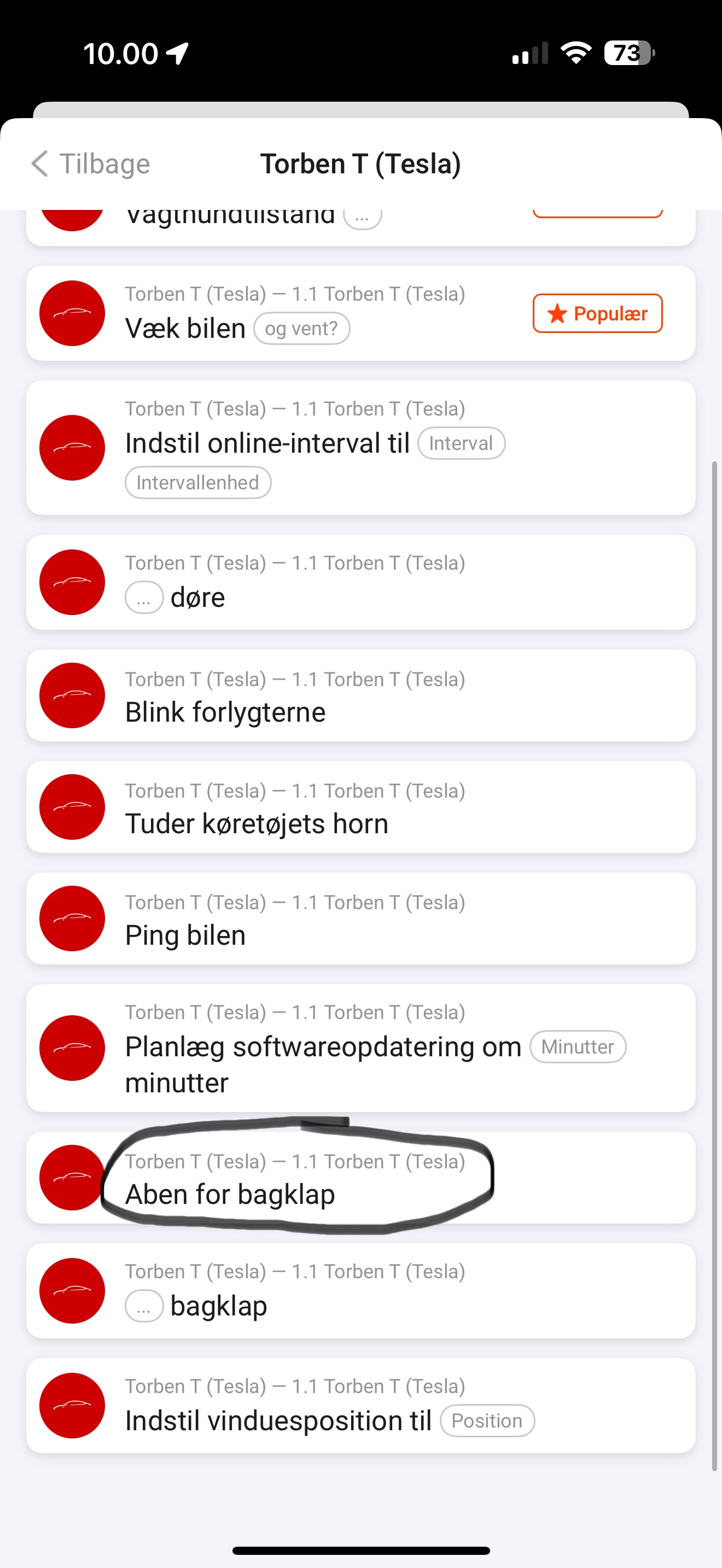
There’s this one. But it doesn’t say trunk. It says open trunk (in danish). Maybe it’s wrong and meant to be frunk instead of trunk?
---
### Author:  [@RonnyW](https://community.homey.app/u/RonnyW)
#### Post date: [March 11, 2025, 10:08am UTC](https://community.homey.app/t/app-pro-tesla-car-energy-zero-emissions-zero-compromises/100824/868 "2025-03-11T10:08:33Z")
Yes, it’s KI translation 🙂
Another try says: Åbn frontbagagerummet
Is that a better translation?
---
### Author:  [@Mads\_Kvols\_Hansen](https://community.homey.app/u/Mads_Kvols_Hansen)
#### Post date: [March 11, 2025, 12:19pm UTC](https://community.homey.app/t/app-pro-tesla-car-energy-zero-emissions-zero-compromises/100824/869 "2025-03-11T12:19:37Z")
I will test it when I come home later and give you feedback! ☺
---
### Author:  [@Mads\_Kvols\_Hansen](https://community.homey.app/u/Mads_Kvols_Hansen)
#### Post date: [March 11, 2025, 6:06pm UTC](https://community.homey.app/t/app-pro-tesla-car-energy-zero-emissions-zero-compromises/100824/870 "2025-03-11T18:06:08Z")
Tested it and works perfectly!
---
### Author:  [@Kim\_Kokholm](https://community.homey.app/u/Kim_Kokholm)
#### Post date: [March 11, 2025, 8:12pm UTC](https://community.homey.app/t/app-pro-tesla-car-energy-zero-emissions-zero-compromises/100824/871 "2025-03-11T20:12:30Z")
Hi @RonnyW
I’ve did some testing and the missing commands are now in place and working.
Maybe the vikings in here would like to provide correct translations - let us know.
I agree with @Mads_Kvols_Hansen , the frunk/trunk is mixed up.
I guess a qualified name could be: “Åbn frontbagagerummet”
I’ve just googled and the ones that is in doubt, used the phrase: frunk 😃
---
### Author:  [@RonnyW](https://community.homey.app/u/RonnyW)
#### Post date: [March 11, 2025, 8:52pm UTC](https://community.homey.app/t/app-pro-tesla-car-energy-zero-emissions-zero-compromises/100824/872 "2025-03-11T20:52:59Z")
Yeah, the translation was not correct for the new trunk card. I hope it’s ok now with
**new test version** 2.3.1 🙂
And even Tesla uses “Front Trunk” instead of “Frunk”, which is just colloquial.
---
### Author:  [@Willie\_Plompen](https://community.homey.app/u/Willie_Plompen)
#### Post date: [March 12, 2025, 10:01am UTC](https://community.homey.app/t/app-pro-tesla-car-energy-zero-emissions-zero-compromises/100824/873 "2025-03-12T10:01:41Z")
We are now 12 days in, and I’m already getting the “Tesla API limit exceeded” alert. How can I change this? I don’t understand any of this. I only use this app to open my garage door and turn on my air conditioning, so it doesn’t need to constantly request data
[Previous page](https://community.homey.app/t/app-pro-tesla-car-energy-zero-emissions-zero-compromises/100824.md?page=42)
[Next page](https://community.homey.app/t/app-pro-tesla-car-energy-zero-emissions-zero-compromises/100824.md?page=44)