# \[APP\]\[Pro\] Tesla Car & Energy - Zero emissions. Zero compromises
**URL:** https://community.homey.app/t/app-pro-tesla-car-energy-zero-emissions-zero-compromises/100824
**Category:** Apps
**Tags:** app, homey-pro
**Created:** [January 11, 2024, 5:15pm UTC](https://community.homey.app/t/app-pro-tesla-car-energy-zero-emissions-zero-compromises/100824 "2024-01-11T17:15:52Z")
**Posts on this page:** 20
**Page:** 3
### Author:  [@Nicolas](https://community.homey.app/u/Nicolas)
#### Post date: [January 17, 2024, 9:23am UTC](https://community.homey.app/t/app-pro-tesla-car-energy-zero-emissions-zero-compromises/100824/42 "2024-01-17T09:23:00Z")
Hi!
Thanks for this wonderful app, better than the last one!
I have all datas on “car” and “climate”, but I don’t have location datas on “location”. Update is OK, but location datas empty.
Should I do anything else to get these datas?
Thanks 🙂

---
### Author:  [@RonnyW](https://community.homey.app/u/RonnyW)
#### Post date: [January 17, 2024, 10:07am UTC](https://community.homey.app/t/app-pro-tesla-car-energy-zero-emissions-zero-compromises/100824/43 "2024-01-17T10:07:55Z")
> [@Nicolas](#):
>
> but location datas empty.
Hi,
due to privacy reasons you can activate location access in car device settings.
If this checkbox is set, the location device is updates - but you will get the privacy/location icon in your car.

As default, this checkbox is not set to avoid the privacy/location icon on the car display on every app request. This icon was added with software 2023.38
> **[2023.38.200.2 Tesla Versionshinweise - Tesla Software Updates](https://www.notateslaapp.com/de/software-updates/version/2023.38.200.2/versionshinweise)**
>
> Tesla Versionshinweise für Version 2023.38.200.2. Dieses Update enthält:
---
### Author:  [@TroRon](https://community.homey.app/u/TroRon)
#### Post date: [January 17, 2024, 12:32pm UTC](https://community.homey.app/t/app-pro-tesla-car-energy-zero-emissions-zero-compromises/100824/44 "2024-01-17T12:32:01Z")
Hi Ronny
Thanks for the new app. I’m slowly getting to grips with it, there’s a lot to adjust.
However, I do have one logical question:

According to the vehicle icon within Homey, this shows the status (D/R/P). Why can’t I put this value in a variable?
Resp. if I want to test this, I can only enter numbers and the values are not written.
Am I making a mistake?

I donated by paypal to support your work and time. Thanks
Best regards
Ronny
---
### Author:  [@StevenV](https://community.homey.app/u/StevenV)
#### Post date: [January 17, 2024, 12:41pm UTC](https://community.homey.app/t/app-pro-tesla-car-energy-zero-emissions-zero-compromises/100824/45 "2024-01-17T12:41:10Z")
Hi,
many thanks for the new app! I’m converting my old flows to this new app.
In the old app, I could reset the power meter:
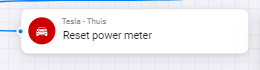
Is there a way to do this in the new app? I don’t see such action.
What I also noticed: once the car is parked, the speed and the shift state are not updating anymore. This results in eg a shift state of “R” and a small speed, even though the car is parked. This remains at these values until the car is started again and you start driving. Waking up & updating does not seem to resolve this. For instance screenshot below: shift and speed information are updated 5 hours ago, but car is parked since then, and I received the most recent status update 2 hours ago

---
### Author:  [@copiis](https://community.homey.app/u/copiis)
#### Post date: [January 17, 2024, 1:52pm UTC](https://community.homey.app/t/app-pro-tesla-car-energy-zero-emissions-zero-compromises/100824/46 "2024-01-17T13:52:05Z")
> [@RonnyW](#):
>
> You don’t need to create accounts. During pairing, the Homey app is added to your car (like a key card). It’s only registered in the car so the car can check the origin of a command and if it trusts the sender (app).
>
> It should look like this:
>
> 
I dont have this in the car, what for is this needed?
---
### Author:  [@RonnyW](https://community.homey.app/u/RonnyW)
#### Post date: [January 17, 2024, 2:15pm UTC](https://community.homey.app/t/app-pro-tesla-car-energy-zero-emissions-zero-compromises/100824/47 "2024-01-17T14:15:49Z")
> [@TroRon](#):
>
> According to the vehicle icon within Homey, this shows the status (D/R/P). Why can’t I put this value in a variable?
Hi, you found a 🪲
the trigger tokes has a wrong type. Should be a text token instead. I will be fixed in the next version (\>1.1.1). I still wait for review of 1.1.1.
---
### Author:  [@Nicolas](https://community.homey.app/u/Nicolas)
#### Post date: [January 17, 2024, 2:21pm UTC](https://community.homey.app/t/app-pro-tesla-car-energy-zero-emissions-zero-compromises/100824/48 "2024-01-17T14:21:10Z")
Thanks for your answer!
I can’t see the form you posted (with polling). Where is it?
My TM3 is on 2023.40 version. I have checked “allow mobile access” on my car display.
---
### Author:  [@RonnyW](https://community.homey.app/u/RonnyW)
#### Post date: [January 17, 2024, 2:22pm UTC](https://community.homey.app/t/app-pro-tesla-car-energy-zero-emissions-zero-compromises/100824/49 "2024-01-17T14:22:07Z")
> [@StevenV](#):
>
> many thanks for the new app! I’m converting my old flows to this new app.
The app has no own power meter. It’s showing the data provided by the API.
If you mean the “Energy added”, then it’s the added energy from last charging. It will start from 0 starting the next charging.

> [@StevenV](#):
>
> What I also noticed: once the car is parked, the speed and the shift state are not updating anymore. This results in eg a shift state of “R” and a small speed, even though the car is parked.
I’m not sure if the car doesn’t update these values when it’s locked.
The car has mobile network and can be waked up?
I think I have to check this in detail…
---
### Author:  [@RonnyW](https://community.homey.app/u/RonnyW)
#### Post date: [January 17, 2024, 2:23pm UTC](https://community.homey.app/t/app-pro-tesla-car-energy-zero-emissions-zero-compromises/100824/50 "2024-01-17T14:23:15Z")
> [@Nicolas](#):
>
> I can’t see the form you posted (with polling). Where is it?
It’s the “car” device settings.

---
### Author:  [@RonnyW](https://community.homey.app/u/RonnyW)
#### Post date: [January 17, 2024, 2:26pm UTC](https://community.homey.app/t/app-pro-tesla-car-energy-zero-emissions-zero-compromises/100824/51 "2024-01-17T14:26:31Z")
> [@copiis](#):
>
> I dont have this in the car, what for is this needed?
If you continue the app registration (in pair view after adding the car) in Tesla app, it should appear in your car.
It’s needed to send encrypted commands. Tesla is updating the cars in steps. New cars will need this from the start. Current cars are working longer without thsi registration. But Tesla announced to update all cars in Q1/2024.
Exceptions are only pre 2021 S/X models. They can only use REST service. But as you are using the proxy, I think it will ne needes in future.
---
### Author:  [@Nicolas](https://community.homey.app/u/Nicolas)
#### Post date: [January 17, 2024, 2:26pm UTC](https://community.homey.app/t/app-pro-tesla-car-energy-zero-emissions-zero-compromises/100824/52 "2024-01-17T14:26:35Z")
Wonderful! It rules. Thanks a lot 🙂
I donated by paypal to support your work and time. Thanks 🙂
---
### Author:  [@RonnyW](https://community.homey.app/u/RonnyW)
#### Post date: [January 17, 2024, 2:44pm UTC](https://community.homey.app/t/app-pro-tesla-car-energy-zero-emissions-zero-compromises/100824/53 "2024-01-17T14:44:20Z")
Who sent diagnostic logs about 403 error?
I only see the app is started but no other logs. Where exactly do you get this error? Can you provide screenshots?
---
### Author:  [@RonnyW](https://community.homey.app/u/RonnyW)
#### Post date: [January 17, 2024, 4:42pm UTC](https://community.homey.app/t/app-pro-tesla-car-energy-zero-emissions-zero-compromises/100824/54 "2024-01-17T16:42:12Z")
Live **version 1.1.1** is online.
Due to permission change (added Homey location) an auto update won’t work. So **please update manually** (install from app store) if you stuck at version 1.0.4.
> **[Tesla](https://homey.app/en-us/app/com.tesla.car/Tesla/)**
>
> Zero emissions. Zero compromises.
---
### Author:  [@Zdenik03](https://community.homey.app/u/Zdenik03)
#### Post date: [January 17, 2024, 5:04pm UTC](https://community.homey.app/t/app-pro-tesla-car-energy-zero-emissions-zero-compromises/100824/55 "2024-01-17T17:04:51Z")
Thank you for the new app!
The commands to control the car work, but unfortunately navigating to an address doesn’t work.
Flow will work fine. But it won’t transfer to the car. Neither option works.
Coordinates or google address. Is there anything else I need to set up?
Thank you for your advice.

---
### Author:  [@RonnyW](https://community.homey.app/u/RonnyW)
#### Post date: [January 17, 2024, 5:19pm UTC](https://community.homey.app/t/app-pro-tesla-car-energy-zero-emissions-zero-compromises/100824/56 "2024-01-17T17:19:45Z")
I only added it without tests. I hoped without API errors it would work.
But perhaps it’s a bug in Teslas command API.
I put it in my todo list.
---
### Author:  [@RonnyW](https://community.homey.app/u/RonnyW)
#### Post date: [January 17, 2024, 9:32pm UTC](https://community.homey.app/t/app-pro-tesla-car-energy-zero-emissions-zero-compromises/100824/57 "2024-01-17T21:32:09Z")
New **test version 1.1.2** :
- Added **Homey location** to location selection.

You can now use your home/Homey location without defining a location in device settings.
- Added location based power measurement for Homey Energy dashboard:
Activate charge power in battery device settings. additionally you can set a location (optional). If a location is set, the charge power is only shown in Homey energy dashboard, if your car is at this location (home wallbox). This way the energy is not logged if your are charging in the way.

If you already used this in previous version, the capability perhaps got removed accidentially on app restart. In this case the checkbox is set in device settings, but the capability is not shown in device and Homey energy.
Please uncheck the checkbox in settings, save, and check again. The capability should be added again.
- Fixed “P” shift state.
- Added shift state condition.
---
### Author:  [@RonnyW](https://community.homey.app/u/RonnyW)
#### Post date: [January 18, 2024, 10:50am UTC](https://community.homey.app/t/app-pro-tesla-car-energy-zero-emissions-zero-compromises/100824/58 "2024-01-18T10:50:01Z")
For iOS users trying to register the app in their cars: Please close the Tesla app on the phone and try again.
>
>
> To reproduce:
>
> 1. Have the Tesla app open in ios
> 2. Select the https://tesla.…com/\_ak/your-domain.com link
> 3. Will show a splash screen saying to install the app or finish setup
> 4. Click finish setup
>
> Expected behaviour:
> Redirect to Tesla app and show authorization modal - "Allow third-party access to your vehicle"
>
> Actual behaviour:
> Redirect to Tesla app and nothing happens
>
> It only seems to work if the Tesla app is closed first, which adds another step / point of failure, and it is quite a tricky and long flow already with many points where things can go wrong.
---
### Author:  [@sbjarnas](https://community.homey.app/u/sbjarnas)
#### Post date: [January 18, 2024, 3:37pm UTC](https://community.homey.app/t/app-pro-tesla-car-energy-zero-emissions-zero-compromises/100824/59 "2024-01-18T15:37:16Z")
Installed 1.1.2 which now shows the Homey charge power. This is in KW values and seem to be a multiplication by 1000 of a integer KW value. Does the Tesla API only give int KW values (not in fractions like 5.2?)
---
### Author:  [@RonnyW](https://community.homey.app/u/RonnyW)
#### Post date: [January 18, 2024, 3:40pm UTC](https://community.homey.app/t/app-pro-tesla-car-energy-zero-emissions-zero-compromises/100824/60 "2024-01-18T15:40:54Z")
This is an issue in v.1.1.2 which is corrected in test version 1.1.3.
Yes, Tesla returns kW and it’s not converted to W for Homeys needs.
---
### Author:  [@RonnyW](https://community.homey.app/u/RonnyW)
#### Post date: [January 18, 2024, 3:44pm UTC](https://community.homey.app/t/app-pro-tesla-car-energy-zero-emissions-zero-compromises/100824/61 "2024-01-18T15:44:24Z")
New **test version 1.1.4** :
- Extended **Google Maps short link check**. Short links can lead to different long URLs with different layout. If Google Links are not recognized (coordinates are not set after storing location device settings - and reopen in WebApp), please send me a short link or the resulting logn URL via PM.
- Added further **condition cards** for boolean (yes/no) capabilities.
> **[Tesla](https://homey.app/en-us/app/com.tesla.car/Tesla/)**
>
> Zero emissions. Zero compromises.
[Previous page](https://community.homey.app/t/app-pro-tesla-car-energy-zero-emissions-zero-compromises/100824.md?page=2)
[Next page](https://community.homey.app/t/app-pro-tesla-car-energy-zero-emissions-zero-compromises/100824.md?page=4)