# \[APP\]\[Pro\] Tesla Car & Energy - Zero emissions. Zero compromises
**URL:** https://community.homey.app/t/app-pro-tesla-car-energy-zero-emissions-zero-compromises/100824
**Category:** Apps
**Tags:** app, homey-pro
**Created:** [January 11, 2024, 5:15pm UTC](https://community.homey.app/t/app-pro-tesla-car-energy-zero-emissions-zero-compromises/100824 "2024-01-11T17:15:52Z")
**Posts on this page:** 20
**Page:** 16
### Author:  [@RonnyW](https://community.homey.app/u/RonnyW)
#### Post date: [April 21, 2024, 10:32am UTC](https://community.homey.app/t/app-pro-tesla-car-energy-zero-emissions-zero-compromises/100824/305 "2024-04-21T10:32:45Z")
Please follow the registration after car device pairing.
Please go to car device maintenance settings and start car registration again.
You have to give the app access in your car via Tesla app.
---
### Author:  [@RonnyW](https://community.homey.app/u/RonnyW)
#### Post date: [April 21, 2024, 4:11pm UTC](https://community.homey.app/t/app-pro-tesla-car-energy-zero-emissions-zero-compromises/100824/307 "2024-04-21T16:11:49Z")
Did you get it to work?
---
### Author:  [@D0N](https://community.homey.app/u/D0N)
#### Post date: [April 22, 2024, 7:40am UTC](https://community.homey.app/t/app-pro-tesla-car-energy-zero-emissions-zero-compromises/100824/308 "2024-04-22T07:40:39Z")
Hey Ronny
I’m not able to add the app as a key. Is it only possible for newer cars? I’ve a legacy model S (2017).
I reach the point where i can SEt Up Thirt-Partty Virtual Key, but when i tap “Finish Setup” nothing happens… I’m logged in on my account and Tesla App is installed.
Any idea?
Thank you
Angelo
---
### Author:  [@RonnyW](https://community.homey.app/u/RonnyW)
#### Post date: [April 22, 2024, 7:43am UTC](https://community.homey.app/t/app-pro-tesla-car-energy-zero-emissions-zero-compromises/100824/309 "2024-04-22T07:43:35Z")
Hi, yes. that could be a reason. Then your car should still support the API without the car registration.
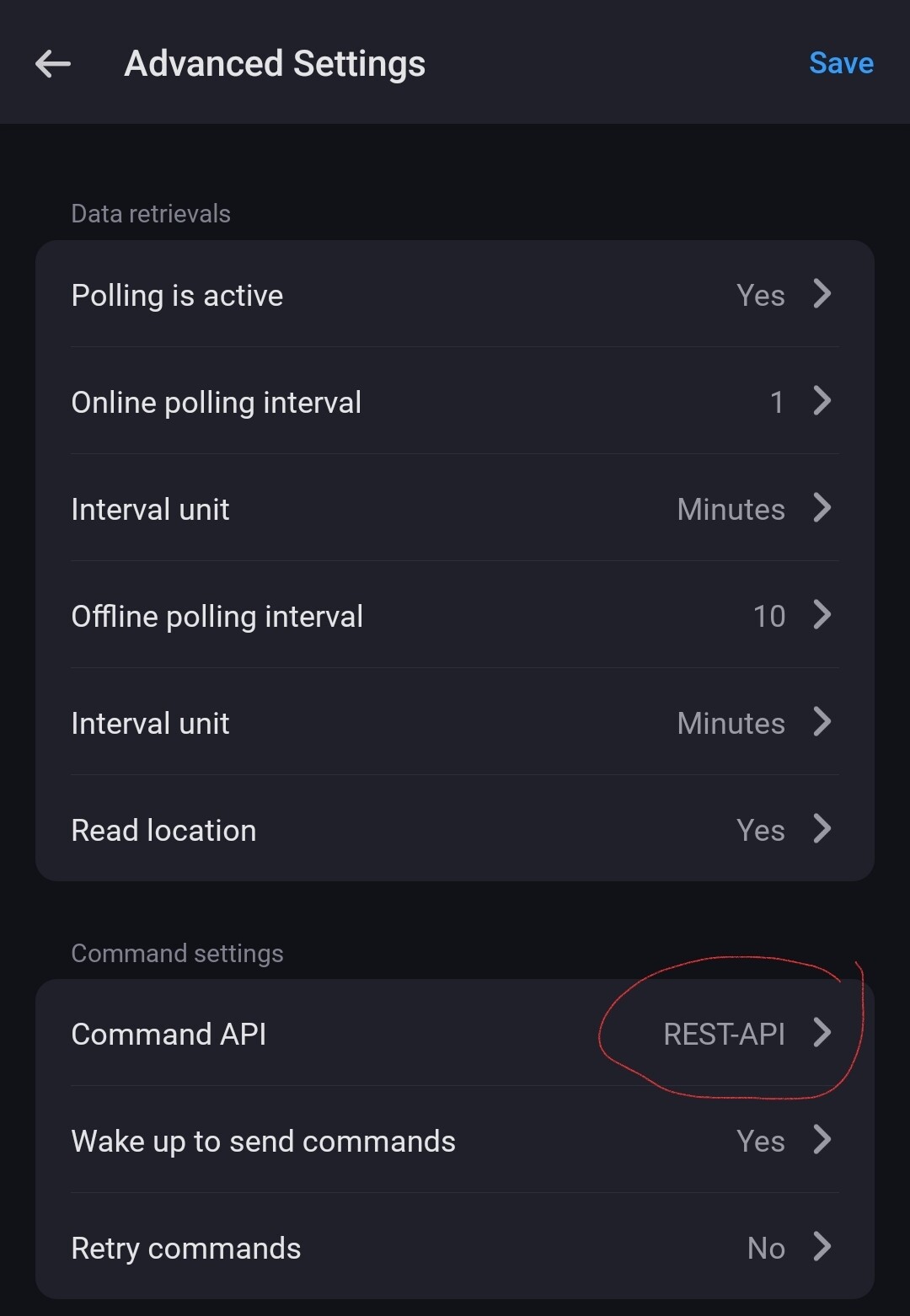
Please select the “REST API” in your car device settings as command API. That’s the legacy API for the older S/X models.
---
### Author:  [@D0N](https://community.homey.app/u/D0N)
#### Post date: [April 22, 2024, 9:17am UTC](https://community.homey.app/t/app-pro-tesla-car-energy-zero-emissions-zero-compromises/100824/310 "2024-04-22T09:17:00Z")
OK thanks. Is there something more to do after switch to rest-api? i still cannot send commands, but i receive data from the car…
API-Status is “OK” in the app.
---
### Author:  [@RonnyW](https://community.homey.app/u/RonnyW)
#### Post date: [April 22, 2024, 11:49am UTC](https://community.homey.app/t/app-pro-tesla-car-energy-zero-emissions-zero-compromises/100824/311 "2024-04-22T11:49:23Z")
Please check if you activated this option:
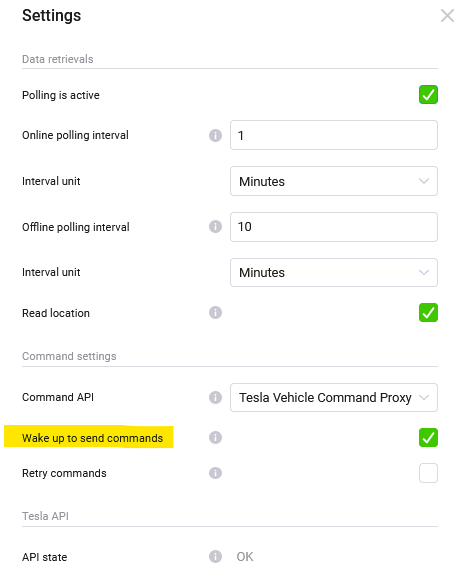
It wakes up the car is it’s sleeping - makes using flows easier.
Else you have to wake up manually vie car device or flow.
That would be the option I can imagign prerventing you to send commands.
I can’t see via API whether a car needs the key registration or not. So it’s a bit of hit or miss 🙂
> [@D0N](#):
>
> I reach the point where i can SEt Up Thirt-Partty Virtual Key, but when i tap “Finish Setup” nothing happens… I’m logged in on my account and Tesla App is installed.
Another idea…Sometimes, you get forwarded to the Tesla webpage only and not to the app. Then you can select “open in app” on top of the page.
And the car must be awake and your phone must be at your car (I think) to allow inserting the key into your car. Perhaps the app can’t proceed if the car is offline.
---
### Author:  [@RonnyW](https://community.homey.app/u/RonnyW)
#### Post date: [April 24, 2024, 3:40pm UTC](https://community.homey.app/t/app-pro-tesla-car-energy-zero-emissions-zero-compromises/100824/312 "2024-04-24T15:40:28Z")
New **Live version 1.4.1** :
- Added car state check before sending commands.
---
### Author:  [@RonnyW](https://community.homey.app/u/RonnyW)
#### Post date: [April 24, 2024, 3:47pm UTC](https://community.homey.app/t/app-pro-tesla-car-energy-zero-emissions-zero-compromises/100824/313 "2024-04-24T15:47:53Z")
New **test version 1.4.2** :
- Added user presence for car device (flow trigger and condition).
If a user is recognized a present or absent based on the car key (mobile phone), the corresponding triggers are started. In addition there is a flow condition for presence.
Currently, the capability is not shown in the devive because this infoamtion would mainly be used in flows.

---
### Author:  [@RonnyW](https://community.homey.app/u/RonnyW)
#### Post date: [April 25, 2024, 4:21pm UTC](https://community.homey.app/t/app-pro-tesla-car-energy-zero-emissions-zero-compromises/100824/314 "2024-04-25T16:21:04Z")
⚠
Who is flooding the Proxy API with a mass of **set-charging** command and get’s a 503 error all the time?
**It’s not so nice for me an Tesla when someone is hammering the API every second!**
And It’s only one car doing such things. So please check your flows to prevent such an amount of API calls!
I ithink I have to add an rate limit to prevent server issues 😣
---
### Author:  [@Bluetexon](https://community.homey.app/u/Bluetexon)
#### Post date: [April 26, 2024, 6:34am UTC](https://community.homey.app/t/app-pro-tesla-car-energy-zero-emissions-zero-compromises/100824/315 "2024-04-26T06:34:52Z")
Hey Ronny!
I am sure it is not me, because I do not have any set-charging commands in use. But I am curious: is there a way to check what commands are getting sent? Some kind of log?
Also I am not sure what a proper polling interval would be. The min-value is 1 second, but doesn’t add a lot of strain to your backend? But it would still be cool to use a 1 second interval for good data freshness.
---
### Author:  [@RonnyW](https://community.homey.app/u/RonnyW)
#### Post date: [April 26, 2024, 11:24am UTC](https://community.homey.app/t/app-pro-tesla-car-energy-zero-emissions-zero-compromises/100824/316 "2024-04-26T11:24:51Z")
> [@Bluetexon](#):
>
> is there a way to check what commands are getting sent? Some kind of log?
Not in detail. But every flow action or button, that causes a change in your car, is a command.
Most of them are not a problem (open/close, start charging, set temperature …), because you will act only once.
A problem are commands sent in short intervals (in seconds). I think set\_charge\_amps is a command that is often changed in flows dependent on PV production amount.
This traffic is passed through “my” server to make the encryption and then it’s passed to Tesla server that’s passing forward to your car. Tesla can scale their servers better. But at the end, Tesla will cut the traffic with rate limits if it gets exploited.
And at the end, your car must react on the commands. I can’t imaging that a car can adjust the charge amps in such short intervals.
> [@Bluetexon](#):
>
> The min-value is 1 second, but doesn’t add a lot of strain to your backend? But it would still be cool to use a 1 second interval for good data freshness.
I give the possibility to adjust the interval to individual needs. But it’s like in real life a question of f live and let live 😉
A interval in seconds will cause a high traffic on Tesla servers (for polling only the Tesla server is affected). And your car has to provide the date in this interval.
Currently I don’t limit this possibility. But Tesla will do if many users (also from other apps) overdo it.
I suggest to use an interval that offers you a good balance between instant update and load distribution across all users. For me, 1min. is a good compromise. Thats fast enough for common cases to get informed about location changes or charging updates. I hope most users are not too selfish 🙂
As reminder for all: That’s an anounced but not active rate limit for FleetAPI:

There is no update from Tesla if or how they will activate a rate limit in future.
---
### Author:  [@R5Turbo](https://community.homey.app/u/R5Turbo)
#### Post date: [May 7, 2024, 9:59pm UTC](https://community.homey.app/t/app-pro-tesla-car-energy-zero-emissions-zero-compromises/100824/317 "2024-05-07T21:59:01Z")
I’ve an issue with the location for my Model Y Performance. Only the first and the last icon will be updated. Any ideas how to fix this?

App Version v1.4.1
---
### Author:  [@RonnyW](https://community.homey.app/u/RonnyW)
#### Post date: [May 8, 2024, 4:45am UTC](https://community.homey.app/t/app-pro-tesla-car-energy-zero-emissions-zero-compromises/100824/318 "2024-05-08T04:45:59Z")
Hi,
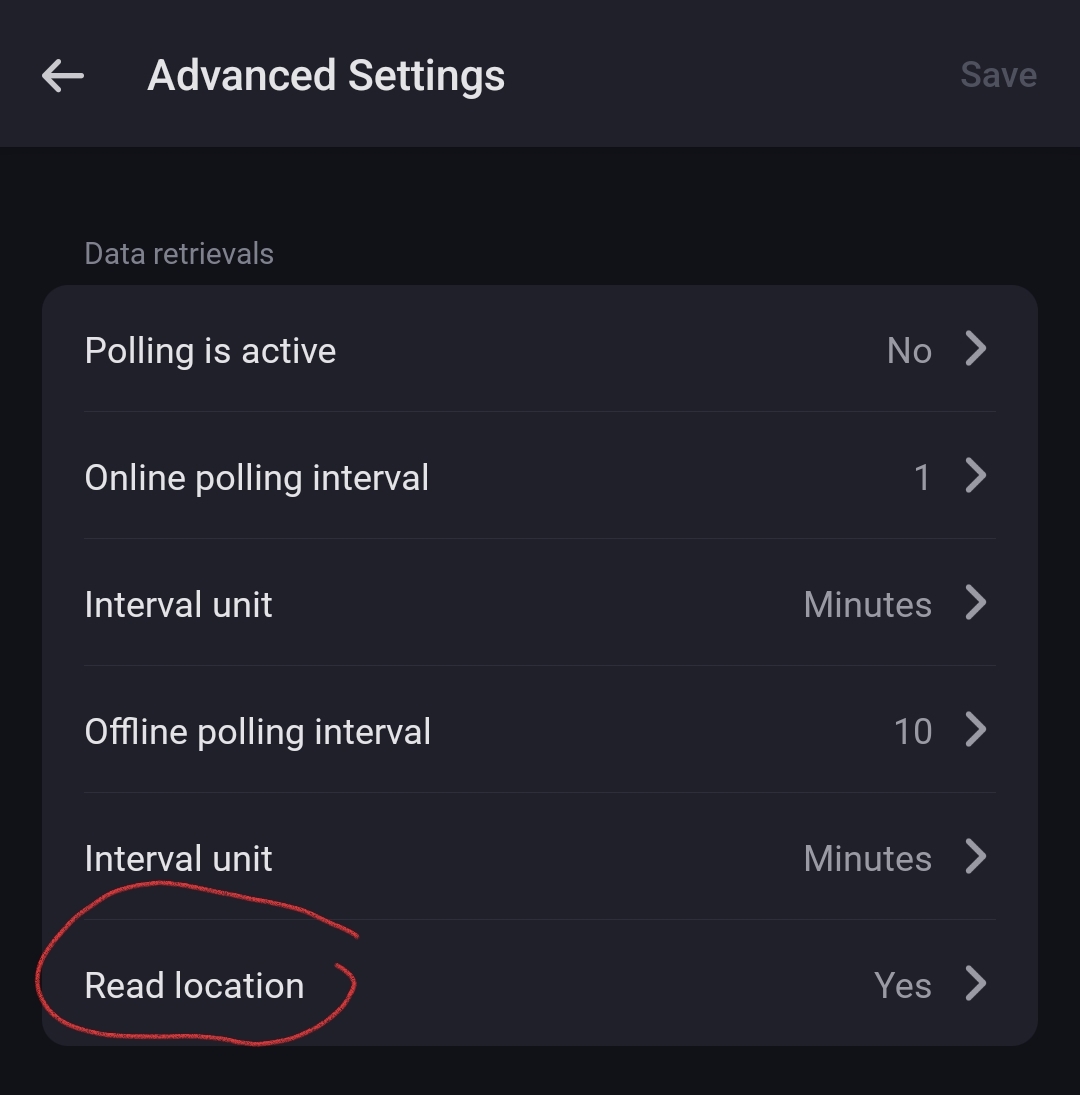
location reading is an opt-in for privacy reason.
You can activate it in car device settings.
---
### Author:  [@R5Turbo](https://community.homey.app/u/R5Turbo)
#### Post date: [May 8, 2024, 5:10am UTC](https://community.homey.app/t/app-pro-tesla-car-energy-zero-emissions-zero-compromises/100824/319 "2024-05-08T05:10:03Z")
Perfect, thanks a lot. To be honest, I didn‘t expect that option to be in the main car settings. I was searching in the „location“ app settings, …
Btw. I really appreciate your effort for the app. Thanks!
---
### Author:  [@RonnyW](https://community.homey.app/u/RonnyW)
#### Post date: [May 8, 2024, 5:26am UTC](https://community.homey.app/t/app-pro-tesla-car-energy-zero-emissions-zero-compromises/100824/320 "2024-05-08T05:26:40Z")
The car device is the “gateway” that’s handling the API and all connections. The other devices are just “outsourced” parts of car date to get a better handling for data/flows.
The location option is part of the API access, so I placed it next to the API settings.
But thinking about this…perhaps it would be also a good alternative to read location data if a location device is added - and use this device as opt-in.
Reason for this option is, that reading the location causes the privacy alert icon to be shown on the car display. That’s why it’s optional.
---
### Author:  [@R5Turbo](https://community.homey.app/u/R5Turbo)
#### Post date: [May 8, 2024, 6:12am UTC](https://community.homey.app/t/app-pro-tesla-car-energy-zero-emissions-zero-compromises/100824/321 "2024-05-08T06:12:32Z")
I fully get your point and I was aware that the “car” is the main app which deals with the API. Just that you understand me as user, here my thoughts which finally lead to this thread ;-):
1. I didn’t expect that there is a global setting for enabling location settings
2. Based on assumption 1, I checked the location settings. I would have been checked the main app if nothing would have been worked in the location app, but two icon were there with data. So I’ve restarted the registering process of the app but with (obviously) the same result.
---
### Author:  [@RonnyW](https://community.homey.app/u/RonnyW)
#### Post date: [May 8, 2024, 8:22am UTC](https://community.homey.app/t/app-pro-tesla-car-energy-zero-emissions-zero-compromises/100824/322 "2024-05-08T08:22:00Z")
> [@R5Turbo](#):
>
> Just that you understand me as user
I welcome feedback to improve usage 👍
> [@R5Turbo](#):
>
> but two icon were there with data
You are right. The technical reason is, that the data is passed to the location device (which is updating the timestamp), but it doesn’t set location data because it’s not included in the API response.
I’ll check if I can improve this process.
---
### Author:  [@RonnyW](https://community.homey.app/u/RonnyW)
#### Post date: [May 8, 2024, 9:02am UTC](https://community.homey.app/t/app-pro-tesla-car-energy-zero-emissions-zero-compromises/100824/323 "2024-05-08T09:02:06Z")
New **Live version 1.5.0** including all updates sinde 1.4.1:
- Added **user presence** for **car** device (flow trigger and condition).
- Added **rate limit** and app version check for proxy **commands**.
The app has a rate limit now to prevent undesirably high usage.
The app is checking the amount of commands in a 10 minute window. You can send up to 60 commands in this time frame (=1 command every 10sec).
You can have some usage peaks as long the amount keeps below 60 commands in the 10min period.
The **rate limit usage is shown in car device settings** as percentage. If the usage goes above 100%, the command gets blocked.
In the next days, an **app version check** will be added.
If you are sending commands, the proxy server checks the Homey app version. If it’s too old, the request gets blocked with an error message.
Best would be to **activate auto update** for this app to keep it up to date.
---
### Author:  [@RonnyW](https://community.homey.app/u/RonnyW)
#### Post date: [May 9, 2024, 7:23pm UTC](https://community.homey.app/t/app-pro-tesla-car-energy-zero-emissions-zero-compromises/100824/324 "2024-05-09T19:23:39Z")
New **test version 1.5.1** :
- Added insights and flows for rate limit usage.
- Changed location request: It’s requested if a location device is present instead of activation in device settings.
---
### Author:  [@RonnyW](https://community.homey.app/u/RonnyW)
#### Post date: [May 11, 2024, 11:15am UTC](https://community.homey.app/t/app-pro-tesla-car-energy-zero-emissions-zero-compromises/100824/325 "2024-05-11T11:15:27Z")
**The app version check is now active.**
Please make sure you have **installed at least version 1.5.0 of the Homey app** to be able to send commands. Please anable auto updates, that necessary changes (due to API/proxy changes) can be installed in time to keep your app working proberly.
[Previous page](https://community.homey.app/t/app-pro-tesla-car-energy-zero-emissions-zero-compromises/100824.md?page=15)
[Next page](https://community.homey.app/t/app-pro-tesla-car-energy-zero-emissions-zero-compromises/100824.md?page=17)