# \[App\]\[Pro\]Soma Connect App (Release 2.0.1)
**URL:** https://community.homey.app/t/app-pro-soma-connect-app-release-2-0-1/22000
**Category:** Apps
**Created:** [December 6, 2019, 1:38pm UTC](https://community.homey.app/t/app-pro-soma-connect-app-release-2-0-1/22000 "2019-12-06T13:38:08Z")
**Posts on this page:** 20
**Page:** 3
### Author:  [@Amersfoort](https://community.homey.app/u/Amersfoort)
#### Post date: [September 17, 2023, 9:28am UTC](https://community.homey.app/t/app-pro-soma-connect-app-release-2-0-1/22000/41 "2023-09-17T09:28:16Z")
I am using the new Soma Connect U1, which is a 2.4 GHz Wi-Fi USB stick, to connect with 3 Soma Tilt 2 motors. The Soma Connect App 2.0.1 does not recognize the Wifi Stick.
In the app settings on the tab Bridges, the Detected Bridges contains the value null.
Should this configuration above be supported, or can I use it setting up things manually. I use Homey 2023.
---
### Author:  [@Amersfoort](https://community.homey.app/u/Amersfoort)
#### Post date: [October 10, 2023, 11:59am UTC](https://community.homey.app/t/app-pro-soma-connect-app-release-2-0-1/22000/42 "2023-10-10T11:59:53Z")
This Soma Connect App is an offical app. The Soma Connect U1 has been available since January 2023 and is the only new connector one can buy today, but still not supported. What is the status?
---
### Author:  [@Adrian\_Rockall](https://community.homey.app/u/Adrian_Rockall)
#### Post date: [October 10, 2023, 1:27pm UTC](https://community.homey.app/t/app-pro-soma-connect-app-release-2-0-1/22000/43 "2023-10-10T13:27:18Z")
As far as I am aware the U1 is compatible with the other Soma Connect modules, so it should work just the same.
---
### Author:  [@Amersfoort](https://community.homey.app/u/Amersfoort)
#### Post date: [October 10, 2023, 2:20pm UTC](https://community.homey.app/t/app-pro-soma-connect-app-release-2-0-1/22000/44 "2023-10-10T14:20:54Z")
In the Homey Soma app config my bridge value contains a null value even after polling every 5 seconds.
In the Soma/Smart shades Android app there is a different step for the previous Raspberry PI oriented connector and the current Soma Connect U1.
According the Soma website: “We have just released a new SOMA Connect Bridge which has totally custom (non-Raspberry Pi) hardware made completely by SOMA”. I think the functionality could be the same, but technically it is something different.
I have a IP Address of the U1, but it seems not possible anymore to use this manually in the Homey Soma app. Some help is appreciated.
---
### Author:  [@Adrian\_Rockall](https://community.homey.app/u/Adrian_Rockall)
#### Post date: [October 11, 2023, 12:51am UTC](https://community.homey.app/t/app-pro-soma-connect-app-release-2-0-1/22000/45 "2023-10-11T00:51:17Z")
When I get back from Holiday I will look into it and ask my contact at Soma if they haven’t published a new API document for it.
---
### Author:  [@Jamie](https://community.homey.app/u/Jamie)
#### Post date: [October 27, 2023, 6:25am UTC](https://community.homey.app/t/app-pro-soma-connect-app-release-2-0-1/22000/46 "2023-10-27T06:25:33Z")
Hey, I was hoping you could help me out.
My Soma Connect was running on a IoT wireless network (separate from Homey), this was working well. But I had to change the IP, and now because you can no longer set its IP … the device can not be found via mDNS (separate wifi) I can no longer use the app?
Any chance that setting the IP could be re-added when a bridge isnt found via mDNS?
---
### Author:  [@Adrian\_Rockall](https://community.homey.app/u/Adrian_Rockall)
#### Post date: [October 27, 2023, 6:32am UTC](https://community.homey.app/t/app-pro-soma-connect-app-release-2-0-1/22000/47 "2023-10-27T06:32:05Z")
I will have a look and refresh my memory about how a device identifies a bridge to use, but I will find a way.
---
### Author:  [@Amersfoort](https://community.homey.app/u/Amersfoort)
#### Post date: [October 27, 2023, 7:12am UTC](https://community.homey.app/t/app-pro-soma-connect-app-release-2-0-1/22000/48 "2023-10-27T07:12:07Z")
Perhaps this IP address can be combined with the possible need of an IP address for the new Soma Connect U1.
---
### Author:  [@Adrian\_Rockall](https://community.homey.app/u/Adrian_Rockall)
#### Post date: [October 27, 2023, 3:06pm UTC](https://community.homey.app/t/app-pro-soma-connect-app-release-2-0-1/22000/49 "2023-10-27T15:06:26Z")
New version is in test.
You can added a bridge via the App settings page and update IP addresses of existing bridges.
I have also added a repair option to the device where it will search the the bridges for the device.
---
### Author:  [@Adrian\_Rockall](https://community.homey.app/u/Adrian_Rockall)
#### Post date: [November 2, 2023, 2:54pm UTC](https://community.homey.app/t/app-pro-soma-connect-app-release-2-0-1/22000/50 "2023-11-02T14:54:40Z")
@Amersfoort and @Jamie
Has the latest version solved the issue with finding the bridge?
---
### Author:  [@Amersfoort](https://community.homey.app/u/Amersfoort)
#### Post date: [November 2, 2023, 3:45pm UTC](https://community.homey.app/t/app-pro-soma-connect-app-release-2-0-1/22000/51 "2023-11-02T15:45:30Z")
@Adrian_Rockall I have filled in the “SOMA Connect ID” in field “Bridge ID” and “IP Address” in field “Bridge IP” of the SOMA Connect (Soma Android App).
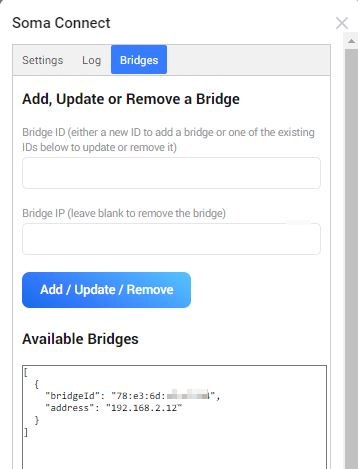
Adding a new Soma device in Homey results in a “No new device found” message using v2.0.3 Test version and after restarting the app.
Any suggestions?
Edit: Also tried BSSID instead of “SOMA Connect ID”, but with the same result.
---
### Author:  [@Amersfoort](https://community.homey.app/u/Amersfoort)
#### Post date: [November 2, 2023, 4:35pm UTC](https://community.homey.app/t/app-pro-soma-connect-app-release-2-0-1/22000/52 "2023-11-02T16:35:12Z")
On the Soma site [Soma API](https://support.somasmarthome.com/hc/en-us/articles/360026064234-HTTP-API) you can see, that the API commands for the USB connector (U1) differ a little from Raspberry Pi based versions.
---
### Author:  [@Adrian\_Rockall](https://community.homey.app/u/Adrian_Rockall)
#### Post date: [November 2, 2023, 6:42pm UTC](https://community.homey.app/t/app-pro-soma-connect-app-release-2-0-1/22000/53 "2023-11-02T18:42:15Z")
The id you enter is just to make it easier for users to identify the entries, so providing the IP address is correct it will find the bridge.
I will take another look at the new API document to find out why it’s not working.
---
### Author:  [@Adrian\_Rockall](https://community.homey.app/u/Adrian_Rockall)
#### Post date: [November 2, 2023, 10:41pm UTC](https://community.homey.app/t/app-pro-soma-connect-app-release-2-0-1/22000/54 "2023-11-02T22:41:19Z")
OK, so looking at the new API, it seems only the commands to control the devices have really changed and the list\_devices looks like it just contains more information.
Could you open the App Settings page and select the Log tab, Enable the Log and then try to add the devices. After the failure, go back to the log tab and send the contents of the list by PM.
---
### Author:  [@Amersfoort](https://community.homey.app/u/Amersfoort)
#### Post date: [November 3, 2023, 6:38am UTC](https://community.homey.app/t/app-pro-soma-connect-app-release-2-0-1/22000/55 "2023-11-03T06:38:01Z")
@Adrian_Rockall Message is too big for PM.
Log after trying to add a new Soma device. The log shows my three Soma devices, but I still see “No new devices found”.
```auto
* 2023-11-03T06:25:12.359Z
*
***Refreshing Values***
* 2023-11-03T06:25:12.363Z
* ***Refreshing Values Finished***
* 2023-11-03T06:25:17.744Z
* Get from: http://192.168.2.12/list_devices
* 2023-11-03T06:25:17.979Z
* getDevices: {
"result": "success",
"version": "3.0.9",
"shades": [
{
"name": "Luxaflex 3",
"mac": "f2:26:02:xx:xx:xx",
"type": "tilt",
"count": "4787065"
},
{
"name": "Luxaflex 2",
"mac": "ed:4d:1b:xx:xx:xx",
"type": "tilt",
"count": "4897836"
},
{
"name": "Luxaflex 1",
"mac": "ca:18:e8:xx:xx:xx",
"type": "tilt",
"count": "4450326"
}
]
}
* 2023-11-03T06:25:17.983Z
* getDevices: [
{
"name": "Luxaflex 3",
"icon": "venetianblind.svg",
"data": {
"id": "f2:26:02:xx:xx:xx"
},
"settings": {
"deviceType": "tilt",
"bridgeId": "somaconnect"
}
},
{
"name": "Luxaflex 2",
"icon": "venetianblind.svg",
"data": {
"id": "ed:4d:1b:xx:xx:xx"
},
"settings": {
"deviceType": "tilt",
"bridgeId": "somaconnect"
}
},
{
"name": "Luxaflex 1",
"icon": "venetianblind.svg",
"data": {
"id": "ca:18:e8:xx:xx:xx"
},
"settings": {
"deviceType": "tilt",
"bridgeId": "somaconnect"
}
}
]
```
---
### Author:  [@Adrian\_Rockall](https://community.homey.app/u/Adrian_Rockall)
#### Post date: [November 3, 2023, 8:35am UTC](https://community.homey.app/t/app-pro-soma-connect-app-release-2-0-1/22000/56 "2023-11-03T08:35:54Z")
That’s strange as the second list is the one returned to the device list page. I will examine it in more detail to see if I can track down the issue.
---
### Author:  [@Amersfoort](https://community.homey.app/u/Amersfoort)
#### Post date: [November 3, 2023, 9:12am UTC](https://community.homey.app/t/app-pro-soma-connect-app-release-2-0-1/22000/57 "2023-11-03T09:12:38Z")
@Adrian_Rockall Thank you for all your effort!
---
### Author:  [@Adrian\_Rockall](https://community.homey.app/u/Adrian_Rockall)
#### Post date: [November 3, 2023, 11:06am UTC](https://community.homey.app/t/app-pro-soma-connect-app-release-2-0-1/22000/58 "2023-11-03T11:06:32Z")
I have published a new test version
---
### Author:  [@Amersfoort](https://community.homey.app/u/Amersfoort)
#### Post date: [November 3, 2023, 11:54am UTC](https://community.homey.app/t/app-pro-soma-connect-app-release-2-0-1/22000/59 "2023-11-03T11:54:48Z")
Closer and closer to the final solution!
After adding a new Soma device, I can select my 3 devices. After selecting these 3, the devices are visible in my Homey Device list with a red exclamation mark: “Device unavailable, HTTP error: not found”. My 3 devices are online and work with Google Home commands and Soma app.
I have checked the USB bridge option.
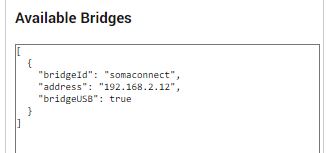
Perhaps it has something to do with the battery level and shade state. The command in the log says "“[http://192.168.2.12/get\_battery\_level/ca:18:e8:xx:xx:xx](http://192.168.2.12/get_battery_level/ca:18:e8:xx:xx:xx)”, but for the USB connector it has to be “[http://192.168.2.12:3000/get\_battery\_level?mac=ca:18:e8:xx:xx:xx](http://192.168.2.12:3000/get_battery_level?mac=ca:18:e8:xx:xx:xx)”. The same for the parameter get\_shade\_state (please see Soma Api description)
```auto
* 2023-11-03T11:27:06.494Z
* HTTPS Error: 404: Not Found
* 2023-11-03T11:27:06.495Z
* Luxaflex 3 onCapabilityPosition Error: HTTP Error: Not Found
* 2023-11-03T11:27:06.521Z
* HTTPS Error: 404: Not Found
* 2023-11-03T11:27:06.523Z
* Luxaflex 2 onCapabilityPosition Error: HTTP Error: Not Found
* 2023-11-03T11:28:03.882Z
* Get from: http://192.168.2.12/list_devices
* 2023-11-03T11:28:04.074Z
* getDevices: {
"result": "success",
"version": "3.0.9",
"shades": [
{
"name": "Luxaflex 3",
"mac": "f2:26:02:xx:xx:xx",
"type": "tilt",
"count": "48862"
},
{
"name": "Luxaflex 2",
"mac": "ed:4d:1b:xx:xx:xx",
"type": "tilt",
"count": "48764"
},
{
"name": "Luxaflex 1",
"mac": "ca:18:e8:xx:xx:xx",
"type": "tilt",
"count": "42069"
}
]
}
* 2023-11-03T11:28:04.076Z
* getDevices: [
{
"name": "Luxaflex 3",
"icon": "venetianblind.svg",
"data": {
"id": "f2:26:02:xx:xx:xx"
},
"settings": {
"deviceType": "tilt",
"bridgeId": "somaconnect"
}
},
{
"name": "Luxaflex 2",
"icon": "venetianblind.svg",
"data": {
"id": "ed:4d:1b:xx:xx:xx"
},
"settings": {
"deviceType": "tilt",
"bridgeId": "somaconnect"
}
},
{
"name": "Luxaflex 1",
"icon": "venetianblind.svg",
"data": {
"id": "ca:18:e8:xx:xx:xx"
},
"settings": {
"deviceType": "tilt",
"bridgeId": "somaconnect"
}
}
]
* 2023-11-03T11:28:04.079Z
* getDevices: [
{
"name": "Luxaflex 3",
"icon": "venetianblind.svg",
"data": {
"id": "f2:26:02:xx:xx:xx"
},
"settings": {
"deviceType": "tilt",
"bridgeId": "somaconnect"
}
},
{
"name": "Luxaflex 2",
"icon": "venetianblind.svg",
"data": {
"id": "ed:4d:1b:xx:xx:xx"
},
"settings": {
"deviceType": "tilt",
"bridgeId": "somaconnect"
}
},
{
"name": "Luxaflex 1",
"icon": "venetianblind.svg",
"data": {
"id": "ca:18:e8:xx:xx:xx"
},
"settings": {
"deviceType": "tilt",
"bridgeId": "somaconnect"
}
}
]
* 2023-11-03T11:28:06.530Z
*
***Refreshing Values***
* 2023-11-03T11:28:06.532Z
* ***Refreshing Values Finished***
* 2023-11-03T11:28:06.673Z
* Device initialising( Name: Luxaflex 3, Class: blinds)
* 2023-11-03T11:28:06.676Z
* Device initialise complete( Name: Luxaflex 3, Class: blinds)
* 2023-11-03T11:28:06.678Z
* Get from: http://192.168.2.12/get_shade_state/f2:26:02:xx:xx:xx
* 2023-11-03T11:28:06.682Z
* Get from: http://192.168.2.12/get_battery_level/f2:26:02:xx:xx:xx
* 2023-11-03T11:28:06.695Z
* Device initialising( Name: Luxaflex 2, Class: blinds)
* 2023-11-03T11:28:06.698Z
* Device initialise complete( Name: Luxaflex 2, Class: blinds)
* 2023-11-03T11:28:06.700Z
* Get from: http://192.168.2.12/get_shade_state/ed:4d:1b:xx:xx:xx
* 2023-11-03T11:28:06.703Z
* Get from: http://192.168.2.12/get_battery_level/ed:4d:1b:xx:xx:xx
* 2023-11-03T11:28:06.721Z
* Device initialising( Name: Luxaflex 1, Class: blinds)
* 2023-11-03T11:28:06.724Z
* Device initialise complete( Name: Luxaflex 1, Class: blinds)
* 2023-11-03T11:28:06.726Z
* Get from: http://192.168.2.12/get_shade_state/ca:18:e8:xx:xx:xx
* 2023-11-03T11:28:06.729Z
* Get from: http://192.168.2.12/get_battery_level/ca:18:e8:xx:xx:xx
* 2023-11-03T11:28:06.906Z
* HTTPS Error: 404: Not Found
* 2023-11-03T11:28:06.909Z
* Triggering device Online State with: false
* 2023-11-03T11:28:06.911Z
* Luxaflex 3 onCapabilityPosition Error: HTTP Error: Not Found
* 2023-11-03T11:28:06.915Z
* HTTPS Error: 404: Not Found
* 2023-11-03T11:28:06.920Z
* Luxaflex 3 getBatteryValues Error HTTP Error: Not Found
Error: HTTP Error: Not Found
at ClientRequest. (/app/lib/SomaConnectBridge.js:218:33)
at Object.onceWrapper (node:events:632:26)
at ClientRequest.emit (node:events:517:28)
at HTTPParser.parserOnIncomingClient (node:_http_client:700:27)
at HTTPParser.parserOnHeadersComplete (node:_http_common:119:17)
at Socket.socketOnData (node:_http_client:541:22)
at Socket.emit (node:events:517:28)
at addChunk (node:internal/streams/readable:335:12)
at readableAddChunk (node:internal/streams/readable:308:9)
at Readable.push (node:internal/streams/readable:245:10)
* 2023-11-03T11:28:06.922Z
* HTTPS Error: 404: Not Found
* 2023-11-03T11:28:06.925Z
* Triggering device Online State with: false
* 2023-11-03T11:28:06.927Z
* Luxaflex 2 onCapabilityPosition Error: HTTP Error: Not Found
* 2023-11-03T11:28:07.012Z
* HTTPS Error: 404: Not Found
* 2023-11-03T11:28:07.015Z
* Luxaflex 2 getBatteryValues Error HTTP Error: Not Found
Error: HTTP Error: Not Found
at ClientRequest. (/app/lib/SomaConnectBridge.js:218:33)
at Object.onceWrapper (node:events:632:26)
at ClientRequest.emit (node:events:517:28)
at HTTPParser.parserOnIncomingClient [as onIncoming] (node:_http_client:700:27)
at HTTPParser.parserOnHeadersComplete (node:_http_common:119:17)
at Socket.socketOnData (node:_http_client:541:22)
at Socket.emit (node:events:517:28)
at addChunk (node:internal/streams/readable:335:12)
at readableAddChunk (node:internal/streams/readable:308:9)
at Readable.push (node:internal/streams/readable:245:10)
* 2023-11-03T11:28:07.036Z
* HTTPS Error: 404: Not Found
* 2023-11-03T11:28:07.040Z
* Triggering device Online State with: false
* 2023-11-03T11:28:07.042Z
* Luxaflex 1 onCapabilityPosition Error: HTTP Error: Not Found
* 2023-11-03T11:28:07.957Z
* HTTPS Error: 404: Not Found
* 2023-11-03T11:28:07.959Z
* Luxaflex 1 getBatteryValues Error HTTP Error: Not Found
Error: HTTP Error: Not Found
at ClientRequest. (/app/lib/SomaConnectBridge.js:218:33)
at Object.onceWrapper (node:events:632:26)
at ClientRequest.emit (node:events:517:28)
at HTTPParser.parserOnIncomingClient [as onIncoming] (node:_http_client:700:27)
at HTTPParser.parserOnHeadersComplete (node:_http_common:119:17)
at Socket.socketOnData (node:_http_client:541:22)
at Socket.emit (node:events:517:28)
at addChunk (node:internal/streams/readable:335:12)
at readableAddChunk (node:internal/streams/readable:308:9)
at Readable.push (node:internal/streams/readable:245:10)
```
---
### Author:  [@Adrian\_Rockall](https://community.homey.app/u/Adrian_Rockall)
#### Post date: [November 3, 2023, 1:06pm UTC](https://community.homey.app/t/app-pro-soma-connect-app-release-2-0-1/22000/60 "2023-11-03T13:06:33Z")
Doh, I missed those ones. I updated the ones that send parameters such as open / close and position.
I will fix it and upload another update in a few minutes.
[Previous page](https://community.homey.app/t/app-pro-soma-connect-app-release-2-0-1/22000.md?page=2)
[Next page](https://community.homey.app/t/app-pro-soma-connect-app-release-2-0-1/22000.md?page=4)