# \[APP\]\[Pro\] Roborock Cloud - Intelligent robot vacuum cleaners
**URL:** https://community.homey.app/t/app-pro-roborock-cloud-intelligent-robot-vacuum-cleaners/128559
**Category:** Apps
**Tags:** app, homey-pro
**Created:** [January 22, 2025, 2:55pm UTC](https://community.homey.app/t/app-pro-roborock-cloud-intelligent-robot-vacuum-cleaners/128559 "2025-01-22T14:55:20Z")
**Posts on this page:** 20
**Page:** 23
### Author:  [@Radim\_Kupcak](https://community.homey.app/u/Radim_Kupcak)
#### Post date: [August 2, 2025, 6:00pm UTC](https://community.homey.app/t/app-pro-roborock-cloud-intelligent-robot-vacuum-cleaners/128559/448 "2025-08-02T18:00:02Z")
Dear @KennyMoens
Could I ask for your advice? My Roborock S8 used to work fine with your app, but now I can only see it in Homey with up to date battery info — however no commands (clean, dock, empty) work, either from device tile or flows. Basically from Android app it works fine, from Homey, no command works (but I can see it in devices as well as when creating flows - but no action is executed at the end).
I’ve tried:
- Re-pairing in Homey
- Restarting & reinstalling the Homey app
- Removing & re-adding the vacuum in the Android Roborock app
Nothing helped.
Diagnostic report: `252c3558-727a-4cf5-bfa5-14b8d71bda9b`
Any guidance would be much appreciated.
Thanks,
Radim
---
### Author:  [@Radim\_Kupcak](https://community.homey.app/u/Radim_Kupcak)
#### Post date: [August 2, 2025, 6:13pm UTC](https://community.homey.app/t/app-pro-roborock-cloud-intelligent-robot-vacuum-cleaners/128559/449 "2025-08-02T18:13:26Z")
@KennyMoens
as suggested by a reply to diagnostic reporpt
“Try with disabling the local connectivity in the settings“
This helped ! thanks a lot
Kind regars
Radim
---
### Author:  [@KennyMoens](https://community.homey.app/u/KennyMoens)
#### Post date: [August 2, 2025, 6:43pm UTC](https://community.homey.app/t/app-pro-roborock-cloud-intelligent-robot-vacuum-cleaners/128559/450 "2025-08-02T18:43:48Z")
Hey,
Perfect news. The newer devices such as Saros 10, but I also think some older devices with firmware updates have another way of communicating directly with the robot.
I am working together with @Erikvl87 to try to figure out how it works and get it back working. We made some progress, but we are not there yet.
Stay tuned, we will get it back to work, but it requires time.
Groetjes
Kenny
---
### Author:  [@Hass](https://community.homey.app/u/Hass)
#### Post date: [August 2, 2025, 7:06pm UTC](https://community.homey.app/t/app-pro-roborock-cloud-intelligent-robot-vacuum-cleaners/128559/451 "2025-08-02T19:06:14Z")
Hey Kenny,
Sorry for the late response, but just wanted to confirm that the update fixed the card.
Thanks for the quick action 🙂
Best regards,
Hass
---
### Author:  [@Radim\_Kupcak](https://community.homey.app/u/Radim_Kupcak)
#### Post date: [August 3, 2025, 4:23pm UTC](https://community.homey.app/t/app-pro-roborock-cloud-intelligent-robot-vacuum-cleaners/128559/452 "2025-08-03T16:23:06Z")
Hi @KennyMoens
unfortunately I think I celebrated too soon (not allowing local connection helped, but just for a little while), yesterday it worked all fine and now it is back to no command from Homey working. Let me explain the situation.
The weird thing is that yesterday, flow card for a room cleaning and flow card for Routine cleaning worked fine - when I click the oval “button” to fill in name of the routine or the room a list that is same as the list of rooms in Roborock Android app appeared, as it should.
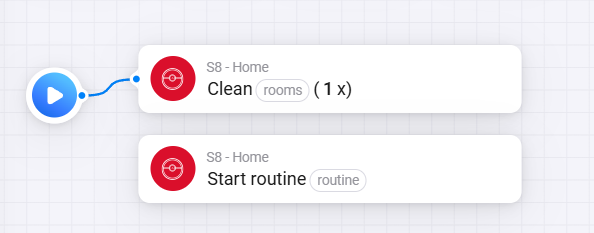
This morning the list did not appear, however if I typed exactly the right name of the room (for example “Kitchen“) it started “Selective room cleaning“ just fine. But for the routines it did not work.
However now in the evenening it does not work anymore even for the Room cleaning. I even tried to “Empty the dustbin“ since it worked yesterday, but that does not work as well.
So all and all I am back to no comand from Homey working. I tried toggleing The local connection on/off and repairing the device and reinstalling the Homey app - nothing seems to make a difference.
Is this behaviour part of the issue that you said you are solving with @Erikvl87 or do you think this is a different problem?
Thanks a lot
Radim
---
### Author:  [@KennyMoens](https://community.homey.app/u/KennyMoens)
#### Post date: [August 4, 2025, 5:52am UTC](https://community.homey.app/t/app-pro-roborock-cloud-intelligent-robot-vacuum-cleaners/128559/453 "2025-08-04T05:52:19Z")
Hey @Radim_Kupcak,
The cloud connectivity is known to be unreliable, that’s my experience. I’ve done some improvements with v2.5.1 (available as test version) to keep it more stable.
You can try with that version, no garantuees however …
The item I’m working on, together with @Erikvl87, should bring major improvements here since once we get that working we’ll be able to use local connectivity again for newer devices. We made progress, but we are certainly not there yet.
Kind regards,
---
### Author:  [@Radim\_Kupcak](https://community.homey.app/u/Radim_Kupcak)
#### Post date: [August 4, 2025, 6:23pm UTC](https://community.homey.app/t/app-pro-roborock-cloud-intelligent-robot-vacuum-cleaners/128559/454 "2025-08-04T18:23:43Z")
Hi @KennyMoens - thanks a lot, seems like its working with v2.5.1 (routines and room cleaning seem to work well) - will test it out thoroughly and let you know how it works
Cheers
Radim
---
### Author:  [@gioglifx](https://community.homey.app/u/gioglifx)
#### Post date: [August 4, 2025, 8:14pm UTC](https://community.homey.app/t/app-pro-roborock-cloud-intelligent-robot-vacuum-cleaners/128559/455 "2025-08-04T20:14:57Z")
Hi @KennyMoens I can now see the Roborock Q7 M5+ using both the “stable” and “test” app versions, but still no controls are available. I’m just wondering if you have any progress or solution or if there’s anything I can do on my end to alleviate the issue.
I’m attaching a screenshot for reference.
Kind regards, I truly appreciate it.

---
### Author:  [@KennyMoens](https://community.homey.app/u/KennyMoens)
#### Post date: [August 5, 2025, 5:24am UTC](https://community.homey.app/t/app-pro-roborock-cloud-intelligent-robot-vacuum-cleaners/128559/456 "2025-08-05T05:24:27Z")
Hey @gioglifx,
I’m currently focussing on getting the new L01 protocol (i.e. local communication) of newer devices working. We made some progress there, but not fully yet.
The main blocking point which we didn’t figure out yet, is the encryption method used for the messages. The structure of the messages is identical to the older robots though, so as soon as we figure out the encryption we should be able to get this rolled out quickly.
The other part, i.e. the B01 protocol which is used for the cloud communication of newer devices, we know the encryption of it, but they changed the protocol completely with these devices. We don’t have much progress on that level. Since it will require quite some reverse engineering to get it properly running.
Kind regards,
---
### Author:  [@Simon\_Kai](https://community.homey.app/u/Simon_Kai)
#### Post date: [August 5, 2025, 1:59pm UTC](https://community.homey.app/t/app-pro-roborock-cloud-intelligent-robot-vacuum-cleaners/128559/457 "2025-08-05T13:59:47Z")
Hello everyone,
How does the local connection work? How can I tell if the Roborock is being controlled locally or via the internet?
I can see that I don’t have an IP address stored. Is this an indication that it’s being controlled via the internet?
I would like to control it primarily locally.
I would appreciate any help.
---
### Author:  [@KennyMoens](https://community.homey.app/u/KennyMoens)
#### Post date: [August 5, 2025, 2:18pm UTC](https://community.homey.app/t/app-pro-roborock-cloud-intelligent-robot-vacuum-cleaners/128559/458 "2025-08-05T14:18:24Z")
Hey Simon,
You cannot directly see it. The app uses local connectivity by default unless it is disabled. It uses the cloud to detect your robot it’s ip address and for the map messages (which are not supported on the local connectivity).
Kind regards
Kenny
---
### Author:  [@KennyMoens](https://community.homey.app/u/KennyMoens)
#### Post date: [August 11, 2025, 8:24am UTC](https://community.homey.app/t/app-pro-roborock-cloud-intelligent-robot-vacuum-cleaners/128559/459 "2025-08-11T08:24:51Z")
Hey @R.S_Kok, @gioglifx,
Based on the work from the guys who develop the Python Roborock library, I found something that might help for the B01 protocol for your robots.
I did an initial implementation - which will not work - in v2.7.0 which is available for test now. You can install it from [Roborock Cloud | Homey](https://homey.app/a/be.functor.roborock/test/)
Can you guys try this one, ensure your robot is added in Homey, restart the application and submit me a diagnostics report.
I don’t know the structure of the response yet, but I suspect that with this diagnostics I can figure it out and at least start by implementing the status info.
Thanks,
---
### Author:  [@R.S\_Kok](https://community.homey.app/u/R.S_Kok)
#### Post date: [August 12, 2025, 7:46pm UTC](https://community.homey.app/t/app-pro-roborock-cloud-intelligent-robot-vacuum-cleaners/128559/460 "2025-08-12T19:46:14Z")
Hi Kenny,
9adb70bd-7f53-41c9-850e-ff965ca1aec0
---
### Author:  [@KennyMoens](https://community.homey.app/u/KennyMoens)
#### Post date: [August 13, 2025, 6:23am UTC](https://community.homey.app/t/app-pro-roborock-cloud-intelligent-robot-vacuum-cleaners/128559/461 "2025-08-13T06:23:28Z")
Hey @R.S_Kok ,
Sadly it does not giv eme the expected results. Could you restart the app and submit a diagnostics report after it is running for 30 seconds - 1 minute. Please keep the Roborock app on Android closed and don’t trigger anything.
Thanks,
---
### Author:  [@R.S\_Kok](https://community.homey.app/u/R.S_Kok)
#### Post date: [August 13, 2025, 9:55am UTC](https://community.homey.app/t/app-pro-roborock-cloud-intelligent-robot-vacuum-cleaners/128559/462 "2025-08-13T09:55:28Z")
f059b17a-39d1-40a0-aae4-cb7c6c43153d
---
### Author:  [@Ado\_Home](https://community.homey.app/u/Ado_Home)
#### Post date: [August 15, 2025, 10:31pm UTC](https://community.homey.app/t/app-pro-roborock-cloud-intelligent-robot-vacuum-cleaners/128559/463 "2025-08-15T22:31:47Z")
bc2e562b-af5d-4442-8f9a-230d483a54b5
---
### Author:  [@Ecker](https://community.homey.app/u/Ecker)
#### Post date: [August 17, 2025, 7:57am UTC](https://community.homey.app/t/app-pro-roborock-cloud-intelligent-robot-vacuum-cleaners/128559/464 "2025-08-17T07:57:21Z")
Hello,
I have a Roborock Q10 S5 and it doesn’t work for me either.
I am currently using version 2.7.0.
Can I help with testing?
---
### Author:  [@Cristopher\_Tolli](https://community.homey.app/u/Cristopher_Tolli)
#### Post date: [August 17, 2025, 3:29pm UTC](https://community.homey.app/t/app-pro-roborock-cloud-intelligent-robot-vacuum-cleaners/128559/465 "2025-08-17T15:29:54Z")
Same here. I updated the homey pro and it worked
---
### Author:  [@KennyMoens](https://community.homey.app/u/KennyMoens)
#### Post date: [August 17, 2025, 3:49pm UTC](https://community.homey.app/t/app-pro-roborock-cloud-intelligent-robot-vacuum-cleaners/128559/466 "2025-08-17T15:49:39Z")
Hey guys,
The modern robots are not supported at this moment.
I am working together with @Erikvl87 to get the local connectivity working again, which is making good progress.
For the cloud connectivity we are checking the new protocol without luck until now. I am also monitoring what occurs on the home assistant front there, but they don’t have it working yet too.
We will get there, but it takes time as we need to reverse engineer everything… sadly roborock does not publish the apis…
Kind regards
Kenny
---
### Author:  [@Erlend\_Hansen](https://community.homey.app/u/Erlend_Hansen)
#### Post date: [August 19, 2025, 7:26pm UTC](https://community.homey.app/t/app-pro-roborock-cloud-intelligent-robot-vacuum-cleaners/128559/467 "2025-08-19T19:26:13Z")
**Minor issue**
Roborock device un-pausing does not resume previous cleaning action.
_Steps to reproduce:_
Open the device. Click on full clean all roms.
Then click pause actions (button is highlighted), and cleaning program is paused.
Finally click un-pause (button is not highlighted). Cleaning is not resumed.
Diagnostic report: 4662188e-fdfb-422f-920a-127d60444f6c
Using the test version \*\*v2.7.0
\*\*
Device: Roborock S6 MaxV
Firmware: 02.62.46
_Potential related info:_
It seems like the home assistant roborock integration could have a PR recently created for the same issue with potential improvements: [Improve roborock resume cleaning logic by Lash-L · Pull Request #150726 · home-assistant/core · GitHub](https://github.com/home-assistant/core/pull/150726)
[Previous page](https://community.homey.app/t/app-pro-roborock-cloud-intelligent-robot-vacuum-cleaners/128559.md?page=22)
[Next page](https://community.homey.app/t/app-pro-roborock-cloud-intelligent-robot-vacuum-cleaners/128559.md?page=24)