# \[APP\]\[Pro\] Roborock Cloud - Intelligent robot vacuum cleaners
**URL:** https://community.homey.app/t/app-pro-roborock-cloud-intelligent-robot-vacuum-cleaners/128559
**Category:** Apps
**Tags:** app, homey-pro
**Created:** [January 22, 2025, 2:55pm UTC](https://community.homey.app/t/app-pro-roborock-cloud-intelligent-robot-vacuum-cleaners/128559 "2025-01-22T14:55:20Z")
**Posts on this page:** 20
**Page:** 17
### Author:  [@KennyMoens](https://community.homey.app/u/KennyMoens)
#### Post date: [May 2, 2025, 5:43am UTC](https://community.homey.app/t/app-pro-roborock-cloud-intelligent-robot-vacuum-cleaners/128559/326 "2025-05-02T05:43:28Z")
Hello,
@ExtraKim that’s good news. Although your diagnostics report showed and error. I have to dig deeper in that one.
@AltonV could you submit a diagnostics report? No flow cards should be gone, the 1.3 only adds the possibility to disable the map.
---
### Author:  [@Sharlihe](https://community.homey.app/u/Sharlihe)
#### Post date: [May 3, 2025, 6:29am UTC](https://community.homey.app/t/app-pro-roborock-cloud-intelligent-robot-vacuum-cleaners/128559/327 "2025-05-03T06:29:30Z")
Hello Kenny, I have a card “Is nettoyage” (Is cleaning), even if the vac is doing is job, if I test using this card it always report as false ☹
Other thing that I notice, I wanted to get a notification when the cleaning is done but it never trigger. Is it linked to my device or a bug ?

What do you think ?
---
### Author:  [@AltonV](https://community.homey.app/u/AltonV)
#### Post date: [May 4, 2025, 12:57am UTC](https://community.homey.app/t/app-pro-roborock-cloud-intelligent-robot-vacuum-cleaners/128559/328 "2025-05-04T00:57:44Z")
> [@KennyMoens](#):
>
> @AltonV could you submit a diagnostics report? No flow cards should be gone, the 1.3 only adds the possibility to disable the map.
70781e07-fe6f-4922-8c73-217eb9b5ce05
---
### Author:  [@KennyMoens](https://community.homey.app/u/KennyMoens)
#### Post date: [May 4, 2025, 4:22am UTC](https://community.homey.app/t/app-pro-roborock-cloud-intelligent-robot-vacuum-cleaners/128559/329 "2025-05-04T04:22:50Z")
Hey guys
@AltonV
The report shows unauthorised when connecting. Please try to repair the device, I guess there is something wrong with the auth tokens.
@Sharlihe
That should not be the case, could you submit a diagnostics report too?
---
### Author:  [@AltonV](https://community.homey.app/u/AltonV)
#### Post date: [May 4, 2025, 7:59am UTC](https://community.homey.app/t/app-pro-roborock-cloud-intelligent-robot-vacuum-cleaners/128559/330 "2025-05-04T07:59:15Z")
That solved it, and a restart of the app brought back the missing cards
---
### Author:  [@Sharlihe](https://community.homey.app/u/Sharlihe)
#### Post date: [May 6, 2025, 8:01am UTC](https://community.homey.app/t/app-pro-roborock-cloud-intelligent-robot-vacuum-cleaners/128559/331 "2025-05-06T08:01:51Z")
Report sent ! bc910cc2-504c-40a9-9691-9b36b1f00e2f
---
### Author:  [@KennyMoens](https://community.homey.app/u/KennyMoens)
#### Post date: [May 6, 2025, 9:10am UTC](https://community.homey.app/t/app-pro-roborock-cloud-intelligent-robot-vacuum-cleaners/128559/332 "2025-05-06T09:10:47Z")
Hey @Sharlihe,
The app goes out-of-memory on your side, this is the issue I’m still working on.
For now, the best approach if you face this issue is to disable the map as follows:
- Disable the map (this is a per device setting, so if you have multiple, disable it for each of them).
- Restart the app
Kind regards,
---
### Author:  [@Sharlihe](https://community.homey.app/u/Sharlihe)
#### Post date: [May 7, 2025, 10:08am UTC](https://community.homey.app/t/app-pro-roborock-cloud-intelligent-robot-vacuum-cleaners/128559/333 "2025-05-07T10:08:17Z")
I can live like that until you fix it but thanks for the advice and the follow up !
---
### Author:  [@Sportswagoneer](https://community.homey.app/u/Sportswagoneer)
#### Post date: [May 11, 2025, 8:15am UTC](https://community.homey.app/t/app-pro-roborock-cloud-intelligent-robot-vacuum-cleaners/128559/334 "2025-05-11T08:15:27Z")
It appears that I have the memory problem as well.

This was yesterdays memory usage for the app.
But: The advanced settings for my only Roborock (S8) doesn’t seem to work either. I can see the map in the device page - so it’s clearly updating - but the device settings for «enable map» is «No». And if I try to change that setting to «Yes» I get an error message «Invalid setting type»:
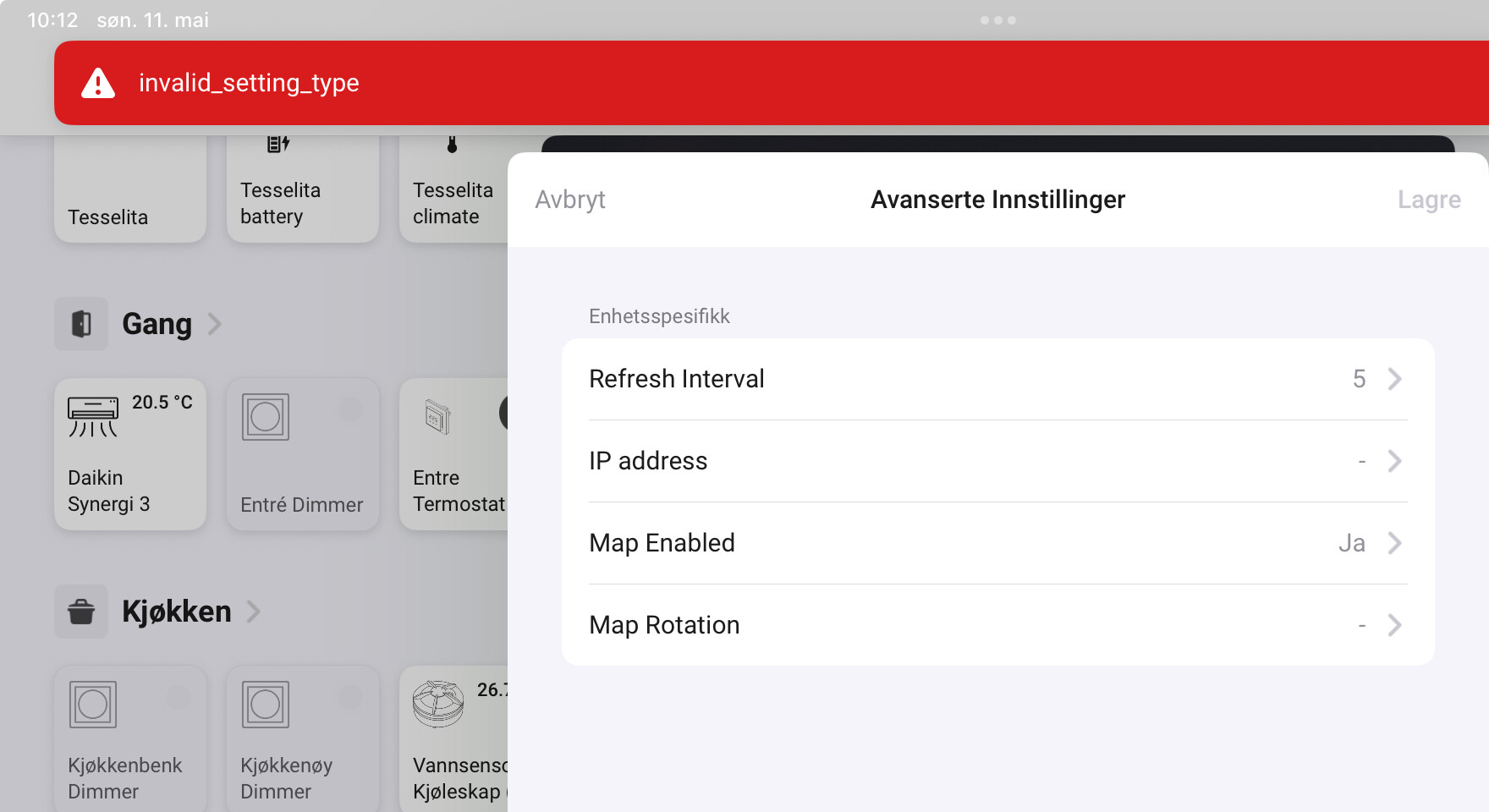
My install is running in Norwegian - so «Yes» is «Ja» and no is «Nei» - but I would believe that this is managed by the OS.
---
### Author:  [@KennyMoens](https://community.homey.app/u/KennyMoens)
#### Post date: [May 11, 2025, 4:38pm UTC](https://community.homey.app/t/app-pro-roborock-cloud-intelligent-robot-vacuum-cleaners/128559/335 "2025-05-11T16:38:08Z")
Did you restart the app after changing the option?
---
### Author:  [@Sportswagoneer](https://community.homey.app/u/Sportswagoneer)
#### Post date: [May 11, 2025, 7:59pm UTC](https://community.homey.app/t/app-pro-roborock-cloud-intelligent-robot-vacuum-cleaners/128559/336 "2025-05-11T19:59:38Z")
It’s impossible to change the option. It’s stuck on «No» even though the map is obviously enabled - and I can’t change it to «Yes» or anything else. Any attempt to do so just generates the error message. This is persistent after restarting the app.
---
### Author:  [@KennyMoens](https://community.homey.app/u/KennyMoens)
#### Post date: [May 12, 2025, 6:13am UTC](https://community.homey.app/t/app-pro-roborock-cloud-intelligent-robot-vacuum-cleaners/128559/337 "2025-05-12T06:13:04Z")
Hey @Sportswagoneer
That’s very strange. It seems to work correctly here at my side.
Which version of the app are you using?
Which version of Homey are you using?
Could you maybe send me a diagnostics report after trying to change the setting?
Thanks!
---
### Author:  [@Sportswagoneer](https://community.homey.app/u/Sportswagoneer)
#### Post date: [May 12, 2025, 6:30am UTC](https://community.homey.app/t/app-pro-roborock-cloud-intelligent-robot-vacuum-cleaners/128559/338 "2025-05-12T06:30:37Z")
Sure.
Everything is set to auto update - so the Homey (2019) is at 12.4.2. The Roborock Cloud app is at 1.3.0.
Diagnostics at e745677f-bc36-4acb-89ec-66fef8f96d6b
---
### Author:  [@KennyMoens](https://community.homey.app/u/KennyMoens)
#### Post date: [May 12, 2025, 6:50am UTC](https://community.homey.app/t/app-pro-roborock-cloud-intelligent-robot-vacuum-cleaners/128559/339 "2025-05-12T06:50:20Z")
Hey @Sportswagoneer
Did you attempt to change the setting before submitting the diagnostics report?
Thanks!
---
### Author:  [@Sportswagoneer](https://community.homey.app/u/Sportswagoneer)
#### Post date: [May 12, 2025, 7:24am UTC](https://community.homey.app/t/app-pro-roborock-cloud-intelligent-robot-vacuum-cleaners/128559/340 "2025-05-12T07:24:26Z")
Yes.
Just before.
Same error message as in my previous screenshot.
>  | [KennyMoens](https://community.homey.app/u/kennymoens)
> May 12 |
>
> - | - |
Hey [@Sportswagoneer](https://community.homey.app/u/sportswagoneer)
Did you attempt to change the setting before submitting the diagnostics report?
Thanks!
---
### Author:  [@KennyMoens](https://community.homey.app/u/KennyMoens)
#### Post date: [May 12, 2025, 8:47am UTC](https://community.homey.app/t/app-pro-roborock-cloud-intelligent-robot-vacuum-cleaners/128559/341 "2025-05-12T08:47:49Z")
Hmm @Sportswagoneer, now I’m really puzzled. The logs don’t show anything wrong with it, so that doesn’t make me wiser at all.
It cannot be caused by language either, since my installation is in Dutch.
The only thing I can think about is that Homey 2019 somehow doesn’t support these kind of settings. I had similar issues with using the ‘label’ setting type in the past, which worked nicely on a Homey 2023, but not on earlier editions …
I’ve noticed that I did not provide a default value for the setting, I’ve done that now with v1.3.1 and put it on disabled by default. This version is now in test.
Can you try if that gives you better results?
---
### Author:  [@Sportswagoneer](https://community.homey.app/u/Sportswagoneer)
#### Post date: [May 12, 2025, 9:19am UTC](https://community.homey.app/t/app-pro-roborock-cloud-intelligent-robot-vacuum-cleaners/128559/342 "2025-05-12T09:19:48Z")
Thanks. That worked!
Not only did the map dissappear after updating - but I can now use the settings to turn it on and off.
(To make the maps-page dissappear from the device still requires restarting the app.)
---
### Author:  [@Inunekko](https://community.homey.app/u/Inunekko)
#### Post date: [May 15, 2025, 8:02pm UTC](https://community.homey.app/t/app-pro-roborock-cloud-intelligent-robot-vacuum-cleaners/128559/343 "2025-05-15T20:02:51Z")
Recieven my Saros 10 today and all seems to work fine! Excellent app. With this device there is also a possibility to use a Routine, which makes it easier to use vacuum only for certain rooms, etc. Would that be possible to implement?
---
### Author:  [@KennyMoens](https://community.homey.app/u/KennyMoens)
#### Post date: [May 16, 2025, 5:07am UTC](https://community.homey.app/t/app-pro-roborock-cloud-intelligent-robot-vacuum-cleaners/128559/344 "2025-05-16T05:07:56Z")
Hey,
That’s currently not possible. I would have to investigate if I can get access to that information, I’ve added it to the backlog as [issue #64](https://gitlab.com/functor-solutions/homey/roborock/-/issues/64).
Sadly, I’m still struggling with the rework I’m doing to improve the memory use. The app works, but still has memory issues, I suspect the library which I’m using for the map drawing. Also, the rework rendered some parts unstable. I hope to finish this work soon, so that I can take in some new features again… Currently I’m using the reworked version, but it is too unstable to publish for test purposes.
Kind regards,
---
### Author:  [@Paal\_Aamaas](https://community.homey.app/u/Paal_Aamaas)
#### Post date: [May 16, 2025, 10:49am UTC](https://community.homey.app/t/app-pro-roborock-cloud-intelligent-robot-vacuum-cleaners/128559/345 "2025-05-16T10:49:27Z")
Great app. Just started using it today after a week and it went smooth. Have 8-button keyboards (Namron Z-wave) around the house where a standard button runs a “vacuum” this room as you always must tidy the room before and after. Awsome work here!!
[Previous page](https://community.homey.app/t/app-pro-roborock-cloud-intelligent-robot-vacuum-cleaners/128559.md?page=16)
[Next page](https://community.homey.app/t/app-pro-roborock-cloud-intelligent-robot-vacuum-cleaners/128559.md?page=18)