# \[APP\]\[Pro\] NetScan - Track devices on your local network using ARP and TCP checks
**URL:** https://community.homey.app/t/app-pro-netscan-track-devices-on-your-local-network-using-arp-and-tcp-checks/47454
**Category:** Apps
**Tags:** app
**Created:** [May 16, 2021, 9:00am UTC](https://community.homey.app/t/app-pro-netscan-track-devices-on-your-local-network-using-arp-and-tcp-checks/47454 "2021-05-16T09:00:48Z")
**Posts on this page:** 20
**Page:** 6
### Author:  [@KaiF](https://community.homey.app/u/KaiF)
#### Post date: [May 8, 2025, 5:45pm UTC](https://community.homey.app/t/app-pro-netscan-track-devices-on-your-local-network-using-arp-and-tcp-checks/47454/101 "2025-05-08T17:45:44Z")
if “ja” would be changed to “offline” and “nein” to “online” everything would be fine (even though this is not 100% German)
Honestly don’t get it why it does not show online/offline for me but ja/nein or maybe “true/false”…
---
### Author:  [@Adrian\_Rockall](https://community.homey.app/u/Adrian_Rockall)
#### Post date: [May 8, 2025, 6:25pm UTC](https://community.homey.app/t/app-pro-netscan-track-devices-on-your-local-network-using-arp-and-tcp-checks/47454/102 "2025-05-08T18:25:14Z")
Unfortunately, I don’t know how to do that as it should already be online and offline and, as you can see in the picture I posted, it is correct for me, even when I switched my Honey to German.
---
### Author:  [@luguber](https://community.homey.app/u/luguber)
#### Post date: [June 12, 2025, 2:26am UTC](https://community.homey.app/t/app-pro-netscan-track-devices-on-your-local-network-using-arp-and-tcp-checks/47454/103 "2025-06-12T02:26:17Z")
For me, the web app shows status online / offline while the android app (english language selected) shows no / yes
---
### Author:  [@Walter\_vande\_kerkhof](https://community.homey.app/u/Walter_vande_kerkhof)
#### Post date: [July 18, 2025, 6:34pm UTC](https://community.homey.app/t/app-pro-netscan-track-devices-on-your-local-network-using-arp-and-tcp-checks/47454/104 "2025-07-18T18:34:24Z")
Hi @Adrian_Rockall, I use netscan to monitor my network components. One of them is my solaredge inverters. All components work fine but the inverter always shows offline while it is connected. Do you have any clue why this might be the case?
---
### Author:  [@Adrian\_Rockall](https://community.homey.app/u/Adrian_Rockall)
#### Post date: [July 18, 2025, 8:47pm UTC](https://community.homey.app/t/app-pro-netscan-track-devices-on-your-local-network-using-arp-and-tcp-checks/47454/105 "2025-07-18T20:47:13Z")
Have you tried both types of device and different ports?
---
### Author:  [@Walter\_vande\_kerkhof](https://community.homey.app/u/Walter_vande_kerkhof)
#### Post date: [July 18, 2025, 9:03pm UTC](https://community.homey.app/t/app-pro-netscan-track-devices-on-your-local-network-using-arp-and-tcp-checks/47454/106 "2025-07-18T21:03:23Z")
Actually i did. Don’t really know which port to use but the device with only ip address worked well for a long time until a couple of months ago
---
### Author:  [@Peter\_Kawa](https://community.homey.app/u/Peter_Kawa)
#### Post date: [July 18, 2025, 10:36pm UTC](https://community.homey.app/t/app-pro-netscan-track-devices-on-your-local-network-using-arp-and-tcp-checks/47454/107 "2025-07-18T22:36:18Z")
> [@Walter\_vande\_kerkhof](#):
>
> worked well for a long time until a couple of months ago
Sounds like the inverter received a different IP address at some point?
Net Scan works perfectly fine for 5 years now @ my Homeys
---
### Author:  [@Walter\_vande\_kerkhof](https://community.homey.app/u/Walter_vande_kerkhof)
#### Post date: [July 19, 2025, 5:02am UTC](https://community.homey.app/t/app-pro-netscan-track-devices-on-your-local-network-using-arp-and-tcp-checks/47454/108 "2025-07-19T05:02:42Z")
Nope, inverter has a fixed ip address. Not a big issue but was wondering if it’s fixable. It’s only the inverter; the rest works lika a charm.
I can ping the IP address
---
### Author:  [@Adrian\_Rockall](https://community.homey.app/u/Adrian_Rockall)
#### Post date: [July 19, 2025, 6:27am UTC](https://community.homey.app/t/app-pro-netscan-track-devices-on-your-local-network-using-arp-and-tcp-checks/47454/109 "2025-07-19T06:27:30Z")
Has the inverter firmware updated?
It seems strange that it did work and has then stopped as the Netscan app hasn’t changed.
Does the inverter have an http browser interface?
If it does you could try the device that has a port option and set that to 80.
I wish that ping was a possibility, but it’s a low-level system function that’s not available to apps.
---
### Author:  [@Vandaahl](https://community.homey.app/u/Vandaahl)
#### Post date: [November 17, 2025, 9:29pm UTC](https://community.homey.app/t/app-pro-netscan-track-devices-on-your-local-network-using-arp-and-tcp-checks/47454/110 "2025-11-17T21:29:30Z")
i am having almost the same problems as above
IP reachable but shows as Offline…
in this case its a Computer running Fedora 43 and the problem is the firewall.
if i turn the firewall off everything works as it should be
If i turn the firewall on its a problem
so what i need to know now is what service i should let through (ICMP probably)
---
### Author:  [@Adrian\_Rockall](https://community.homey.app/u/Adrian_Rockall)
#### Post date: [November 17, 2025, 9:57pm UTC](https://community.homey.app/t/app-pro-netscan-track-devices-on-your-local-network-using-arp-and-tcp-checks/47454/111 "2025-11-17T21:57:38Z")
The app doesn’t use any particular service, it just tries to make a connection. If there is no response, it assumes the device is offline. The problem is most firewalls will ignore connections rather than rejecting them.
---
### Author:  [@Peter\_Kawa](https://community.homey.app/u/Peter_Kawa)
#### Post date: [November 17, 2025, 10:26pm UTC](https://community.homey.app/t/app-pro-netscan-track-devices-on-your-local-network-using-arp-and-tcp-checks/47454/112 "2025-11-17T22:26:41Z")
Idea:
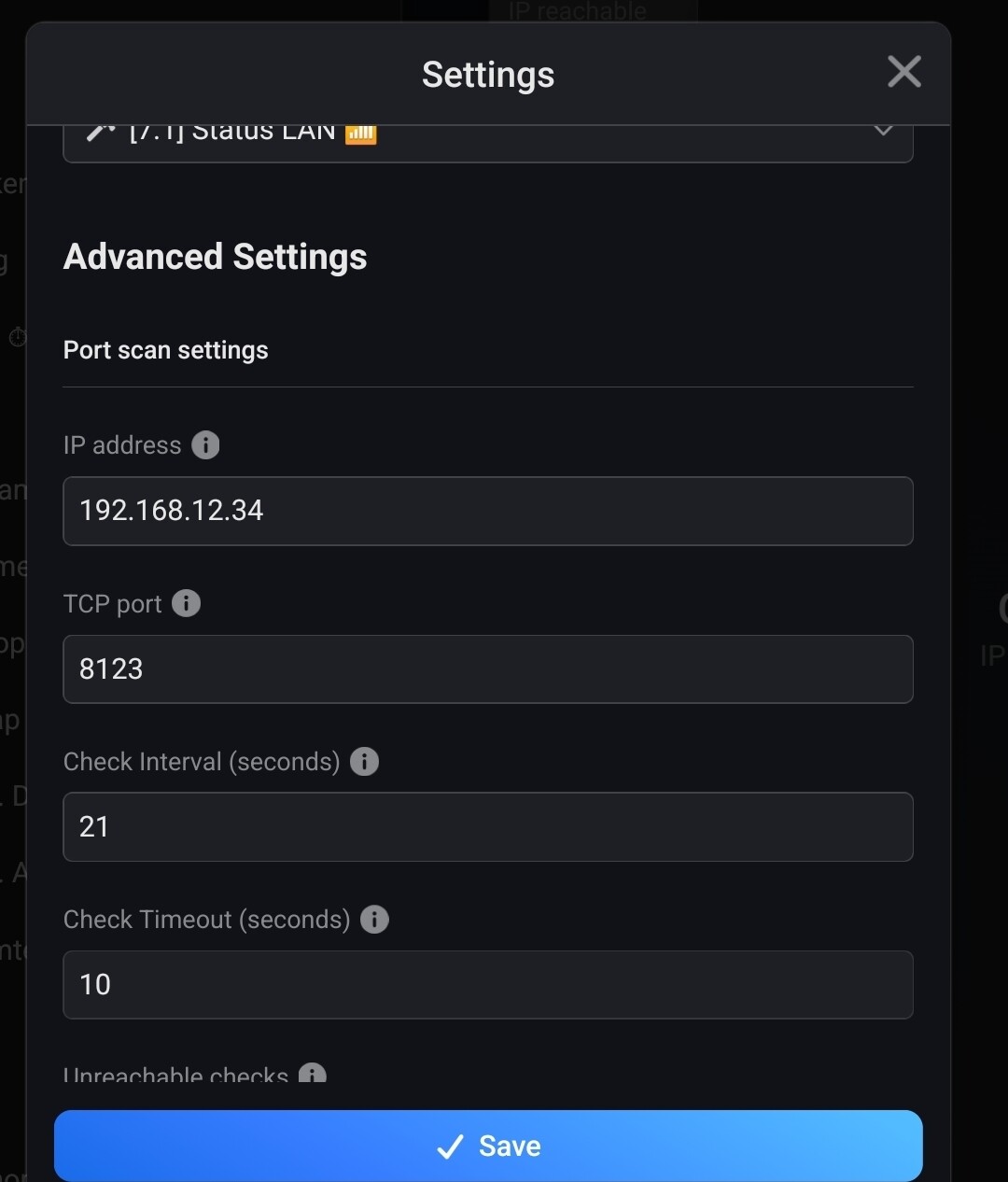
You can open a (local) firewall port higher than 49152, like 53967, on the Fedora machine, and have the Net Scan app “port number” device check for the computers’ IP on that particular portnumber
Check up front if the number is not assigned to a service:
[Portnumber reference](https://wiki.wireshark.org/PortReference)
As example, a check on a virtual PC which communicates @ port 8123:
---
### Author:  [@Vandaahl](https://community.homey.app/u/Vandaahl)
#### Post date: [November 17, 2025, 11:18pm UTC](https://community.homey.app/t/app-pro-netscan-track-devices-on-your-local-network-using-arp-and-tcp-checks/47454/113 "2025-11-17T23:18:36Z")
i do not have a Port field in my settings?
found it…
---
### Author:  [@JohanP](https://community.homey.app/u/JohanP)
#### Post date: [November 18, 2025, 9:27am UTC](https://community.homey.app/t/app-pro-netscan-track-devices-on-your-local-network-using-arp-and-tcp-checks/47454/114 "2025-11-18T09:27:18Z")
I somewhere read you could use netscan to monitor devices outside the local network also ?
I can’t get it to work, I tried 1.1.1.1 I can ping but get ‘IP Offline’ with Netscan ?
---
### Author:  [@Adrian\_Rockall](https://community.homey.app/u/Adrian_Rockall)
#### Post date: [November 18, 2025, 9:47am UTC](https://community.homey.app/t/app-pro-netscan-track-devices-on-your-local-network-using-arp-and-tcp-checks/47454/115 "2025-11-18T09:47:50Z")
It is possible, but the device needs to respond to anonymous connections, even if it is just a rejection.
I wish the app could use ping, but that’s a low level function that’s no available to a Homey app.
---
### Author:  [@Peter\_Kawa](https://community.homey.app/u/Peter_Kawa)
#### Post date: [November 19, 2025, 12:34am UTC](https://community.homey.app/t/app-pro-netscan-track-devices-on-your-local-network-using-arp-and-tcp-checks/47454/116 "2025-11-19T00:34:02Z")
Try the “Tcp port” device instead, Johan, and use port 443 for example;
This works:

---
### Author:  [@Walter\_vande\_kerkhof](https://community.homey.app/u/Walter_vande_kerkhof)
#### Post date: [April 27, 2026, 8:16am UTC](https://community.homey.app/t/app-pro-netscan-track-devices-on-your-local-network-using-arp-and-tcp-checks/47454/117 "2026-04-27T08:16:53Z")
@Adrian_Rockall Hi Adrian, I was wondering what the difference is between ‘aangezet’ en ‘apparaat kwam online’. I’m using this to detect a Google Chromecast.
---
### Author:  [@Peter\_Kawa](https://community.homey.app/u/Peter_Kawa)
#### Post date: [April 28, 2026, 5:03pm UTC](https://community.homey.app/t/app-pro-netscan-track-devices-on-your-local-network-using-arp-and-tcp-checks/47454/118 "2026-04-28T17:03:40Z")
“Aangezet” (turned on) is about the device’tile’ being in the on or off state in the Homey app;
“Apparaat kwam online” (Device is back online) is about the actual connection status of the monitored device.
So, when the device is back online, the device tile is turned on.
This generates the “twin” log entries for one event.
---
### Author:  [@Adrian\_Rockall](https://community.homey.app/u/Adrian_Rockall)
#### Post date: [July 20, 2026, 7:40am UTC](https://community.homey.app/t/app-pro-netscan-track-devices-on-your-local-network-using-arp-and-tcp-checks/47454/119 "2026-07-20T07:40:22Z")
I have passed this app on to @Sharkys
He has already made some great improvements, so I am sure it is in good hands.
---
### Author:  [@Peter\_Kawa](https://community.homey.app/u/Peter_Kawa)
#### Post date: [July 20, 2026, 1:31pm UTC](https://community.homey.app/t/app-pro-netscan-track-devices-on-your-local-network-using-arp-and-tcp-checks/47454/120 "2026-07-20T13:31:56Z")
Nice to hear, Adrian. Thanks for all of your efforts for this great tool.
[Previous page](https://community.homey.app/t/app-pro-netscan-track-devices-on-your-local-network-using-arp-and-tcp-checks/47454.md?page=5)
[Next page](https://community.homey.app/t/app-pro-netscan-track-devices-on-your-local-network-using-arp-and-tcp-checks/47454.md?page=7)