# \[APP\]\[Pro\] MOVA & Dreame Mower
**URL:** https://community.homey.app/t/app-pro-mova-dreame-mower/154425
**Category:** Apps
**Tags:** app, homey-pro
**Created:** [May 1, 2026, 3:30pm UTC](https://community.homey.app/t/app-pro-mova-dreame-mower/154425 "2026-05-01T15:30:14Z")
**Posts on this page:** 17
**Page:** 6
### Author:  [@Fishflu](https://community.homey.app/u/Fishflu)
#### Post date: [July 14, 2026, 11:11am UTC](https://community.homey.app/t/app-pro-mova-dreame-mower/154425/104 "2026-07-14T11:11:47Z")
Woop woop 🙌🏼


---
### Author:  [@Fishflu](https://community.homey.app/u/Fishflu)
#### Post date: [July 14, 2026, 11:16am UTC](https://community.homey.app/t/app-pro-mova-dreame-mower/154425/105 "2026-07-14T11:16:05Z")
Question: what operation in Homey (if any) would equate to hitting “continue” in the dreame app, after a generic (bumper) error? I want the mower to simply carry on with its current session.


---
### Author:  [@Andi](https://community.homey.app/u/Andi)
#### Post date: [July 14, 2026, 11:38am UTC](https://community.homey.app/t/app-pro-mova-dreame-mower/154425/106 "2026-07-14T11:38:13Z")
I’ve just added a dedicated **Resume Mowing** button in version 1.1.21 — it sends the same command as “Continue” in the Dreame app (`siid:5, aiid:1`) without requiring a zone selection. After a bumper or other error, simply press Resume Mowing on the device card and the mower will pick up its current session right where it left off.
Could you please let me know if it works for you?
Thank you
---
### Author:  [@Fishflu](https://community.homey.app/u/Fishflu)
#### Post date: [July 14, 2026, 3:35pm UTC](https://community.homey.app/t/app-pro-mova-dreame-mower/154425/107 "2026-07-14T15:35:04Z")
Pause and Resume mowing now works from Homey 💪🏼
The Resume command seems to be missing from Flows, could it be added there as well? 🙂
---
### Author:  [@Andi](https://community.homey.app/u/Andi)
#### Post date: [July 14, 2026, 8:34pm UTC](https://community.homey.app/t/app-pro-mova-dreame-mower/154425/108 "2026-07-14T20:34:12Z")
Added in version 1.1.22 — **“Resume mowing”** is now available as a Flow action under _Then…_, and **“Resume Mowing button pressed”** is available as a _When…_ trigger.
---
### Author:  [@Skossan](https://community.homey.app/u/Skossan)
#### Post date: [July 16, 2026, 8:26am UTC](https://community.homey.app/t/app-pro-mova-dreame-mower/154425/109 "2026-07-16T08:26:24Z")
Hello!
I’m trying to get this to work with my Mova viax 300 and I can add the mower just fine, all the status update correctly but nothing happens when I press Start Mowing (Zone Selection). How do I get it to start? None of the buttons seem to work.
---
### Author:  [@Andi](https://community.homey.app/u/Andi)
#### Post date: [July 16, 2026, 1:45pm UTC](https://community.homey.app/t/app-pro-mova-dreame-mower/154425/110 "2026-07-16T13:45:52Z")
Hi Skossan
Did you choose the Zone?
Andi
---
### Author:  [@Skossan](https://community.homey.app/u/Skossan)
#### Post date: [July 16, 2026, 1:52pm UTC](https://community.homey.app/t/app-pro-mova-dreame-mower/154425/111 "2026-07-16T13:52:50Z")
I feel a bit dumb now. I didn’t realise I could click on the top of the “Mow Mode” text and choose a zone from there. Now it works! Awesome! Thanks!
---
### Author:  [@Asterix](https://community.homey.app/u/Asterix)
#### Post date: [July 23, 2026, 3:29am UTC](https://community.homey.app/t/app-pro-mova-dreame-mower/154425/112 "2026-07-23T03:29:25Z")
Hi Andi
From this simple flow I get a timeline entry both at the start and at the end of the mowing process, but I only want an entry when it is finished. Do I have to change something in the flow or is this a small error in the app?


---
### Author:  [@micke\_011](https://community.homey.app/u/micke_011)
#### Post date: [July 23, 2026, 7:03pm UTC](https://community.homey.app/t/app-pro-mova-dreame-mower/154425/113 "2026-07-23T19:03:52Z")
I did something similar and added a whitelisting to only create timeline entries for the events I wanted, perhaps it would do the trick for you as well @Asterix?
---
### Author:  [@Asterix](https://community.homey.app/u/Asterix)
#### Post date: [July 24, 2026, 2:21am UTC](https://community.homey.app/t/app-pro-mova-dreame-mower/154425/114 "2026-07-24T02:21:54Z")
> [@micke\_011](#):
>
> added a whitelisting
Hi Micke
What’s that?
---
### Author:  [@Fishflu](https://community.homey.app/u/Fishflu)
#### Post date: [July 24, 2026, 5:14am UTC](https://community.homey.app/t/app-pro-mova-dreame-mower/154425/115 "2026-07-24T05:14:39Z")
Yet some cases of error message: Normal Operation, for my AWD 3500. see below timeline vs Dreame app:

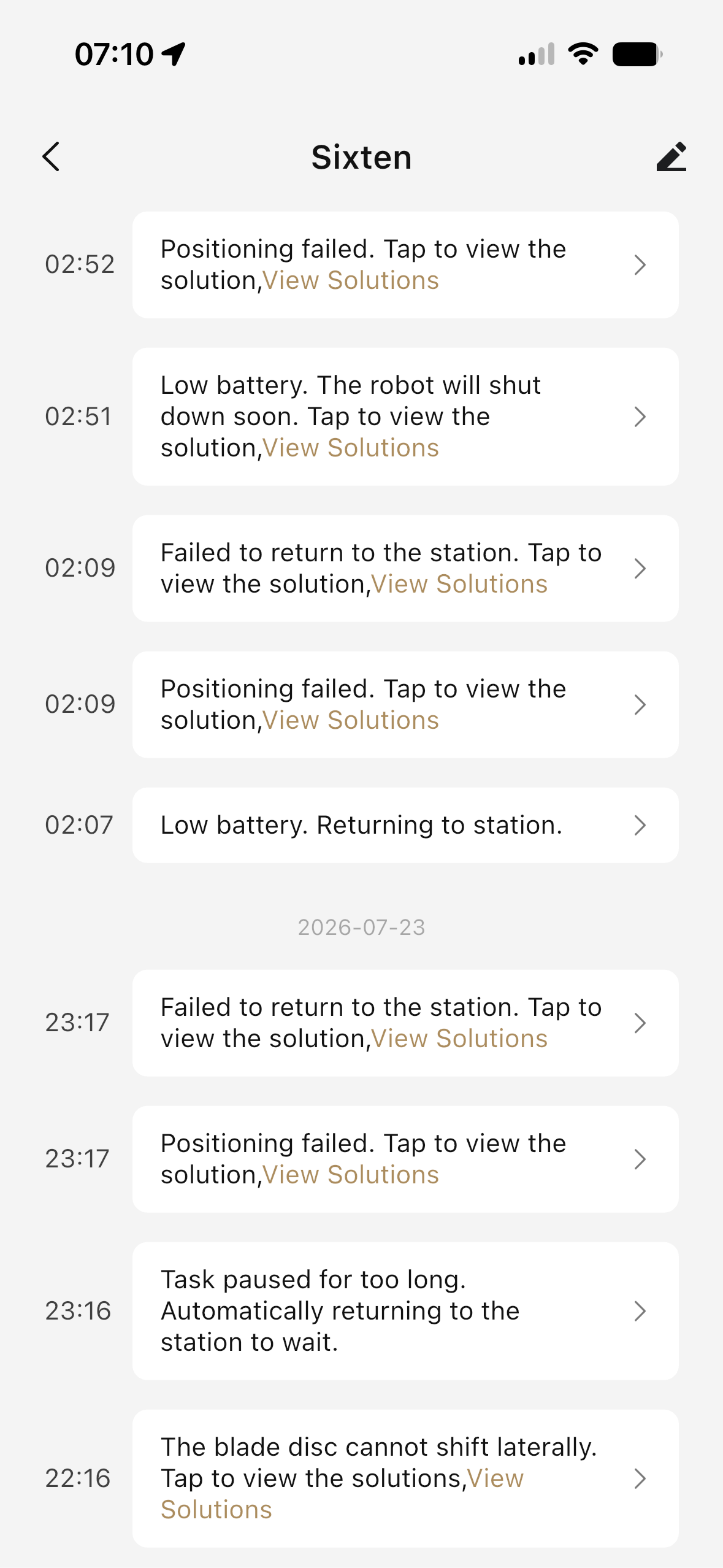
in this case we are looking at “disc cannot shift laterally”, and “positioning failed”.. both reporting error with description “normal operation” in Homey.
Want me to provide additional info?
---
### Author:  [@micke\_011](https://community.homey.app/u/micke_011)
#### Post date: [July 24, 2026, 6:22am UTC](https://community.homey.app/t/app-pro-mova-dreame-mower/154425/116 "2026-07-24T06:22:01Z")
Since my mower was constantly switching between idle and charging, I just did this simple filtering to see relevant status changes

---
### Author:  [@Andi](https://community.homey.app/u/Andi)
#### Post date: [July 24, 2026, 7:13am UTC](https://community.homey.app/t/app-pro-mova-dreame-mower/154425/117 "2026-07-24T07:13:40Z")
To pinpoint exactly which field contains the real code, could you open **Settings → App Logs** in the Homey app shortly after one of these errors occurs and paste the log lines that start with `[diag]`? They look like this:
`[diag] latestStatus=4 rawStatus=error ... faultCode=0 ... info keys: ..., property sub-keys: ...`
The field list at the end of that line will tell us where on your device the real fault code is hiding (e.g. `latestFaultCode`, `errCode`, something inside `property`, etc.) — then it’s a quick fix to add that field to the lookup chain.
---
### Author:  [@Fishflu](https://community.homey.app/u/Fishflu)
#### Post date: [July 24, 2026, 8:49am UTC](https://community.homey.app/t/app-pro-mova-dreame-mower/154425/118 "2026-07-24T08:49:50Z")
So what you are asking me to do is the exact same thing you asked me to do last time I reported this very issue. A smarter person (apparently not me) would have figured this out and not wasted everybody’s time. 🤡
Will get back with more info when I am able to reproduce! 💕
---
### Author:  [@Fishflu](https://community.homey.app/u/Fishflu)
#### Post date: [July 27, 2026, 11:04am UTC](https://community.homey.app/t/app-pro-mova-dreame-mower/154425/119 "2026-07-27T11:04:51Z")
Not the exact same error, but here is a similar example with log:


---
### Author:  [@Andi](https://community.homey.app/u/Andi)
#### Post date: [July 27, 2026, 5:10pm UTC](https://community.homey.app/t/app-pro-mova-dreame-mower/154425/120 "2026-07-27T17:10:54Z")
As I don’t have a complete error table yet (number‑to‑error mapping), this information is extremely valuable. Please let me know if you have any additional details. This one is now included in version **1.1.28**.
Thank you, Fishflu!
[Previous page](https://community.homey.app/t/app-pro-mova-dreame-mower/154425.md?page=5)