# \[App\]\[Pro\]LinknLink eMotion
**URL:** https://community.homey.app/t/app-pro-linknlink-emotion/150691
**Category:** Apps
**Tags:** presence, emotion
**Created:** [February 6, 2026, 2:40pm UTC](https://community.homey.app/t/app-pro-linknlink-emotion/150691 "2026-02-06T14:40:04Z")
**Posts on this page:** 20
**Page:** 1
### Author:  [@Adrian\_Rockall](https://community.homey.app/u/Adrian_Rockall)
#### Post date: [February 6, 2026, 2:40pm UTC](https://community.homey.app/t/app-pro-linknlink-emotion/150691/1 "2026-02-06T14:40:04Z")
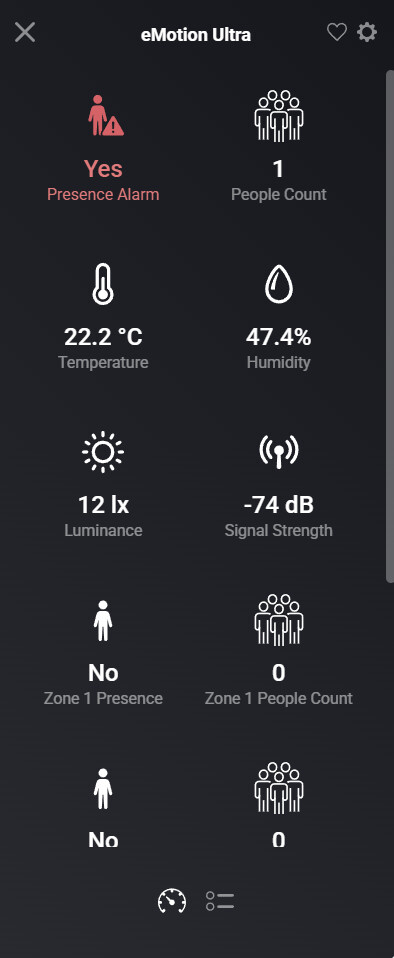
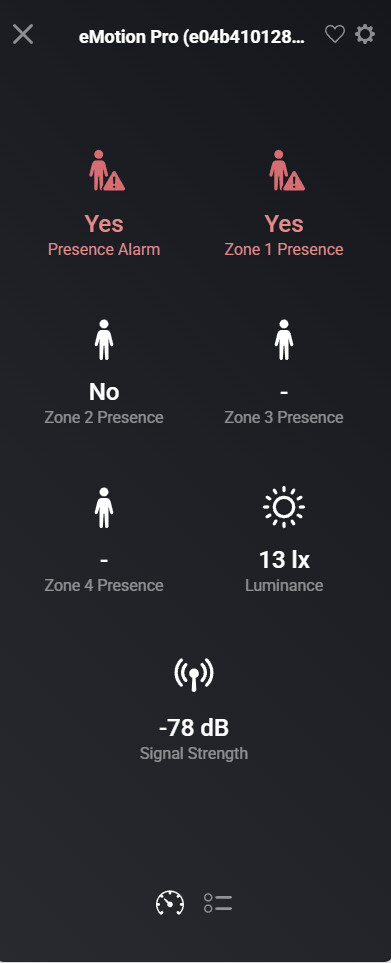
I am creating a new app for the LinknLink eMotion sensors, in particular the eMotion Pro and eMotion Ultra.
The test version is in the store [LinknLink | Homey](https://homey.app/a/ady.linknlink/test/)
---
### Author:  [@Adrian\_Rockall](https://community.homey.app/u/Adrian_Rockall)
#### Post date: [February 23, 2026, 10:09am UTC](https://community.homey.app/t/app-pro-linknlink-emotion/150691/2 "2026-02-23T10:09:23Z")
Version 1.0.1 of the app is now live.
---
### Author:  [@NeosS](https://community.homey.app/u/NeosS)
#### Post date: [February 25, 2026, 8:03pm UTC](https://community.homey.app/t/app-pro-linknlink-emotion/150691/3 "2026-02-25T20:03:13Z")
Hi
I configure the app with the mqtt integrated , but no detect the Emotion Ultra, any idea?

---
### Author:  [@Adrian\_Rockall](https://community.homey.app/u/Adrian_Rockall)
#### Post date: [February 25, 2026, 8:32pm UTC](https://community.homey.app/t/app-pro-linknlink-emotion/150691/4 "2026-02-25T20:32:04Z")
Have you setup the MQTT client on the sensor.

You will need to put Homey’s IP address in the settings.

Then set the user name and password that you have configured in the Homey app settings.
---
### Author:  [@NeosS](https://community.homey.app/u/NeosS)
#### Post date: [February 26, 2026, 10:46am UTC](https://community.homey.app/t/app-pro-linknlink-emotion/150691/5 "2026-02-26T10:46:20Z")
yes


---
### Author:  [@Marcel\_Visser](https://community.homey.app/u/Marcel_Visser)
#### Post date: [February 26, 2026, 10:53am UTC](https://community.homey.app/t/app-pro-linknlink-emotion/150691/6 "2026-02-26T10:53:00Z")
A bit offtopic: But can you tell us how well there sensors behave? By example compared to the Aqara Fp2?
---
### Author:  [@Adrian\_Rockall](https://community.homey.app/u/Adrian_Rockall)
#### Post date: [February 26, 2026, 11:19am UTC](https://community.homey.app/t/app-pro-linknlink-emotion/150691/7 "2026-02-26T11:19:25Z")
And 192.168.50.88 is the IP address of Homey?
If you look in the Detected tab and tap on Get Devices, do you see anything in there?
Edit: Also make sure the device is not locked in the settings. I’m not sure if this is required, but mine are not locked.
---
### Author:  [@NeosS](https://community.homey.app/u/NeosS)
#### Post date: [February 26, 2026, 11:33am UTC](https://community.homey.app/t/app-pro-linknlink-emotion/150691/8 "2026-02-26T11:33:01Z")
And 192.168.50.88 is the IP address of Homey? YES
If you look in the Detected tab and tap on Get Devices, do you see anything in there? is Unlocked


Edit: Also make sure the device is not locked in the settings. I’m not sure if this is required, but mine are not locked.
---
### Author:  [@Adrian\_Rockall](https://community.homey.app/u/Adrian_Rockall)
#### Post date: [February 26, 2026, 11:36am UTC](https://community.homey.app/t/app-pro-linknlink-emotion/150691/9 "2026-02-26T11:36:25Z")
The Pro version only has a basic zone feature, which is based on distance from the sensor.

But the Ultra is more like the fp2.

Generally I am pretty happy with them, but they are not perfect, as with any of this type of sensor.
---
### Author:  [@Adrian\_Rockall](https://community.homey.app/u/Adrian_Rockall)
#### Post date: [February 26, 2026, 12:08pm UTC](https://community.homey.app/t/app-pro-linknlink-emotion/150691/10 "2026-02-26T12:08:44Z")
While the Log is enabled, could you restart the app and then go back to the log page and after a minute or two, tap on Send Log.
---
### Author:  [@NeosS](https://community.homey.app/u/NeosS)
#### Post date: [February 26, 2026, 12:13pm UTC](https://community.homey.app/t/app-pro-linknlink-emotion/150691/11 "2026-02-26T12:13:18Z")
SEND!
---
### Author:  [@Adrian\_Rockall](https://community.homey.app/u/Adrian_Rockall)
#### Post date: [February 26, 2026, 12:28pm UTC](https://community.homey.app/t/app-pro-linknlink-emotion/150691/12 "2026-02-26T12:28:54Z")
Interesting the log shows the broker is having problems connecting to the selected ports.
Maybe try choosing different ports and restart the app again.
---
### Author:  [@NeosS](https://community.homey.app/u/NeosS)
#### Post date: [February 26, 2026, 12:33pm UTC](https://community.homey.app/t/app-pro-linknlink-emotion/150691/13 "2026-02-26T12:33:40Z")
I changed port , but the same problem changed port and same error, a send the new Log
---
### Author:  [@NeosS](https://community.homey.app/u/NeosS)
#### Post date: [February 26, 2026, 12:43pm UTC](https://community.homey.app/t/app-pro-linknlink-emotion/150691/14 "2026-02-26T12:43:30Z")
For your information, I have these plugins installed and they do not interfere with each other.
Mqtt broker
Mqtt client
Mqtt Hub
---
### Author:  [@Adrian\_Rockall](https://community.homey.app/u/Adrian_Rockall)
#### Post date: [February 26, 2026, 12:59pm UTC](https://community.homey.app/t/app-pro-linknlink-emotion/150691/15 "2026-02-26T12:59:48Z")
And you haven’t used the same port for those as the LinknLink app?
---
### Author:  [@Adrian\_Rockall](https://community.homey.app/u/Adrian_Rockall)
#### Post date: [February 26, 2026, 1:00pm UTC](https://community.homey.app/t/app-pro-linknlink-emotion/150691/16 "2026-02-26T13:00:44Z")
This is what I get when I restart the app:
> ```auto
> undefined
>
> 2026-02-26T12:56:47.744Z
> LinknLink app has been initialized
>
> 2026-02-26T12:56:47.747Z
> server started and listening on port 10883
>
> 2026-02-26T12:56:47.750Z
> setupMQTTClient connect: mqtt://localhost:10883
>
> 2026-02-26T12:56:47.909Z
> websocket server listening on port 18888
>
> 2026-02-26T12:56:47.929Z
> eMotionProDriver has been initialized
>
> 2026-02-26T12:56:47.934Z
> eMotionUltraDriver has been initialized
>
> 2026-02-26T12:56:48.080Z
> setupMQTTClient.onConnect: connected to mqtt://localhost:10883 as LinknLinkLocalBroker
>
> 2026-02-26T12:56:48.132Z
> subscribed to discovery
>
> ```
---
### Author:  [@Adrian\_Rockall](https://community.homey.app/u/Adrian_Rockall)
#### Post date: [February 26, 2026, 1:18pm UTC](https://community.homey.app/t/app-pro-linknlink-emotion/150691/17 "2026-02-26T13:18:02Z")
Was there a particular reason you changed the default ports?
The ones I used as default shouldn’t interfere with anything else.
You could also try using the MQTT Broker that you have installed by switching of the option to use the built-in broker and then point the app and the device to that port and credentials. No point having two broker running on Homey
---
### Author:  [@NeosS](https://community.homey.app/u/NeosS)
#### Post date: [February 26, 2026, 1:31pm UTC](https://community.homey.app/t/app-pro-linknlink-emotion/150691/18 "2026-02-26T13:31:00Z")
Well, honestly I don’t understand it. Some plugin is causing a conflict — something’s happening. Which one is it? I don’t know.
---
### Author:  [@NeosS](https://community.homey.app/u/NeosS)
#### Post date: [February 26, 2026, 1:31pm UTC](https://community.homey.app/t/app-pro-linknlink-emotion/150691/19 "2026-02-26T13:31:58Z")
> [@Adrian\_Rockall](#):
>
> Was there a particular reason you changed the default ports?
>
> The ones I used as default shouldn’t interfere with anything else.
>
> You could also try using the MQTT Broker that you have installed by switching of the option to use the built-in broker and then point the app and the device to that port and credentials. No point having two broker running on Homey
How too config this?
---
### Author:  [@Adrian\_Rockall](https://community.homey.app/u/Adrian_Rockall)
#### Post date: [February 26, 2026, 1:59pm UTC](https://community.homey.app/t/app-pro-linknlink-emotion/150691/20 "2026-02-26T13:59:28Z")
If you have the MQTT broker app installed, you should be able to configure the setting for it in their app settings page.
Once you know what settings it’s using, switch off the option to use the Homey built-in broker and enter the the port, username and password that is setup for the broker app. You can use the localhost for the url.
Then save the setting and restart the app. It should then connect to the MQTT broker app. Again you could send the log once you’ve done that if you want me to check it.
Obviously, you then need to ensure the presence sensor is configured with the correct details as well.
[Next page](https://community.homey.app/t/app-pro-linknlink-emotion/150691.md?page=2)