# \[APP\]\[Pro\] Broadlink App
**URL:** https://community.homey.app/t/app-pro-broadlink-app/6389
**Category:** Apps
**Tags:** app
**Created:** [January 6, 2019, 12:37pm UTC](https://community.homey.app/t/app-pro-broadlink-app/6389 "2019-01-06T12:37:15Z")
**Posts on this page:** 20
**Page:** 6
### Author:  [@ArtjeB](https://community.homey.app/u/ArtjeB)
#### Post date: [January 11, 2020, 5:25pm UTC](https://community.homey.app/t/app-pro-broadlink-app/6389/104 "2020-01-11T17:25:43Z")
Econtrol app:

---
### Author:  [@Rocodamelshekima](https://community.homey.app/u/Rocodamelshekima)
#### Post date: [January 11, 2020, 5:25pm UTC](https://community.homey.app/t/app-pro-broadlink-app/6389/105 "2020-01-11T17:25:53Z")
That will be the wrong type then. There is 2 of them u know?
---
### Author:  [@ArtjeB](https://community.homey.app/u/ArtjeB)
#### Post date: [January 11, 2020, 5:31pm UTC](https://community.homey.app/t/app-pro-broadlink-app/6389/106 "2020-01-11T17:31:31Z")
2 types of what? I think I am not aware.
**Update:** Sorry I cant reply anymore to this topic, so I have to edit my reply 😕
How can I recognize the “red” bean? The physical color is black. I can’t find neither of the codes you mention. Bottom shows FCC ID: 2ACDZ RMMINI3-RM.
---
### Author:  [@Rocodamelshekima](https://community.homey.app/u/Rocodamelshekima)
#### Post date: [January 11, 2020, 5:35pm UTC](https://community.homey.app/t/app-pro-broadlink-app/6389/107 "2020-01-11T17:35:34Z")
It’s like the new red bean version instead of the black bean version.
The Red has device code 5f36, the black has 2737.
And because this Broadlink app uses the E-control app (where u cannot add the device) it’s for now not possible to add it to Homey and get it to do something.
---
### Author:  [@DrakCinema](https://community.homey.app/u/DrakCinema)
#### Post date: [January 11, 2020, 5:53pm UTC](https://community.homey.app/t/app-pro-broadlink-app/6389/108 "2020-01-11T17:53:26Z")
I added two black ones Yesterday, using the old e-control app on IOS to add the Wifi config and than added them to Homey. They came with Fw. Version 5.0
---
### Author:  [@Rocodamelshekima](https://community.homey.app/u/Rocodamelshekima)
#### Post date: [January 11, 2020, 5:54pm UTC](https://community.homey.app/t/app-pro-broadlink-app/6389/109 "2020-01-11T17:54:26Z")
Black versions have no problems to connect indeed, it’s the “Red” versions giving trouble.
---
### Author:  [@ArtjeB](https://community.homey.app/u/ArtjeB)
#### Post date: [January 13, 2020, 8:00am UTC](https://community.homey.app/t/app-pro-broadlink-app/6389/110 "2020-01-13T08:00:05Z")
How can I recognize the “red or black" bean? The physical color is black. I can’t find neither of the codes you mention. Bottom shows FCC ID: 2ACDZ RMMINI3-RM.
---
### Author:  [@Rocodamelshekima](https://community.homey.app/u/Rocodamelshekima)
#### Post date: [January 13, 2020, 8:06am UTC](https://community.homey.app/t/app-pro-broadlink-app/6389/111 "2020-01-13T08:06:31Z")
Bottom shows the same here on 2 different devices. For what i know: The red cannot be added to the e-control app and shows an error in the Homey app with the (5f36) code. The physical color gives no guarantee although there are actually also red colors.
---
### Author:  [@ArtjeB](https://community.homey.app/u/ArtjeB)
#### Post date: [January 13, 2020, 8:38am UTC](https://community.homey.app/t/app-pro-broadlink-app/6389/112 "2020-01-13T08:38:00Z")
Ah you are right, I received this code in the app as you mention (also visible in my screenshot).
Thanks for the quick help\responses.
---
### Author:  [@Rocodamelshekima](https://community.homey.app/u/Rocodamelshekima)
#### Post date: [January 13, 2020, 8:38am UTC](https://community.homey.app/t/app-pro-broadlink-app/6389/113 "2020-01-13T08:38:32Z")
Anytime!
---
### Author:  [@Pacho](https://community.homey.app/u/Pacho)
#### Post date: [January 18, 2020, 7:29pm UTC](https://community.homey.app/t/app-pro-broadlink-app/6389/114 "2020-01-18T19:29:55Z")
Hi,
I set my broadlink rm pro+ up earlier today and put it in a flow together with locative, so that the main gate would open when I got close to the house, it worked perfect and I really loved it.
So just now I was walking my dog and thought it will be cool when the gate opens up when I come walking, I checked with locative that I was outside my area, went back inside, but nothing happened…So I tried the flow in homey directly but nothing happened so I thought maybe the rm just lost connection to the gate, but when I tried its own app it worked perfect…
Anyone else experienced this?I have checked the ip and nothing has changed so I am kind of clueless as to why it cant communicate with homey
---
### Author:  [@Shiki](https://community.homey.app/u/Shiki)
#### Post date: [January 19, 2020, 3:32pm UTC](https://community.homey.app/t/app-pro-broadlink-app/6389/115 "2020-01-19T15:32:18Z")
Hi All,
I’m trying to add a new RM Mini 3 to homey, it showing below error:
**"Found another device: unknown (27DE)**"
is this device too new not inside the database ? how request new add in or resolve the problem ?
Thanks!
---
### Author:  [@Pacho](https://community.homey.app/u/Pacho)
#### Post date: [January 20, 2020, 11:46am UTC](https://community.homey.app/t/app-pro-broadlink-app/6389/116 "2020-01-20T11:46:16Z")
Is there any support on this app?
As stated earlier I bought a broadlink rm pro + to use with my gate.
Problem is it kind of works whenever it wants to…
I have made a virtual device to make it work as a button, I have made a voice command and also a location command flow.
Problem is its working maybe 25% of the times at best…
I have tried the remote and also broadlinks own app and both work everytime so I have narrowed it down to something with the homey app
I have tried copying the code 4 times, but none of them work better than the other…
Not sure what to do here?
---
### Author:  [@Hannes85](https://community.homey.app/u/Hannes85)
#### Post date: [January 24, 2020, 10:51am UTC](https://community.homey.app/t/app-pro-broadlink-app/6389/118 "2020-01-24T10:51:22Z")
@Pacho
Most gates use a rolling code (for security) and your homey probably only learned one of these so that explains the intermittent functionality.
RM3 supports and understands rolling codes so naturally those work…
---
### Author:  [@Pacho](https://community.homey.app/u/Pacho)
#### Post date: [January 24, 2020, 12:20pm UTC](https://community.homey.app/t/app-pro-broadlink-app/6389/119 "2020-01-24T12:20:27Z")
That makes a lot of sense. Any way to fix it in the homey app?
---
### Author:  [@Hannes85](https://community.homey.app/u/Hannes85)
#### Post date: [January 24, 2020, 1:18pm UTC](https://community.homey.app/t/app-pro-broadlink-app/6389/120 "2020-01-24T13:18:05Z")
Not by yourself
---
### Author:  [@Hendrik\_V](https://community.homey.app/u/Hendrik_V)
#### Post date: [February 6, 2020, 12:54pm UTC](https://community.homey.app/t/app-pro-broadlink-app/6389/121 "2020-02-06T12:54:29Z")
Hallo Remko,
Many thanks for your app. It works fine with my RM Pro +. However I have bought a rm4 mini and that won’t connect to my Homey (new- 3 weeks; latest software). Are you planning to incorporate the rm4 or will it remain useless with Homey?
Second question, if you allow me: are you aware of any possibility to add rm with rf 868?
Thanks
Hendrik
P.S. I have ordered a universal RF converter from HongXing Technology market.co.ltd. Maybe that works through Broadlink.
---
### Author:  [@FvB](https://community.homey.app/u/FvB)
#### Post date: [February 29, 2020, 10:22pm UTC](https://community.homey.app/t/app-pro-broadlink-app/6389/122 "2020-02-29T22:22:18Z")
The app records my remote’s commands but they seem to disappear randomly when restarting the app. Using 2.0.5 and 3.2.1 of Homey software.
The original Broadlink e-Control app has no issues at all with remembering commands. Would it be possible to use those commands already recorded in the Broadlink app?
Tnx!
---
### Author:  [@Sierra](https://community.homey.app/u/Sierra)
#### Post date: [March 4, 2020, 8:30pm UTC](https://community.homey.app/t/app-pro-broadlink-app/6389/123 "2020-03-04T20:30:10Z")
Is support for RM4 Plus coming?
---
### Author:  [@Magic](https://community.homey.app/u/Magic)
#### Post date: [March 12, 2020, 8:52pm UTC](https://community.homey.app/t/app-pro-broadlink-app/6389/124 "2020-03-12T20:52:50Z")
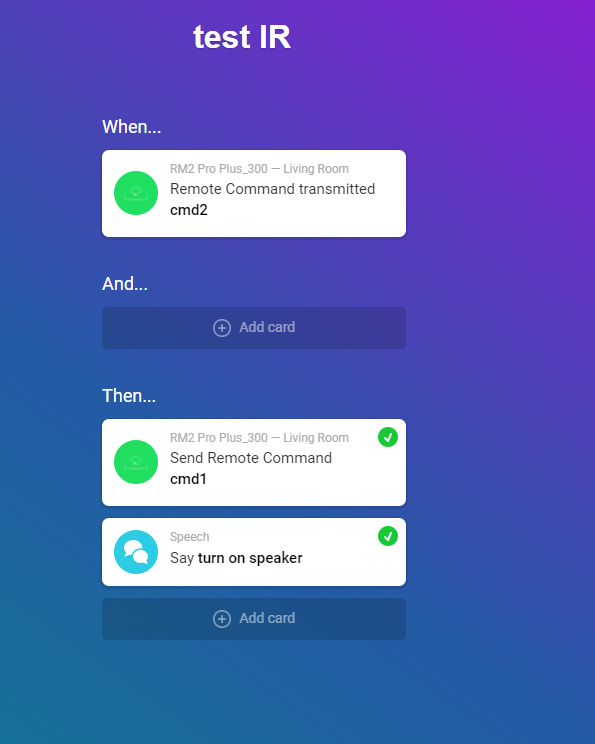
Hi, i have RM pro plus. I succesful lear RF key or IR I set flow, that i push button on RF or IR (set in flow) remote, nothing will happen. Sending learn signal in end of flow works perfect, but start flow via signal NO ☹ Where is a problem. Thx
[Previous page](https://community.homey.app/t/app-pro-broadlink-app/6389.md?page=5)
[Next page](https://community.homey.app/t/app-pro-broadlink-app/6389.md?page=7)