# \[APP\]\[Pro\] Broadlink App
**URL:** https://community.homey.app/t/app-pro-broadlink-app/6389
**Category:** Apps
**Tags:** app
**Created:** [January 6, 2019, 12:37pm UTC](https://community.homey.app/t/app-pro-broadlink-app/6389 "2019-01-06T12:37:15Z")
**Posts on this page:** 20
**Page:** 18
### Author:  [@sebyldino](https://community.homey.app/u/sebyldino)
#### Post date: [June 17, 2021, 2:42pm UTC](https://community.homey.app/t/app-pro-broadlink-app/6389/350 "2021-06-17T14:42:13Z")
Hello,
I bought a RM3 Mini, it’s connected perfectly with Homey.
When i press the “Learn IR command” button, nothing happened.
Someone have the same problem? How solve it?
Thank you
---
### Author:  [@bayrambass](https://community.homey.app/u/bayrambass)
#### Post date: [June 18, 2021, 2:32pm UTC](https://community.homey.app/t/app-pro-broadlink-app/6389/351 "2021-06-18T14:32:52Z")
When will the RM4 mini be supported in the app?
---
### Author:  [@bayrambass](https://community.homey.app/u/bayrambass)
#### Post date: [June 18, 2021, 2:34pm UTC](https://community.homey.app/t/app-pro-broadlink-app/6389/352 "2021-06-18T14:34:13Z")
I had this problem with my airco. The RM3/RM4 supports long range IR but sometimes the device it’s reach/detection is low. So I need to keep my RM4 close. Did you try it on close range?
---
### Author:  [@Pieterv123](https://community.homey.app/u/Pieterv123)
#### Post date: [June 18, 2021, 3:17pm UTC](https://community.homey.app/t/app-pro-broadlink-app/6389/353 "2021-06-18T15:17:25Z")
You can use the Unofficial Broadlink app which support the new RM3 mini and RM4 mini.
If your device is not supported reply me the device code.
Only IR is supported, RF is in progress, but I lack time, so it will be a matter of months.
Please the other thread for requests:
[https://community.homey.app/t/broadlinkred-app/36921](https://community.homey.app/t/broadlinkred-app/36921)
---
### Author:  [@Pieterv123](https://community.homey.app/u/Pieterv123)
#### Post date: [June 18, 2021, 3:20pm UTC](https://community.homey.app/t/app-pro-broadlink-app/6389/354 "2021-06-18T15:20:53Z")
And BTW the homebridge Broadlink integration is also very good and supports everything
---
### Author:  [@Ray\_Godjord](https://community.homey.app/u/Ray_Godjord)
#### Post date: [June 23, 2021, 8:47pm UTC](https://community.homey.app/t/app-pro-broadlink-app/6389/355 "2021-06-23T20:47:10Z")
Hi, I’m trying to connect my rm4 pro, but get error code: Found another device: unknown (653C)
```auto
{"Device IP":"10.0.0.90@80","MAC":"a0:43:b0:2c:d7:f5","DID":"00000000000000000000a043b02cd7f5","SDK":"2.15","Plug-in version":"1.6.4.2","IoT Cloud":"World","Routine traits":"Trigger","S/N code":"RM93H0232536","Data Cloud":"European server","Firmware":"V52079","PID":"0000000000000000000000003c650000"}
```
Is there any solution?
---
### Author:  [@Pieterv123](https://community.homey.app/u/Pieterv123)
#### Post date: [June 24, 2021, 9:49am UTC](https://community.homey.app/t/app-pro-broadlink-app/6389/356 "2021-06-24T09:49:44Z")
The device is not supported (yet)
Which app afr gou using?
---
### Author:  [@Ray\_Godjord](https://community.homey.app/u/Ray_Godjord)
#### Post date: [June 24, 2021, 4:55pm UTC](https://community.homey.app/t/app-pro-broadlink-app/6389/357 "2021-06-24T16:55:06Z")
To set it up? Broadlink International
---
### Author:  [@Bellringer2](https://community.homey.app/u/Bellringer2)
#### Post date: [June 26, 2021, 10:58pm UTC](https://community.homey.app/t/app-pro-broadlink-app/6389/358 "2021-06-26T22:58:27Z")
I have exactly the same problem.
It’s really annoying when you want to learn more buttons.
I’m never confident that the original learnt codes which now appear to have vanished in advanced settings but still appear correctly in the flow won’t be overwritten.
Remko did you get a chance to take a look at this?
Be really grateful if you would.
---
### Author:  [@sebyldino](https://community.homey.app/u/sebyldino)
#### Post date: [July 19, 2021, 5:23pm UTC](https://community.homey.app/t/app-pro-broadlink-app/6389/359 "2021-07-19T17:23:43Z")
Feedback: work perfectly with the BraodlinkRed app on Homey community store. Don’t forget to reset the RM before add it on Homey.
---
### Author:  [@HuisCHovens](https://community.homey.app/u/HuisCHovens)
#### Post date: [July 19, 2021, 7:15pm UTC](https://community.homey.app/t/app-pro-broadlink-app/6389/360 "2021-07-19T19:15:00Z")
Reset is not necessary I still have the broadlink app running on mobile and adding codes on homey works fine at the same time. I have an rm4 mini by the way
has anyone seen this already ? In the broadlink android app there is a devices menu lock mode so that rm4 mini is not found for other wifi devices. If you turn this off and turn unit mode in homey on. Rm4 mini will work on multiple apps. At least for me it works great 😀
---
### Author:  [@Stian\_Hogganvik](https://community.homey.app/u/Stian_Hogganvik)
#### Post date: [July 28, 2021, 5:00pm UTC](https://community.homey.app/t/app-pro-broadlink-app/6389/361 "2021-07-28T17:00:47Z")
Hi,
Love This app, but all IR and RF command are not available anymore. They are listed in device settings but not available in flows. Any fix for this and I’ll donate a beer!
---
### Author:  [@HuisCHovens](https://community.homey.app/u/HuisCHovens)
#### Post date: [July 28, 2021, 5:19pm UTC](https://community.homey.app/t/app-pro-broadlink-app/6389/362 "2021-07-28T17:19:26Z")
have you tried the app from community store by @Pieterv123 ? and which broadlink do you have
?
---
### Author:  [@Stian\_Hogganvik](https://community.homey.app/u/Stian_Hogganvik)
#### Post date: [July 28, 2021, 6:02pm UTC](https://community.homey.app/t/app-pro-broadlink-app/6389/363 "2021-07-28T18:02:09Z")
Hi,
I have RM2 pro + use the broadlink 2.05 app from homey app store.
---
### Author:  [@Sierra](https://community.homey.app/u/Sierra)
#### Post date: [August 7, 2021, 5:09am UTC](https://community.homey.app/t/app-pro-broadlink-app/6389/364 "2021-08-07T05:09:11Z")
Have rm4 pro and getting error when trying to add it: another device found. unknown 6026
Any workarounds? I didn’t factory reset my rm4, could that cause this error yo occur?
---
### Author:  [@Shawnoot](https://community.homey.app/u/Shawnoot)
#### Post date: [August 19, 2021, 4:31pm UTC](https://community.homey.app/t/app-pro-broadlink-app/6389/365 "2021-08-19T16:31:37Z")

I am not able to link RM Pro+ to Homey. ☹
- Done resetting RM Pro+
- Done setup on BroadLink eApp (managed to control Air Conditioner and TV)
- Located and entered router IP address on Homey app
What am I missing?
---
### Author:  [@Rocodamelshekima](https://community.homey.app/u/Rocodamelshekima)
#### Post date: [August 19, 2021, 5:46pm UTC](https://community.homey.app/t/app-pro-broadlink-app/6389/366 "2021-08-19T17:46:43Z")
> [@Shawnoot](#):
>
> What am I missing?
The IP address from ur device.
The sentence should be:
Go to ur WiFi router and find the ip address from the device u added.
---
### Author:  [@Shawnoot](https://community.homey.app/u/Shawnoot)
#### Post date: [August 19, 2021, 6:16pm UTC](https://community.homey.app/t/app-pro-broadlink-app/6389/367 "2021-08-19T18:16:47Z")

I believe I added the correct one?
---
### Author:  [@Rocodamelshekima](https://community.homey.app/u/Rocodamelshekima)
#### Post date: [August 19, 2021, 6:19pm UTC](https://community.homey.app/t/app-pro-broadlink-app/6389/368 "2021-08-19T18:19:00Z")
If that is the IP address from ur BroadLink device u just added then it’s correct yes.
But u best go to ur WiFi router, find the devices in the list and check for MAC address of ur device. MAC address of the BroadLink device can be found in the e-control app. Then find the corresponding IP address and fill it in the Homey app.
---
### Author:  [@Peter\_Kawa](https://community.homey.app/u/Peter_Kawa)
#### Post date: [August 19, 2021, 10:25pm UTC](https://community.homey.app/t/app-pro-broadlink-app/6389/369 "2021-08-19T22:25:48Z")
Maybe this can clear things up.
The Broadlink app shows the used IP address:
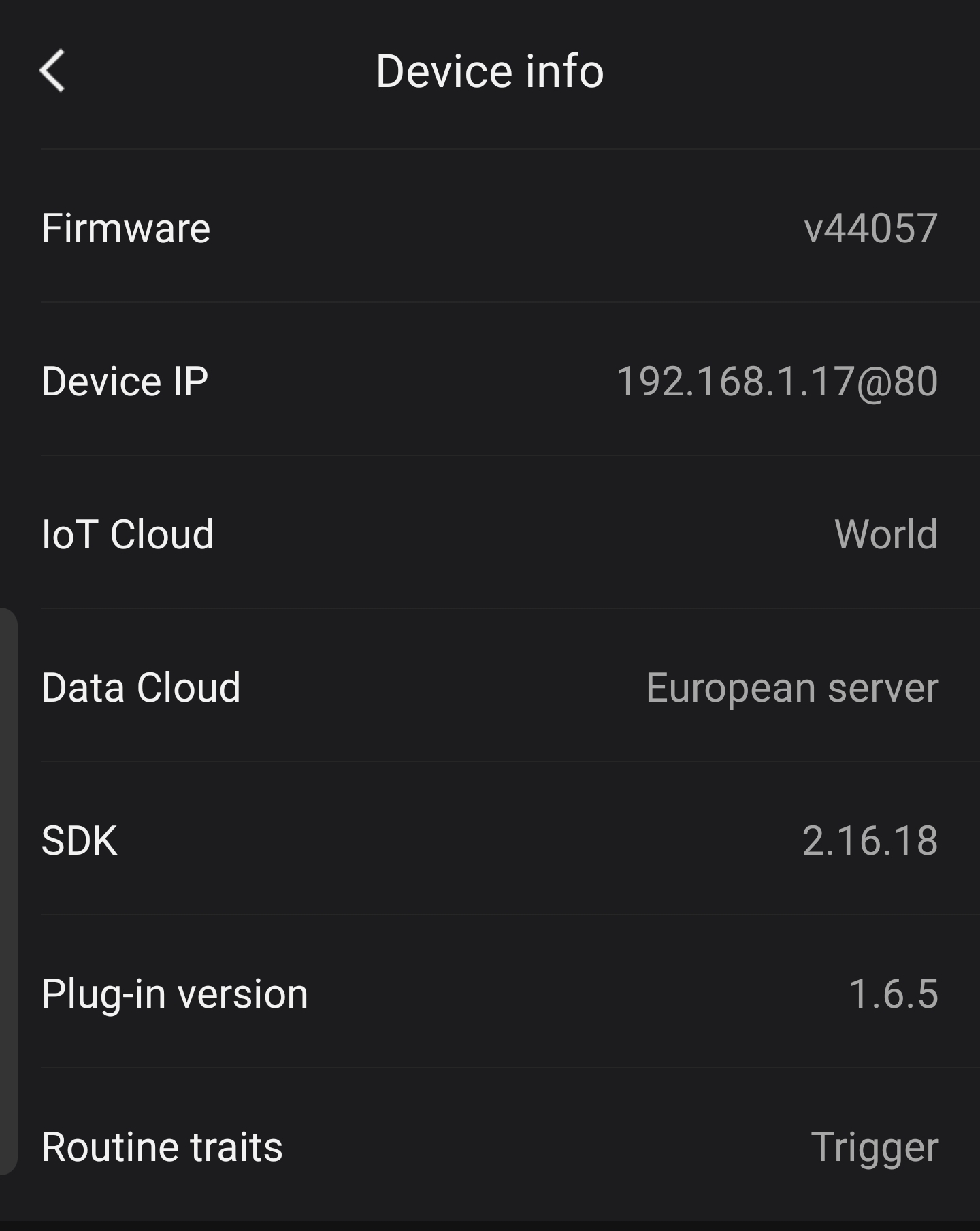
Or
If you happen to have an Android phone/tablet available, you can use the [Fing app](https://play.google.com/store/apps/details?id=com.overlook.android.fing) f.i. to discover the IP address of your Broadlink. IP’s ending with `.1` could be your router’s IP instead of the Broadlink IP.

[Previous page](https://community.homey.app/t/app-pro-broadlink-app/6389.md?page=17)
[Next page](https://community.homey.app/t/app-pro-broadlink-app/6389.md?page=19)