# \[APP\] Govee - Making your life smarter
**URL:** https://community.homey.app/t/app-govee-making-your-life-smarter/50660
**Category:** Apps
**Tags:** app, homey-pro, homey-bridge
**Created:** [August 19, 2021, 11:39pm UTC](https://community.homey.app/t/app-govee-making-your-life-smarter/50660 "2021-08-19T23:39:31Z")
**Posts on this page:** 20
**Page:** 32
### Author:  [@Loren\_Statema](https://community.homey.app/u/Loren_Statema)
#### Post date: [October 31, 2025, 6:31pm UTC](https://community.homey.app/t/app-govee-making-your-life-smarter/50660/632 "2025-10-31T18:31:01Z")
I’m getting the “Device Unavailable" “Cannot read properties of undefined (reading ‘options’) error on 6 of my Govee devices.
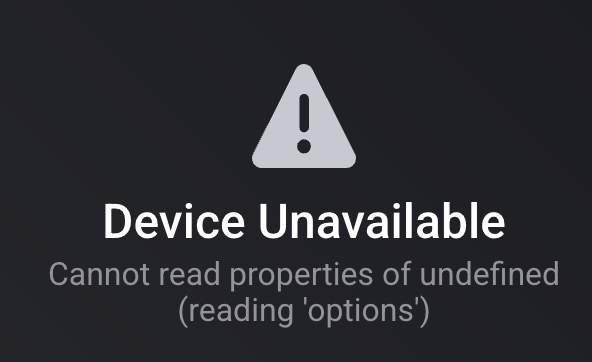

Backlight = H61B2
Entry Down = H61E1
Entry Up = H61E0
Hall Path = H61E0
Living Room Path = H61E0
TV light = H6168
All are compatible devices.
I have a Homey Pro 2023 hub.
I’ve attempted the following fixes already:
- Restart app
- Power cycled devices
- Removed and re-added devices
- Uninstalled & reinstalled app
- Created new api key
How can I fix this?
---
### Author:  [@Kaoh](https://community.homey.app/u/Kaoh)
#### Post date: [October 31, 2025, 6:55pm UTC](https://community.homey.app/t/app-govee-making-your-life-smarter/50660/633 "2025-10-31T18:55:10Z")
Are they local api or cloud api or matter devices?
Did they ever work?
---
### Author:  [@Loren\_Statema](https://community.homey.app/u/Loren_Statema)
#### Post date: [October 31, 2025, 7:46pm UTC](https://community.homey.app/t/app-govee-making-your-life-smarter/50660/634 "2025-10-31T19:46:31Z")
They are all Cloud API.
Living Room Path and Hall Path were the only ones connected previous when I was testing out Homey Cloud and they worked fine then.
I later purchased a Homey Pro hub and removed the devices and app from the Homey Cloud. But they have never worked on the Homey Pro hub, though other Govee lights are working fine.

---
### Author:  [@Kaoh](https://community.homey.app/u/Kaoh)
#### Post date: [November 1, 2025, 12:04am UTC](https://community.homey.app/t/app-govee-making-your-life-smarter/50660/635 "2025-11-01T00:04:18Z")
Please create a diagnostic report, it’s a weird error.
---
### Author:  [@Loren\_Statema](https://community.homey.app/u/Loren_Statema)
#### Post date: [November 1, 2025, 12:22am UTC](https://community.homey.app/t/app-govee-making-your-life-smarter/50660/636 "2025-11-01T00:22:21Z")
19918179-f4a8-4d4b-8bde-6958cbae4175
---
### Author:  [@Damian\_Surma](https://community.homey.app/u/Damian_Surma)
#### Post date: [November 11, 2025, 7:19pm UTC](https://community.homey.app/t/app-govee-making-your-life-smarter/50660/637 "2025-11-11T19:19:22Z")
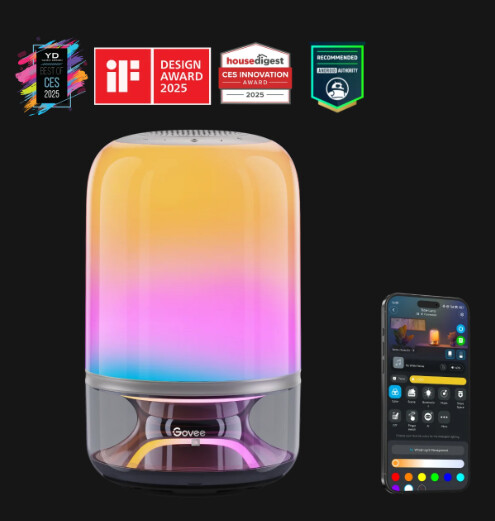
hey, with the new Govee Table Lamp 2 Pro x Sound by JBL in homeypro, will I be able to control the lighting but also have a speaker available?
---
### Author:  [@Kaoh](https://community.homey.app/u/Kaoh)
#### Post date: [November 11, 2025, 7:38pm UTC](https://community.homey.app/t/app-govee-making-your-life-smarter/50660/638 "2025-11-11T19:38:39Z")
Doubtful, so far I haven’t seen any speaker control in the api other then simpel music scenes.
---
### Author:  [@Goshawk29](https://community.homey.app/u/Goshawk29)
#### Post date: [November 17, 2025, 7:50am UTC](https://community.homey.app/t/app-govee-making-your-life-smarter/50660/639 "2025-11-17T07:50:41Z")
So I noticed in reading the description on app front page the note about DIY scenes being available in cloud only. Also saw comment stating for cloud features you need to use the Govee mobile app to request the API key for you account. Additionally saw that Govee API v2 allows for DIY flight scenes.
I have not been able to get them to show up in flows. Has something changed? Or just a misprint/typo?
How does one do that? Within govee mobile phone app?
---
### Author:  [@Kaoh](https://community.homey.app/u/Kaoh)
#### Post date: [November 17, 2025, 8:26am UTC](https://community.homey.app/t/app-govee-making-your-life-smarter/50660/640 "2025-11-17T08:26:36Z")
Nope should work if you have them. But there are DIY scenes features that make them not show up in the api if you use those in your diy. We are not sure yet what features make them dissappear.
Also sometimes it helps to restart the app. I don’t update the known diy list very often.
---
### Author:  [@Goshawk29](https://community.homey.app/u/Goshawk29)
#### Post date: [November 17, 2025, 8:40am UTC](https://community.homey.app/t/app-govee-making-your-life-smarter/50660/641 "2025-11-17T08:40:00Z")
yeah it is very strange. For my curtain lights, H70B3 only scenes that show up are the govee standard ones. No DIY scenes. For H70B5, none of the govee preset scenes show up, but only some of my DIY scenes show. And for H705F Permanent Outdoor lights, no govee scenes show and all of my DIY scenes show up. Very strange behavior
I did a JSON pull of capabilities and that also confirmed it too. ODD
---
### Author:  [@luca\_reina](https://community.homey.app/u/luca_reina)
#### Post date: [November 21, 2025, 6:19pm UTC](https://community.homey.app/t/app-govee-making-your-life-smarter/50660/642 "2025-11-21T18:19:09Z")
Can I use these lights for my Christmas tree with my HP23 (Homey Pro 2023)?
I’m not interested in complex scenes or special effects, I mainly care about having cool white and warm white, adjusting the brightness, turning them on and off, and using them in Flows.
Most importantly, I want them to work locally (without relying on the cloud).
Thanks to anyone who can advise me!

---
### Author:  [@Kaoh](https://community.homey.app/u/Kaoh)
#### Post date: [November 21, 2025, 6:45pm UTC](https://community.homey.app/t/app-govee-making-your-life-smarter/50660/643 "2025-11-21T18:45:21Z")
Yes they would work, minimal through the matter support and probably also through the api
---
### Author:  [@luca\_reina](https://community.homey.app/u/luca_reina)
#### Post date: [November 21, 2025, 6:58pm UTC](https://community.homey.app/t/app-govee-making-your-life-smarter/50660/644 "2025-11-21T18:58:44Z")
thank you 🙂
---
### Author:  [@Richard\_Vermeulen](https://community.homey.app/u/Richard_Vermeulen)
#### Post date: [November 25, 2025, 1:55pm UTC](https://community.homey.app/t/app-govee-making-your-life-smarter/50660/645 "2025-11-25T13:55:20Z")
Ik krijg zins een paar dagen onderstaande error op mijn Plafond lampen en air purifier eigenlijk op alles dus in mijn geval.
Ze zijn verbonden via de cloud api en hebben altijd goed gewerkt.
De error is
Apparaat Onbeschikbaar
Unexpected end of JSON input
---
### Author:  [@Kaoh](https://community.homey.app/u/Kaoh)
#### Post date: [November 25, 2025, 7:43pm UTC](https://community.homey.app/t/app-govee-making-your-life-smarter/50660/646 "2025-11-25T19:43:27Z")
Probeer eens een nieuwe api key te maken en in te stellen, daarna de app herstarten.
Soms wordt de throttling toch geactiveerd als he teveel cloud devices c hebt. Stel dan de poll interval wat groter in.
---
### Author:  [@Kaoh](https://community.homey.app/u/Kaoh)
#### Post date: [November 25, 2025, 7:43pm UTC](https://community.homey.app/t/app-govee-making-your-life-smarter/50660/647 "2025-11-25T19:43:50Z")
And back to English please
---
### Author:  [@eddiebullman](https://community.homey.app/u/eddiebullman)
#### Post date: [November 25, 2025, 8:08pm UTC](https://community.homey.app/t/app-govee-making-your-life-smarter/50660/648 "2025-11-25T20:08:52Z")
I have to sets connected via the Govee App using the cloud Api and they work well but I have noticed you can’t use DIY scenes with this version of light
---
### Author:  [@Kaoh](https://community.homey.app/u/Kaoh)
#### Post date: [November 25, 2025, 8:27pm UTC](https://community.homey.app/t/app-govee-making-your-life-smarter/50660/649 "2025-11-25T20:27:38Z")
If some of you send me the json in the advanced settings of this device using the browser app, select entire json and copy paste, then I can check if a new diy method was added
---
### Author:  [@eddiebullman](https://community.homey.app/u/eddiebullman)
#### Post date: [November 27, 2025, 6:04pm UTC](https://community.homey.app/t/app-govee-making-your-life-smarter/50660/650 "2025-11-27T18:04:26Z")
Hi Kaoh
is this what you need
[{“type”:“devices.capabilities.on\_off”,“instance”:“powerSwitch”,“parameters”:{“dataType”:“ENUM”,“options”:[{“name”:“on”,“value”:1},{“name”:“off”,“value”:0}]}},{“type”:“devices.capabilities.toggle”,“instance”:“gradientToggle”,“parameters”:{“dataType”:“ENUM”,“options”:[{“name”:“on”,“value”:1},{“name”:“off”,“value”:0}]}},{“type”:“devices.capabilities.range”,“instance”:“brightness”,“parameters”:{“unit”:“unit.percent”,“dataType”:“INTEGER”,“range”:{“min”:1,“max”:100,“precision”:1}}},{“type”:“devices.capabilities.segment\_color\_setting”,“instance”:“segmentedBrightness”,“parameters”:{“dataType”:“STRUCT”,“fields”:[{“fieldName”:“segment”,“size”:{“min”:1,“max”:15},“dataType”:“Array”,“elementRange”:{“min”:0,“max”:14},“elementType”:“INTEGER”,“required”:true},{“fieldName”:“brightness”,“dataType”:“INTEGER”,“range”:{“min”:0,“max”:100,“precision”:1},“required”:true}]}},{“type”:“devices.capabilities.segment\_color\_setting”,“instance”:“segmentedColorRgb”,“parameters”:{“dataType”:“STRUCT”,“fields”:[{“fieldName”:“segment”,“size”:{“min”:1,“max”:15},“dataType”:“Array”,“elementRange”:{“min”:0,“max”:14},“elementType”:“INTEGER”,“required”:true},{“fieldName”:“rgb”,“dataType”:“INTEGER”,“range”:{“min”:0,“max”:16777215,“precision”:1},“required”:true}]}},{“type”:“devices.capabilities.color\_setting”,“instance”:“colorRgb”,“parameters”:{“dataType”:“INTEGER”,“range”:{“min”:0,“max”:16777215,“precision”:1}}},{“type”:“devices.capabilities.color\_setting”,“instance”:“colorTemperatureK”,“parameters”:{“dataType”:“INTEGER”,“range”:{“min”:2000,“max”:9000,“precision”:1}}},{“type”:“devices.capabilities.dynamic\_scene”,“instance”:“lightScene”,“parameters”:{“dataType”:“ENUM”,“options”:}},{“type”:“devices.capabilities.music\_setting”,“instance”:“musicMode”,“parameters”:{“dataType”:“STRUCT”,“fields”:[{“fieldName”:“musicMode”,“dataType”:“ENUM”,“options”:[{“name”:“Energic”,“value”:0},{“name”:“Rhythm”,“value”:1},{“name”:“Separation”,“value”:2},{“name”:“Hopping”,“value”:3},{“name”:“Piano Keys”,“value”:4},{“name”:“Fountain”,“value”:5},{“name”:“Day and Night”,“value”:6},{“name”:“Flow”,“value”:7},{“name”:“Spin”,“value”:8},{“name”:“Blend”,“value”:9},{“name”:“Spring”,“value”:10},{“name”:“Ripple”,“value”:11}],“required”:true},{“unit”:“unit.percent”,“fieldName”:“sensitivity”,“dataType”:“INTEGER”,“range”:{“min”:0,“max”:100,“precision”:1},“required”:true},{“fieldName”:“autoColor”,“dataType”:“ENUM”,“options”:[{“name”:“on”,“value”:1},{“name”:“off”,“value”:0}],“required”:false},{“fieldName”:“rgb”,“dataType”:“INTEGER”,“range”:{“min”:0,“max”:16777215,“precision”:1},“required”:false}]}},{“type”:“devices.capabilities.dynamic\_scene”,“instance”:“diyScene”,“parameters”:{“dataType”:“ENUM”,“options”:}},{“type”:“devices.capabilities.dynamic\_scene”,“instance”:“snapshot”,“parameters”:{“dataType”:“ENUM”,“options”:}},{“type”:“devices.capabilities.toggle”,“instance”:“dreamViewToggle”,“parameters”:{“dataType”:“ENUM”,“options”:[{“name”:“on”,“value”:1},{“name”:“off”,“value”:0}]}}]
Thanks
---
### Author:  [@Kaoh](https://community.homey.app/u/Kaoh)
#### Post date: [November 27, 2025, 6:25pm UTC](https://community.homey.app/t/app-govee-making-your-life-smarter/50660/651 "2025-11-27T18:25:10Z")
Yes, unfortunately I see only the normal diy capability. So those I retrieve dynamically based on the presence of this capability. So if they return an empty list it’s unsupported by the api.
[Previous page](https://community.homey.app/t/app-govee-making-your-life-smarter/50660.md?page=31)
[Next page](https://community.homey.app/t/app-govee-making-your-life-smarter/50660.md?page=33)